A Good Place Mod is a Minecraft block animation mod that adds placement animations to blocks for Fabric, Forge, and NeoForge. It changes the feel of building by making placed blocks appear with customizable visual motion instead of an instant pop-in.
Vanilla Minecraft places blocks instantly, which is functional but can look abrupt when you are building large structures, decorating interiors, or recording gameplay. A Good Place solves that presentation problem by adding animated placement effects, and its more than 1.9 million downloads suggest a lot of players already see value in that extra layer of visual feedback.
Key Features of A Good Place Mod
- Animated block placement — The main draw here is simple: blocks no longer just appear with no visual transition. That matters because building feels smoother and more intentional, especially when you are working on detailed houses, landscaping, or decorative interiors where presentation is part of the fun.
- Resource-pack-driven customization — The mod appears to put customization in the hands of the player through resource packs rather than hardcoded settings alone. That makes it easier to personalize the experience, because you can shape the look of the animation without needing to change how you actually play Minecraft.
- Per-block control — The author notes that you can define which blocks are affected by an animation. This is useful because not every block needs the same treatment, and selective control helps builders keep important decorative blocks looking special while leaving other placements more straightforward.
- Tweakable animation behavior with control points — Animation playback is described as adjustable through control points, which suggests a deeper level of fine-tuning than a basic on/off visual tweak. For players who care about style, that matters because you can aim for something subtle, dramatic, or themed to a specific build pack.
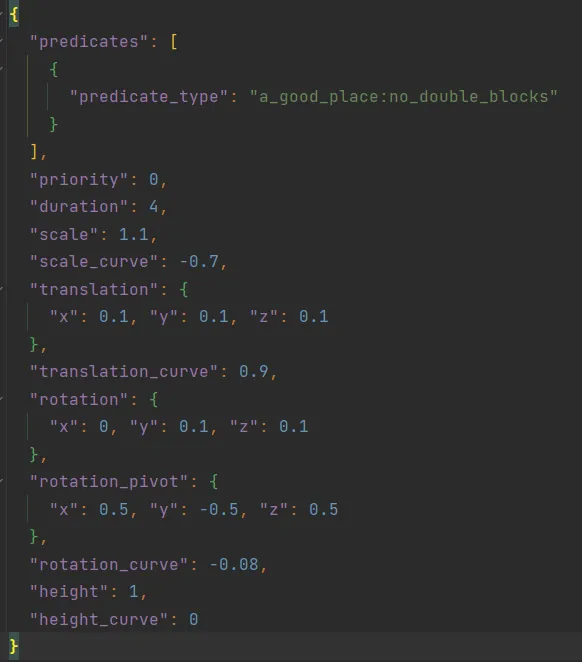
- Editable sample pack included — The included sample pack lowers the barrier to entry for customization because you are not starting from a blank file. That is important for first-time users, since seeing a working JSON setup gives you a practical base to edit rather than forcing you to guess the format.
- Support for multiple animations — The original description indicates you can edit existing JSON files or add new ones to create one or more animations. That gives the mod more long-term appeal, because it is not limited to a single preset look and can grow with your resource-pack setup.
Screenshots
How to Install A Good Place
- Install the correct mod loader for your setup: Fabric Mod Loader, Minecraft Forge, or NeoForge.
- Download the A Good Place file that matches both your Minecraft version and your loader, such as Fabric or NeoForge for 1.21.4, or Forge/Fabric/NeoForge for 1.20.1.
- Move the downloaded mod file into your Minecraft
modsfolder, then start the game with the same loader profile you installed. - Open Minecraft and check that the mod is loaded correctly before joining a world or creating a new one.
- If the default animation pack does not appear right away, open the Resource Packs menu and enable the relevant default pack or edit the included sample pack in your resource pack folder.
Requirements & Compatibility
| Category | Details |
|---|---|
| Mod Author | MehVahdJukaar |
| Category | Minecraft Mods |
| Tags | Decoration, Utility |
| Supported Loaders | Fabric, Forge, NeoForge |
| Minecraft Versions | 1.21.4, 1.21.1, 1.21, 1.20.1, 1.20 |
| Stated Requirements | Fabric Mod Loader, Minecraft Forge, NeoForge |
| License | MIT |
| Published | 2024-05-18 |
| Last Updated | 2025-07-23 |
What's New
- The latest noted change says animations are now parsed only when first needed.
- This update appears aimed at preventing some issues tied to earlier parsing behavior.
- The focus of the change is stability and when animation data gets loaded, rather than adding a brand-new visual system.
Pros and Cons
Pros
- Makes block placement look more polished and visually satisfying.
- Customization is a core strength thanks to resource-pack support.
- Can target specific blocks instead of forcing one effect onto everything.
- Includes a sample pack, which makes customization easier to approach.
- Available across Fabric, Forge, and NeoForge on several recent Minecraft versions.
Cons
- The mod is mainly visual, so players who do not care about building aesthetics may not notice much value.
- Deeper customization requires editing JSON files in a resource pack.
- You may need to manually enable the default texture or resource pack after installation.
Alternatives to A Good Place
- Continuity — A visual enhancement mod that can complement a polished building setup by improving connected textures and overall presentation.
- Sodium — A common companion mod for players building a cleaner client setup, especially if you want visual improvements alongside broader client-side optimization.
- Iris Shaders — A useful add-on if your goal is not just better placement feedback but a more dramatic overall visual style for screenshots and builds.
Download A Good Place
| Minecraft Version | Fabric | Forge | NeoForge |
|---|---|---|---|
| For Minecraft 1.21.4 | Download | — | Download |
| For Minecraft 1.21.1 | Download | — | Download |
| For Minecraft 1.21 | Download | — | Download |
| For Minecraft 1.20.1 | Download | Download | Download |
| For Minecraft 1.20 | Download | — | — |
Always download mods from official sources to stay safe.
Frequently Asked Questions
What does A Good Place Mod do?
A Good Place Mod adds placement animations to blocks. In practical use, that means block placement looks more animated and stylized instead of appearing instantly, which can make building sessions feel more refined.
Is A Good Place available for Fabric, Forge, and NeoForge?
Yes — the provided data lists Fabric, Forge, and NeoForge support. Download availability varies by Minecraft version, so you should still choose the file that matches both your game version and your loader.
Can I customize the animations?
Yes — customization is one of the mod's main features. The author states that animations can be edited through resource packs, including which blocks are affected and how the animation plays through configurable control points.
Does this mod support Minecraft 1.21.4?
Yes — Minecraft 1.21.4 is explicitly listed as supported. The available downloads for that version are shown for Fabric and NeoForge.
Do I need to edit files to use A Good Place?
No — you do not need to edit files just to use the default behavior. However, if you want to change the animation style or create your own effects, you will need to work with the sample resource pack and its JSON files.
Should builders install A Good Place Mod?
Yes — builders are the clearest audience for this mod. If you care about how block placement looks during normal play, timelapses, or showcase videos, the added animation can make your builds feel more deliberate and visually pleasing.