
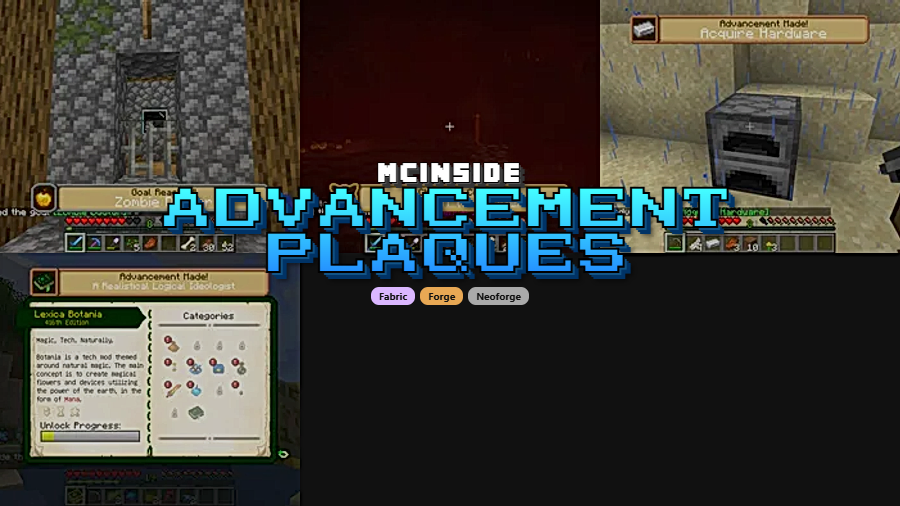
Advancement Plaques is a cosmetic UI mod that replaces Minecraft's default advancement toast popups with elegant, glowing plaques for Fabric, Forge, and NeoForge mod loaders.
There is a strange disconnect in vanilla Minecraft. You spend hours grinding toward a difficult challenge — defeating the Ender Dragon, exploring every biome, or breeding every animal — and the game rewards you with a tiny, forgettable toast notification that slides in from the corner of your screen and vanishes in seconds. For a game built on a sense of accomplishment, the default advancement popup feels remarkably anticlimactic. That is exactly the problem Advancement Plaques solves. Created by Grend, this mod has been downloaded over 12 million times since its release in late 2022, making it one of the most popular UI enhancement mods in the Minecraft ecosystem. It swaps out those bland rectangles for beautifully animated, glowing plaques that actually make you feel like you achieved something worth celebrating.
Key Features of Advancement Plaques
- Animated Glowing Plaques — Every advancement you earn triggers a polished, eye-catching plaque animation instead of the vanilla toast. The glow effect and smooth entrance make even routine task completions feel rewarding, which keeps the sense of progression alive throughout long play sessions.
- Custom Sound Effects — The mod adds unique audio cues that play alongside the visual plaque. Hearing a distinct chime when you complete a challenge reinforces the reward loop and makes each advancement type feel meaningfully different from the others.
- Granular Advancement Filtering — You can configure the mod to display plaques for any combination of the three advancement types: Tasks, Goals, and Challenges. This means you can reserve the flashy plaque treatment for only the hardest challenges while keeping everyday tasks subtle, preventing notification fatigue during heavy gameplay.
- Screen Position Control — Plaques can be anchored to either the top or bottom of the screen, with adjustable distance from the edge. This is critical for players who use HUD-heavy modpacks where screen real estate is at a premium — you can tuck plaques wherever they will not overlap with minimaps, health bars, or other UI elements.
- Whitelist Mode — For players who want maximum control, a whitelist configuration option lets you specify exact advancement IDs. Only the advancements you list will trigger plaques, which is perfect for modpack creators who want to highlight specific milestones without cluttering the screen.
- Resource Pack Customization — The appearance of plaques is fully customizable through standard Minecraft resource packs. Community packs like Embellished Stone already exist, and creators can design their own plaque textures to match any aesthetic theme or modpack visual identity.
- Broad Mod Compatibility — Advancement Plaques works with advancements from any mod, not just vanilla ones. It is also fully compatible with Toast Control, so you can manage other toast notifications independently without conflicts.
Screenshots
How to Install Advancement Plaques
- Install your preferred mod loader — Fabric, Minecraft Forge, or NeoForge — for your Minecraft version.
- Download and install the Iceberg library mod, which is a required dependency for Advancement Plaques to function.
- Download the correct Advancement Plaques file for your Minecraft version and mod loader from the download section below.
- Place the downloaded
.jarfile into your.minecraft/modsfolder. If the folder does not exist, launch Minecraft once with your mod loader profile to generate it. - Launch Minecraft and verify the mod is loaded. Earn any advancement to confirm the new plaque animation appears instead of the vanilla toast.
Requirements & Compatibility
| Requirement | Details |
|---|---|
| Mod Loaders | Fabric, Forge, NeoForge |
| Minecraft Versions | 1.21.4, 1.21.3, 1.21.1, 1.21, 1.20.6, 1.20.5, 1.20.4, 1.20.2, 1.20.1, 1.20, 1.19.x, 1.18.2, 1.16.5, 1.12.2 |
| Required Dependency | Iceberg |
| Side (Fabric) | Client-side only |
| Side (Forge) | Client and server (if custom sounds enabled) |
| License | CC-BY-NC-ND-4.0 |
One important distinction to keep in mind: the Fabric version of Advancement Plaques is fully client-side, meaning you do not need it installed on the server at all. The Forge version, however, includes custom sounds that require server-side installation due to a Forge limitation. If you disable the custom sounds in the config, the Forge version can also run as client-only.
What's New
- Fixed a bug that prevented the Advancement Screenshot mod from working as intended alongside Advancement Plaques.
- Continued support for Minecraft 1.21.4 across Fabric, Forge, and NeoForge loaders.
- Ongoing stability improvements and compatibility updates for the latest Minecraft releases.
Pros and Cons
Pros
- Dramatically improves the visual reward for earning advancements
- Supports all three major mod loaders with wide version coverage back to 1.12.2
- Highly configurable — filter by advancement type, position, or whitelist specific IDs
- Fabric version is fully client-side with no server installation needed
- Resource pack support allows complete visual customization
- Compatible with modded advancements from other mods
Cons
- Requires the Iceberg library as an additional dependency
- Forge version needs server-side installation for custom sounds to work
- May conflict with other mods that modify advancement popup rendering
- No built-in plaque style variants — you need separate resource packs for different looks
Alternatives to Advancement Plaques
- Toast Control — Gives you fine-grained control over which toast notifications appear in Minecraft, letting you hide or show specific popup types without replacing their visual style.
- Better Advancements — Overhauls the entire advancement screen interface with a cleaner layout and improved navigation, making it easier to track progress across large advancement trees.
- Custom HUD — Allows you to build a completely personalized heads-up display with custom elements, which can include advancement tracking alongside other gameplay information.
Download Advancement Plaques
| Minecraft Version | Fabric | Forge | NeoForge |
|---|---|---|---|
| For Minecraft 1.21.4 | Download | Download | Download |
| For Minecraft 1.21.3 | Download | Download | Download |
| For Minecraft 1.21.1 | Download | — | Download |
| For Minecraft 1.21 | Download | Download | Download |
| For Minecraft 1.20.6 | Download | Download | — |
| For Minecraft 1.20.5 | Download | — | — |
| For Minecraft 1.20.4 | Download | Download | — |
| For Minecraft 1.20.2 | Download | Download | — |
| For Minecraft 1.20.1 | Download | Download | — |
| For Minecraft 1.20 | Download | Download | — |
| For Minecraft 1.19.4 | Download | Download | — |
| For Minecraft 1.19.3 | Download | Download | — |
Always download mods from official sources to stay safe.
Frequently Asked Questions
Is Advancement Plaques client-side only?
It depends on your mod loader. The Fabric version is fully client-side and requires no server installation. The Forge and NeoForge versions need to be installed on both client and server when custom sounds are enabled, but disabling sounds in the config allows client-only use on Forge as well.
Does Advancement Plaques work with modded advancements?
Yes — Advancement Plaques works with advancements from any mod, not just vanilla Minecraft ones. Any advancement that triggers through the standard Minecraft advancement system will display as a plaque, so modpacks with hundreds of custom advancements are fully supported.
Can I customize how the plaques look?
Yes, the plaque textures are fully customizable through resource packs. You can create your own resource pack to change the plaque design, or download community-made packs like Embellished Stone that offer alternative visual styles out of the box.
Do I need to install Iceberg to use this mod?
Yes — Iceberg is a required library dependency for Advancement Plaques on all mod loaders. Without Iceberg installed, Advancement Plaques will not load. Make sure you download the version of Iceberg that matches both your Minecraft version and your mod loader.
Is Advancement Plaques compatible with Toast Control?
Yes, Advancement Plaques is fully compatible with Toast Control. You can use Toast Control to manage other toast notifications like recipe unlocks and tutorial hints while Advancement Plaques handles the advancement popups separately, giving you complete control over your notification experience.


![[Let's Do] Candlelight - Farm&Charm compat Mod (1.21.1) - thumbnail](http://mcinside.com/wp-content/uploads/2026/04/thumbnail-81-52x52.webp)


![[Let's Do] Meadow Mod (1.21.1) - thumbnail](http://mcinside.com/wp-content/uploads/2026/04/thumbnail-64-52x52.webp)


![Not Enough Recipe Book [NERB] Mod (1.21.11) - thumbnail](http://mcinside.com/wp-content/uploads/2026/04/thumbnail-63-52x52.webp)