

AdvancementInfo is a utility mod for Minecraft Fabric that shows detailed information about advancement requirements, making it easier for players to track exactly what they still need to complete each advancement in the game.
If you have ever opened your advancement tab in Minecraft and stared at a half-completed advancement with no idea what you still need to do, you are not alone. Vanilla Minecraft shows you a progress bar and a vague description, but it never tells you specifically which biomes you have not visited, which mobs you have not bred, or which foods you have not eaten. This is the exact frustration that AdvancementInfo solves. With over 11 million downloads on Modrinth, it has become one of the most popular utility mods in the Fabric ecosystem. Created by Giselbaer and released under the MIT license, this lightweight client-side mod transforms the advancement screen from a guessing game into a clear, actionable checklist.
Key Features of AdvancementInfo
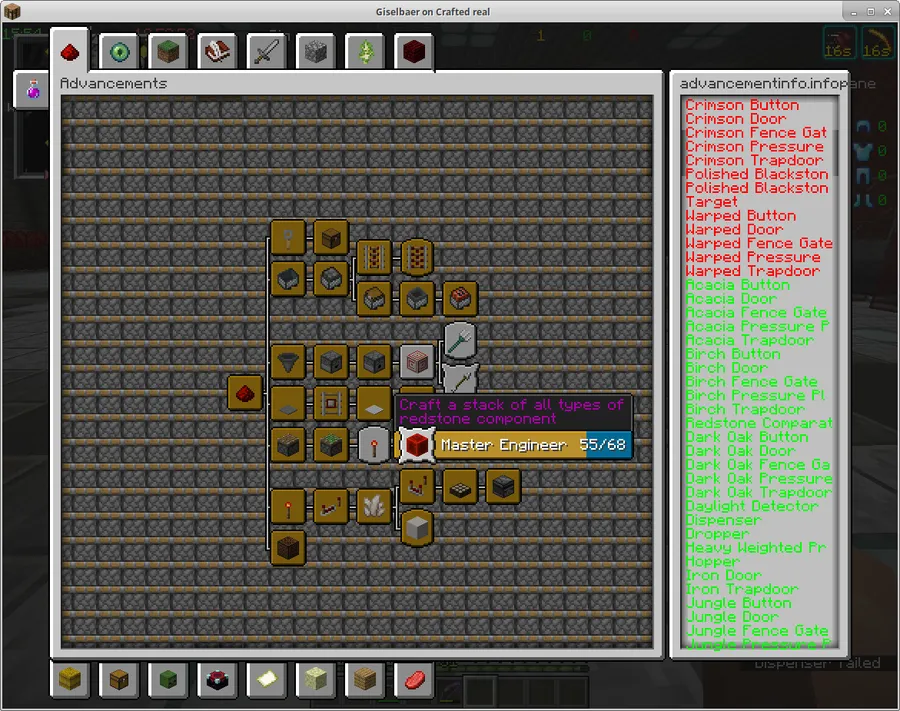
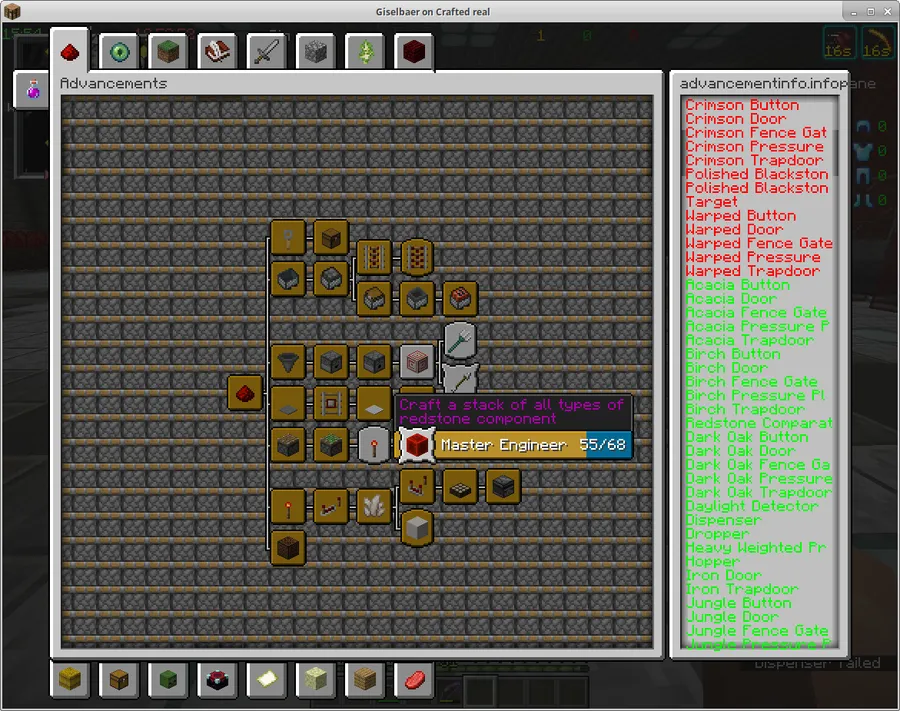
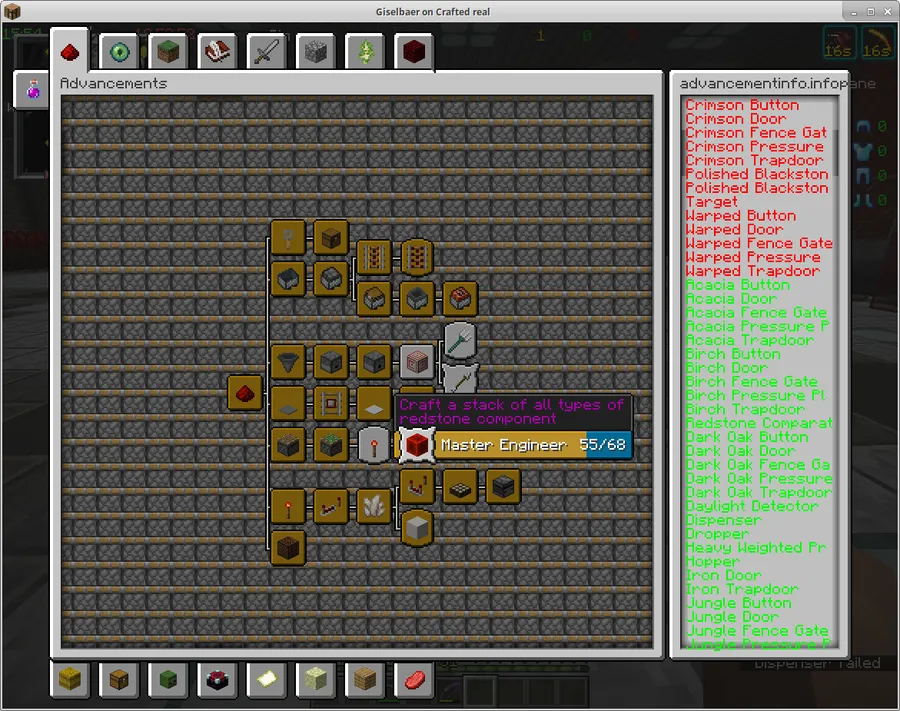
- Detailed Requirement Breakdown — Instead of showing a generic progress bar, AdvancementInfo lists every individual criterion needed to complete an advancement. For a challenge like "A Balanced Diet," you can see exactly which foods you have eaten and which ones remain. This eliminates the tedious process of cross-referencing wikis while playing.
- Completed vs. Remaining Tracking — The mod clearly distinguishes between requirements you have already fulfilled and those still pending. This visual separation means you can glance at any advancement and instantly understand your progress without counting items manually or second-guessing yourself.
- Native Advancement Screen Integration — Rather than adding a separate menu or overlay, AdvancementInfo enhances the existing vanilla advancement screen. This means there is no new keybinding to learn or interface to navigate — you simply open your advancements as usual and see the extra information right there.
- Client-Side Only Operation — AdvancementInfo runs entirely on the client side, which means you can use it on multiplayer servers without requiring the server owner to install anything. Just drop it into your mods folder and it works, whether you are playing single-player or joining a community server.
- Lightweight and Focused Design — This mod does one thing and does it well. It appears to be lightweight with minimal overhead since it only modifies the advancement display screen. There are no configuration files to manage or complex settings to adjust — it works out of the box immediately after installation.
- Broad Version Support — AdvancementInfo supports a wide range of Minecraft versions from 1.16.2 all the way through 1.20.4. Whether you are playing on an older modpack or a recent Fabric setup, chances are good there is a compatible version available for your game.
- Open Source and MIT Licensed — The full source code is available on GitHub, giving modpack creators and developers full transparency. The permissive MIT license allows it to be included freely in any modpack without licensing concerns.
Screenshots
How to Install AdvancementInfo
- Download and install Fabric Loader for your Minecraft version. The latest supported version is 1.20.4, but versions down to 1.16.2 are also available.
- Make sure you also have Fabric API installed, as most Fabric mods depend on it for core functionality.
- Download the AdvancementInfo .jar file that matches your Minecraft version from the download section below.
- Place the downloaded .jar file into your
.minecraft/modsfolder. If the folder does not exist, launch Minecraft once with the Fabric profile to create it automatically. - Launch Minecraft using the Fabric loader profile. Open any world and check your advancement screen to confirm the mod is working — you should see detailed requirement lists on each advancement.
Requirements & Compatibility
| Requirement | Details |
|---|---|
| Mod Loader | Fabric |
| Minecraft Versions | 1.16.2 – 1.20.4 |
| Side | Client-side only |
| License | MIT |
| Dependencies | Fabric Mod Loader |
| Status | End of life — no further updates planned |
What's New
- Final release supports Minecraft 1.20.4 on Fabric, published December 2023.
- The mod has been declared end of life by the author — no new features, fixes, or version ports will be released going forward.
- All existing files remain available for download so players on supported versions can continue using the mod.
- Previous updates expanded support across the 1.17, 1.18, 1.19, and 1.20 version lines throughout the mod's active development period from 2020 to 2023.
Pros and Cons
Pros
- Solves a genuine pain point that vanilla Minecraft ignores entirely
- Client-side only — works on any server without installation requirements
- Extremely simple to use with zero configuration needed
- Over 11 million downloads proving widespread community trust
- Open source under MIT license with full GitHub transparency
- Supports a wide range of versions from 1.16.2 to 1.20.4
Cons
- End of life — will not receive updates for Minecraft 1.21 or newer versions
- Fabric only — no Forge or NeoForge version available
- Limited to advancement screen enhancement with no additional utility features
- Players on newer Minecraft versions will need to find an alternative mod
Alternatives to AdvancementInfo
- Better Advancements — A popular advancement overhaul mod that redesigns the entire advancement screen with a zoomable tree view and improved layout, available for both Forge and Fabric on newer Minecraft versions.
- WTHIT (What The Hell Is That) — While primarily a tooltip mod for blocks and entities, WTHIT provides detailed in-game information overlays that complement advancement tracking for players who want more data at their fingertips.
- Roughly Enough Items (REI) — A comprehensive recipe and item browser that helps you identify specific items, foods, and mobs needed for advancement requirements, making it a strong companion or replacement for tracking completion goals.
Download AdvancementInfo
| Minecraft Version | Fabric |
|---|---|
| For Minecraft 1.20.4 | Download |
| For Minecraft 1.20.1 | Download |
| For Minecraft 1.20 | Download |
| For Minecraft 1.19.4 | Download |
| For Minecraft 1.19.3 | Download |
| For Minecraft 1.19.2 | Download |
| For Minecraft 1.19.1 | Download |
| For Minecraft 1.19 | Download |
| For Minecraft 1.18.2 | Download |
| For Minecraft 1.18 | Download |
| For Minecraft 1.17.1 | Download |
| For Minecraft 1.17 | Download |
Always download mods from official sources to stay safe.
Frequently Asked Questions
Is AdvancementInfo compatible with Minecraft 1.21?
No — AdvancementInfo has been declared end of life by its developer, and 1.20.4 is the final supported version. The mod will not receive updates for 1.21 or any future Minecraft releases. Players on newer versions should look into alternatives like Better Advancements.
Does AdvancementInfo work on multiplayer servers?
Yes — AdvancementInfo is a client-side only mod, so it works on any multiplayer server without the server needing to install it. You simply add it to your own mods folder and the enhanced advancement screen will appear in your game regardless of the server setup.
Does AdvancementInfo require Forge?
No — AdvancementInfo is exclusively a Fabric mod and has no Forge or NeoForge version. You must use the Fabric Loader to run this mod. If you are on Forge, consider Better Advancements as a similar alternative that supports the Forge ecosystem.
Will AdvancementInfo affect my game performance?
The mod appears to be lightweight since it only modifies the advancement display screen and does not run background processes during gameplay. You should not notice any frame rate changes or increased load times. It activates only when you open the advancement tab.
Can I include AdvancementInfo in my modpack?
Yes — AdvancementInfo is released under the MIT license, which is one of the most permissive open-source licenses available. You are free to include it in any modpack, public or private, without needing special permission from the author. The source code is also publicly available on GitHub for review.


