

Armor Chroma for Fabric Mod is a client-side decoration and utility mod that improves the vanilla armor bar with material-based icons, enchanted glint support, and extra armor display options for Minecraft Fabric and Quilt.
If you have ever looked at the default armor bar and wished it told you more, this mod solves that exact problem. It makes the HUD communicate what you are wearing instead of just how much protection you have, and with more than 1.5 million downloads on Modrinth it has already proven that a lot of players want that extra clarity. Based on its scope, it appears to be lightweight and focused on presentation rather than systems or content.
Key Features of Armor Chroma for Fabric Mod
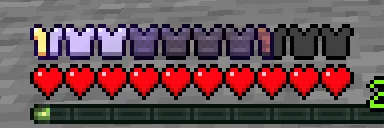
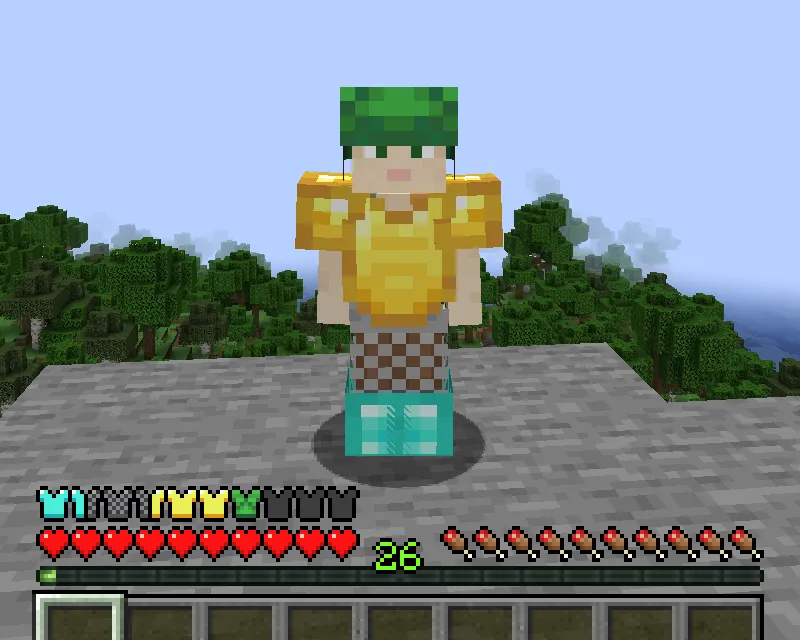
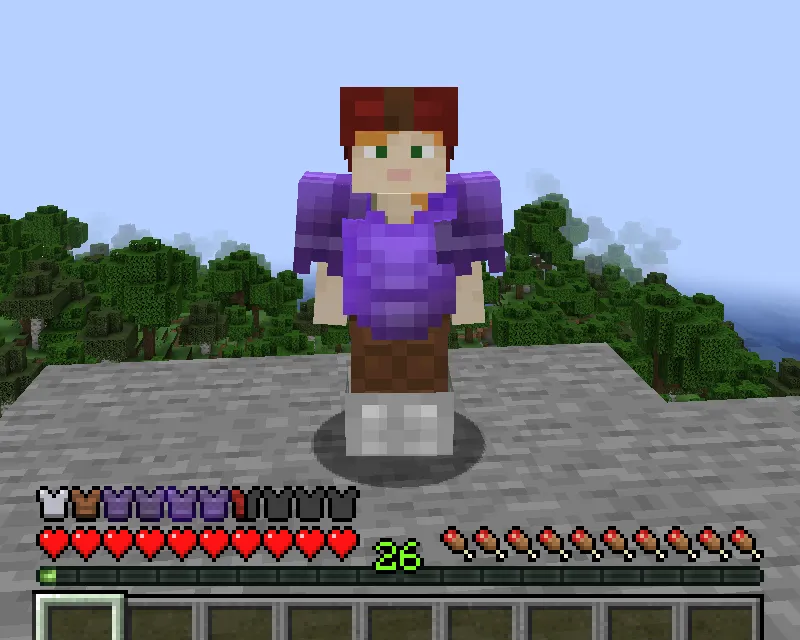
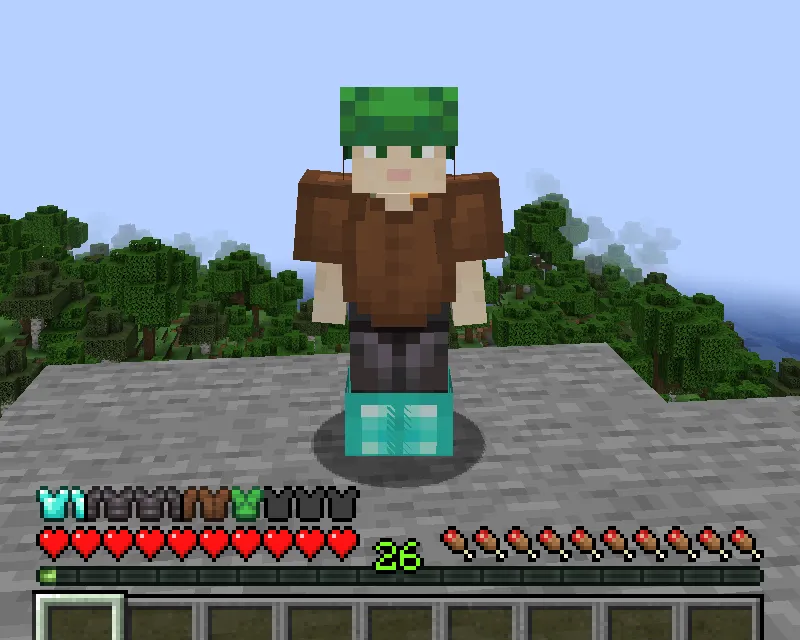
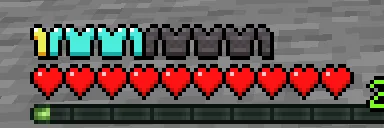
- Material-based armor icons — The armor bar changes its look depending on the material of your equipped items, which makes the HUD more informative without forcing you to open inventories. That matters in survival because you can tell equipment quality faster while moving, fighting, or swapping gear.
- Enchantment glint support — Enchanted armor pieces can show a glint effect in the armor bar, so your HUD reflects what you are actually wearing. That gives the interface a more consistent visual language and makes enchanted gear feel more distinct at a glance.
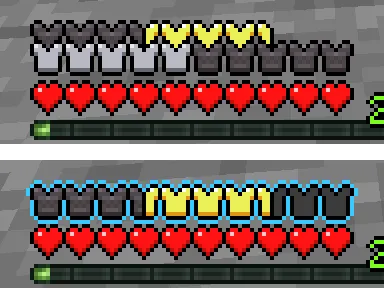
- Armor above 20 points — If your protection goes beyond the normal cap, the mod can display it with additional armor icon rows or with a colored outline. That is useful on modded servers and heavy gear setups where the vanilla bar would otherwise stop communicating the full picture.
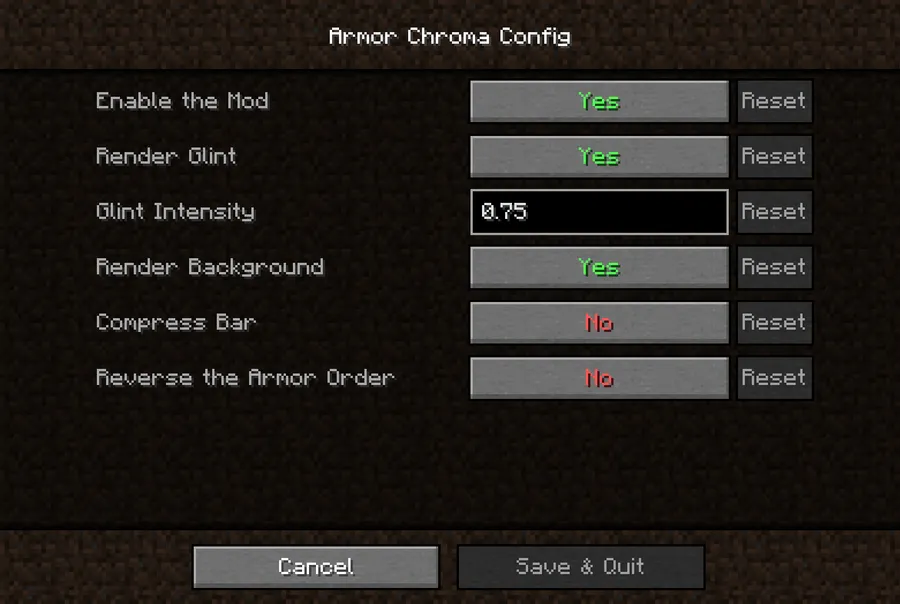
- Minimal config through Mod Menu — When Cloth Config is installed, you get a small configuration screen accessible through Mod Menu. That keeps the setup simple for players who want to tune the display without digging through files.
- Optional built-in resource pack — The mod includes an optional resource pack with alternative icons for vanilla materials by Andrew Grant. This helps the armor bar look more polished out of the box and gives you a ready-made visual style if you do not want to build your own textures.
- Support for selected modded equipment — Built-in icons are included for several supported mods, including Additional Additions, Botania, Copper Equipment, DragonLoot, and Tech Reborn. That is important because the mod stays useful even when your gear comes from modded progression instead of vanilla materials.
Screenshots
How to Install Armor Chroma for Fabric Mod
- Choose the loader you use: install Fabric Mod Loader or Quilt Loader before anything else.
- Download the Armor Chroma file that matches your Minecraft version from the download section below.
- Open your Minecraft
modsfolder and place the mod file there. - If you want the configuration screen, also install Mod Menu and Cloth Config so the settings page can appear in-game.
- Launch Minecraft, open the HUD normally, and check the armor bar to confirm the new icons and display behavior are active.
Requirements & Compatibility
| Category | Details |
|---|---|
| Mod Type | Fabric and Quilt client-side mod |
| Required Loaders | Fabric Mod Loader, Quilt Loader |
| Minecraft Versions | 1.16.5 through 1.21.5, including 1.20.x, 1.19.x, 1.18.x, and 1.17.x |
| Config Support | Minimal config screen available through Mod Menu when Cloth Config is installed |
| Resource Pack | Optional built-in resource pack with alternate vanilla material icons |
| License | GPL-3.0-only |
What's New
- Updated support for Minecraft 1.21.5.
- Armor material in inventory tooltips is now hidden by default unless you enable the "Show Material in Tooltip" option.
- Rendering issues were fixed in certain situations, including loom interactions.
- Rendering issues were also fixed for compatibility cases involving the Double Hotbar mod.
- The changelog indicates continued maintenance rather than a redesign, which is a good sign for players who want a stable HUD mod.
Pros and Cons
Pros
- Gives the armor bar more useful visual feedback without changing gameplay.
- Supports enchanted armor glint, extra armor points, and material-specific icons.
- Includes built-in support for several modded equipment sets.
- Offers a simple config path when Mod Menu and Cloth Config are installed.
- Has broad version coverage across many Minecraft releases.
Cons
- Requires Fabric or Quilt, so it is not a universal loader mod.
- The config screen depends on other mods being installed.
- Its value is mostly visual, so players who prefer a pure vanilla HUD may not need it.
Alternatives to Armor Chroma for Fabric Mod
- Mod Menu helps surface in-game configuration screens, which makes Armor Chroma easier to adjust if you want to fine-tune the HUD.
- Cloth Config is the settings framework that can unlock Armor Chroma's minimal config screen when paired with Mod Menu.
- Chromatic Icons is a useful alternative resource pack style if you want to customize modded armor visuals beyond the built-in textures.
Download Armor Chroma for Fabric Mod
| Minecraft Version | Fabric | Quilt |
|---|---|---|
| For Minecraft 1.21.5 | Download | Download |
| For Minecraft 1.21.4 | Download | Download |
| For Minecraft 1.21.3 | Download | Download |
| For Minecraft 1.21.2 | Download | Download |
| For Minecraft 1.21.1 | Download | Download |
| For Minecraft 1.21 | Download | Download |
| For Minecraft 1.20.6 | Download | Download |
| For Minecraft 1.20.5 | Download | Download |
| For Minecraft 1.20.4 | Download | Download |
| For Minecraft 1.20.3 | Download | Download |
| For Minecraft 1.20.2 | Download | Download |
| For Minecraft 1.20.1 | Download | Download |
Always download mods from official sources to stay safe.
Frequently Asked Questions
Is Armor Chroma for Fabric Mod client-side?
Yes — it is a client-side mod. That means it is focused on how the armor bar looks and behaves on your screen rather than adding server-side mechanics.
Does Armor Chroma work on Quilt?
Yes — the mod supports Quilt as well as Fabric. The available downloads in this data are labeled for both loaders, so you can use the version that matches your setup.
Do I need Cloth Config to use Armor Chroma?
No — the mod itself can still be used without the config screen. Cloth Config matters if you want the minimal settings menu to appear through Mod Menu.
Can Armor Chroma show different icons for different armor materials?
Yes — that is one of its main features. Instead of a generic bar, the HUD can reflect the material of your equipped items, which makes gear easier to read at a glance.
Does it support armor values over 20?
Yes — it can display armor points beyond 20. The mod handles that with additional icon rows or a colored outline, so the extra protection is not hidden by the vanilla display limit.
Is there a built-in resource pack?
Yes — the mod includes an optional built-in resource pack. It provides alternative icons for vanilla materials, which is helpful if you want a different look without building a pack yourself.
Does the mod support modded equipment?
Yes — it includes built-in icons for some supported mods such as Additional Additions, Botania, Copper Equipment, DragonLoot, and Tech Reborn. For other modded items, the data says support can be added through resource packs.


