

Better Biome Reblend Mod is a client-side optimization mod that improves biome blending for Minecraft on Fabric, Forge, NeoForge, and Quilt.
If you have ever noticed harsh biome borders, awkward grass tint shifts, or jarring water and leaf colors at the edge of different biomes, this mod is aimed directly at that problem. It updates Better Biome Blend for Minecraft 1.21.x, and its 1.3 million+ downloads make it clear that a lot of players consider biome smoothing worth adding to a client.
Key Features of Better Biome Reblend Mod
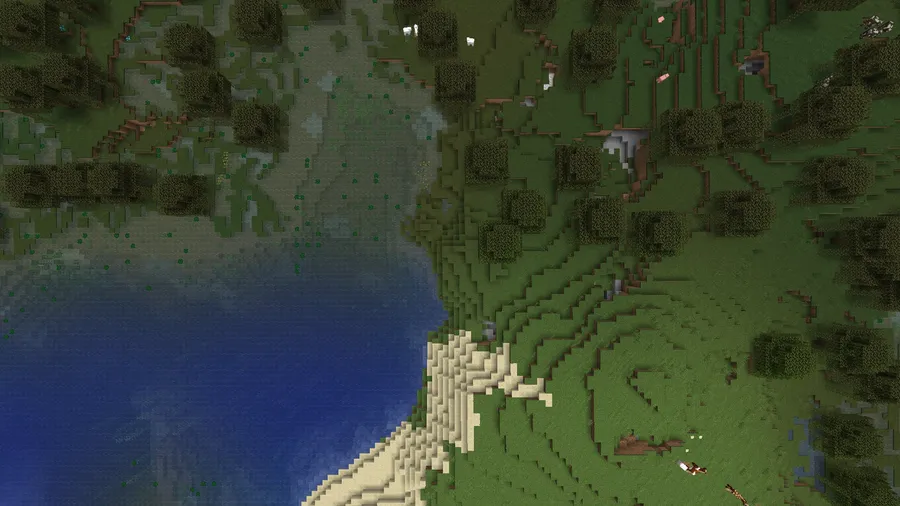
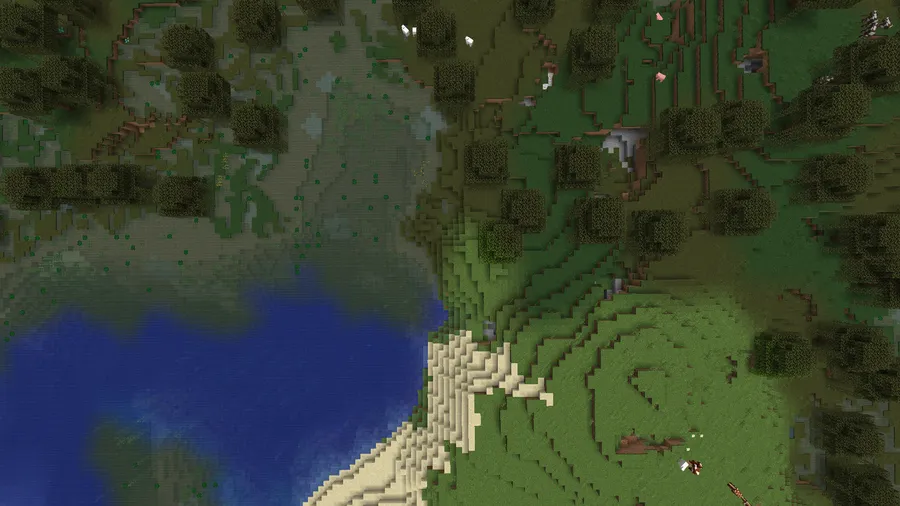
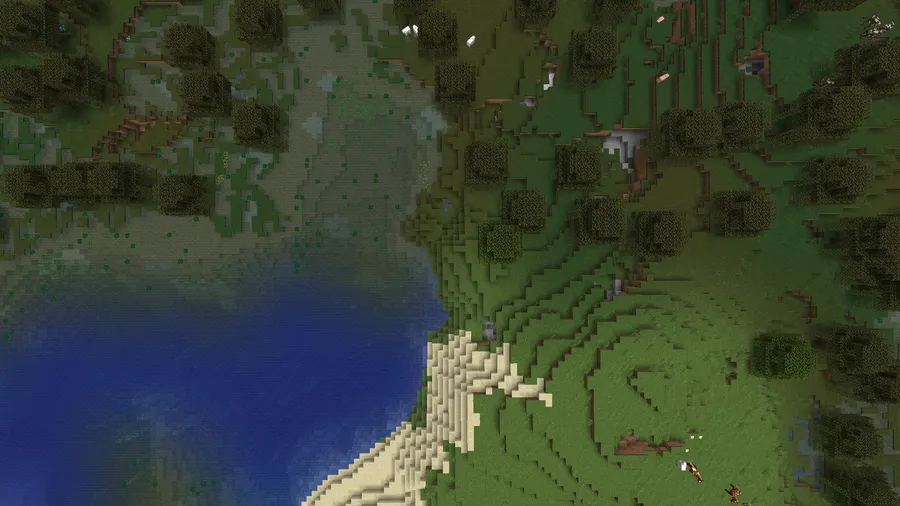
- Smarter biome color transitions — The main draw here is smoother biome blending, which makes terrain edges look more natural as you move between biomes. That matters because abrupt color changes are one of the easiest ways for a world to feel visually inconsistent.
- sRGB-correct blending — This mod is designed to handle biome colors in a more accurate way instead of leaving them to a rough visual approximation. In practice, that gives grass, foliage, and water transitions a more believable look, especially in mixed-biome areas.
- Biome Blend settings without the old performance tradeoff — The mod lets you raise the in-game Biome Blend setting from 0x0 all the way to 29x29. The important part is that it is built so the setting is not tied to the same performance cost you would expect from vanilla behavior.
- Updated for 1.18+ biome changes — Minecraft's newer biome system is 3D rather than 2D, which makes color calculation more complicated. Better Biome Reblend handles that with a specialized approach so the feature still works cleanly on modern versions.
- Cave vegetation support — Vanilla still leaves some cave visuals feeling incomplete, especially when grass, water, and leaves appear underground. This mod explicitly supports those colors in caves, which helps those spaces feel more consistent with the rest of the world.
- Sodium-aware compatibility — The mod notes full compatibility with Sodium 0.6.x on 1.21.x and compatibility with Sodium 0.5.x on 1.20.1/x. That matters if you already use Sodium and want to keep a performance-focused setup without giving up biome smoothing.
- Lightweight client-side utility feel — This is not a gameplay overhaul or a content mod; it is a visual fix and quality-of-life improvement. If you just want the world to look cleaner while keeping your pack focused, it appears to be a lightweight addition.
Screenshots
How to Install Better Biome Reblend Mod
- Choose the loader you are actually using: Fabric, Forge, NeoForge, or Quilt.
- Download the file that matches both your Minecraft version and your loader, such as the 1.21.11 build for Fabric or NeoForge.
- Install the correct loader first if it is not already on your system, then launch the game once so Minecraft can create the needed folders.
- Place the mod jar into your `mods` folder, then restart the game.
- Open Video Settings and look for the Biome Blend option so you can confirm the mod is active and tune it to your preference.
Requirements & Compatibility
| Requirement | Details |
|---|---|
| Mod type | Client-side performance and bug-fix mod focused on biome blending. |
| Supported loaders | Fabric Mod Loader, Minecraft Forge, NeoForge, and Quilt Loader. |
| Supported Minecraft versions | 1.21.11 through 1.21, plus 1.20.6 through 1.20. |
| Sodium compatibility | Fully compatible with Sodium 0.6.x on 1.21.x; Sodium 0.5.x is listed as compatible on 1.20.1/x. |
| Author | Cartrigger. |
| License | LGPL-3.0-only. |
| Latest update | Updated on 2026-01-10. |
What's New
- The mod was updated to support Minecraft 1.21.11.
- Sodium 0.8.x support was added in the latest changelog update.
- The update credits forkiesassds for helping move Better Biome Reblend forward.
- The changelog points to a commit that documents the 1.21.11 and Sodium work in the source repository.
Pros and Cons
Pros
- Smoother biome transitions make worlds look cleaner and more natural.
- It supports modern Minecraft versions, including 1.21.11.
- Works across multiple loaders, which makes it easy to fit into different modpacks.
- It keeps cave grass, water, and leaves visually consistent, which vanilla still does not fully handle.
Cons
- Older Minecraft versions should use the original Better Biome Blend instead.
- Sodium compatibility depends on the version you are running, so you need to match the notes carefully.
- If you do not care about biome color transitions, this is purely a visual quality-of-life mod.
Alternatives to Better Biome Reblend Mod
- Better Biome Blend — The original mod is the obvious fallback for older versions, and the author specifically recommends it when you are not on 1.21.x.
- Sodium — A performance-focused client mod that pairs naturally with visual optimization projects if you are building a leaner Minecraft setup.
- Lithium — Another optimization-oriented option for players who want to improve the feel of their client or modpack without changing the game's content.
Download Better Biome Reblend Mod
| Minecraft Version | Fabric | NeoForge | Quilt |
|---|---|---|---|
| For Minecraft 1.21.11 | Download | Download | — |
| For Minecraft 1.21.10 | Download | Download | Download |
| For Minecraft 1.21.9 | Download | Download | Download |
| For Minecraft 1.21.8 | Download | Download | Download |
| For Minecraft 1.21.7 | Download | Download | Download |
| For Minecraft 1.21.6 | Download | Download | Download |
| For Minecraft 1.21.5 | Download | Download | Download |
| For Minecraft 1.21.4 | Download | Download | Download |
| For Minecraft 1.21.3 | Download | Download | Download |
| For Minecraft 1.21.2 | Download | Download | Download |
| For Minecraft 1.21.1 | Download | Download | Download |
| For Minecraft 1.21 | Download | Download | Download |
Always download mods from official sources to stay safe.
Frequently Asked Questions
What does Better Biome Reblend Mod actually do?
It smooths biome color transitions so the world looks less harsh where biomes meet. The mod focuses on biome blending, which affects how grass, water, leaves, and similar colors appear across terrain.
Is Better Biome Reblend Mod client-side only?
Yes, it is described as a client-side performance and bug-fix mod. That means it is aimed at improving how the game looks on your machine rather than changing server-side gameplay.
Should I install this on older Minecraft versions?
No, the author says older versions should use the original Better Biome Blend. This fork is specifically presented as the updated version for the 1.21.x line.
Does it work with Sodium?
Yes, Sodium compatibility is explicitly listed for the supported versions. The notes say 1.21.x works with Sodium 0.6.x, and 1.20.1/x works with Sodium 0.5.x.
Can I use Better Biome Reblend Mod in a modpack?
Yes, the author says you may use it without worry in any modpack. Credit is appreciated, but the usage note says it is fine to include.
What Minecraft versions are supported?
It supports 1.21.11, 1.21.10, 1.21.9, 1.21.8, 1.21.7, 1.21.6, 1.21.5, 1.21.4, 1.21.3, 1.21.2, 1.21.1, 1.21, 1.20.6, 1.20.5, 1.20.4, 1.20.3, 1.20.2, 1.20.1, and 1.20. The download list in the data shows separate builds for the newer 1.21.x releases.
Is this mod a gameplay overhaul?
No, it is not a gameplay overhaul. Its purpose is visual and technical: better biome blending, cleaner transitions, and improved handling of modern biome color calculations.


