The best Bedrock addons are the ones that match how you actually play Minecraft Bedrock: survival upgrades, mob expansions, furniture packs, visual tweaks, UI improvements, and adventure maps that work with Bedrock's behavior-pack and resource-pack system. They are not the same thing as Java Edition mods, so picking the right format matters more than chasing random mod lists.
If you are new to Minecraft modding in general, start with our Minecraft Modding for Beginners guide. If you are comparing Bedrock addons with Java mods, the important thing to understand is that Bedrock uses a different addon model than Java's Forge, Fabric, and NeoForge ecosystem.
Quick Picks
| Addon Type | Best For | What to Look For |
|---|---|---|
| Survival Addons | Players who want new progression without leaving Bedrock | Clear behavior-pack support, recipes, item balance, and world compatibility notes. |
| Mob Addons | Adventure worlds and players who want more creatures | Stable spawn behavior, readable documentation, and no suspicious install steps. |
| Furniture Addons | Builders and roleplay worlds | Good model quality, resource-pack pairing, and mobile-friendly performance. |
| Texture Packs | Players who want a new look without gameplay changes | Resolution options, device support, and Marketplace or trusted download source. |
| Adventure Maps | Players who want a complete experience | World file format, multiplayer notes, and whether required packs are bundled. |
Quick answer: start with survival and furniture addons if you want everyday gameplay changes, texture packs if you only want visuals, and adventure maps if you want a complete curated world. Avoid any addon that requires suspicious installers, modified APKs, or unclear file sources.
What Counts as a Bedrock Addon?
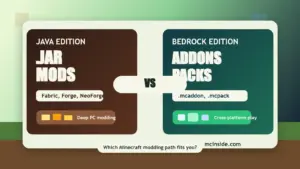
In Bedrock Edition, addons usually come as behavior packs, resource packs, worlds, or bundled files such as .mcaddon and .mcpack. This is different from Java Edition, where most mods are .jar files loaded through Fabric, Forge, or NeoForge.
Common Bedrock addon formats include:
.mcaddon- usually bundles behavior and resource packs together.mcpack- often a resource pack, behavior pack, or single addon pack.mcworld- imports a complete world or map- Marketplace content - official ecosystem content installed through Minecraft Marketplace
This matters because Java mods from our best Minecraft mods list generally do not work in Bedrock Edition. Bedrock has its own system, its own limitations, and its own installation workflow.
Best Survival and Gameplay Addons
Survival addons are the best place to start if you want Bedrock to feel fresh without turning the whole game into a different genre. Look for addons that add new tools, recipes, progression systems, crops, structures, or gameplay rules while keeping the game stable.
1. Vanilla+ survival addons
Vanilla+ Bedrock addons are ideal for players who want more content without overwhelming the base game. The best ones add small improvements such as new blocks, food items, simple mobs, or crafting tweaks. They are usually easier to run on mobile devices than large adventure packs.
2. Tool and equipment addons
Equipment-focused addons can add new weapons, armor sets, tools, or utility items. These are useful for survival worlds where you want progression beyond diamond and netherite. Check whether the addon explains crafting recipes clearly before installing it.
3. Farming and food addons
Farming addons work well for long-term survival worlds because they add goals without requiring constant combat or world resets. Good Bedrock farming addons should include clear behavior-pack support and avoid breaking existing vanilla crop mechanics.
Best Mob and Adventure Addons
Mob addons are popular on Bedrock because they can make familiar worlds feel more alive. The main risk is stability. Poorly built mob packs can create spawn issues, performance problems, or behavior conflicts.
4. Wildlife and animal addons
Wildlife addons are a good fit for players who want richer biomes. Look for packs that explain where mobs spawn, whether they can be tamed or bred, and how they interact with vanilla mobs.
5. Boss and dungeon addons
Boss addons can be fun for multiplayer worlds, but they need careful selection. The better ones include clear instructions, balanced rewards, and warnings about whether they are meant for new worlds or existing saves.
6. Adventure map bundles
Sometimes the best Bedrock "addon" experience is a complete world rather than a standalone pack. Adventure maps bundle the rules, structures, and resources into one curated experience. This is often easier for console and mobile players than manually combining several packs.
Best Furniture and Building Addons
Furniture and building addons are among the safest categories for many Bedrock players because they focus on decoration, roleplay, and world design. They are especially useful for creative worlds, survival bases, and multiplayer communities.
7. Furniture packs
Good furniture addons add usable-looking chairs, tables, lamps, shelves, kitchen blocks, or decorative objects without requiring strange install methods. Builders should prioritize packs with consistent textures and clean models over packs with the biggest item count.
8. Building block addons
Building addons expand the palette with new block variants, decorative shapes, or themed materials. These are useful when you want more design options but do not need entirely new mechanics.
9. City and roleplay packs
Roleplay-oriented packs work best when paired with a specific world or server concept. Vehicles, signs, modern blocks, and city props can add a lot to Bedrock multiplayer worlds, but they should be tested before you commit them to an important save.
Best Visual and Texture Addons
Visual addons for Bedrock can be confusing because the shader situation has changed across versions and devices. Treat "shader" claims carefully and check whether the pack supports your exact Bedrock version and platform.
10. Texture packs
Texture packs are the most reliable visual upgrade for many Bedrock players. They can change block textures, UI elements, items, and mobs without adding new gameplay mechanics. Lower-resolution packs are usually safer on mobile devices.
11. UI packs
UI packs can make inventory screens, hotbars, menus, and HUD elements easier to use. These are useful if you play on touch devices or want a cleaner interface.
12. Lighting and atmosphere packs
Some visual packs focus on lighting feel, skyboxes, water, fog, or color grading. Before installing, confirm that the pack still works with your Bedrock version and does not require unsupported render features.
How to Install Bedrock Addons
Most Bedrock addons install by opening the .mcaddon, .mcpack, or .mcworld file directly with Minecraft. After import, you usually enable the behavior pack and resource pack in the world settings.
- Download the addon from a trusted source or Minecraft Marketplace
- Open the
.mcaddonor.mcpackfile with Minecraft - Wait for the import message
- Create or edit a world
- Enable the behavior pack and resource pack in world settings
- Test the world before using it as your main save
Console support can be more limited than Windows or mobile. Marketplace content is usually the cleanest route on consoles, while Windows and mobile users have more flexibility with third-party files. For platform-specific steps, use our full How to Install Bedrock Addons guide once you are ready to set up a pack.
Java Mods vs Bedrock Addons
Java mods and Bedrock addons are not interchangeable. A Fabric or Forge .jar mod will not run in Bedrock Edition. Likewise, a Bedrock .mcaddon is not a Java mod file.
Use Java Edition if you want the largest traditional mod ecosystem, including loaders like Fabric, Forge, and NeoForge. Use Bedrock addons if you play on mobile, Windows Bedrock, console-friendly Marketplace content, or cross-platform Bedrock worlds.
If you are not sure which edition fits you, compare the two paths before spending time installing the wrong files. Our Java vs Bedrock Mods comparison is the safer next step for players switching from YouTube Java mod videos to Bedrock Edition on mobile or console.
Frequently Asked Questions
Are Bedrock addons the same as Java mods?
No. Bedrock addons use behavior packs, resource packs, worlds, and files like .mcaddon or .mcpack. Java mods usually use .jar files with loaders such as Fabric, Forge, or NeoForge.
Can I install Java mods on Minecraft Bedrock?
No. Java mods do not run on Bedrock Edition. You need Bedrock-specific addons or Marketplace content.
Are Bedrock addons safe?
They can be safe if you use trusted sources, Marketplace content, and normal addon files. Avoid suspicious installers, modified APKs, piracy sites, and files that ask you to disable device security.
Do Bedrock addons work on console?
Console support is more restricted. Marketplace content is usually the easiest path on console, while Windows and mobile Bedrock players generally have more flexibility with imported files.
What is the best Bedrock addon category to start with?
Start with texture packs, furniture packs, or light vanilla+ gameplay addons. These are usually easier to understand than large behavior-pack overhauls or complex adventure bundles.
Do Bedrock addons work in multiplayer?
Some do, but it depends on the addon and world settings. Test the addon in a copy of the world before using it on an important multiplayer save.