Tired of Minecraft running at 30 FPS? The right optimization mods can double, triple, or even 5x your frame rate — without changing how the game looks or plays. We've tested every major performance mod on Minecraft 1.21.1 and ranked the 15 best ones by real impact.
These mods fix Minecraft's biggest performance bottlenecks: rendering, memory usage, game logic, networking, and loading times. Most are compatible with each other, so you can stack them for maximum effect. All mods on this list are free, open-source, and available on Modrinth.
Already know the basics? Jump to our Best Mods for Low-End PCs guide or read our Sodium vs OptiFine comparison.
Rendering Optimization
Rendering is where Minecraft wastes the most resources. These mods rewrite or optimize how blocks, entities, and effects are drawn on screen.
1. Sodium — The King of FPS
Downloads: 133M+ | Loaders: Fabric, NeoForge, Quilt | Impact: +100-400% FPS
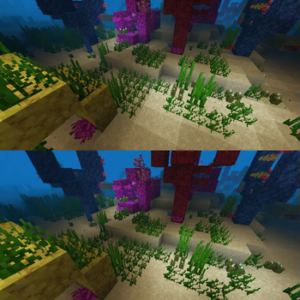
Sodium rewrites Minecraft's entire rendering engine from the ground up. It's not a tweak — it's a replacement. The result is 2-5x higher FPS compared to vanilla, with better chunk loading, smoother frame pacing, and reduced micro-stutter.
Sodium is the single most impactful optimization mod available. If you install nothing else from this list, install Sodium. It requires OpenGL 4.5+ (any GPU from 2012 or newer). For a detailed comparison with OptiFine, see our Sodium vs OptiFine breakdown.
2. Entity Culling — Skip What You Can't See
Downloads: 96M+ | Loaders: Fabric, Forge, NeoForge | Impact: +10-50% FPS in entity-heavy areas
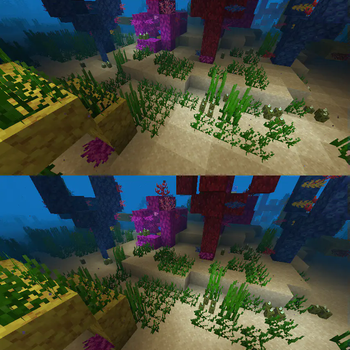
Entity Culling uses async path-tracing to determine which entities and block entities are actually visible. If 500 chickens are behind a wall, your GPU doesn't waste time rendering them. The biggest gains come in areas with many entities — farms, mob grinders, villages, and storage rooms full of chests.
3. ImmediatelyFast — Faster UI & HUD Rendering
Downloads: 79M+ | Loaders: Fabric, Forge, NeoForge | Impact: +5-20% FPS, especially in GUIs
ImmediatelyFast optimizes "immediate mode" rendering — the system Minecraft uses for text, HUD elements, item models, and inventory screens. If your FPS drops when opening chests or looking at item frames, this mod directly addresses that. Lightweight and fully compatible with Sodium.
4. More Culling — Extended Culling for Everything
Downloads: 41M+ | Loaders: Fabric, NeoForge | Impact: +5-15% FPS
More Culling extends culling optimizations beyond what Entity Culling covers. It handles leaves, snow layers, powder snow, end gateway beams, and other block types that Minecraft renders unnecessarily. Think of it as the complement to Entity Culling — one handles entities, this handles blocks.
5. Enhanced Block Entities — FPS-Friendly Block Entities
Downloads: 19M+ | Loaders: Fabric | Impact: +10-30% FPS with many chests/signs
Chests, signs, beds, and bells are "block entities" — rendered differently and more expensively than normal blocks. Enhanced Block Entities converts them to use baked models instead, dramatically reducing their rendering cost. If you have a storage room with 100+ chests, this mod is a game-changer.
6. Distant Horizons — See Further Without Lag
Downloads: 21M+ | Loaders: Fabric, Forge, NeoForge | Impact: Enables 64+ chunk render distance
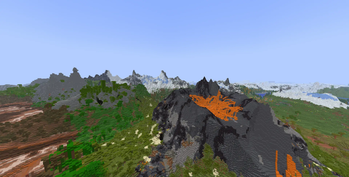
Distant Horizons uses a LOD (Level of Detail) system to render far-away chunks as simplified geometry. You can set render distance to 64+ chunks while maintaining playable FPS — something impossible in vanilla without a top-tier GPU. Far-away terrain looks slightly simplified but the result is stunning draw distances.
Memory & Game Logic Optimization
These mods reduce RAM usage, speed up game logic calculations, and fix memory leaks. Essential for modpacks and servers.
7. Lithium — Faster Game Logic
Downloads: 81M+ | Loaders: Fabric, NeoForge | Impact: +5-15% server TPS, fewer lag spikes
Lithium optimizes Minecraft's internal systems — mob AI pathfinding, block ticking, world generation, collision detection, and chunk loading. You won't see a big FPS number jump, but you'll notice fewer lag spikes and smoother gameplay. It's especially impactful on servers where game logic is the main bottleneck, not rendering.
8. FerriteCore — Cut Memory Usage in Half
Downloads: 96M+ | Loaders: Fabric, Forge, NeoForge | Impact: -40-60% RAM usage
FerriteCore reduces Minecraft's memory footprint significantly by optimizing how block states, models, and other data structures are stored in memory. In large modpacks with 200+ mods, FerriteCore can be the difference between crashing with "Out of Memory" and running smoothly. Works silently in the background with zero configuration.
9. ModernFix — All-in-One Fixer
Downloads: 53M+ | Loaders: Fabric, Forge, NeoForge | Impact: -20-40% RAM, faster load, bug fixes
ModernFix is a Swiss army knife — it improves performance, reduces memory usage, speeds up loading, AND fixes many vanilla bugs. It's especially valuable in modpacks where weird interactions between mods cause unexpected memory leaks or slowdowns. Compatible with all other optimization mods on this list.
10. BadOptimizations — The Rest of the Bottlenecks
Downloads: 23M+ | Loaders: Fabric, Forge, NeoForge | Impact: +3-10% overall
BadOptimizations targets the performance issues that other mods don't — non-rendering bottlenecks scattered across Minecraft's codebase. It optimizes sky angle calculations, entity attribute lookups, and other small-but-frequent operations. Each individual fix is tiny, but together they add up.
11. Let Me Despawn — Smarter Mob Cleanup
Downloads: 15M+ | Loaders: Fabric, Forge, NeoForge | Impact: Reduces entity count, improves TPS
Vanilla Minecraft prevents named mobs, mobs holding items, and other "special" mobs from despawning — even when nobody is nearby. Over time, this bloats entity counts and tanks performance. Let Me Despawn tweaks despawn rules so these entities eventually clean up. Especially useful on servers and in modpacks that add many persistent mobs.
Loading & Background Optimization
These mods speed up game startup, world loading, and reduce resource usage when you're alt-tabbed.
12. Dynamic FPS — Save Resources When Idle
Downloads: 42M+ | Loaders: Fabric, Forge, NeoForge | Impact: -90% GPU/CPU when minimized
Dynamic FPS drops the frame rate to 1 FPS when Minecraft is minimized or unfocused, and throttles it when idle. This saves massive amounts of CPU, GPU, and battery — your laptop fans will thank you. When you click back into the game, full performance resumes instantly.
13. Concurrent Chunk Management Engine (C2ME)
Downloads: 21M+ | Loaders: Fabric | Impact: +50-200% world gen speed
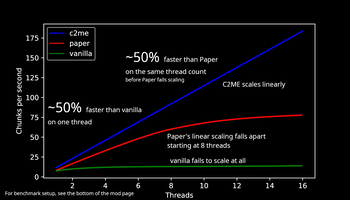
C2ME parallelizes Minecraft's chunk loading and world generation across multiple CPU cores. Vanilla Minecraft is largely single-threaded for chunk operations — C2ME fixes that. The result is dramatically faster world generation and chunk loading, especially noticeable when flying with elytra or teleporting.
14. FastQuit — Return to Menu Instantly
Downloads: 15M+ | Loaders: Fabric | Impact: Instant world exit
Normally, saving and quitting a world forces you to wait while chunks save. FastQuit moves the world saving to a background thread, letting you return to the title screen immediately. The world finishes saving in the background. Simple, safe, and saves minutes of waiting over time.
Networking & Server Optimization
15. Krypton — Optimized Network Stack
Downloads: 28M+ | Loaders: Fabric | Impact: -30-40% bandwidth, less network lag
Krypton optimizes Minecraft's networking stack — compressing packets better, flushing more efficiently, and reducing unnecessary network traffic. On servers, this translates to lower bandwidth usage and reduced network-related lag. On clients, it means smoother multiplayer especially on slower connections.
Recommended Performance Stack
Not sure which mods to combine? Here are our recommended stacks by use case:
Essential Stack (Everyone)
Install these 5 mods regardless of your hardware. They're compatible with each other and provide the biggest combined impact:
- Sodium — Rendering (+100-400% FPS)
- Lithium — Game logic (smoother gameplay)
- FerriteCore — Memory (-40-60% RAM)
- Entity Culling — Skip hidden entities
- Dynamic FPS — Save resources when idle
Low-End PC Stack
For machines with 4-8GB RAM and older GPUs, add these on top of the essentials. See our full Best Mods for Low-End PCs guide.
- Essential Stack (above)
- ModernFix — Extra memory savings + bug fixes
- ImmediatelyFast — Faster UI rendering
- More Culling — Skip hidden blocks
- Enhanced Block Entities — Cheaper block entity rendering
- BadOptimizations — Catch remaining bottlenecks
Server Stack
For dedicated servers, rendering mods don't apply. Focus on game logic, memory, and networking:
- Lithium — Faster mob AI, ticking, collisions
- FerriteCore — Lower memory usage
- Krypton — Network optimization
- C2ME — Parallel chunk loading
- Let Me Despawn — Prevent entity buildup
- ModernFix — General fixes + memory
Modpack Stack
Large modpacks (100+ mods) have unique performance challenges. Start with:
- Essential Stack (above)
- ModernFix — Critical for memory in large packs
- FerriteCore — Already in essentials, but extra important here
- ImmediatelyFast — Many mods add custom GUIs
- Allocate 6-8GB RAM
For loader-specific advice: most optimization mods are Fabric-first. If you're unsure which loader to use, read Forge vs Fabric. All mods above except C2ME, FastQuit, and Krypton also support Forge/NeoForge.
Frequently Asked Questions
Can I use Sodium and OptiFine together?
No — they're incompatible. Sodium replaces Minecraft's rendering engine and cannot coexist with OptiFine. For shaders, use Iris Shaders (works with Sodium). For connected textures, use Continuity. For zoom, use Zoomify. Together, these fully replace OptiFine with better performance.
Do optimization mods work on servers?
Rendering mods (Sodium, Entity Culling, ImmediatelyFast) are client-side only — install them on your game client. Logic mods (Lithium, C2ME, Let Me Despawn) and network mods (Krypton) work on both client and server. FerriteCore and ModernFix also benefit servers.
Will these mods change how Minecraft looks?
No. All mods on this list maintain vanilla visual parity — same textures, same lighting, same colors. The only exception is Distant Horizons, which renders far-away terrain at reduced detail (which is the point). Sodium's rendering output is pixel-identical to vanilla.
How much FPS can I realistically expect?
With the full Essential Stack (Sodium + Lithium + FerriteCore + Entity Culling + Dynamic FPS), most players see 2-4x FPS improvement over vanilla. A PC getting 40 FPS vanilla typically reaches 120-160 FPS with these mods. Results vary by hardware, settings, and world complexity.
Are these mods compatible with each other?
Yes. All 15 mods on this list are compatible with each other on their supported loaders. They're designed to address different bottlenecks and don't conflict. The only restriction is loader-specific: C2ME, FastQuit, and Krypton are Fabric-only.