
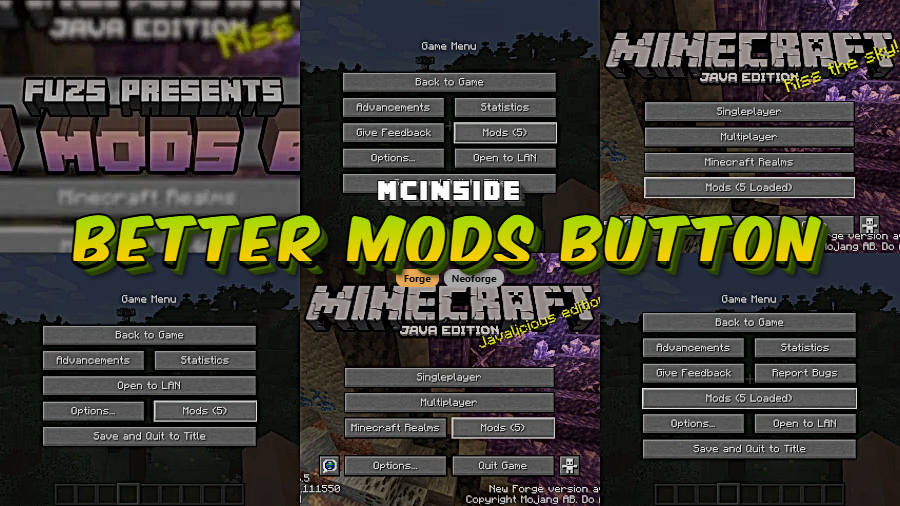
Better Mods Button is a client-side utility mod that gives players full control over the placement and appearance of the "Mods" button on Minecraft's title screen and pause menu, available for Forge and NeoForge loaders.
Anyone who has played modded Minecraft on Forge knows the frustration: you're in-game, you need to tweak a mod's settings, and the only way to reach the mod configuration screen is to quit to the main menu first. Before Minecraft 1.13, Forge placed a handy "Mods" button right on the pause screen — but that convenience quietly disappeared in newer versions. Better Mods Button by Fuzs brings it back and takes the concept further, letting you choose exactly where the button appears and how it looks. With over 7 million downloads on Modrinth, it has become one of the most popular utility mods in the Forge and NeoForge ecosystem — a clear sign that players have been wanting this fix for years.
Key Features of Better Mods Button
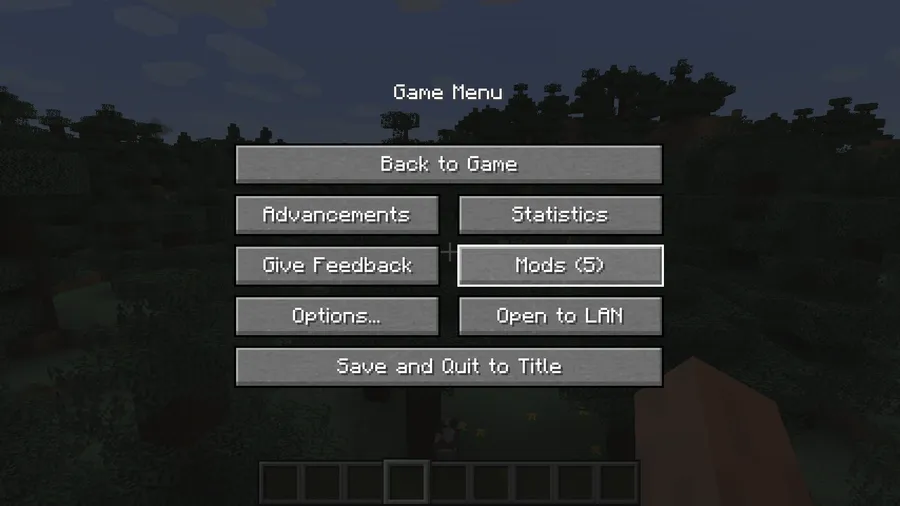
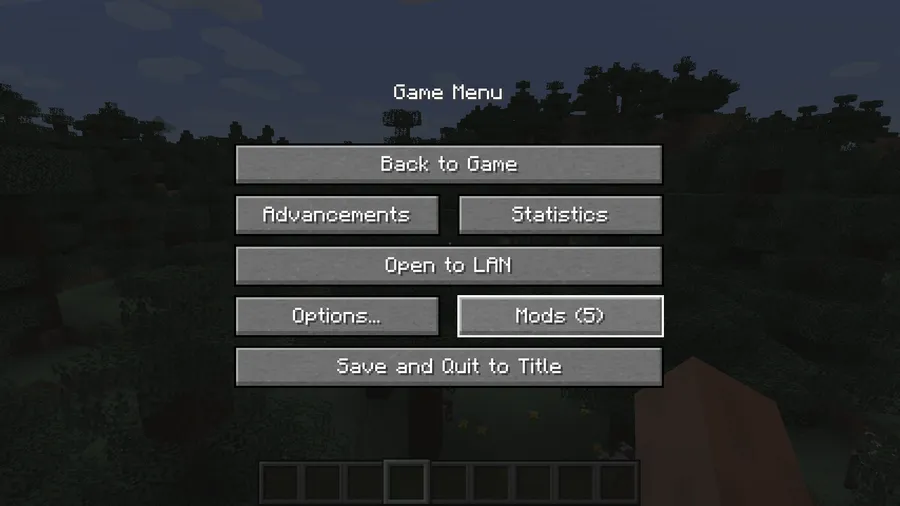
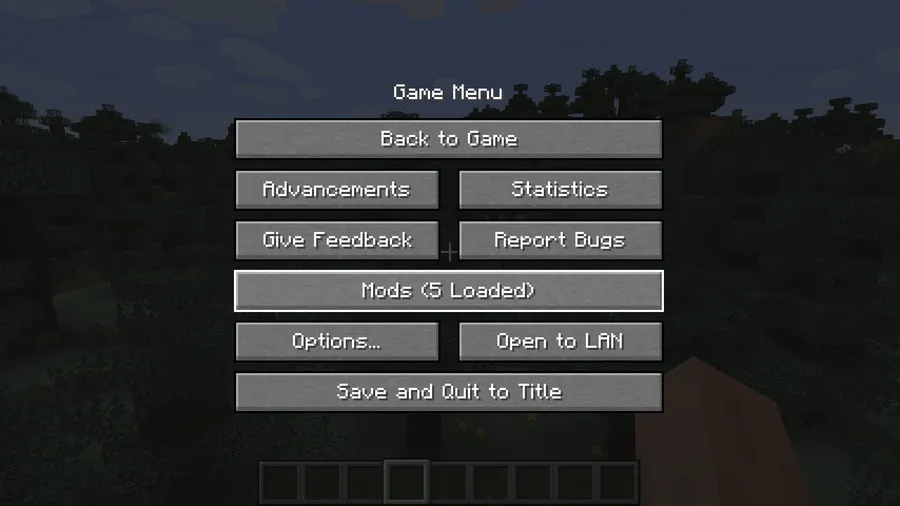
- Mods Button on the Pause Screen — The headline feature restores the mods button to the in-game pause menu, exactly where Forge used to place it before 1.13. This means you no longer have to disconnect from a server or quit your singleplayer world just to adjust a mod's configuration. It is a small change that saves real time during extended play sessions.
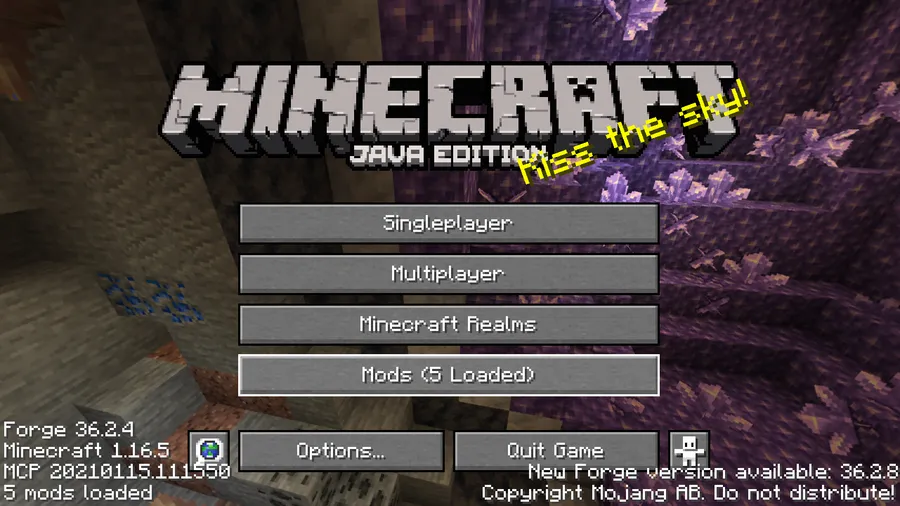
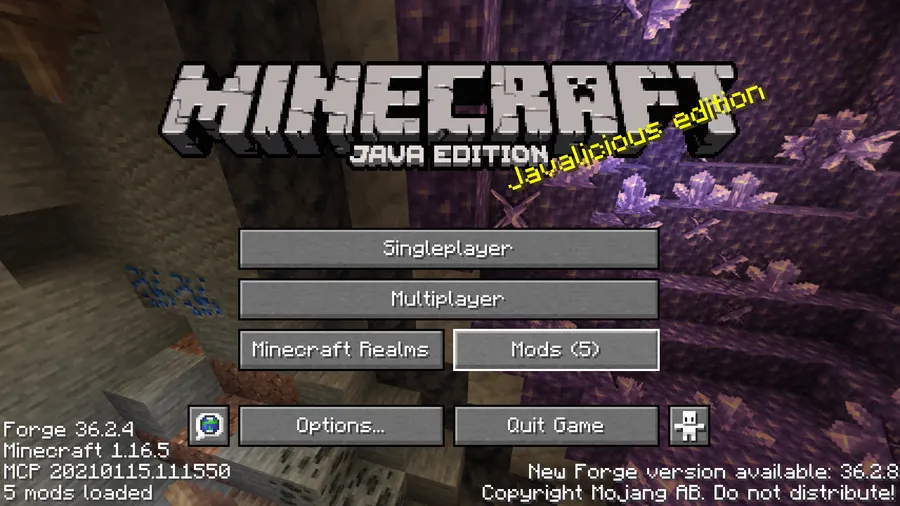
- Customizable Button Placement — You are not locked into a single layout. Better Mods Button offers multiple placement options on both the title screen and the pause menu, inspired by the popular Mod Menu mod on Fabric. Whether you prefer the button next to singleplayer, tucked into a corner, or replacing an existing element, you can position it where it feels natural to your workflow.
- Total Mod Count Display — The mod button can show the total number of mods you have installed, giving you a quick at-a-glance count without opening the full mod list. This is especially useful when you run large modpacks and want to confirm everything loaded correctly after adding or removing mods.
- Update Notification Glyph Toggle — Some mod loaders display an update notification icon on the mods button when newer versions are available. Better Mods Button lets you toggle this glyph on or off, so you can stay informed about updates or hide the notification if you find it distracting during gameplay.
- Client-Side Only — This mod runs entirely on the client and does not need to be installed on the server. You can add it to your personal setup and join any server without compatibility concerns. Server administrators do not need to take any action for players using this mod.
- Broad Version Support — Better Mods Button supports Minecraft versions ranging from 1.18.2 all the way up to the latest 1.21.11 release. Whether you are playing on a legacy modpack or a bleeding-edge setup, there is likely a compatible version available for your game.
- Lightweight and Focused — The mod does one thing and does it well. It appears to be lightweight with no heavy dependencies beyond Forge or NeoForge, so it slots into any modpack without adding bloat or conflicts with other UI mods.
Screenshots
How to Install Better Mods Button
- Install Minecraft Forge or NeoForge for your Minecraft version. For versions 1.21.5 and newer, NeoForge is the only supported loader.
- Download the correct Better Mods Button file for your Minecraft version and mod loader from the download section below.
- Open your Minecraft installation folder. On Windows, press
Win + R, type%appdata%.minecraft, and hit Enter. - Place the downloaded
.jarfile into themodsfolder. If the folder does not exist, create it manually. - Launch Minecraft using your Forge or NeoForge profile. The mods button should appear on both the title screen and the pause menu immediately.
Requirements & Compatibility
| Detail | Info |
|---|---|
| Mod Loaders | Forge, NeoForge |
| Minecraft Versions | 1.21.11, 1.21.10, 1.21.9, 1.21.8, 1.21.7, 1.21.6, 1.21.5, 1.21.4, 1.21.3, 1.21.1, 1.21, 1.20.4, 1.20.1, 1.20, 1.19.4, 1.19.3, 1.19.2, 1.19.1, 1.19, 1.18.2 |
| Side | Client only |
| Author | Fuzs |
| License | MPL-2.0 |
| Downloads | 7.3 million+ |
What's New
- Updated to support Minecraft 1.21.11 (latest release as of December 2025).
- Newer versions (1.21.5+) have transitioned to NeoForge exclusively, reflecting the broader modding ecosystem shift.
- Forge support remains available for Minecraft 1.21.4 and earlier versions.
- The mod continues to follow Semantic Versioning, making it easy to track breaking changes between updates.
Pros and Cons
Pros
- Restores the missing mods button on the pause screen for quick in-game access
- Highly customizable placement options for both the title screen and pause menu
- Client-side only — works on any server without installation
- Excellent version coverage from 1.18.2 to 1.21.11
- Open-source under MPL-2.0 with active maintenance
Cons
- No Fabric or Quilt support — Fabric players should look at Mod Menu instead
- Forge support dropped for versions 1.21.5 and newer (NeoForge only)
- Does not add its own mod configuration screen browser — relies on each mod's existing config UI
Alternatives to Better Mods Button
- Mod Menu — The go-to mod list and configuration button for Fabric and Quilt players. If you play on Fabric rather than Forge or NeoForge, Mod Menu provides similar functionality with even deeper customization options.
- Configured — A mod that adds in-game configuration screens to mods that lack them. Pairs well with Better Mods Button since it ensures more of your mods actually have settings to access from the newly placed button.
- Catalogue — An alternative mod list viewer for Forge that replaces the default mod list screen with a cleaner, more organized layout. Complements Better Mods Button by improving the screen you see after clicking the button.
Download Better Mods Button
| Minecraft Version | Forge | NeoForge |
|---|---|---|
| For Minecraft 1.21.11 | — | Download |
| For Minecraft 1.21.10 | — | Download |
| For Minecraft 1.21.9 | — | Download |
| For Minecraft 1.21.8 | — | Download |
| For Minecraft 1.21.7 | — | Download |
| For Minecraft 1.21.6 | — | Download |
| For Minecraft 1.21.5 | — | Download |
| For Minecraft 1.21.4 | Download | Download |
| For Minecraft 1.21.3 | Download | Download |
| For Minecraft 1.21.1 | Download | Download |
| For Minecraft 1.21 | Download | Download |
| For Minecraft 1.20.4 | Download | Download |
Always download mods from official sources to stay safe.
Frequently Asked Questions
Is Better Mods Button client-side only?
Yes — Better Mods Button is entirely client-side and does not need to be installed on the server. You can add it to your personal mod folder and join multiplayer servers without any issues or compatibility requirements on the server side.
Does Better Mods Button work with NeoForge?
Yes — Better Mods Button fully supports NeoForge across all its available versions. In fact, for Minecraft 1.21.5 and newer, NeoForge is the only supported loader as the mod has transitioned away from legacy Forge for the latest game versions.
Can I use Better Mods Button on Fabric?
No — Better Mods Button is designed exclusively for Forge and NeoForge. Fabric players looking for similar functionality should install Mod Menu, which provides a comparable mods button and configuration access on the Fabric loader.
Does Better Mods Button affect game performance?
The mod appears to be very lightweight with no noticeable impact on performance. It only modifies the menu UI by adding and repositioning a button, so it does not run any processes during gameplay that would affect frame rates or loading times.
Can I customize where the mods button appears on screen?
Yes — the mod offers multiple placement options for both the title screen and the pause menu. You can choose from several predefined positions inspired by Mod Menu's layout system, including options to show the button next to existing menu elements or as a standalone icon.


![[Let's Do] Meadow Mod (1.21.1) - thumbnail](http://mcinside.com/wp-content/uploads/2026/04/thumbnail-64-52x52.webp)


![Not Enough Recipe Book [NERB] Mod (1.21.11) - thumbnail](http://mcinside.com/wp-content/uploads/2026/04/thumbnail-63-52x52.webp)


