
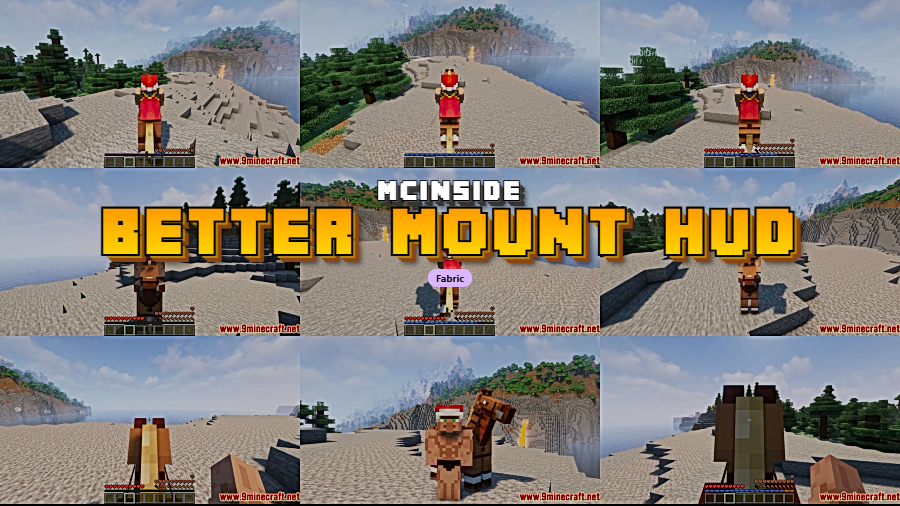
Better Mount HUD is a client-side utility mod for Minecraft that improves the heads-up display while riding horses, donkeys, and other mounts, available for the Fabric mod loader. It allows players to see both their hunger bar and mount health simultaneously, and keeps the experience bar visible unless the player is actively charging a jump.
Anyone who has spent time exploring Minecraft on horseback knows the frustration: the moment you mount up, your hunger bar vanishes and your experience bar is swapped out for a jump charge meter you rarely use. You lose critical survival information at the worst possible time — while traveling through dangerous terrain. Better Mount HUD solves this elegantly by redesigning the mounted HUD so nothing important gets hidden. With over 14.9 million downloads since its 2021 release, this lightweight quality-of-life mod has become one of the most popular HUD improvements in the Minecraft modding community, and for good reason.
Key Features of Better Mount HUD
- Simultaneous food and mount health display — In vanilla Minecraft, mounting a horse completely replaces your hunger bar with the mount's health bar. Better Mount HUD rearranges the layout so both are visible at the same time. This means you can monitor your own hunger level while keeping an eye on whether your horse is taking damage, which is essential during long journeys through hostile biomes.
- Experience bar stays visible while mounted — Normally, the XP bar is permanently replaced by the jump charge bar the entire time you are riding. Better Mount HUD changes this so the experience bar remains visible by default and only switches to the jump meter when you actually hold the jump key. This is especially useful for players who farm XP while mounted or simply want to track their level progress.
- Client-side only — no server installation needed — Better Mount HUD runs entirely on the client side, which means you can use it on any multiplayer server without requiring the server owner to install anything. Just drop it into your mods folder and it works immediately, making it one of the easiest quality-of-life mods to adopt.
- Lightweight and unobtrusive — The mod appears to be lightweight based on its narrow scope — it only modifies the HUD rendering when mounted. It does not add new items, blocks, or complex systems. This focused approach means it is unlikely to conflict with other mods or cause performance issues, even on lower-end hardware.
- Broad version support from 1.17 to 26.1 — Better Mount HUD supports an impressive range of Minecraft versions, from 1.17 all the way through the latest 26.1 snapshots. This wide compatibility means you can keep using it across major Minecraft updates without waiting for a port, which is a common pain point with other mods.
- Open source under GPL-3.0 — The mod's source code is publicly available on GitHub, giving the community full transparency into how it works. Players who are cautious about mod safety can review the code themselves, and other developers can contribute improvements or learn from the implementation.
Screenshots
How to Install Better Mount HUD
- Download and install Fabric Loader for your Minecraft version. Better Mount HUD requires Fabric — it does not support Forge or NeoForge.
- Make sure you also have the Fabric API installed, as most Fabric mods depend on it for core functionality.
- Download the Better Mount HUD .jar file that matches your Minecraft version from the download section below.
- Place the downloaded .jar file into your
.minecraft/modsfolder. If the folder does not exist, launch Minecraft once with the Fabric profile to create it automatically. - Launch Minecraft using the Fabric loader profile. The mod will activate immediately — no configuration required.
Requirements & Compatibility
| Requirement | Details |
|---|---|
| Mod Loader | Fabric |
| Minecraft Versions | 1.17 – 26.1 (including snapshots) |
| Side | Client-side only |
| Dependencies | Fabric API |
| License | GPL-3.0-only |
| Author | Lortseam |
What's New
- Updated to support Minecraft 26.1-rc-3, the latest snapshot release
- Continued compatibility with the full Minecraft 26.1 release cycle
- Ongoing maintenance ensures the mod stays current with Mojang's latest updates
Pros and Cons
Pros
- Solves a genuine vanilla annoyance that has existed for years
- Client-side only — works on any server without installation
- Zero configuration needed, works out of the box
- Excellent version support spanning 1.17 through 26.1
- Actively maintained with over 14.9 million downloads
- Open source and transparent
Cons
- Fabric only — no Forge or NeoForge support available
- Limited to mount HUD improvements; does not offer broader HUD customization
- No configuration options for players who want to customize the layout further
Alternatives to Better Mount HUD
- AppleSkin — A food and hunger visualization mod that adds detailed saturation and exhaustion overlays to the HUD, complementing Better Mount HUD's mounted display improvements.
- Jade — A comprehensive information overlay mod that shows block and entity details on screen, useful for players who want more HUD information beyond what Better Mount HUD provides.
- Status Effect Bars — Replaces the default potion effect icons with clean progress bars, pairing well with Better Mount HUD for a fully improved HUD experience while riding.
Download Better Mount HUD
| Minecraft Version | Fabric |
|---|---|
| For Minecraft 26.1 | Download |
| For Minecraft 1.21.11 | Download |
| For Minecraft 1.21.10 | Download |
| For Minecraft 1.21.8 | Download |
| For Minecraft 1.21.7 | Download |
| For Minecraft 1.21.6 | Download |
| For Minecraft 1.21.5 | Download |
| For Minecraft 1.21.4 | Download |
| For Minecraft 1.21.3 | Download |
| For Minecraft 1.21.1 | Download |
| For Minecraft 1.21 | Download |
| For Minecraft 1.20.6 | Download |
Always download mods from official sources to stay safe.
Frequently Asked Questions
Does Better Mount HUD work on multiplayer servers?
Yes — Better Mount HUD is a client-side mod, so it works on any multiplayer server without requiring the server to install it. The mod only changes how your local game renders the HUD while riding, which means it does not modify any server-side behavior or give you an unfair advantage.
Is Better Mount HUD compatible with Forge or NeoForge?
No — Better Mount HUD is exclusively a Fabric mod and does not have a Forge or NeoForge version. If you are using Forge, you would need to switch to Fabric or look for an alternative mod that offers similar HUD improvements on that loader.
Does this mod affect game performance?
The mod appears to be lightweight and should not noticeably impact performance. It only modifies the HUD rendering layer when you are actively riding a mount, and it does not add any new textures, entities, or world generation that could slow down your game.
Do I need to configure anything after installing Better Mount HUD?
No — the mod works immediately after installation with no configuration required. Once you place the .jar file in your mods folder and launch Minecraft with Fabric, the improved mount HUD will automatically appear the next time you ride a horse, donkey, or other mountable entity.
What Minecraft versions does Better Mount HUD support?
Better Mount HUD supports Minecraft versions from 1.17 through 26.1, including snapshot releases like 26.1-rc-3. The mod has been actively maintained since November 2021 and consistently receives updates to stay compatible with the latest Minecraft releases.


