
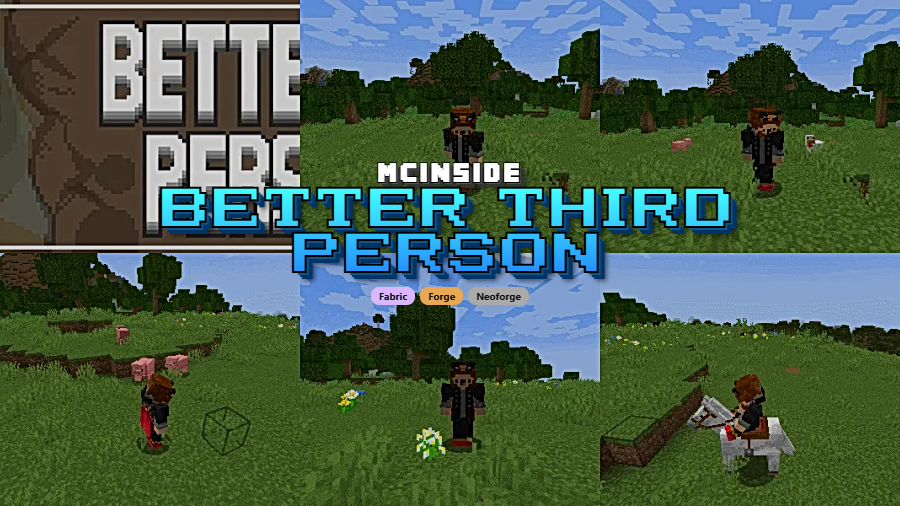
Better Third Person is a client-side camera mod that completely overhauls the third person view in Minecraft, allowing independent camera rotation and full 360-degree freedom for Fabric, Forge, and NeoForge players. Instead of the rigid, locked camera that vanilla Minecraft forces on you, this mod lets you orbit your character freely while maintaining full control over movement, block placement, and combat.
Anyone who has pressed F5 in Minecraft knows the frustration. The vanilla third person camera is locked to your character's facing direction, making it nearly useless for anything beyond a quick selfie. You cannot look around independently, you cannot maintain a cinematic angle while walking, and trying to build or fight from this perspective is an exercise in misery. Better Third Person by Socolio solves this completely by decoupling the camera from your character's head rotation. With over 14.7 million downloads since its 2021 release, it has become one of the most popular quality-of-life mods in the entire Minecraft ecosystem — and for good reason.
Key Features of Better Third Person
- Full 360-Degree Camera Rotation — You can freely orbit the camera around your character in any direction without affecting where your player is looking. This means you can admire your builds from every angle, keep an eye on mobs behind you during exploration, or simply enjoy watching your character from a cinematic perspective while playing normally.
- 8-Directional Movement Without Camera Lock — In vanilla third person, moving forward always means moving where the camera faces. Better Third Person decouples this, letting you walk in eight directions while the camera stays exactly where you positioned it. This is particularly useful for navigating tight spaces or keeping a wide-angle view of your surroundings during combat.
- Full Block Interaction in Third Person — Placing blocks, breaking them, and using items all work correctly from the third person perspective. The mod calculates your crosshair position accurately even with the camera rotated away from default, so you never have to switch back to first person just to place a redstone component or open a chest.
- Vehicle and Movement Support — Riding horses, pigs, and other mounts works seamlessly with the free camera system. Swimming and elytra flight are also fully supported, meaning you can finally enjoy those dramatic elytra flyover shots of your world without losing control of your character. The camera remains smooth and responsive regardless of your movement state.
- Completely Client-Side — The mod runs entirely on your client and uses only legal player actions to control rotations. This means you can install it for multiplayer servers without requiring the server to have the mod installed, and you will not trigger any anti-cheat systems. No server-side configuration is needed at all.
- Multi-Loader Availability — Better Third Person supports Fabric, Forge, and NeoForge across a wide range of Minecraft versions from 1.16.4 all the way through 1.21.8. Whether you run a lightweight Fabric setup or a heavy NeoForge modpack, this mod fits right in without compatibility headaches.
- Lightweight and Non-Intrusive — The mod appears to be lightweight based on its client-side-only nature and minimal scope. It focuses on doing one thing well — fixing the third person camera — without bundling unnecessary extras or complex configuration menus that bloat your mod folder.
How to Install Better Third Person
- First, install a compatible mod loader for your Minecraft version. You can use Fabric (with Fabric API), Minecraft Forge, or NeoForge depending on your preference and existing mod setup.
- Download the correct version of Better Third Person for your Minecraft version and mod loader from the official Modrinth or CurseForge page. Double-check that the file matches both your game version and your loader.
- Place the downloaded
.jarfile into your.minecraft/modsfolder. If you are using a custom launcher profile or instance, navigate to that instance's mods directory instead. - Launch Minecraft with your mod loader profile selected. The mod should load automatically with no additional configuration required.
- Press F5 in-game to switch to third person view, then move your mouse to freely rotate the camera around your character. No keybind setup is needed — it works immediately.
Requirements & Compatibility
| Requirement | Details |
|---|---|
| Mod Loaders | Fabric, Forge, NeoForge |
| Minecraft Versions | 1.16.4 – 1.21.8 |
| Side | Client-side only |
| Server Required | No |
| Author | Socolio |
| License | All Rights Reserved |
Pros and Cons
Pros
- Completely transforms the unusable vanilla third person camera into a smooth, cinematic system
- Client-side only — works on any server without installation or permission
- Supports all major mod loaders: Fabric, Forge, and NeoForge
- Excellent version coverage from 1.16.4 through 1.21.8
- Block placement, combat, and item use all work correctly in the rotated view
- Full support for vehicles, swimming, and elytra flight
Cons
- License is All Rights Reserved, limiting redistribution in modpacks without permission
- No public source code available for community contributions or auditing
- Some Minecraft versions between 1.17 and 1.19.2 have gaps in support
- Limited configuration options for players who want fine-tuned camera behavior
Alternatives to Better Third Person
- Shoulder Surfing Reloaded — An alternative third person camera mod that positions the view over your character's shoulder, providing a more action-game-style perspective with its own crosshair adjustments.
- Camera Overhaul — Adds dynamic camera tilting, rolling, and smoothing effects to both first and third person views, focusing on making movement feel more cinematic and immersive.
- Freecam — A client-side mod that lets you detach the camera entirely from your character and fly around freely, useful for inspecting builds or scouting terrain without moving your player.
Download Better Third Person
| Minecraft Version | Fabric | Forge | NeoForge |
|---|---|---|---|
| For Minecraft 1.21.8 | Download | — | Download |
| For Minecraft 1.21.7 | Download | — | Download |
| For Minecraft 1.21.6 | Download | — | Download |
| For Minecraft 1.21.5 | Download | — | Download |
| For Minecraft 1.21.4 | Download | — | Download |
| For Minecraft 1.21.3 | Download | — | Download |
| For Minecraft 1.21.2 | Download | — | Download |
| For Minecraft 1.21.1 | Download | — | Download |
| For Minecraft 1.21 | Download | — | Download |
| For Minecraft 1.20.4 | Download | — | — |
| For Minecraft 1.20.3 | Download | — | — |
| For Minecraft 1.20.2 | Download | Download | Download |
Always download mods from official sources to stay safe.
Frequently Asked Questions
Is Better Third Person client-side only?
Yes — Better Third Person is completely client-side and does not need to be installed on the server. It uses only legal player actions to handle camera and rotation controls, so you can safely use it on multiplayer servers without any server-side setup or risk of triggering anti-cheat systems.
Does Better Third Person work with Fabric and Forge?
Yes — the mod supports all three major mod loaders: Fabric, Forge, and NeoForge. You simply need to download the correct version file that matches both your mod loader and your Minecraft version. Builds are available from 1.16.4 through the latest 1.21.8 release.
Can I still place blocks and fight in third person with this mod?
Yes — block placement, breaking, item use, and combat all function correctly even when the camera is rotated away from the default position. The mod accurately calculates your interaction target based on the crosshair, so you do not need to switch back to first person for precision tasks like redstone work or PvP combat.
Does Better Third Person support elytra flight and horse riding?
Yes — the free camera system works during elytra flight, horse and pig riding, swimming, and all other movement states. You can maintain a cinematic camera angle while flying through your world or galloping across terrain without the camera snapping back to a locked position.
Is Better Third Person compatible with other camera mods?
It depends on the specific mod. Because Better Third Person overrides the vanilla third person camera system, it may conflict with other mods that modify the same camera behavior, such as Shoulder Surfing Reloaded. However, it generally works well alongside performance mods like Sodium and visual mods like shader packs, since those do not directly alter third person camera controls.


![[Let's Do] Meadow Mod (1.21.1) - thumbnail](http://mcinside.com/wp-content/uploads/2026/04/thumbnail-64-52x52.webp)


![Not Enough Recipe Book [NERB] Mod (1.21.11) - thumbnail](http://mcinside.com/wp-content/uploads/2026/04/thumbnail-63-52x52.webp)
