

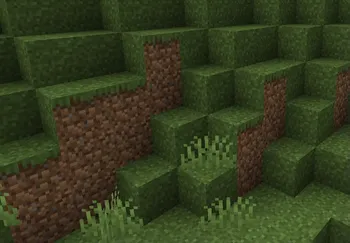
BetterGrassify is a visual enhancement mod that brings OptiFine's Fancy and Fast better grass rendering to Fabric, NeoForge, and Quilt mod loaders for Minecraft. Developed by UltimatChamp under the Apache-2.0 license, BetterGrassify extends grass block textures across their side faces for a cleaner, more natural look — without requiring OptiFine.
Anyone who has switched from OptiFine to a Fabric-based performance setup knows the feeling: your grass blocks suddenly look blocky and unfinished, with dirt-colored sides breaking the illusion of lush terrain. OptiFine bundled a "better grass" feature that extended the grass texture down the sides of blocks, but that feature was locked behind OptiFine itself — a mod loader that conflicts with Fabric's modern modding ecosystem. BetterGrassify solves this exact problem by reimplementing both OptiFine's Fancy and Fast grass rendering modes as a standalone mod. With over 8 million downloads on Modrinth, it has clearly become the go-to solution for players who want beautiful grass without sacrificing mod loader flexibility.
Key Features of BetterGrassify
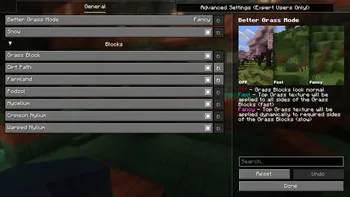
- Fancy Better Grass — This mode extends the top grass texture onto the sides of grass blocks, creating a seamless and natural appearance across your terrain. It mimics exactly how OptiFine's Fancy grass mode works, so players transitioning from OptiFine will feel right at home with no visual difference.
- Fast Better Grass — For players who prefer a simpler look or want to save a few frames, Fast mode applies a uniform grass texture to the sides without the blending complexity of Fancy mode. It still looks significantly better than vanilla Minecraft's default grass rendering while keeping the processing overhead minimal.
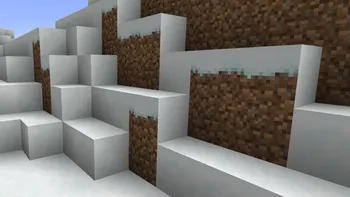
- Better Snowy Grass — Snow biomes get their own visual treatment. When snow covers a grass block, BetterGrassify extends the snowy texture down the sides, eliminating the jarring contrast between a white top and brown dirt sides. This makes tundra, taiga, and mountain biomes look dramatically more cohesive during winter exploration.
- Better Snow Coverage — Beyond just grass blocks, this feature improves how snow appears on other block types, closely matching OptiFine's Better Snow option. Blocks adjacent to snow layers get a snowy overlay, creating a more realistic snowfall effect across your builds and landscapes.
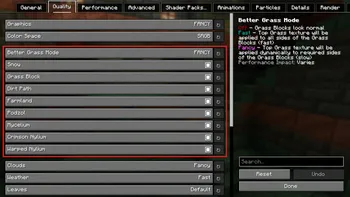
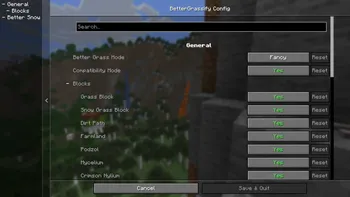
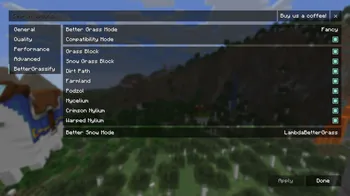
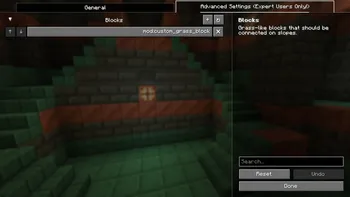
- Fully Configurable Settings — BetterGrassify integrates with both Cloth Config and Sodium's options screen, giving you a proper GUI to toggle each feature on or off. You can fine-tune exactly which grass improvements you want active, making it easy to balance visual quality against performance on lower-end hardware.
- Multi-Loader Support — The mod runs natively on Fabric and Quilt, with NeoForge support available through Sinytra Connector. This broad compatibility means you can slot it into virtually any modern modpack configuration without worrying about loader conflicts.
- Sodium Compatibility — As of version 1.8.3, BetterGrassify works with Sodium 0.8.1, meaning you can combine the most popular Fabric performance mod with better grass visuals. Earlier versions had a temporary incompatibility that has since been resolved.
Screenshots
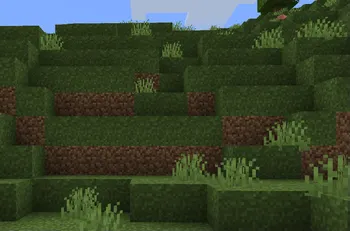
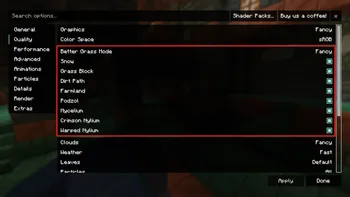
How to Install BetterGrassify
- Install Fabric Loader or Quilt Loader for your Minecraft version (1.20 through 1.21.11 are supported).
- Download BetterGrassify from the official Modrinth page, selecting the file that matches your Minecraft version and mod loader.
- Place the downloaded
.jarfile into your.minecraft/modsfolder. If the folder does not exist, launch Minecraft once with your mod loader profile to generate it. - For in-game configuration, install Cloth Config or use Sodium's built-in options menu to access BetterGrassify's settings screen.
- Launch Minecraft with your Fabric or Quilt profile and verify the mod is active by checking the Mods menu or observing grass block sides in-game.
Requirements & Compatibility
| Requirement | Details |
|---|---|
| Minecraft Versions | 1.20 – 1.21.11 |
| Mod Loaders | Fabric, Quilt (native); NeoForge via Sinytra Connector |
| Required Dependencies | Fabric API or Quilt Standard Libraries |
| Optional Dependencies | Cloth Config (for settings GUI), Sodium 0.8.1+ |
| License | Apache-2.0 (open source) |
| Author | UltimatChamp |
What's New
- Added support for Minecraft 1.21.11 in version 1.8.3.
- Fixed compatibility with Sodium 0.8.1 — the mod now works correctly with the latest Sodium release.
- Added integration with Sodium's new Video Settings Menu for a more streamlined configuration experience.
- Ongoing bug fixes and stability improvements from version 1.8.2 to 1.8.3.
Pros and Cons
Pros
- Faithfully replicates OptiFine's better grass without requiring OptiFine itself
- Works with Sodium, the most popular Fabric performance mod
- Offers both Fancy and Fast modes to suit different hardware capabilities
- Fully configurable through a GUI — no manual config file editing needed
- Open source under Apache-2.0 with active development and frequent updates
- Supports a wide range of Minecraft versions from 1.20 to 1.21.11
Cons
- No native NeoForge builds — requires Sinytra Connector as a workaround
- Forge support is limited to older builds with no active Forge development
- Requires a separate config mod (Cloth Config) for the full settings GUI outside of Sodium
- Purely visual — does not include other OptiFine features like shaders or connected textures
Alternatives to BetterGrassify
- Continuity — A Fabric mod that brings connected textures and other OptiFine visual parity features, making it an excellent companion to BetterGrassify for a complete OptiFine replacement.
- LambdaBetterGrass — An earlier better grass mod for Fabric that served a similar purpose; BetterGrassify is considered its spiritual successor with broader version support and active updates.
- Sodium — While primarily a performance optimization mod, Sodium pairs perfectly with BetterGrassify and provides the options menu integration that makes configuration seamless.
Download BetterGrassify
| Minecraft Version | Fabric | NeoForge | Quilt |
|---|---|---|---|
| For Minecraft 1.21.11 | Download | — | Download |
| For Minecraft 1.21.10 | Download | — | Download |
| For Minecraft 1.21.9 | Download | — | Download |
| For Minecraft 1.21.8 | Download | — | Download |
| For Minecraft 1.21.7 | Download | — | Download |
| For Minecraft 1.21.6 | Download | — | Download |
| For Minecraft 1.21.5 | Download | — | Download |
| For Minecraft 1.21.4 | Download | — | Download |
| For Minecraft 1.21.3 | Download | — | Download |
| For Minecraft 1.21.2 | Download | — | Download |
| For Minecraft 1.21.1 | Download | Download | Download |
| For Minecraft 1.21 | Download | Download | Download |
Always download mods from official sources to stay safe.
Frequently Asked Questions
Is BetterGrassify compatible with Sodium?
Yes — BetterGrassify is fully compatible with Sodium 0.8.1 and later. An earlier incompatibility was resolved in BetterGrassify version 1.8.3, and the mod now integrates directly into Sodium's Video Settings menu for convenient configuration.
Does BetterGrassify work on NeoForge?
Not natively — there are no current NeoForge builds being actively developed. However, you can run the Fabric version on NeoForge by installing Sinytra Connector, which acts as a compatibility layer for Fabric mods on the NeoForge loader.
Will BetterGrassify affect my game performance?
The impact appears to be lightweight for most systems. The mod offers a Fast mode that uses simpler rendering for minimal overhead, while Fancy mode applies slightly more processing for smoother texture blending. Players on lower-end hardware can toggle individual features off to find the right balance.
Can I use BetterGrassify alongside OptiFine?
No — BetterGrassify is designed as a Fabric and Quilt alternative to OptiFine's better grass feature. OptiFine does not run on Fabric or Quilt, so there is no scenario where both mods would be loaded simultaneously. If you use OptiFine on Forge, you already have better grass built in.
What Minecraft versions does BetterGrassify support?
BetterGrassify supports Minecraft 1.20 through 1.21.11, covering a wide range of both current and recent versions. The mod receives regular updates to stay compatible with the latest Minecraft releases, with the most recent update adding 1.21.11 support in December 2025.


![[Let's Do] Candlelight - Farm&Charm compat Mod (1.21.1) - thumbnail](http://mcinside.com/wp-content/uploads/2026/04/thumbnail-81-52x52.webp)


![[Let's Do] Meadow Mod (1.21.1) - thumbnail](http://mcinside.com/wp-content/uploads/2026/04/thumbnail-64-52x52.webp)


![Not Enough Recipe Book [NERB] Mod (1.21.11) - thumbnail](http://mcinside.com/wp-content/uploads/2026/04/thumbnail-63-52x52.webp)