

Blur+ is a client-side aesthetic mod that replaces Minecraft's default GUI background blur with a fully customizable Gaussian blur effect featuring animated transitions, gradient colors, and per-screen configuration, available for Fabric, NeoForge, and Quilt mod loaders.
Every Minecraft player knows the experience: you open your inventory or a crafting table, and the world behind the GUI gets a flat, uninspired dark overlay. It works, but it looks dated — especially when you've spent hours building something beautiful. Blur+ solves this by applying a real Gaussian blur shader to the background of every GUI screen, complete with a smooth fade-in animation that gives the game a genuinely polished feel. Originally created by Motschen and first published in January 2021, the mod has been downloaded over 7.9 million times and remains actively maintained through Minecraft 26.1. What started as a simple Fabric blur mod has evolved into a feature-rich visual enhancement tool that supports multiple mod loaders and offers deep customization options for players who care about how their game looks and feels.
Key Features of Blur+
- Gaussian Blur Shader on All GUIs — Every menu, inventory, crafting table, and settings screen gets a real-time Gaussian blur applied to the world behind it. This means instead of staring at a dim, flat overlay while managing your items, you see a smooth, defocused version of your surroundings that keeps the atmosphere of your world intact without being distracting.
- Animated Fade-In Transitions — When you open any GUI, the blur effect doesn't just snap on — it smoothly fades in over a configurable duration. This subtle animation makes screen transitions feel far more polished and professional, closer to what you'd expect from a modern game engine rather than a blocky sandbox title.
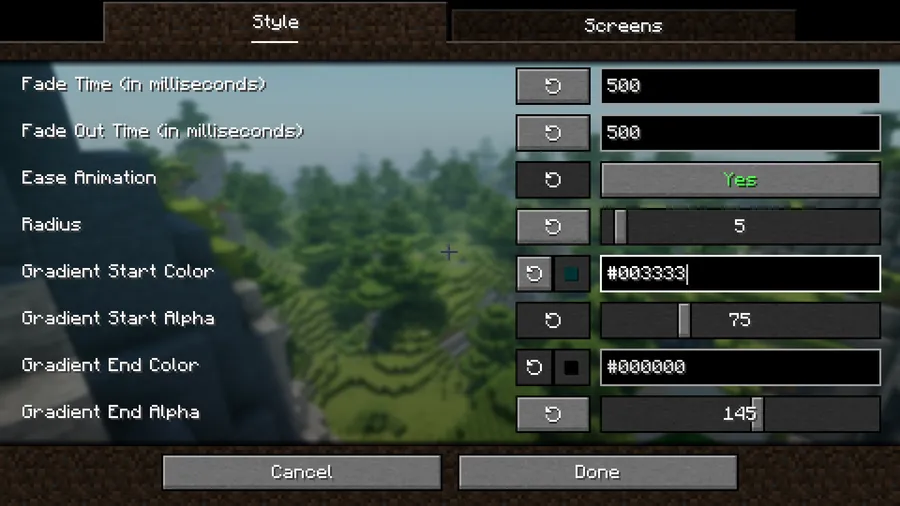
- Customizable Blur Radius — You can adjust the strength of the blur effect through the configuration file by changing the radius value. A low radius gives a subtle soft-focus look, while a high radius creates a heavy, dreamy defocus. This lets you dial in exactly how much of the background detail you want to preserve when menus are open.
- Custom Background Colors and Gradients — Blur+ lets you change the background color tint and apply gradient effects to your GUI overlays. Instead of the default dark tint, you can set custom colors that match your resource pack aesthetic or personal preference, adding another layer of visual consistency to your game.
- Per-Screen Configuration — Not every screen needs the same treatment. Blur+ allows you to configure which screens receive the blur effect and which don't, giving you fine-grained control. Recipe screens from mods like REI and JEI are now blurred by default as of the latest update, and screens like world creation and statistics properly maintain their blur state.
- Multi-Loader Support — Whether you run Fabric, NeoForge, or Quilt, Blur+ has you covered. This broad compatibility means you don't need to switch mod loaders or hunt for alternative versions — the same mod works across the three most popular modding platforms for modern Minecraft.
- Open Source and MIT Licensed — The mod is fully open source under the MIT license with its source code available on GitHub. This transparency means the community can audit the code, contribute improvements, and trust that the mod does exactly what it claims — nothing more, nothing less.
Screenshots
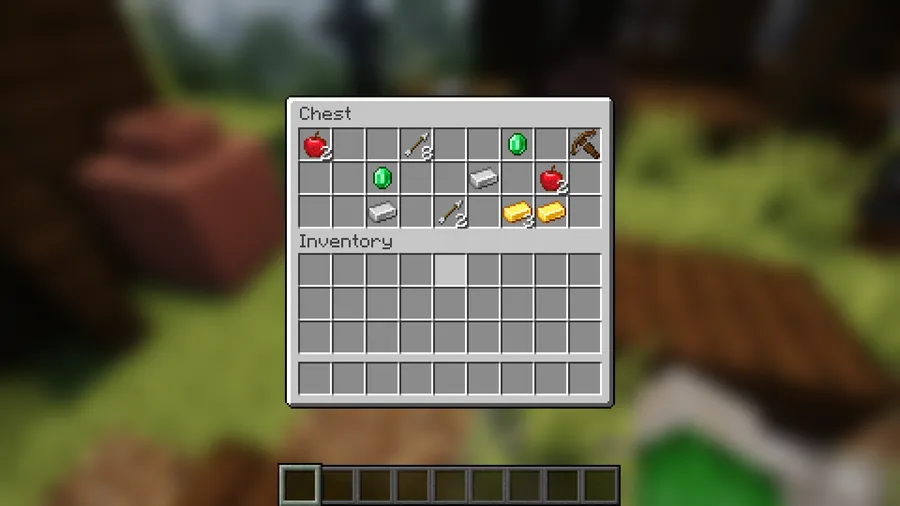
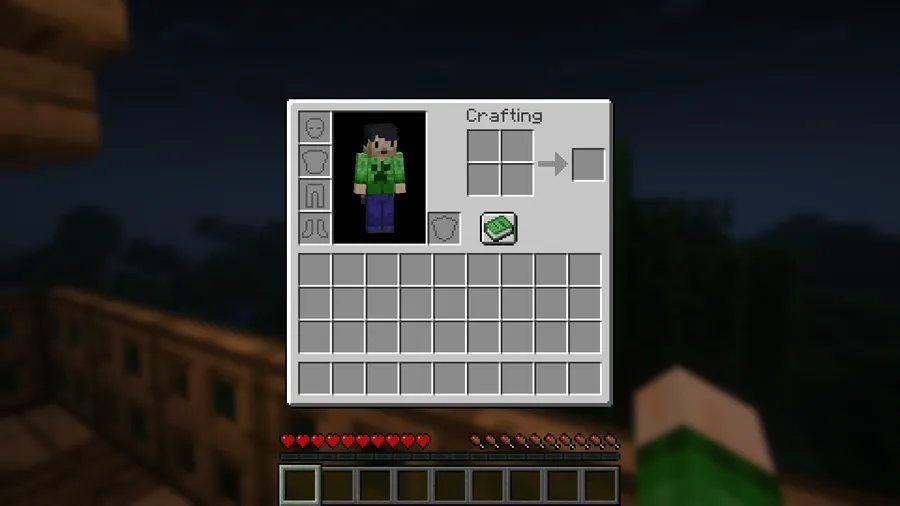
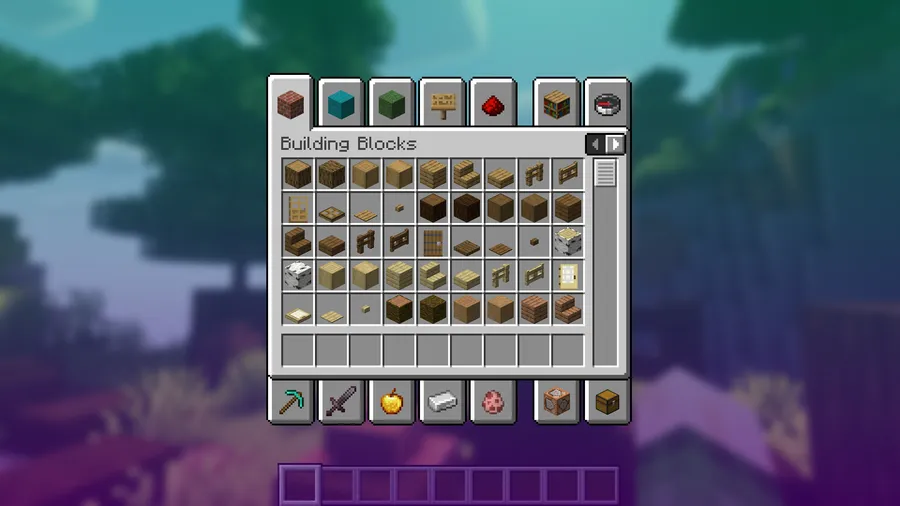
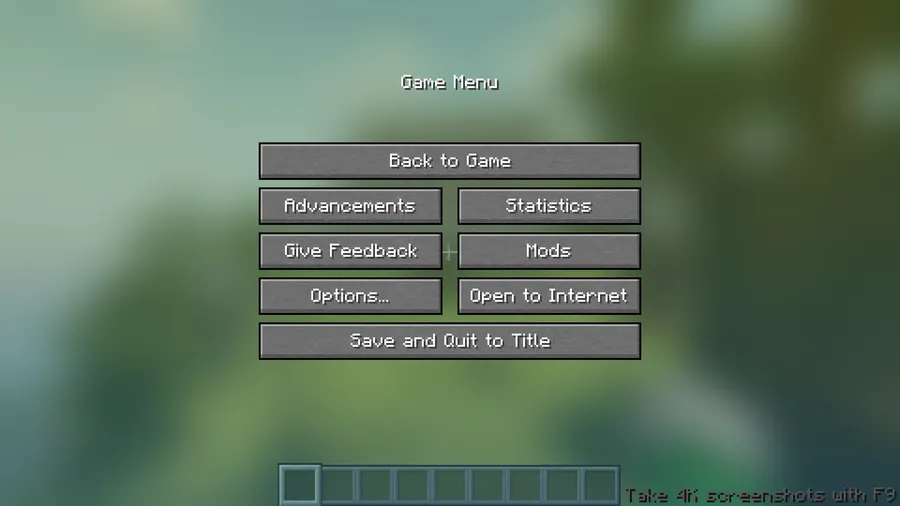
How to Install Blur+
- Install your preferred mod loader: Fabric, NeoForge, or Quilt. Make sure the loader version matches your Minecraft version.
- If using Fabric or Quilt, also install Fabric API (or Quilted Fabric API), as most Fabric-based mods require it as a dependency.
- Download the correct Blur+ file for your Minecraft version and mod loader from the download section below.
- Place the downloaded
.jarfile into your.minecraft/modsfolder. If the folder doesn't exist, launch the game once with your mod loader to generate it. - Launch Minecraft and open any inventory or menu to verify the blur effect is active. To customize settings, look for the Blur+ config file in your
.minecraft/configdirectory.
Requirements & Compatibility
| Detail | Info |
|---|---|
| Mod Loaders | Fabric, NeoForge, Quilt |
| Minecraft Versions | 1.17 – 26.1 |
| Latest Supported | Minecraft 26.1 |
| Side | Client-side |
| License | MIT |
| Author | Motschen |
| Category | Decoration |
What's New
- REI and JEI recipe screens are now blurred by default, providing a consistent look across popular recipe-viewing mods.
- Fixed gradient colors being decoded incorrectly, resolving issues where custom color configurations appeared wrong in-game.
- Fixed background gradient fading out on screens that shouldn't fade, such as the world creation screen and statistics screen.
- Refactored all animations with improved abstractions, enabling more than two animation states in future updates.
- Switched to Minecraft's built-in timer for all animations, improving reliability and reducing custom code overhead.
Pros and Cons
Pros
- Dramatically improves the visual polish of every GUI and menu screen
- Highly configurable blur radius, colors, gradients, and per-screen settings
- Supports all three major mod loaders: Fabric, NeoForge, and Quilt
- Actively maintained with support from Minecraft 1.17 through 26.1
- Open source under MIT license with transparent development on GitHub
- Appears to be lightweight as a client-side shader mod with minimal scope
Cons
- Shader-based effect may not work correctly with all custom GUI mods
- Configuration requires editing files manually rather than an in-game settings menu for some options
- Purely cosmetic — adds no gameplay functionality
Alternatives to Blur+
- Custom HUD — A broader HUD customization mod that lets you redesign the entire interface, useful if you want to go beyond just blur effects and overhaul your screen layout.
- Dark Loading Screen — Replaces Minecraft's bright red loading screen with a dark theme, complementing Blur+ nicely for players who want a consistently sleek visual experience.
- Sodium — A performance optimization mod that improves rendering efficiency, which can help maintain high frame rates when using visual mods like Blur+ that add shader effects.
Download Blur+
| Minecraft Version | Fabric | NeoForge | Quilt |
|---|---|---|---|
| For Minecraft 26.1 | Download | Download | Download |
| For Minecraft 1.21.11 | Download | Download | Download |
| For Minecraft 1.21.10 | Download | Download | Download |
| For Minecraft 1.21.9 | Download | Download | Download |
| For Minecraft 1.21.8 | Download | Download | Download |
| For Minecraft 1.21.7 | Download | Download | Download |
| For Minecraft 1.21.6 | Download | Download | Download |
| For Minecraft 1.21.5 | Download | Download | Download |
| For Minecraft 1.21.4 | Download | Download | Download |
| For Minecraft 1.21.3 | Download | Download | Download |
| For Minecraft 1.21.2 | Download | Download | Download |
| For Minecraft 1.21.1 | Download | Download | Download |
Always download mods from official sources to stay safe.
Frequently Asked Questions
Is Blur+ compatible with Sodium and other performance mods?
Yes — Blur+ is a client-side visual mod that applies a post-processing shader, which generally works alongside performance mods like Sodium and Iris without conflicts. Since it only affects GUI background rendering, it operates in a different rendering layer than most optimization mods.
Does Blur+ work on servers or is it client-side only?
Blur+ is entirely client-side. You do not need to install it on a server, and no one else on the server needs to have it installed. It only changes how GUI backgrounds appear on your own screen.
Can I disable the blur effect for specific screens?
Yes — Blur+ supports per-screen configuration that lets you control exactly which GUIs receive the blur effect. You can exclude specific screens through the mod's configuration file if you prefer certain menus to keep the default background.
Does Blur+ affect game performance or FPS?
The impact appears to be minimal for most systems since it applies a single Gaussian blur shader only when a GUI is open. The effect is not active during normal gameplay, so your FPS while exploring, building, or fighting should remain unaffected. Players with very low-end hardware may notice a slight dip when opening menus.
What Minecraft versions does Blur+ support?
Blur+ supports Minecraft versions from 1.17 through the latest 26.1. It covers a wide range including 1.17.x, 1.18.x, 1.19.x, 1.20.x, 1.21.x, and 26.1, with builds available for Fabric, NeoForge, and Quilt on each supported version.


![[Let's Do] Meadow Mod (1.21.1) - thumbnail](http://mcinside.com/wp-content/uploads/2026/04/thumbnail-64-52x52.webp)


![Not Enough Recipe Book [NERB] Mod (1.21.11) - thumbnail](http://mcinside.com/wp-content/uploads/2026/04/thumbnail-63-52x52.webp)
