

The Botany Pots Mod is a farming mod that adds pots you can use to grow crops for Minecraft on Fabric, Forge, NeoForge, and Quilt.
If you are tired of carving out huge fields just to grow a handful of useful crops, Botany Pots solves that problem with a small, flexible block that can handle farming in a much tighter space. It is also popular for a reason: the Modrinth page shows well over 1.5 million downloads, which is a strong sign that players trust it for survival worlds and modpacks alike.
Key Features of Botany Pots Mod
- Compact crop growing — The core idea is simple, but it matters a lot in real survival play. Instead of spreading crops across a full field, you can keep your farm organized in a small footprint and still grow the plants you need.
- Automatic replanting — When you harvest a crop from a Botany Pot, the seed is planted again right away. That removes a lot of tedious re-seeding and makes the whole system feel smooth once it is set up.
- Hopper Botany Pot upgrade — The hopper upgrade lets the pot harvest itself and push items into a chest or another inventory block. That is the feature that turns the mod from a neat plant display into a real automation tool.
- Decorative color variety — The mod includes seventeen different colors, so the pots are not locked into a single look. This matters if you care about the visual side of your base, because you can make the farm feel intentional instead of purely functional.
- Datapack support — The mod uses predefined JSON files, which makes it easier to add new crops, soils, and fertilizers through data packs. That gives modpack makers and server owners a practical way to extend the system without waiting for a full code change.
- CraftTweaker support — You can remove, modify, and add crops, soils, and fertilizers through CraftTweaker. That is valuable if you want to rebalance progression, tighten up modpack integration, or adjust farming around your own rules.
- Flexible soil rules — Different crops can require different soils, so the mod does more than just duplicate vanilla farming in a new block. That makes setup a little more involved, but it also gives the farming system more structure and makes unusual crops feel more believable.
Screenshots
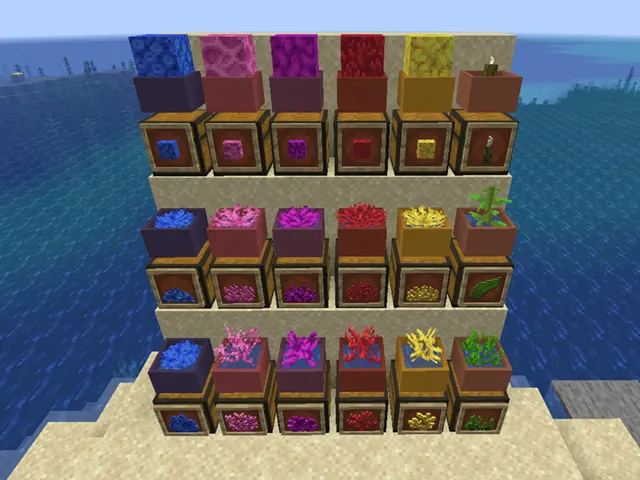
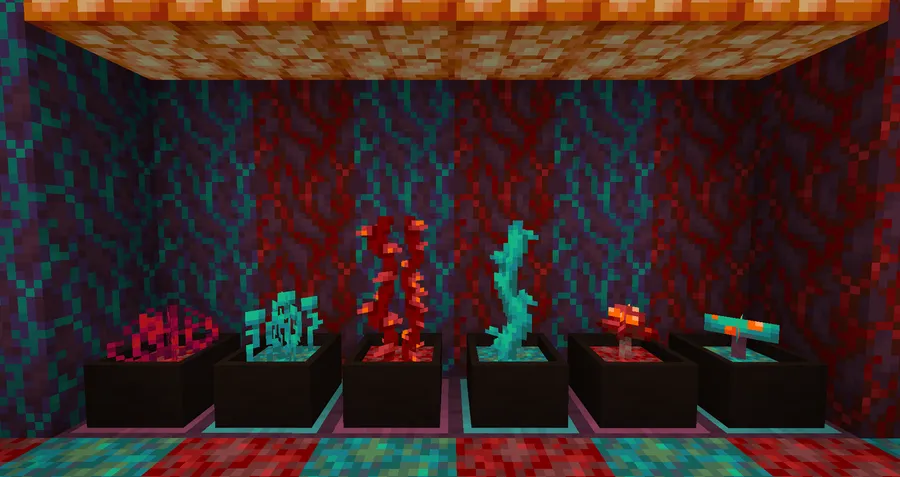
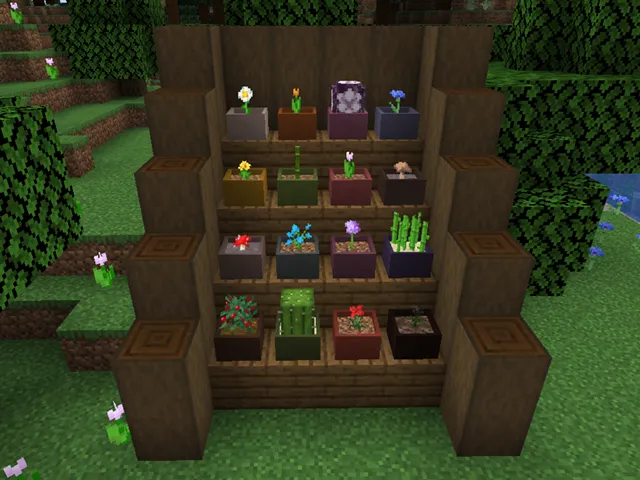
How to Install Botany Pots Mod
- Install the loader that matches your Minecraft setup from Fabric, Forge, NeoForge, or Quilt.
- Pick the Botany Pots file for your exact Minecraft version, such as 1.21.1 or 1.20.1.
- Place the mod file into your Minecraft
modsfolder. - Launch the game once so the mod can load and register its content.
- Craft a Botany Pot, add the correct soil and seed, then start growing your crop.
Requirements & Compatibility
| Item | Details |
|---|---|
| Supported loaders | Fabric Mod Loader, Minecraft Forge, NeoForge, Quilt Loader |
| Supported Minecraft versions | 1.21.1, 1.20.4, 1.20.3, 1.20.2, 1.20.1, 1.19.2 |
| Core requirement | You need the correct soil and seed pairing before the crop will grow |
| Automation support | Hopper Botany Pot upgrade can output to an inventory block |
| Content extension | Supports datapacks and CraftTweaker for deeper customization |
What's New
- Language file encoding issues for non-ASCII characters were fixed.
- The GUI background textures were optimized for cleaner presentation.
- Deprecated build dependencies were removed.
Pros and Cons
Pros
- It gives you a compact way to grow crops without building a full farm.
- Harvesting automatically replants, which cuts down on repetitive work.
- The hopper upgrade makes it practical for inventory-based automation.
- Datapack and CraftTweaker support make it useful in modpacks.
Cons
- You still need to match crops with the correct soil.
- Setup is more involved than placing a normal block and waiting.
- Some of the deeper flexibility depends on datapacks or scripting tools.
Alternatives to Botany Pots Mod
- Botania — A natural companion for players who like plant-focused mod content and want another mod that fits well into organized gardens and crop-heavy bases.
- Mystical Agriculture — A good choice if you want a different style of progression-driven farming and resource growth.
- Simple Farming — A straightforward option for players who want more crops and a broader food setup alongside their farming tools.
Download Botany Pots Mod
| Minecraft Version | Fabric | Forge | NeoForge | Quilt |
|---|---|---|---|---|
| For Minecraft 1.21.1 | Download | — | Download | Download |
| For Minecraft 1.20.4 | Download | Download | Download | — |
| For Minecraft 1.20.3 | Download | Download | Download | — |
| For Minecraft 1.20.2 | Download | Download | Download | — |
| For Minecraft 1.20.1 | Download | Download | — | — |
| For Minecraft 1.19.2 | Download | Download | — | — |
Always download mods from official sources to stay safe.
Frequently Asked Questions
Does Botany Pots automatically replant crops?
Yes — harvesting a crop in a Botany Pot automatically replants the seed. That makes repeated harvesting much easier and reduces the amount of manual upkeep your farm needs.
Can I automate Botany Pots with hoppers?
Yes — the Hopper Botany Pot upgrade is designed for automation. It can harvest the pot on its own and send items into a chest or another inventory block.
Does Botany Pots support datapacks?
Yes — it has extensive datapack support. That is useful if you want to add or adjust crops, soils, and fertilizers without rebuilding the mod from scratch.
Can I use CraftTweaker with Botany Pots?
Yes — the mod includes extensive CraftTweaker support. You can remove, modify, and add crops, soils, and fertilizers, which is especially helpful for modpacks and custom server balance.
What Minecraft versions does Botany Pots support?
It supports Minecraft 1.21.1, 1.20.4, 1.20.3, 1.20.2, 1.20.1, and 1.19.2. That gives you a solid spread of modern versions to choose from, depending on your loader and pack setup.
Can I remove items from a Botany Pot without breaking it?
Yes — you can sneak and right-click the block with an empty hand to take items out. Breaking the block also works if you want to retrieve it more directly.
Is Botany Pots only for farming, or can it be decorative too?
It is both. The pot is useful for crop growth, but the mod is also designed to look good in builds, and the seventeen color options make it easier to match your base.


