
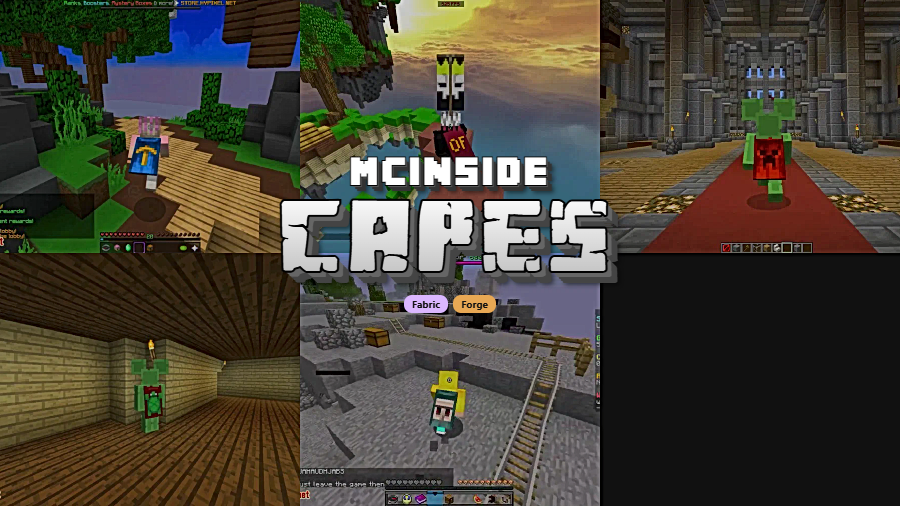
Capes Mod is a utility mod that lets you display capes from OptiFine, LabyMod, and MinecraftCapes Mod all in one place for Minecraft Fabric and Forge. Instead of being locked into a single cape provider, this mod aggregates capes from multiple popular sources so you can wear whichever one you prefer without switching mods.
Here is a common frustration for Minecraft players: you earned or purchased a cape through OptiFine, but you play on Fabric. Or maybe you have a LabyMod cape but your friends cannot see it because they use a different client. Capes Mod solves this by pulling cape data from multiple providers and rendering them in-game, no matter which loader you are running. With over 19 million downloads on Modrinth, it has become one of the most popular cosmetic utility mods in the Minecraft community — and for good reason. It does one thing and does it well, with virtually no setup required from the player.
Key Features of Capes Mod
- OptiFine Cape Support — If you own an OptiFine cape but play on Fabric or want to use a lightweight alternative to OptiFine, this mod ensures your cape still renders correctly. You no longer need to install full OptiFine just to display your cape, which means you can pair it with performance mods like Sodium instead.
- LabyMod Cape Integration — LabyMod users who switch to vanilla or another mod loader often lose their cape visibility. Capes Mod pulls your LabyMod cape and displays it seamlessly, so your cosmetic investment carries over regardless of your setup.
- MinecraftCapes Mod Compatibility — The MinecraftCapes community offers a wide selection of free custom capes. With Capes Mod installed, these capes render in-game without needing the standalone MinecraftCapes client mod, giving you access to a large library of cape designs.
- Zero Configuration Required — Unlike many cosmetic mods that require account linking or complex setup screens, Capes Mod works immediately after installation. Drop it into your mods folder and your capes appear automatically on the next launch.
- Per-Provider Toggle — If you have capes from multiple providers and want to control which ones display, the mod includes a configuration screen where you can enable or disable specific cape sources individually. This is useful when cape designs conflict or when you want a clean look from one specific provider.
- Dual Loader Support (Fabric & Forge) — Capes Mod is maintained for both Fabric and Forge, which is increasingly rare for utility mods. Whether you run a heavily modded Forge pack or a lightweight Fabric setup, the same functionality is available to you.
- Lightweight and Non-Intrusive — The mod appears to be lightweight since it only handles cape rendering from external APIs. It does not modify gameplay, add new items, or interfere with other visual mods, making it safe to include in virtually any modpack.
How to Install Capes Mod
- Install Fabric Loader or Minecraft Forge for your Minecraft version. Capes Mod supports versions from 1.17 through 1.21.11.
- If using Fabric, make sure you also have Fabric API installed, as most Fabric mods depend on it.
- Download the correct version of Capes Mod for your Minecraft version and mod loader from the download section below.
- Place the downloaded
.jarfile into your.minecraft/modsfolder. If the folder does not exist, launch Minecraft once with your mod loader selected to generate it. - Launch Minecraft and your capes from OptiFine, LabyMod, and MinecraftCapes will appear automatically. To adjust which cape sources are active, check the mod's configuration screen.
Requirements & Compatibility
| Requirement | Details |
|---|---|
| Mod Loader | Fabric or Forge |
| Minecraft Versions | 1.17 – 1.21.11 |
| Dependencies | Fabric API (for Fabric users) |
| License | LGPL-2.1-only (open source) |
| Last Updated | March 25, 2026 |
What's New
- The mod continues to receive active updates, with the latest release on March 25, 2026 adding support for Minecraft 1.21.11
- Fabric remains the primary loader with the most up-to-date builds available
- Support has been extended through the entire 1.21.x branch, including snapshots up to 26.1
- Bug fixes and improvements are tracked on the project's GitHub repository
Pros and Cons
Pros
- Works instantly with no configuration or account linking
- Supports multiple cape providers in a single mod
- Available for both Fabric and Forge
- Actively maintained with frequent updates
- Open source under LGPL-2.1 license
- Appears to be lightweight with minimal performance overhead
Cons
- Limited to capes from OptiFine, LabyMod, and MinecraftCapes only
- Does not support custom cape uploads directly — you still need an account with a supported provider
- Forge builds may lag behind Fabric in update frequency
- Other players need a compatible mod installed to see non-Mojang capes
Alternatives to Capes Mod
- MinecraftCapes Mod — A standalone cape mod that lets you upload and wear custom capes for free, with its own large community of cape designers and a built-in editor.
- Customizable Player Models — Goes beyond capes to let you create fully custom player models, animations, and cosmetics, ideal if you want more than just a cape.
- Fabric Capes — A Fabric-specific alternative that also renders OptiFine capes, useful if you only play on Fabric and want a minimal solution.
Download Capes Mod
| Minecraft Version | Fabric |
|---|---|
| For Minecraft 26.1 | Download |
| For Minecraft 1.21.11 | Download |
| For Minecraft 1.21.10 | Download |
| For Minecraft 1.21.9 | Download |
| For Minecraft 1.21.8 | Download |
| For Minecraft 1.21.7 | Download |
| For Minecraft 1.21.6 | Download |
| For Minecraft 1.21.5 | Download |
| For Minecraft 1.21.4 | Download |
| For Minecraft 1.21.3 | Download |
| For Minecraft 1.21.2 | Download |
| For Minecraft 1.21.1 | Download |
Always download mods from official sources to stay safe.
Frequently Asked Questions
Does Capes Mod work with Sodium and other performance mods?
Yes — Capes Mod is compatible with Sodium, Lithium, Iris, and other popular performance mods. Since it only handles cape rendering and does not modify the rendering engine itself, there are no known conflicts with optimization mods.
Do other players need Capes Mod installed to see my cape?
No — other players do not need Capes Mod specifically, but they do need some mod that supports the same cape provider. For example, if you wear an OptiFine cape, anyone running OptiFine or Capes Mod will see it. Players on vanilla Minecraft without any cape mod will only see official Mojang capes.
Can I use Capes Mod on multiplayer servers?
Yes — Capes Mod is a client-side mod and works on any server without requiring server-side installation. It fetches cape data from external APIs, so it functions on vanilla servers, Fabric servers, and Forge servers alike.
Does Capes Mod let me create or upload custom capes?
No — Capes Mod only displays capes you already own through supported providers like OptiFine, LabyMod, or MinecraftCapes. To create or upload a custom cape, you need to register with one of those services first, then Capes Mod will render it in-game.
Is Capes Mod available for Bedrock Edition?
No — Capes Mod is only available for Minecraft Java Edition on Fabric and Forge. Bedrock Edition uses a different modding system and has its own marketplace for cosmetics including capes.


![[Let's Do] Meadow Mod (1.21.1) - thumbnail](http://mcinside.com/wp-content/uploads/2026/04/thumbnail-64-52x52.webp)


![Not Enough Recipe Book [NERB] Mod (1.21.11) - thumbnail](http://mcinside.com/wp-content/uploads/2026/04/thumbnail-63-52x52.webp)


