
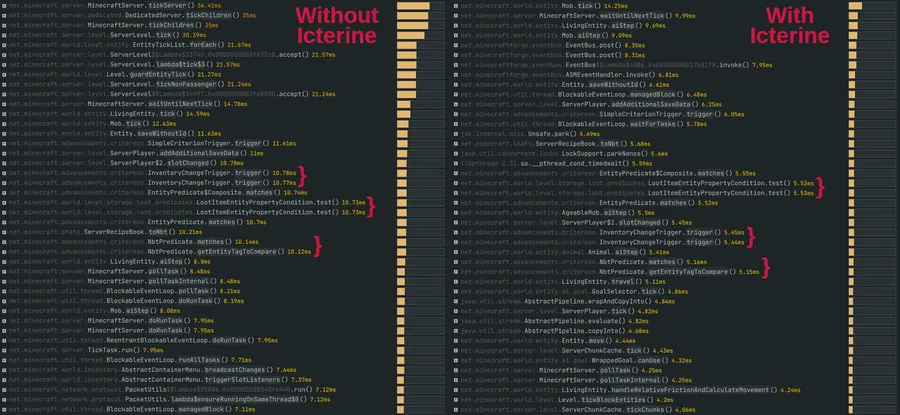
Cerulean Mod is an advancement optimization mod that improves how Minecraft checks item-based advancements for Fabric, Forge, and NeoForge. It focuses on reducing the cost of the laggy inventory change trigger in packs with many modded advancements.
The problem Cerulean targets is easy to miss until a pack gets large: advancement checks tied to item pickups can become surprisingly expensive, especially when many mods add their own advancement trees. That is exactly why a player would want this mod, because it aims to streamline one of the most commonly triggered advancement systems without changing the way vanilla advancements are supposed to matter in normal play. With 960K+ downloads on Modrinth, Cerulean already has strong social proof for players and server owners looking for a focused optimization mod rather than a huge gameplay overhaul.
Key Features of Cerulean Mod
- Optimizes item-based advancement triggers — Cerulean focuses on the inventory change trigger, which is one of the noisier parts of the advancement system in heavily modded setups. That matters because large packs often create many chances for these checks to fire, so reducing that overhead can make progression systems feel less burdensome on the server.
- Modern fork of Icterine with added features — This is not just an old project kept alive for a new Minecraft version; it is a maintained fork updated for modern releases and expanded with extra options. For players, that means you get the original idea behind Icterine while benefiting from a more current implementation for Minecraft 1.21.1.
- Optional processing every few ticks — Cerulean adds a setting to process advancements every few ticks instead of on every single relevant event. In practice, this gives pack builders another lever to balance responsiveness and optimization, which is especially useful when you are tuning a larger server-side mod list.
- First pickup is still processed for achievements — The mod is designed so that the first time a player picks up an item, it is still checked for advancement progress. That detail matters because it avoids the frustrating situation where a player thinks an advancement is broken until they shuffle items around or repeat an action.
- Safe fallback if parity shifts — Cerulean notes that it might not match vanilla behavior perfectly in every edge case, although it should not affect vanilla advancements and should not affect the vast majority of mods or datapacks. Even in a case where something does behave differently, the stated fallback is simple: dropping and picking up one required item should still allow the advancement to register.
- No known incompatibilities or issues listed — The published description currently reports no known incompatibilities or issues. That matters to players because optimization mods are often judged by how quietly they fit into an existing pack, and Cerulean presents itself as a low-drama addition rather than something that needs special workarounds.
- Configurable vanilla injections and server-side-only changes — Every injection into vanilla code can be disabled in the config, which gives server owners a clean way to dial behavior back if they want a more cautious setup. The fact that all changes are server-side is also useful, because it suggests the mod is aimed at backend optimization rather than client-side visual or gameplay changes.
Screenshots
How to Install Cerulean Mod
- Choose the Minecraft version you actually play: Cerulean is available for 1.21.1, 1.20.1, and 1.20.
- Install the correct mod loader for your setup: Fabric Mod Loader, Minecraft Forge, or NeoForge.
- Download the Cerulean build that matches both your Minecraft version and your loader.
- Place the mod file into your Minecraft
modsfolder, then launch the game or server once so the mod can load. - If needed, review the config and disable specific vanilla injections you do not want to use.
Requirements & Compatibility
| Item | Details |
|---|---|
| Mod Name | Cerulean |
| Author | Txni |
| Category | Minecraft Mods |
| Tag | Optimization |
| Supported Minecraft Versions | 1.21.1, 1.20.1, 1.20 |
| Supported Loaders | Fabric, Forge, NeoForge |
| 1.21.1 Builds | Fabric, NeoForge |
| 1.20.1 Builds | Forge, Fabric |
| 1.20 Builds | Forge, Fabric |
| Side | Server-side changes only |
| Known Issues | There are currently no known incompatibilities or issues listed |
What's New
- Initial 1.0.0 release.
- Updated fork of Icterine for modern Minecraft versions, including 1.21.1.
- Adds extra features beyond the original project.
- Includes an option to process advancement checks every few ticks.
Pros and Cons
Pros
- Targets a specific source of lag in modpacks with many advancements.
- Supports Fabric, Forge, and NeoForge across multiple Minecraft versions.
- Server-side-only approach is practical for multiplayer environments.
- Config options let you disable vanilla injections if needed.
- No known incompatibilities or issues are currently listed.
Cons
- May not preserve vanilla parity in every edge case.
- The biggest benefit is tied to packs with lots of modded advancements, so lighter setups may notice less value.
- Players who want a pure client-side performance mod are looking in the wrong category here.
Alternatives to Cerulean Mod
- Icterine — The original project Cerulean is forked from, making it the most obvious comparison point.
- Achievements Optimizer — Mentioned alongside Cerulean's every-few-ticks strategy, so it is a relevant option for players comparing advancement-focused optimization approaches.
- Optimization Mods — If you want a broader performance stack around Cerulean, browsing other optimization-focused mods is the natural next step.
Download Cerulean Mod
| Minecraft Version | Fabric | Forge | NeoForge |
|---|---|---|---|
| For Minecraft 1.21.1 | Download | — | Download |
| For Minecraft 1.20.1 | Download | Download | — |
| For Minecraft 1.20 | Download | Download | — |
Always download mods from official sources to stay safe.
Frequently Asked Questions
What does Cerulean Mod do?
Cerulean optimizes Minecraft's advancement checking for obtaining items. More specifically, it targets the inventory change trigger that can become laggy in modpacks with lots of modded advancements.
Should I install Cerulean Mod in a large modpack?
Yes — Cerulean is built for exactly that kind of use case. If your pack has many modded advancements, this mod is designed to reduce the cost of those item-based checks on the server side.
Does Cerulean affect vanilla advancements?
No — the description says it does not affect vanilla advancements. It may break parity with vanilla in some cases, but it also says that this should not affect vanilla advancements and should not affect the vast majority of mods or datapacks.
Is Cerulean client-side or server-side?
Server-side — all listed changes are server-side. That makes it more relevant for servers and backend-focused pack optimization than for players looking for visual FPS improvements.
Can I disable Cerulean's vanilla code injections?
Yes — every injection into vanilla code can be disabled in the config file. That is useful if you want to test the mod conservatively or narrow down behavior in a custom setup.
What happens if an advancement does not trigger correctly?
The stated fallback is to drop and pick up one of the required items again. According to the description, even in cases where parity is affected, the advancement should still be obtainable that way.
Which versions and loaders does Cerulean support?
Cerulean supports Minecraft 1.21.1, 1.20.1, and 1.20. Available loaders include Fabric, Forge, and NeoForge, with exact loader combinations depending on the Minecraft version you choose.



![[Let's Do] BloomingNature Mod (1.21.1) - thumbnail](http://mcinside.com/wp-content/uploads/2026/04/thumbnail-138-52x52.webp)


