
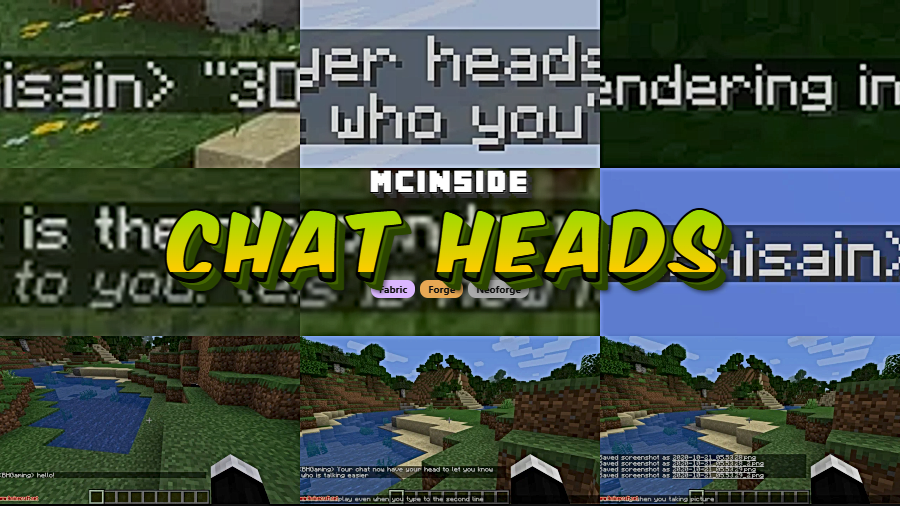
Chat Heads is a client-side cosmetic mod that displays player head avatars next to chat messages in Minecraft, available for Fabric, Forge, and NeoForge mod loaders. Created by dzwdz, the mod makes multiplayer chat easier to follow by visually identifying who sent each message at a glance.
Anyone who has spent time on a busy Minecraft server knows the problem: chat messages scroll by in a wall of text, and figuring out who said what becomes a chore. You end up squinting at usernames, mixing up conversations, and occasionally responding to the wrong person entirely. Chat Heads solves this with a deceptively simple idea — it places a small player head icon beside each chat message, turning the chat window into something that actually looks like a modern messaging interface. With over 32 million downloads and active development spanning from Minecraft 1.19.2 all the way to the latest 26.1 snapshot, this is one of the most popular quality-of-life mods in the entire Minecraft ecosystem. It has been in continuous development since December 2020, and the developer consistently ports it to new Minecraft versions within days of release.
Key Features of Chat Heads
- Player Head Avatars in Chat — Every chat message gets a small rendered player head placed beside it, showing the sender's actual Minecraft skin. This means you can instantly identify speakers in a crowded server chat without reading usernames, which is especially helpful during fast-paced conversations or PvP callouts.
- 3D Head Rendering — Introduced in version 1.2.0, the "3Dness" configuration option renders the hat layer of player heads slightly larger than the base layer, creating a subtle depth effect. This makes the tiny avatars look less flat and more like actual Minecraft heads, adding a polished visual touch to the chat interface.
- Multiple Sender Detection Modes — The mod offers different methods for detecting who sent a message, including a "Heuristic only" mode for servers with non-standard chat formatting. This flexibility means Chat Heads works on vanilla servers, modded servers, and even servers with custom chat plugins — though some detection modes may occasionally misidentify senders on heavily customized setups.
- Fully Configurable via Cloth Config — When paired with Cloth Config (and Mod Menu on Fabric), you get a full settings screen to tweak head size, positioning, rendering style, and detection behavior. The mod also works perfectly fine without these optional dependencies, using sensible defaults out of the box.
- "Before Line" Rendering Option — Chat heads can be rendered before the chat line itself, and as of version 1.2.1 this mode now supports the 3D rendering effect on Minecraft 1.21.9 and newer. This gives you control over exactly where the avatar appears relative to the message text.
- Client-Side Only — No Server Required — Chat Heads runs entirely on your client, meaning you do not need server permission, server-side installation, or any special configuration from server admins. Install it on your end, join any server, and it simply works. This makes it one of the easiest mods to add to any modpack or personal setup.
- Cross-Loader Support — The mod is available for Fabric, Forge, and NeoForge, covering virtually every modded Minecraft player. Whether you run a lightweight Fabric setup or a heavy NeoForge modpack, Chat Heads fits right in without compatibility headaches.
How to Install Chat Heads
- Install a compatible mod loader for your Minecraft version: Fabric, Forge, or NeoForge. Fabric and NeoForge are recommended for the latest versions.
- Download the Chat Heads file matching your Minecraft version and mod loader from the download section below.
- Place the downloaded
.jarfile into your.minecraft/modsfolder. If the folder does not exist, launch Minecraft once with your mod loader profile to generate it. - (Optional) Install Cloth Config to access the in-game settings menu. On Fabric, you will also want Mod Menu to reach the configuration screen.
- Launch Minecraft with your mod loader profile, join a multiplayer server, and player heads will appear next to chat messages automatically.
Requirements & Compatibility
| Requirement | Details |
|---|---|
| Mod Loaders | Fabric, Forge, NeoForge |
| Minecraft Versions | 1.19.2 – 1.21.11, 26.1 |
| Side | Client-side only |
| Required Dependencies | None (Cloth Config optional for settings) |
| Optional Dependencies | Cloth Config, Mod Menu (Fabric) |
| Known Incompatibility | OptiFine on Minecraft ~1.20.1 and newer — use Sodium instead |
| License | MPL-2.0 (open source) |
What's New
- Version 1.2.2: Ported to Minecraft 26.1 — despite massive modding community changes in this version, the port was completed quickly thanks to the Architectury Loom toolchain.
- Version 1.2.1: Added 3D rendering support for the "Before Line" display mode on Minecraft 1.21.9 and newer, and fixed a bug where 3D heads appeared taller than intended.
- Version 1.2.0: Introduced the "3Dness" configuration option, which renders the hat layer slightly larger to create a depth effect that makes chat heads look less flat and more lifelike.
- Ongoing: Consistent version ports covering 1.21.9, 1.21.10, and 1.21.11, keeping the mod current with every Minecraft update.
Pros and Cons
Pros
- Instantly improves chat readability on multiplayer servers
- Client-side only — no server installation needed
- Supports all three major mod loaders (Fabric, Forge, NeoForge)
- Actively maintained since 2020 with fast version ports
- Lightweight and appears to have minimal performance impact
- Open source under MPL-2.0 license
- New 3D rendering adds visual polish
Cons
- Default sender detection may not work on all servers — requires manual mode switching
- Incompatible with newer versions of OptiFine
- Heuristic detection mode can occasionally assign wrong heads to messages
- Requires Cloth Config as an extra download to access settings
Alternatives to Chat Heads
- Compact Chat — Reduces chat clutter by stacking duplicate messages and trimming old lines, complementing Chat Heads nicely for a cleaner chat experience.
- No Chat Reports — A privacy-focused chat mod that removes cryptographic signatures from messages, often used alongside Chat Heads in multiplayer-focused modpacks.
- Better Chat — Overhauls the chat interface with features like timestamps, longer chat history, and improved formatting for players who want a more comprehensive chat upgrade.
Download Chat Heads
| Minecraft Version | Fabric | Forge | NeoForge |
|---|---|---|---|
| For Minecraft 26.1 | Download | — | Download |
| For Minecraft 1.21.11 | Download | — | Download |
| For Minecraft 1.21.10 | Download | — | Download |
| For Minecraft 1.21.9 | Download | — | Download |
| For Minecraft 1.21.8 | Download | — | Download |
| For Minecraft 1.21.7 | Download | — | Download |
| For Minecraft 1.21.6 | Download | — | Download |
| For Minecraft 1.21.5 | Download | — | Download |
| For Minecraft 1.21.4 | Download | Download | Download |
| For Minecraft 1.21.3 | Download | Download | Download |
| For Minecraft 1.21.2 | Download | — | Download |
| For Minecraft 1.21.1 | Download | Download | Download |
Always download mods from official sources to stay safe.
Frequently Asked Questions
Is Chat Heads client-side only?
Yes — Chat Heads runs entirely on your client and does not need to be installed on the server. You can add it to your mods folder and join any multiplayer server without the server needing to have the mod installed. This also means it works on servers you do not own or administrate.
Does Chat Heads work with OptiFine?
No — Chat Heads is incompatible with newer versions of OptiFine, specifically around Minecraft 1.20.1 and later. The developer recommends using Sodium and its companion mods as a replacement for OptiFine. Sodium provides similar or better performance improvements and is fully compatible with Chat Heads.
Why are chat heads showing the wrong player on some messages?
This typically happens because the server uses a non-standard chat format that the default sender detection cannot parse correctly. Open the mod settings via Cloth Config and switch the sender detection mode to "Heuristic only." Keep in mind that heuristic mode may occasionally misidentify senders, but it works more reliably on servers with custom chat plugins.
Do I need Cloth Config to use Chat Heads?
No — Cloth Config is optional and only needed if you want to customize the mod's settings in-game. Chat Heads works perfectly with its default configuration. However, if the default settings do not work on your server, you will need Cloth Config (and Mod Menu on Fabric) to access the sender detection mode settings.
What Minecraft versions does Chat Heads support?
Chat Heads supports Minecraft 1.19.2 through 1.21.11, plus the latest 26.1 version. The mod is available for Fabric and NeoForge on the newest releases, with Forge support on older versions. The developer actively ports the mod to new Minecraft versions shortly after they release, so expect continued support going forward.


![[Let's Do] Meadow Mod (1.21.1) - thumbnail](http://mcinside.com/wp-content/uploads/2026/04/thumbnail-64-52x52.webp)


![Not Enough Recipe Book [NERB] Mod (1.21.11) - thumbnail](http://mcinside.com/wp-content/uploads/2026/04/thumbnail-63-52x52.webp)

