

Cloth Config API is a configuration library mod that provides a standardized config screen framework for Minecraft mods running on Fabric, Forge, and NeoForge. Developed by shedaniel, it allows mod developers to create clean, user-friendly settings menus without building their own configuration system from scratch.
Every Minecraft player who has modded their game has hit the same frustration: you install a new mod, launch the game, and realize there is no in-game way to change its settings. You are stuck digging through config files in your .minecraft folder, editing JSON or TOML by hand, and restarting the game to see if your changes worked. Cloth Config API eliminates that problem entirely. It gives mod developers a ready-made toolkit to build polished configuration screens that players can access directly from the mod menu. With over 107 million downloads on Modrinth alone, it has become one of the most essential utility mods in the entire Minecraft modding ecosystem — a true behind-the-scenes backbone that powers the settings screens for hundreds of popular mods.
Key Features of Cloth Config API
- Unified Configuration Screen Framework — Instead of every mod inventing its own settings UI, Cloth Config API provides a shared system that looks and behaves consistently. This means once you learn how to navigate one mod's config screen, every other mod using Cloth Config feels immediately familiar. It reduces confusion and saves time when fine-tuning your modpack.
- Multi-Loader Support (Fabric, Forge, NeoForge) — Cloth Config API works across all three major mod loaders. Whether you run a lightweight Fabric setup or a feature-heavy NeoForge modpack, you get the same config screen experience. This cross-platform availability is a major reason it has been adopted so widely by developers.
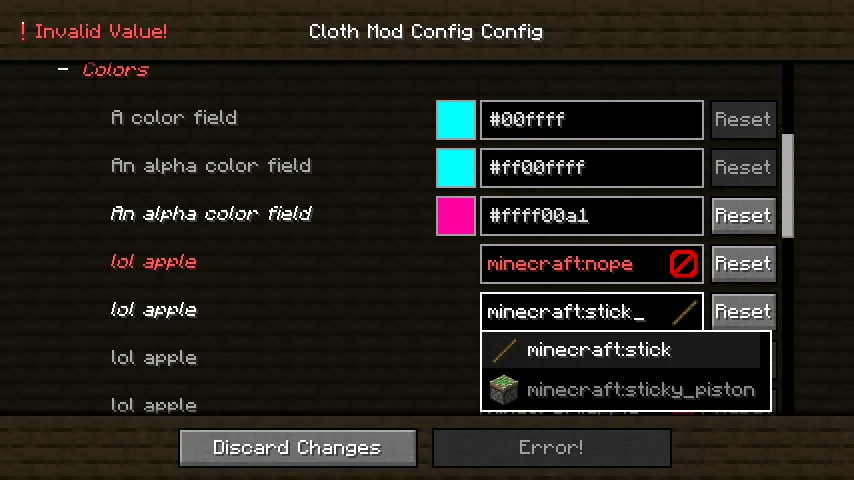
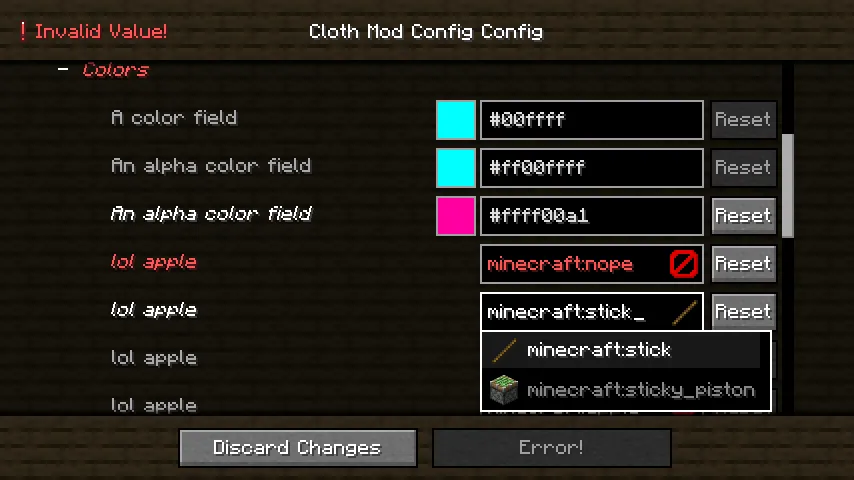
- Rich Entry Types for Developers — The API supports a wide range of config entry types including toggles, sliders, dropdowns, color pickers, text fields, and nested categories. For players, this translates to intuitive settings menus where you can adjust values visually rather than guessing at raw numbers in a config file.
- Real-Time Config Preview — Many settings built with Cloth Config API can be previewed before applying. This means you can tweak values and see what they do without restarting Minecraft every single time, which dramatically speeds up the process of dialing in your preferred gameplay experience.
- Dependency for Hundreds of Popular Mods — Mods like Roughly Enough Items, Light Overlay, and many others require Cloth Config API as a dependency. Installing it once unlocks the settings screens for a large portion of the Fabric and NeoForge mod ecosystem. Think of it as a shared foundation that keeps your mod list running smoothly.
- Lightweight Library Design — As a library mod, Cloth Config API appears to be lightweight and focused solely on configuration functionality. It does not add gameplay content, alter world generation, or change mechanics. It loads only what is needed when a mod calls its API, keeping its footprint minimal in your mod stack.
- Open Source Under LGPL-3.0 — The full source code is available on GitHub, licensed under LGPL-3.0. This transparency means the community can audit the code, contribute improvements, and trust that the library does exactly what it claims — nothing more, nothing less.
Screenshots


How to Install Cloth Config API
- First, make sure you have the correct mod loader installed. Cloth Config API supports Fabric, Forge, and NeoForge — pick the one that matches your modpack.
- Download the Cloth Config API file for your specific Minecraft version and loader from the download section below. Double-check that the version numbers match exactly.
- Open your Minecraft installation folder. You can find it by launching Minecraft, going to Options → Resource Packs → Open Pack Folder, then navigating one level up.
- Drop the downloaded .jar file into the
modsfolder. If the folder does not exist, create it manually. - Launch Minecraft using your mod loader profile. Cloth Config API will load automatically in the background — you will not see it as a standalone mod, but any mod that depends on it will now have access to its config screen system.
Requirements & Compatibility
| Requirement | Details |
|---|---|
| Supported Loaders | Fabric, Forge, NeoForge |
| Minecraft Versions | 1.19 – 1.21.11 |
| Latest Build | Version 26.1 |
| License | LGPL-3.0-only |
| Author | shedaniel |
| Last Updated | March 26, 2026 |
Pros and Cons
Pros
- Required by hundreds of popular mods, making it a one-time install that benefits your entire modpack
- Cross-loader support means you do not need to switch libraries when moving between Fabric and NeoForge
- Consistently updated — the mod has been maintained since 2022 with regular updates through 2026
- Appears to be lightweight with no gameplay impact or noticeable resource overhead
- Open-source codebase allows community auditing and contributions
Cons
- Not useful as a standalone mod — it only functions when other mods depend on it
- Players may not realize they need it until a dependent mod fails to load
- Config screens depend on individual mod developers implementing them correctly
- New Minecraft versions may require waiting for Cloth Config API to update before dependent mods work
Alternatives to Cloth Config API
- Forge Config API Port — Brings the Forge configuration system to Fabric, offering an alternative config framework for developers who prefer Forge-style config files and want cross-loader compatibility.
- Mod Menu — A Fabric mod that adds a dedicated mod list screen where you can access config screens provided by libraries like Cloth Config API. Often installed alongside it as a companion.
- YetAnotherConfigLib (YACL) — A newer configuration library that offers a modern API with animated transitions and a different design philosophy, used by mods that want a more visually polished settings experience.
Download Cloth Config API
| Minecraft Version | Fabric | Forge | NeoForge |
|---|---|---|---|
| For Minecraft 26.1 | Download | — | Download |
| For Minecraft 1.21.11 | Download | — | Download |
| For Minecraft 1.21.10 | Download | — | Download |
| For Minecraft 1.21.9 | Download | — | Download |
| For Minecraft 1.21.8 | Download | — | Download |
| For Minecraft 1.21.7 | Download | — | Download |
| For Minecraft 1.21.6 | Download | — | Download |
| For Minecraft 1.21.5 | Download | — | Download |
| For Minecraft 1.21.4 | Download | — | Download |
| For Minecraft 1.21.3 | Download | Download | Download |
| For Minecraft 1.21.2 | Download | Download | Download |
| For Minecraft 1.21.1 | Download | Download | Download |
Always download mods from official sources to stay safe.
Frequently Asked Questions
Do I need Cloth Config API to play Minecraft?
No — Cloth Config API is not required for vanilla Minecraft. You only need it if you install mods that list it as a dependency. However, because so many popular mods depend on it, most modded setups will require it at some point.
Does Cloth Config API work with both Fabric and NeoForge?
Yes — Cloth Config API officially supports Fabric, Forge, and NeoForge. Make sure you download the correct version for your specific mod loader, as the files are not interchangeable between loaders.
Will Cloth Config API affect my game performance?
No noticeable impact is expected. Cloth Config API is a library that only activates when a mod calls its config screen functions. It does not run background processes, modify gameplay, or add entities to your world.
How do I know if a mod requires Cloth Config API?
Check the mod's download page or documentation for a dependencies list. If Cloth Config API is listed as a required dependency, you must install it. Most mod loaders will also show an error on startup if a required library is missing.
Is Cloth Config API safe to install?
Yes — it is open-source under the LGPL-3.0 license with its full source code available on GitHub. With over 107 million downloads and active maintenance since 2022, it is one of the most widely trusted library mods in the Minecraft community.


![Not Enough Recipe Book [NERB] Mod (1.21.11) - thumbnail](http://mcinside.com/wp-content/uploads/2026/04/thumbnail-63-52x52.webp)


