

Ever joined a busy Minecraft server and watched the same message flood your chat window dozens of times? Compact Chat Mod solves that annoyance elegantly — duplicate messages get collapsed into a single line with a counter like "(3x)" appended to it, so you can track message frequency without the clutter. With over 140,000 downloads on Modrinth and active development since 2021, this lightweight Fabric mod has become a go-to quality-of-life pick for players who want a cleaner, more readable chat experience.
Key Features
- Automatic duplicate removal — Previous instances of repeated messages are quietly removed from the chat window, keeping only the latest one visible.
- Occurrence counter — A small "(Nx)" tag is appended to the latest duplicate message, letting you see exactly how many times it was sent without scrolling through spam.
- Cleaner chat interface — Conversations become far easier to follow on busy servers where repeated messages, system notifications, or automated alerts tend to pile up.
- Seamless integration — Works within Minecraft's existing chat system with no configuration required out of the box, though advanced users can customize message separator behavior.
Screenshots


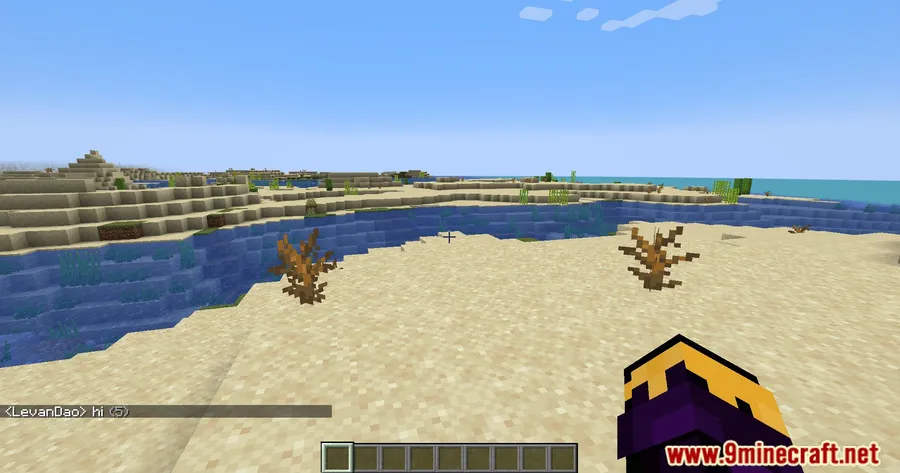
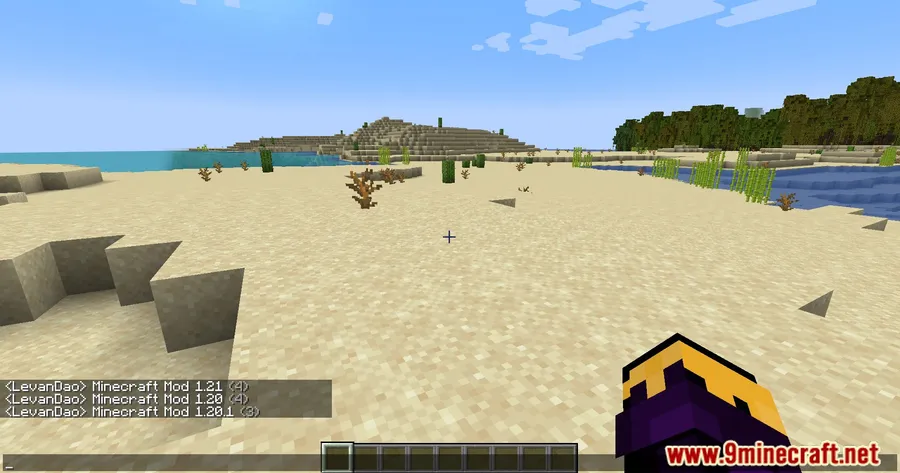
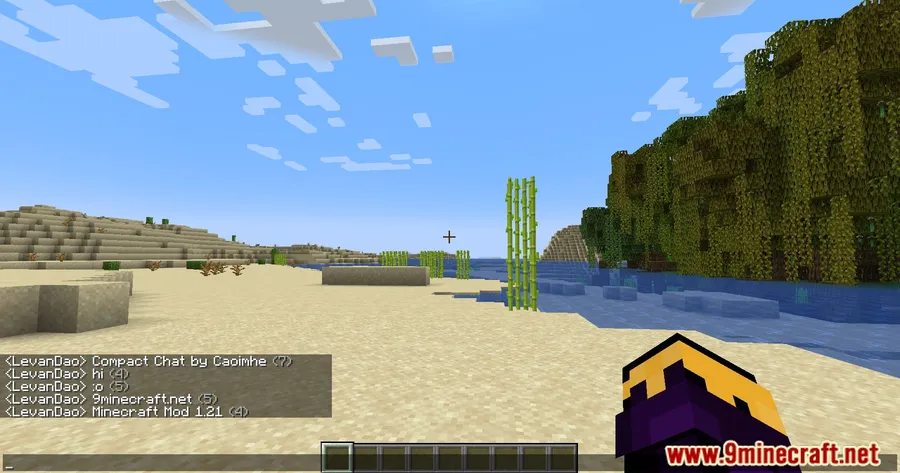
How to Install
- Download and install Fabric Loader for your Minecraft version from the official Fabric website.
- Download Fabric API and place the .jar file into your
modsfolder. - Download the Compact Chat Mod file matching your Minecraft version from the link below.
- Drop the Compact Chat .jar file into your
.minecraft/modsfolder. - Launch Minecraft with the Fabric profile and open any multiplayer server to see it in action.
Requirements
| Requirement | Details |
|---|---|
| Mod Loader | Fabric |
| Dependencies | Fabric Modloader, Fabric API |
| Minecraft Versions | 26.1, 1.21.11, 1.21.10, 1.21.9, 1.21.8, 1.21.7, 1.21.6, 1.21.5, 1.21.1, 1.21, 1.20.6, 1.20.4, 1.20.1, 1.20, 1.19.3, 1.19.2, 1.19.1, 1.18.2, 1.18.1, 1.17.1 |
Pros
- Instantly declutters busy server chat without any setup
- Covers a wide range of Minecraft versions from 1.17.1 to 26.1
- Open-source (MIT license) with active development and regular updates
- Configurable message separator rules for advanced users
- Appears to be lightweight — works within the existing chat system with no reported overhead
Cons
- Fabric only — no Forge or NeoForge support available
- Requires Fabric API as an additional dependency
- Only affects the client-side chat display, not server-side message handling
Download
Always download mods from official sources to stay safe.
What's New
- The list of "common message separators" is now fully configurable through the in-game configuration screen.
- Players can add custom message separators to fine-tune which messages get compacted.
- When the "ignore common message separators" option is enabled, messages containing those separators will no longer be compacted together.
- This update gives users more control over how the mod handles edge cases in chat formatting.
FAQ
Does Compact Chat Mod work on multiplayer servers?
Yes, it works on any server since it operates entirely on the client side. It modifies how your chat window displays messages without affecting what other players see or how the server processes chat.
Can I customize which messages get compacted?
Yes, the latest version introduced a configurable list of common message separators. You can access these settings through the in-game configuration screen and control which messages the mod treats as duplicates.
Is Compact Chat Mod compatible with other chat mods?
The mod works within Minecraft's existing chat system, so it is generally compatible with other Fabric chat mods. Since it only modifies duplicate message display behavior, conflicts with other chat-related mods appear to be unlikely.


![Not Enough Recipe Book [NERB] Mod (1.21.11, 1.20.6) – New Recipes](http://mcinside.com/wp-content/uploads/2026/04/thumbnail-63-300x169.webp)


![[Let's Do] Meadow Mod (1.21.1, 1.20.1) – Nature and Farming Expansion](http://mcinside.com/wp-content/uploads/2026/04/thumbnail-64-300x169.webp)


![[Let's Do] Candlelight - Farm&Charm compat Mod (1.21.1) - thumbnail](http://mcinside.com/wp-content/uploads/2026/04/thumbnail-81-52x52.webp)


![[Let's Do] Meadow Mod (1.21.1) - thumbnail](http://mcinside.com/wp-content/uploads/2026/04/thumbnail-64-52x52.webp)


![Not Enough Recipe Book [NERB] Mod (1.21.11) - thumbnail](http://mcinside.com/wp-content/uploads/2026/04/thumbnail-63-52x52.webp)