
Crash Assistant is a client-side utility mod that displays a detailed GUI whenever Minecraft crashes, instantly showing all relevant logs, crash reports, and error files while analyzing them for known issues — available for Fabric, Forge, NeoForge, and Quilt loaders across Minecraft 1.21 through 26.1.
Minecraft crashes are one of the most frustrating experiences in modded gameplay. You're deep into a build, you add one new mod, and suddenly the game won't launch. The default crash screen is nearly useless for most players — a wall of Java stack traces that means nothing unless you're a developer. That's exactly the problem Crash Assistant solves. Created by KostromDan and downloaded over 6.6 million times, this mod transforms the post-crash experience from confusion into clarity. Instead of manually hunting through log files buried in your .minecraft folder, Crash Assistant instantly surfaces every relevant file, analyzes the crash against a database of known issues, and tells you in plain language what went wrong and how to fix it. For anyone running more than a handful of mods, it has become an essential part of any modpack toolkit.
Key Features of Crash Assistant
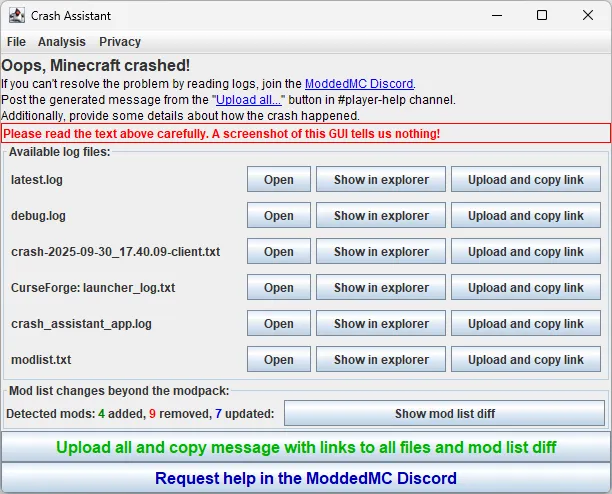
- Instant Crash GUI with Log Analysis — When Minecraft crashes, Crash Assistant immediately displays a clean graphical interface showing all affected logs, crash reports, and hs_err files. This matters because you no longer need to dig through your file system to find the right log — everything is presented in one place, seconds after the crash happens. The GUI also supports drag-and-drop, so you can pull log files directly to Discord or a bug report form.
- Known Crash Detection and Auto-Fixes — The mod maintains an extensive database of recognized crash causes, from AMD driver issues (atio6axx.dll) to corrupted CurseForge installations to out-of-disk-space errors. When it identifies a known problem, it displays a clear description and a step-by-step solution. For many common issues, it even offers automatic fixes with a single click, saving you hours of troubleshooting.
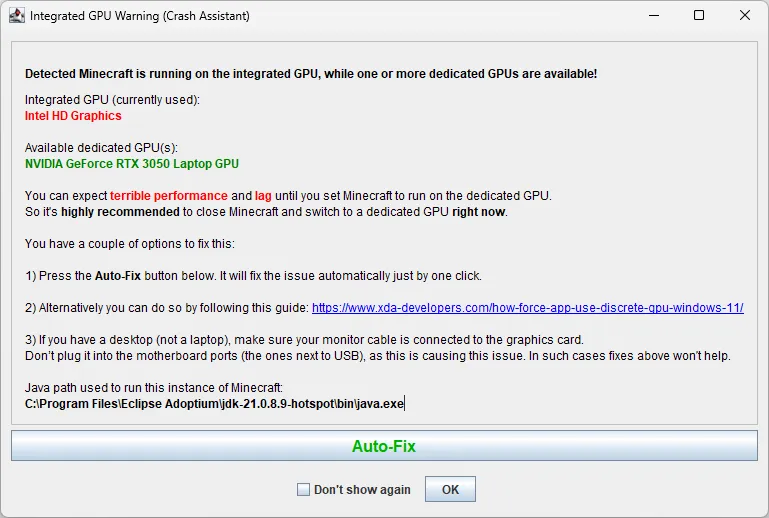
- GPU Detection Warning — Crash Assistant checks whether Minecraft is running on your integrated GPU instead of your dedicated graphics card. This is a surprisingly common issue, especially on laptops, and it causes severe performance problems or outright crashes. The mod warns you immediately so you can switch to the correct GPU before wasting time on other fixes.
- Create and Epic Fight Addon Compatibility Scanner — If you use the Create mod or Epic Fight, Crash Assistant can scan your entire mod list to identify addons that are incompatible with your installed versions. This is invaluable because version mismatches between Create and its many addons are one of the most frequent sources of modpack crashes, and manually checking each addon's compatibility is tedious.
- MCreator Mod Detector — This tool lists every mod in your installation that was built with the MCreator tool. MCreator mods are a common source of instability in modpacks, so being able to quickly identify them helps you isolate problematic mods faster when debugging crashes.
- Package and Class Finder — When a crash report references a specific Java class or package, this tool searches all your installed mods to identify which one contains it. This turns a cryptic error message like "NoClassDefFoundError: com/example/SomeClass" into an actionable answer — you'll know exactly which mod to update, remove, or report a bug against.
- One-Click Log Upload — Instead of manually copying log files and pasting them into services like mclo.gs or Pastebin, Crash Assistant lets you upload all relevant logs with a single click and copies the shareable link to your clipboard. This makes it far easier to get help from modpack developers or community support channels.
Screenshots
How to Install Crash Assistant
- Install your preferred mod loader — Fabric, Forge, NeoForge, or Quilt — for your Minecraft version (1.21 through 26.1 are supported).
- Download the correct Crash Assistant file for your loader and Minecraft version from the download section below.
- Place the downloaded .jar file into your
.minecraft/modsfolder. If the folder doesn't exist, create it. - Launch Minecraft through your mod loader profile. Crash Assistant is client-only and requires no configuration — it activates automatically whenever a crash occurs.
- To verify it's working, you can use the built-in test command that triggers a controlled crash. The Crash Assistant GUI should appear immediately after.
Requirements & Compatibility
| Requirement | Details |
|---|---|
| Mod Loaders | Fabric, Forge, NeoForge, Quilt |
| Minecraft Versions | 1.21 – 1.21.11, 26.1 (including snapshots, pre-releases, and release candidates) |
| Side | Client-only (does nothing on servers) |
| Dependencies | None required beyond the mod loader itself |
| License | KostromDan-MML-1.1.3 (custom license) |
What's New
- Added a Connector Mod Detector GUI tool that identifies Fabric mods loaded through the Sinytra Connector, making it easier to spot compatibility issues.
- New Mods Searcher Analysis tool lets you search for specific strings or regex patterns inside mod files and the Minecraft folder — useful for tracking down problematic resources or configs.
- The modlist.txt export now includes a "notes" column that flags mods loaded via Connector or built with MCreator for quick identification.
- The crash_assistant_app.log now records disk space information (total and free) at both launch and crash time, along with the Minecraft main class name, providing better context for debugging.
- Startup scripts log is now only added to the logs list if it contains errors, reducing clutter in the GUI.
Pros and Cons
Pros
- Supports all four major mod loaders (Fabric, Forge, NeoForge, Quilt)
- Extensive crash analysis database covering dozens of known issues
- One-click log uploads and auto-fix options save significant troubleshooting time
- Client-only with no performance impact during normal gameplay
- Actively maintained with frequent updates for the latest Minecraft versions
- Specialized tools for Create, Epic Fight, and MCreator compatibility checking
Cons
- Client-side only — cannot help diagnose server-side crashes
- Custom license may restrict redistribution in some modpack scenarios
- Cannot detect every possible crash cause — only those in its known-issue database
Alternatives to Crash Assistant
- Not Enough Crashes — Prevents Minecraft from closing entirely after a crash, letting you return to the title screen instead. Works well alongside Crash Assistant for a complete crash recovery setup.
- Spark — A performance profiler that helps identify lag and memory issues before they cause crashes. While it doesn't analyze crash logs, it's excellent for preventing performance-related crashes in the first place.
- Mod Menu — Provides a browsable list of all installed mods with version info and configuration access. Useful as a companion tool when you need to check mod versions or disable specific mods after Crash Assistant identifies a conflict.
Download Crash Assistant
| Minecraft Version | Fabric | Forge | NeoForge | Quilt |
|---|---|---|---|---|
| For Minecraft 26.1 | Download | Download | Download | Download |
| For Minecraft 1.21.11 | Download | Download | Download | Download |
| For Minecraft 1.21.10 | Download | Download | Download | Download |
| For Minecraft 1.21.9 | Download | Download | Download | Download |
| For Minecraft 1.21.8 | Download | Download | Download | Download |
| For Minecraft 1.21.7 | Download | Download | Download | Download |
| For Minecraft 1.21.6 | Download | Download | Download | Download |
| For Minecraft 1.21.5 | Download | Download | Download | Download |
| For Minecraft 1.21.4 | Download | Download | Download | Download |
| For Minecraft 1.21.3 | Download | Download | Download | Download |
| For Minecraft 1.21.2 | Download | Download | Download | Download |
| For Minecraft 1.21.1 | Download | Download | Download | Download |
Always download mods from official sources to stay safe.
Frequently Asked Questions
Does Crash Assistant affect Minecraft performance during normal gameplay?
No — Crash Assistant is designed to remain dormant during normal gameplay and only activates after a crash occurs. Since it is a client-side utility that triggers post-crash, it does not add processing overhead, render hooks, or tick listeners while you are playing. You can safely leave it installed at all times.
Does Crash Assistant work on servers?
No — Crash Assistant is strictly a client-side mod and does nothing on a dedicated server. If you install it in a server's mods folder, it will simply be ignored. For server-side crash analysis, you would need to review logs manually or use server-specific monitoring tools.
Can Crash Assistant automatically fix crashes?
Yes — for many common issues, Crash Assistant offers one-click auto-fixes directly from its GUI. These include problems like GPU driver conflicts, corrupted launcher installations, duplicate mods, and missing dependencies. However, not every crash has an automatic fix available; in those cases, the mod provides a detailed description of the problem and a manual solution.
Is Crash Assistant compatible with both Fabric and Forge at the same time?
No — you need to download the version that matches your specific mod loader. Crash Assistant is available separately for Fabric, Forge, NeoForge, and Quilt. Make sure you pick the correct file for your loader and Minecraft version from the download table above.
What Minecraft versions does Crash Assistant support?
Crash Assistant supports Minecraft 1.21 through 1.21.11 and the full 26.1 release cycle, including all snapshots, pre-releases, and release candidates. The mod is actively maintained and typically receives updates within days of new Minecraft versions being released, as evidenced by its most recent update on March 28, 2026.


![Not Enough Recipe Book [NERB] Mod (1.21.11) - thumbnail](http://mcinside.com/wp-content/uploads/2026/04/thumbnail-63-52x52.webp)


