

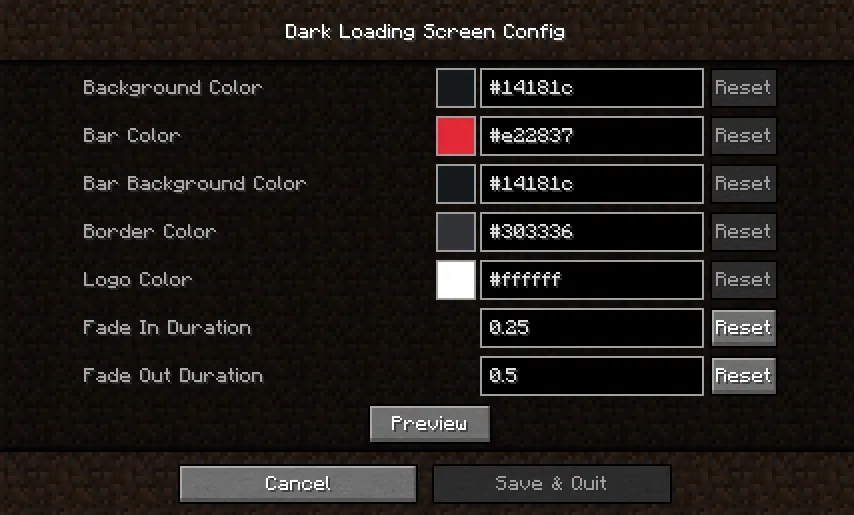
If Minecraft's default loading screen feels too bright, Dark Loading Screen Mod changes it to a darker look and also supports color adjustment in-game when Mod Menu and Cloth Config API are installed. Manual configuration is available through .minecraft/config/dark-loading-screen.json, and those manual changes appear after restarting the game.
Key Features
- Changes Minecraft's loading screen to a darker presentation.
- Supports in-game color adjustment when Mod Menu and Cloth Config API are installed.
- Allows manual color configuration through
.minecraft/config/dark-loading-screen.json. - Listed for Fabric and Quilt setups across the supported Minecraft versions in available information.
Screenshots


How to Install
- Install the loader that matches your setup: Fabric or Quilt Loader.
- Add the required dependencies listed below, including Fabric API and Cloth Config API where needed.
- Place Dark Loading Screen Mod in your Minecraft
modsfolder for a supported game version. - Install Mod Menu with Cloth Config API if you want to change colors in-game.
- For manual setup, create or edit
.minecraft/config/dark-loading-screen.json, then restart Minecraft.
Requirements
| Type | Details |
|---|---|
| Mod Loader | Fabric, Quilt Loader |
| Dependencies | Fabric API, Cloth Config API; Mod Menu is needed with Cloth Config API for in-game color changes |
| Minecraft Version | 1.21.11, 1.21.10, 1.21.9, 1.21.8, 1.21.7, 1.21.6, 1.20.2, 1.20.1, 1.20, 1.19.4, 1.19.3, 1.19.2, 1.19.1, 1.19, 1.18.2, 1.18.1, 1.17.1, 1.16.5 |
Pros & Cons
Pros
- Makes the loading screen darker with a clear, focused visual change.
- Supports in-game color editing when Mod Menu and Cloth Config API are installed.
- Also allows manual configuration through a JSON file.
- Provided version data covers a wide range of Minecraft releases.
Cons
- The scope is limited to the loading screen experience.
- In-game color controls depend on extra tools.
- Manual config changes only appear after restarting the game.
Download
Always download mods from official sources to stay safe.
What's New
- Updated to 1.21.6.
es_artranslation updated by @Texaliuz (#38).- Modrinth listing updated on 2025-06-21.
- Modrinth shows 3,313,593 downloads.
FAQ
What does Dark Loading Screen Mod actually change?
It changes Minecraft's loading screen to a darker look. Available information does not list broader gameplay changes beyond that visual adjustment.
Can I change the colors without editing files?
Yes. Colors can be modified in-game if both Mod Menu and Cloth Config API are installed. Otherwise, you can edit .minecraft/config/dark-loading-screen.json manually and restart the game.
Which Minecraft versions and loaders are listed for this mod?
Available information lists support for Fabric and Quilt, with Minecraft versions ranging from 1.16.5 up to 1.21.11, including 1.20.1 and 1.20.2.


![[Let's Do] Candlelight - Farm&Charm compat Mod (1.21.1) - thumbnail](http://mcinside.com/wp-content/uploads/2026/04/thumbnail-81-52x52.webp)


![[Let's Do] Meadow Mod (1.21.1) - thumbnail](http://mcinside.com/wp-content/uploads/2026/04/thumbnail-64-52x52.webp)


![Not Enough Recipe Book [NERB] Mod (1.21.11) - thumbnail](http://mcinside.com/wp-content/uploads/2026/04/thumbnail-63-52x52.webp)