
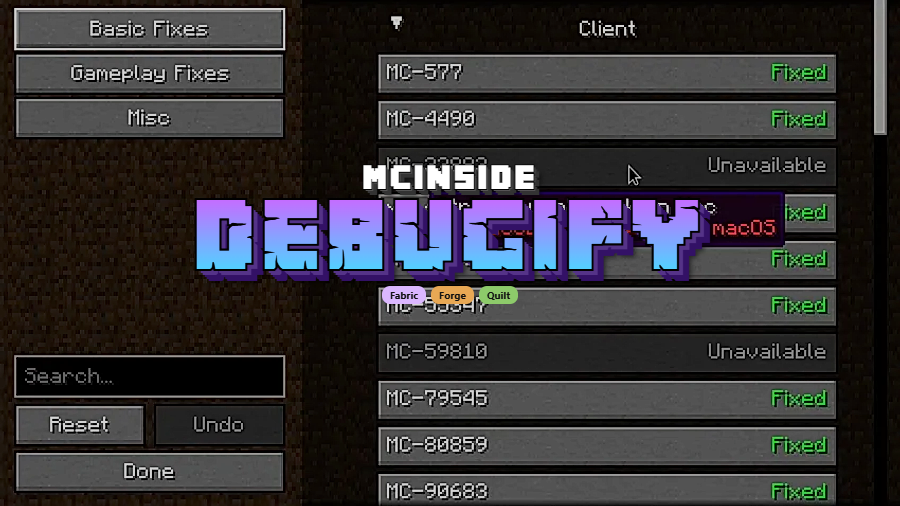
Debugify is a bug-fixing utility mod that patches over 70 confirmed Minecraft bugs sourced directly from the official Mojang bug tracker, available for Fabric, Forge, and Quilt mod loaders.
Every Minecraft player has encountered at least one maddening bug — shields that fail to block properly, tooltips that clip off-screen, or chunks that mysteriously refuse to save. Mojang acknowledges many of these issues on their official bug tracker, but fixes can take months or even years to ship in a vanilla update. That gap between "known bug" and "actually patched" is exactly the problem Debugify solves. Created by developer isxander, this mod has earned over 23 million downloads precisely because it does one thing and does it well: it squashes the bugs Mojang hasn't gotten to yet. Rather than forcing players to hunt down ten separate single-fix mods, Debugify bundles them all into one configurable package — and it stays updated across a wide range of Minecraft versions from 1.18.2 through the latest 1.21.11 release.
Key Features of Debugify
- Over 70 Bug Fixes from the Official Tracker — Every fix in Debugify corresponds to a real, documented issue on bugs.mojang.com. This means you are not installing experimental tweaks or opinion-based changes — each patch addresses a verified problem that Mojang has acknowledged. For players who value stability, this approach builds genuine trust.
- Replaces Multiple Single-Fix Mods — Debugify supersedes standalone mods like BetterShields, ForgetMeChunk, ChunkSavingFix, ToolTipFix, No Telemetry, and Skeleton Aiming Fix, among others. Instead of managing a dozen separate downloads with potential version conflicts, you get all these fixes consolidated into one jar file. The superseded mods can still run alongside Debugify if you need their extra features beyond bug fixes.
- Configurable Fix Toggle via GUI — Not every player wants every fix enabled. Debugify includes a configuration menu accessible through Mod Menu on Fabric, where you can enable or disable individual bug patches. If you prefer, you can also edit the configuration file directly at
.minecraft/config/debugify.json. This level of control is rare among fix mods and lets you troubleshoot conflicts with precision. - Client and Server Coverage — Many bug-fix mods only address client-side rendering issues. Debugify patches bugs on both the client and the server, with all server-side fixes also applying when playing singleplayer. This dual coverage means fewer desyncs, fewer chunk corruption events, and a more consistent experience whether you run a dedicated server or play alone.
- Shield Mechanics Fix (BetterShields) — Vanilla Minecraft has long-standing issues with shield blocking behavior, where shields occasionally fail to register hits correctly. Debugify incorporates the BetterShields fix to make shield interactions more reliable, which is especially noticeable during combat with skeletons and other ranged mobs.
- Chunk Saving and Loading Fixes — Two persistent Minecraft bugs involve chunks failing to save properly and the world loading screen not closing correctly. Debugify addresses both with its ChunkSavingFix and ForgetMeChunk patches, reducing the risk of lost builds and eliminating the frustrating loading screen hang that forces players to restart.
- Telemetry Removal and Tooltip Rendering — For privacy-conscious players, Debugify includes the No Telemetry fix to disable Minecraft's data collection. It also patches the tooltip rendering bug where long item descriptions clip beyond the screen edge, making modded items with complex tooltips actually readable.
Screenshots
How to Install Debugify
- Install your preferred mod loader. For Fabric, download and run the Fabric installer, then add the Fabric API to your mods folder. For Forge, grab the Minecraft Forge installer. Quilt users can install the Quilt Loader instead.
- If using Fabric, also install Mod Menu so you can access Debugify's in-game configuration screen to toggle individual fixes on or off.
- Download the Debugify jar file that matches your Minecraft version and mod loader from the official download section below.
- Place the downloaded
.jarfile into your.minecraft/modsfolder. If the folder does not exist, launch Minecraft once with your mod loader profile to generate it automatically. - Launch Minecraft using your mod loader profile. Open Mod Menu (Fabric/Quilt) to verify Debugify is loaded and to customize which bug fixes are active.
Requirements & Compatibility
| Detail | Information |
|---|---|
| Mod Loaders | Fabric, Forge, Quilt |
| Minecraft Versions | 1.21.11, 1.21.10, 1.21.8, 1.21.7, 1.21.6, 1.21.5, 1.21.4, 1.21.3, 1.21.1, 1.21, 1.20.x, 1.19.x, 1.18.2 |
| Author | isxander |
| License | LGPL-3.0-only |
| Dependencies | Fabric API (for Fabric), Mod Menu (optional, for config GUI) |
| Categories | Optimization, Utility |
What's New
- Updated to Minecraft 1.21.11 with full compatibility for the latest release.
- Removed bug fixes that Mojang has officially patched in vanilla 1.21.11, keeping the mod lean and conflict-free.
- This is a 1.0 milestone release, indicating a clean slate of only currently-relevant fixes for the newest game version.
Pros and Cons
Pros
- Replaces over a dozen standalone fix mods with a single download
- Every fix is sourced from the official Mojang bug tracker — no guesswork
- Individual fixes can be toggled on or off through a GUI or config file
- Works on both client and server for comprehensive coverage
- Supports all three major mod loaders: Fabric, Forge, and Quilt
- Actively maintained with updates for each new Minecraft version
- Over 23 million downloads — well-tested by the community
Cons
- Requires Mod Menu for the easiest configuration experience on Fabric
- Some superseded mods offer extra QOL features beyond bug fixes that Debugify does not replicate
- Fixes are removed once Mojang patches them in vanilla, so the fix list changes between versions
- Forge support may lag behind Fabric releases for newer Minecraft versions
Alternatives to Debugify
- Lithium — A general-purpose server optimization mod that focuses on improving tick performance and game logic efficiency without changing vanilla behavior, making it an excellent companion to Debugify's bug-fix approach.
- Sodium — The leading client-side rendering optimization mod for Minecraft that dramatically improves frame rates; pairs well with Debugify since Sodium handles performance while Debugify handles bug fixes.
- Mod Menu — An essential Fabric utility that provides an in-game interface for managing and configuring installed mods, including Debugify's per-fix toggle system.
Download Debugify
| Minecraft Version | Fabric | Quilt |
|---|---|---|
| For Minecraft 1.21.11 | Download | — |
| For Minecraft 1.21.10 | Download | — |
| For Minecraft 1.21.8 | Download | — |
| For Minecraft 1.21.7 | Download | — |
| For Minecraft 1.21.6 | Download | — |
| For Minecraft 1.21.5 | Download | — |
| For Minecraft 1.21.4 | Download | — |
| For Minecraft 1.21.3 | Download | — |
| For Minecraft 1.21.1 | Download | — |
| For Minecraft 1.21 | Download | — |
| For Minecraft 1.20.6 | Download | Download |
| For Minecraft 1.20.5 | Download | Download |
Always download mods from official sources to stay safe.
Frequently Asked Questions
Is Debugify safe to install?
Yes — Debugify is open-source under the LGPL-3.0 license with its full source code available on GitHub for anyone to audit. With over 23 million downloads and active development since March 2022, it is one of the most trusted utility mods in the Minecraft community. Every fix it applies is based on a documented bug from the official Mojang bug tracker.
Does Debugify work with Forge?
Yes — Debugify officially supports Fabric, Forge, and Quilt mod loaders. However, Fabric tends to receive updates first, so Forge builds for the very latest Minecraft versions may arrive slightly later. Always check the download section for your specific version and loader combination.
Can I use Debugify alongside optimization mods like Sodium or Lithium?
Yes — Debugify is designed to be compatible with other popular mods. Since it only patches confirmed bugs rather than overhauling game systems, it works alongside performance mods like Sodium and Lithium without conflicts. The mod even replaces Entity Collision FPS Fix, so you can remove that if you had it installed separately.
Will Debugify affect my existing worlds or saves?
No — Debugify does not modify world data, save files, or game mechanics. It only patches buggy code at runtime, so you can safely add or remove it from any existing world without risking corruption or data loss. If you disable the mod, Minecraft simply reverts to its default (buggy) behavior.
Can I choose which bug fixes to enable?
Yes — Debugify includes a full configuration GUI accessible through Mod Menu on Fabric and Quilt. You can toggle each individual bug fix on or off depending on your preferences or if you suspect a conflict with another mod. Alternatively, you can edit the debugify.json config file in your .minecraft/config folder directly.


![Not Enough Recipe Book [NERB] Mod (1.21.11) - thumbnail](http://mcinside.com/wp-content/uploads/2026/04/thumbnail-63-52x52.webp)


