
Difficulty Lock Mod is a management and utility mod that sets a chosen world difficulty, can lock that difficulty, and can enforce Hardcore-focused world setup for Minecraft on Fabric, Forge, NeoForge, and Quilt. It is designed to make new world creation follow your preferred challenge rules automatically.
The core problem this mod solves is inconsistency: you create a world, forget a setting, and only notice later when progression already started. Difficulty Lock fixes that by applying your chosen rules from the beginning, including options that tighten game mode choices for challenge-focused play. With 4,628,258 downloads on Modrinth (nearly 5 million), it has clear social proof from players and pack makers who want reliable world setup behavior instead of manual pre-game checks.
Key Features of Difficulty Lock Mod
- Automatic difficulty setup for new worlds — This matters because repeat world creation becomes predictable, especially if you always play at one difficulty. Instead of rechecking settings every run, your preferred challenge level is applied as part of the normal creation flow.
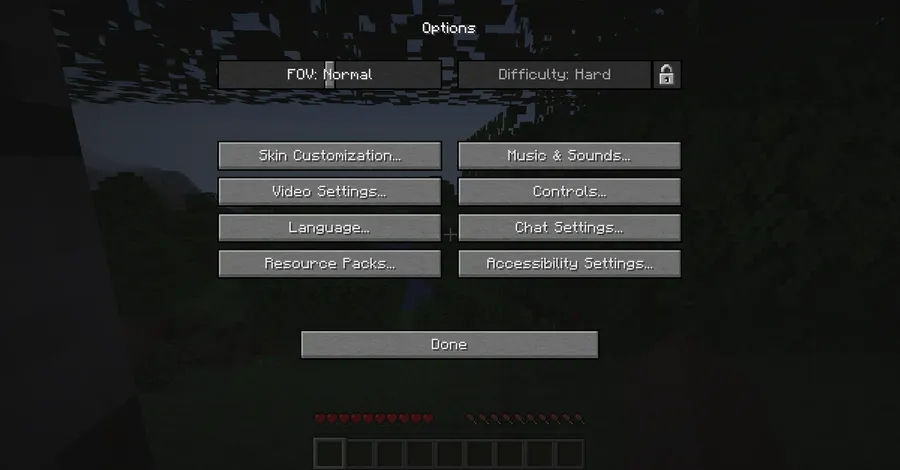
- Optional difficulty lock — This helps players who want commitment once the world starts. Locking difficulty prevents casual mid-run toggles and keeps survival balance aligned with the run you intended to play.
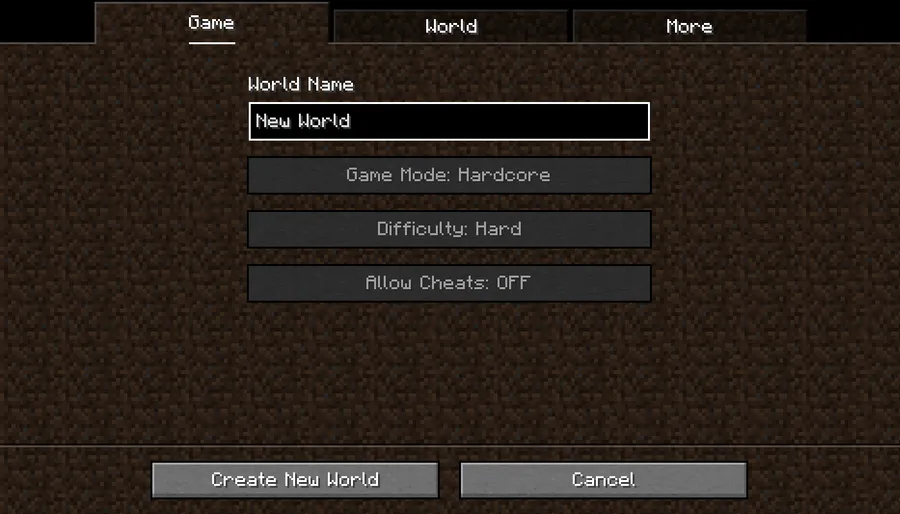
- Force Hardcore mode option — This is valuable for challenge runs and modpacks that require a strict survival structure. When enabled, it takes priority over other difficulty selections, which makes the resulting world state unambiguous.
- Creative mode selection can be disabled — This matters for players who want to protect progression integrity at world start. It removes an easy route to accidental or intentional bypass of survival-oriented goals.
- Cheat-restriction support during world setup — This is useful when you want cleaner run conditions without manual policing. It keeps world creation aligned with no-cheat expectations right at the setup stage.
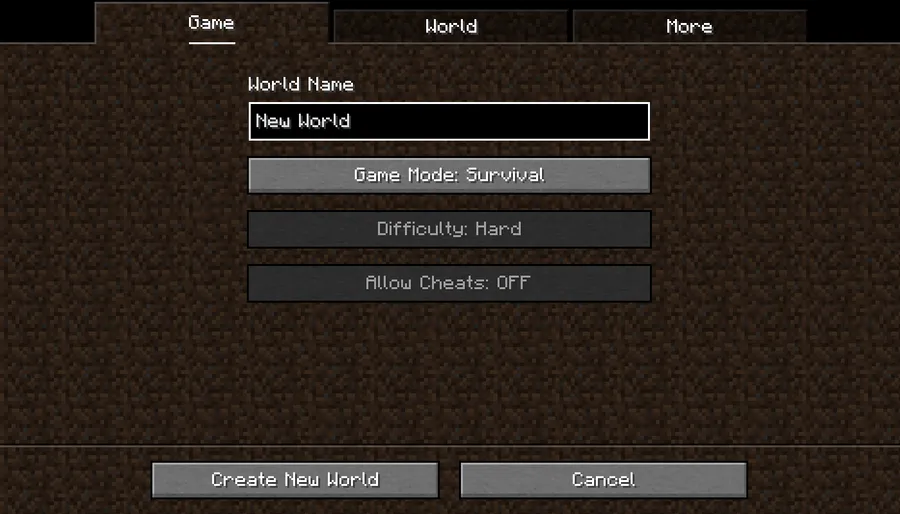
- Create World screen integration plus dedicated server support — This is important because the mod's rules are reflected where you actually configure worlds, not hidden behind unclear behavior. It also works on dedicated servers, so the same philosophy can carry over from singleplayer to shared environments.
Screenshots
How to Install Difficulty Lock Mod
- Choose your loader first: Fabric Mod Loader, Minecraft Forge, NeoForge, or Quilt Loader.
- Match your Minecraft version to a supported build (from 1.16.5 up through 1.21.11, plus the listed 26.1 release track).
- Install the required library mod Collective, since Difficulty Lock depends on it.
- Download the Difficulty Lock file for your exact loader and Minecraft version, then place it in your `mods` folder.
- Launch the game or server once, then configure options like Hardcore enforcement, creative selection restrictions, and difficulty behavior to fit your playstyle or pack rules.
Requirements & Compatibility
| Item | Details |
|---|---|
| Mod Type | Management, Utility |
| Author | Serilum |
| Required Library | Collective |
| Supported Loaders | Fabric, Forge, NeoForge, Quilt |
| Listed Minecraft Versions | 26.1, 1.21.11, 1.21.10, 1.21.9, 1.21.8, 1.21.7, 1.21.6, 1.21.5, 1.21.4, 1.21.3, 1.21.2, 1.21.1, 1.21, 1.20.6, 1.20.5, 1.20.4, 1.20.3, 1.20.2, 1.20.1, 1.20, 1.19.4, 1.19.3, 1.19.2, 1.18.2, 1.16.5 |
| Server Use | Works on dedicated servers |
| License | LicenseRef-All-Rights-Reserved |
What's New
- Version 26.1 includes a fix for the mod not loading correctly.
- The project metadata was updated on 2026-03-25.
- The full historical changelog remains available on Serilum's changelog page for version-by-version tracking.
Pros and Cons
Pros
- Removes repetitive manual setup when creating new worlds.
- Supports all major modern Java loaders: Fabric, Forge, NeoForge, and Quilt.
- Includes stricter rule options such as Hardcore enforcement and creative selection limits.
- Works in both singleplayer and dedicated server environments.
- Backed by broad community adoption with millions of downloads.
Cons
- Requires the Collective library, so it is not a single-file standalone install.
- Strict config choices can feel restrictive if your group prefers flexible world rules.
- You still need to pick the correct file for loader and Minecraft version to avoid startup issues.
Alternatives to Difficulty Lock Mod
- Collective — A required companion library for this mod and many related Serilum releases, useful if you run multiple mods from the same ecosystem.
- Serilum's Customization Bundle — A broader customization-focused package where Difficulty Lock is included, better for players building a unified ruleset stack.
- Serilum Mods — A complementary route if you want to combine Difficulty Lock with other utility and management-style mods by the same author.
Download Difficulty Lock Mod
| Minecraft Version | Fabric | Forge | NeoForge | Quilt |
|---|---|---|---|---|
| For Minecraft 26.1 | Download | Download | Download | Download |
| For Minecraft 1.21.11 | Download | Download | Download | Download |
| For Minecraft 1.21.10 | Download | Download | Download | Download |
| For Minecraft 1.21.9 | Download | Download | Download | Download |
| For Minecraft 1.21.8 | Download | Download | Download | Download |
| For Minecraft 1.21.7 | Download | Download | Download | Download |
| For Minecraft 1.21.6 | Download | Download | Download | Download |
| For Minecraft 1.21.5 | Download | Download | Download | Download |
| For Minecraft 1.21.4 | Download | Download | Download | Download |
| For Minecraft 1.21.3 | Download | Download | Download | Download |
| For Minecraft 1.21.2 | Download | — | Download | Download |
| For Minecraft 1.21.1 | Download | Download | Download | Download |
Always download mods from official sources to stay safe.
Frequently Asked Questions
Does Difficulty Lock work on Fabric, Forge, NeoForge, and Quilt?
Yes, it supports all four. The available files are provided for Fabric, Forge, NeoForge, and Quilt across the listed version range, so you can stay on your preferred loader.
Do I need any dependency before installing this mod?
Yes, Collective is required. Without the Collective library mod present, Difficulty Lock will not be set up as intended.
Can this mod force Hardcore mode for new worlds?
Yes, it can. There is a config option to force Hardcore mode, and that option takes priority over the other difficulty settings when enabled.
Can I stop players from choosing Creative mode at world creation?
Yes, that option exists. You can disable Creative mode selection in the creation screen, which helps maintain survival-focused progression rules.
Is Difficulty Lock only for singleplayer?
No, it is not limited to singleplayer. The mod also works on dedicated servers, making it practical for shared worlds and curated server experiences.
Is this mod actively maintained?
Yes, it appears to be actively maintained. The Modrinth metadata shows an update date of 2026-03-25, and version 26.1 specifically notes a loading fix.


![[Let's Do] Meadow Mod (1.21.1) - thumbnail](http://mcinside.com/wp-content/uploads/2026/04/thumbnail-64-52x52.webp)


![Not Enough Recipe Book [NERB] Mod (1.21.11) - thumbnail](http://mcinside.com/wp-content/uploads/2026/04/thumbnail-63-52x52.webp)


