Ears (+ Snouts/Muzzles, Tails, Horns, Wings, and More) Mod is a cosmetic skin customization mod that adds ears, snouts, muzzles, tails, horns, wings, and other player extras for Minecraft on Fabric, Forge, NeoForge, and Quilt.
If you have ever wanted a more expressive skin without giving up broad version support, this mod solves that problem directly. It gives players a way to stand out in multiplayer with animal-like details and custom skin backports, and its 999K+ downloads suggest a lot of players have already found that balance useful.
Key Features of Ears (+ Snouts/Muzzles, Tails, Horns, Wings, and More) Mod
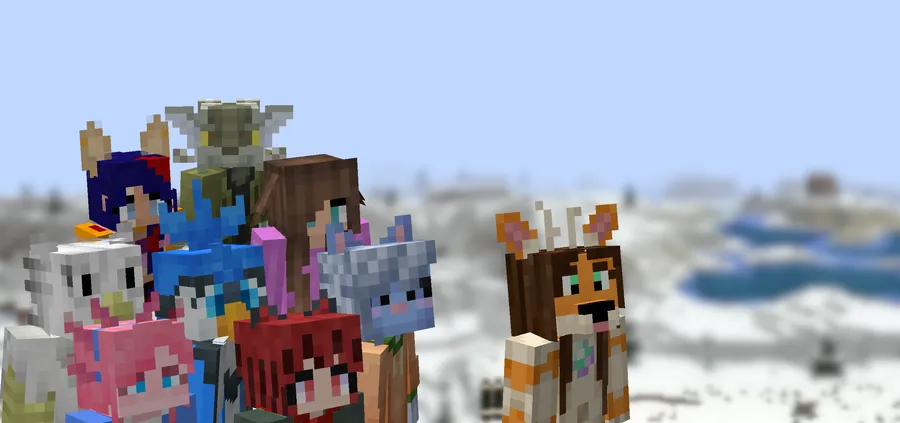
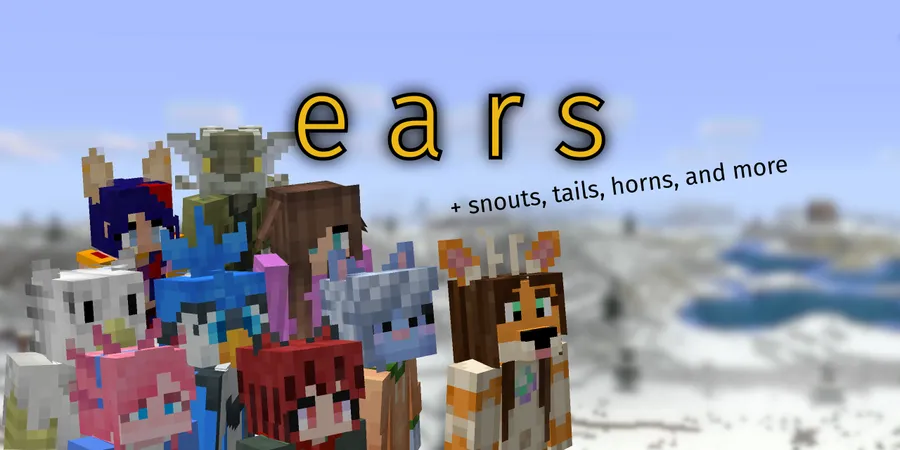
- Extra character parts — The main draw is obvious: you can add ears, snouts, muzzles, tails, horns, wings, and more to your player skin. That matters because it lets you express a theme or identity that the default skin system cannot cover. For roleplay, servers, or just personal style, those details make a skin feel intentional instead of generic.
- Vanilla-faithful skin style — Ears is designed to look closer to vanilla than a full custom model overhaul. That matters if you want the skin to feel like it still belongs in Minecraft rather than looking detached from it. In practice, it is easier to keep the character recognizable while still adding personality.
- 2D-first with some 3D support — The mod uses a lot of 2D skin regions, with a few 3D elements mixed in. That balance matters because it keeps the system relatively simple while still allowing extra shape where it helps most. Players who want something more flexible than a plain skin layer, but less complex than a full animation framework, get a good middle ground here.
- Broad version reach — The mod is built to work across many Minecraft versions, including very old ones, and it also includes skin backports and fixes for pre-1.9 versions. That matters if you move between different servers, modpacks, or legacy installs. You do not have to treat your skin customization as something that only works on one narrow version range.
- Lightweight alternative to larger model systems — The author positions Ears as a lighter option than systems like Tails, CPM, or Figura. That matters for players who want customization without committing to a large rendering or data-sync stack. It appears to be lightweight by design, which makes it easier to carry across loaders and versions.
- No external skin server dependency — Ears uses Mojang's skin server rather than requiring its own third-party backend. That matters because it avoids the risk of an extra service going offline and breaking your setup. For a player, that means less maintenance and fewer moving parts to trust over time.
- Open-ended customization — The mod is flexible, but it still expects you to draw your own additions rather than handing you a giant prefab library. That matters because it gives you control over the final look instead of forcing a predefined template. If you want something simple and specific, that can be a better fit than a more rigid preset-based system.
Screenshots
How to Install Ears (+ Snouts/Muzzles, Tails, Horns, Wings, and More) Mod
- Choose the Minecraft version you are playing, then open the matching internal loader page for your setup, such as Fabric Loader, Minecraft Forge, NeoForge, or Quilt Loader.
- Download the Ears file that matches your Minecraft version and loader combination from the download section below.
- Install the required loader first if it is not already on your instance, then place the mod file into your `mods` folder.
- Launch Minecraft once to let the loader initialize the mod, then check your skin setup in-game.
- If you want a custom look, use the mod's skin configuration workflow and adjust the additions you want before joining a server.
Requirements & Compatibility
| Item | Details |
|---|---|
| Mod Name | Ears (+ Snouts/Muzzles, Tails, Horns, Wings, and More) Mod |
| Category | Minecraft Mods |
| Author | exaptations |
| Supported Loaders | Fabric, Forge, NeoForge, Quilt |
| Supported Versions | 26.1, 1.21.11, 1.21.10, 1.21.8, 1.21.7, 1.21.6, 1.21.5, 1.21.4, 1.21.1, 1.21, 1.20.6, 1.20.5, 1.20.4, 1.20.3, 1.20.2, 1.20.1, 1.20-pre1, 1.20, 1.19.4, 1.19.3, 1.19.2, 1.19.1, 1.19, 1.18.2, 1.18.1, 1.18, 1.17.1, 1.17, 1.16.5, 1.16.4 |
| License | MIT |
| Source | GitHub repository |
| Updated | 2026-03-30 |
| Downloads | 999,487 |
What's New
- 26.1 release: the mod was ported to Minecraft 26.1.
- The port work is credited to Riflusso in the changelog.
- StAPI b1.7.3 release: Ears' skin fix is disabled when RetroAuth is present.
- The RetroAuth change is specifically tied to the StAPI b1.7.3 branch.
Pros and Cons
Pros
- Works across a wide range of Minecraft versions, including older releases.
- Uses Mojang's skin server instead of requiring an external service.
- Feels closer to vanilla than a full custom-player-model system.
- Supports a broad set of cosmetic ideas like tails, horns, wings, and ears.
- Open source and backed by a public GitHub project.
Cons
- You need to draw your own additions instead of relying on ready-made prefabs.
- It offers fewer customization options than larger systems like CPM or Figura.
- Some players may prefer the more animated look of fully 3D model mods.
- Version support is broad, but you still need the matching loader and build.
Alternatives to Ears (+ Snouts/Muzzles, Tails, Horns, Wings, and More) Mod
- Tails Mod - A more model-heavy option if you want a different style of player customization with stronger 3D presentation.
- Figura Mod - A stronger choice for players who want deeper avatar customization and do not mind a more involved system.
- Custom Player Models Mod - A useful alternative if you want more advanced player model control than Ears provides.
Download Ears (+ Snouts/Muzzles, Tails, Horns, Wings, and More) Mod
| Minecraft Version | Fabric | NeoForge | Quilt |
|---|---|---|---|
| For Minecraft 26.1 | Download | Download | Download |
| For Minecraft 1.21.11 | Download | Download | Download |
| For Minecraft 1.21.10 | Download | Download | Download |
| For Minecraft 1.21.8 | Download | Download | Download |
| For Minecraft 1.21.7 | Download | Download | Download |
| For Minecraft 1.21.6 | Download | Download | Download |
| For Minecraft 1.21.5 | Download | Download | Download |
| For Minecraft 1.21.4 | Download | Download | Download |
| For Minecraft 1.21.1 | Download | Download | Download |
| For Minecraft 1.21 | Download | Download | Download |
| For Minecraft 1.20.6 | Download | Download | Download |
| For Minecraft 1.20.5 | — | Download | — |
Always download mods from official sources to stay safe.
Frequently Asked Questions
What does Ears mod add to the game?
It adds cosmetic skin features such as ears, snouts, muzzles, tails, horns, wings, and similar player extras. The focus is on making your skin more expressive without replacing the whole player model system.
Is Ears mod lightweight?
Yes, it appears to be a lightweight option compared with larger custom model systems. The mod stores its data as pixels in the skin, which is one reason it is easier to carry across versions.
Does Ears mod require an external server?
No, it does not rely on a third-party skin server. It uses Mojang's skin server, which reduces the risk of a separate service going down and breaking your setup.
Which Minecraft loaders does Ears support?
It supports Fabric, Forge, NeoForge, and Quilt. The download list also shows builds for many Minecraft versions, so you need to match both the loader and game version you are running.
Can I use Ears on older Minecraft versions?
Yes, it supports older releases and includes skin backports and fixes for pre-1.9 versions. That makes it a practical choice if you play legacy modpacks or older servers.
Is Ears better than Tails?
That depends on what you want. Ears is the better fit if you want easier version portability and a more vanilla-faithful skin system, while Tails is described as having more elaborate 3D models and animations.
Do I have to design the additions myself?
Yes, you do. The mod does not ship with easy recolorable prefabs in the way some other customization systems do, so it expects a bit more hands-on skin work.