
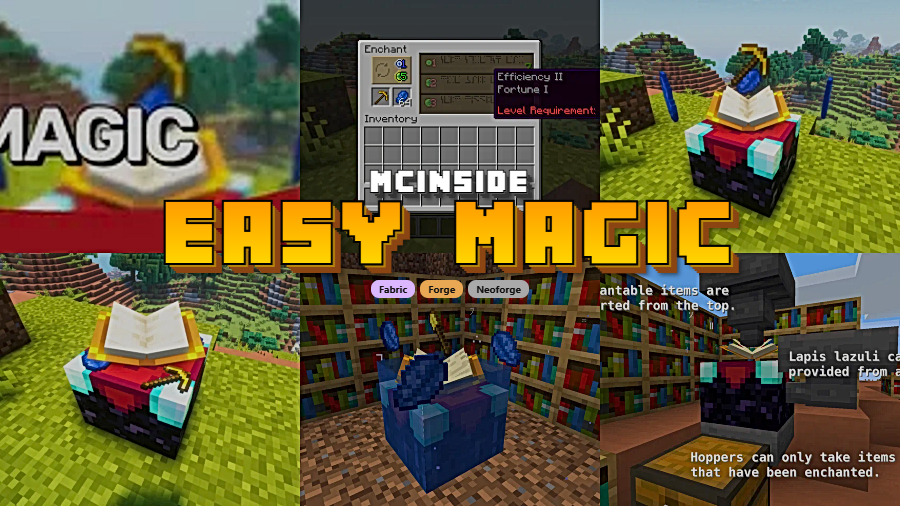
Easy Magic is a utility mod that overhauls the enchanting table experience by letting items stay inside the table after closing the interface and adding a simple re-roll button for enchantment options, available for Fabric, Forge, and NeoForge.
Vanilla Minecraft's enchanting system has a well-known pain point that has persisted for years: every time you close an enchanting table, your items and lapis lazuli vanish back into your inventory. You then have to tediously re-place everything just to browse enchantment options again. For players who enchant frequently — especially on survival servers or during late-game grinding — this adds up to a genuinely frustrating experience. Easy Magic, created by Fuzs, tackles this head-on with a clean, lightweight solution. With nearly 10 million downloads on Modrinth alone, it has become one of the most popular quality-of-life enchanting mods in the Minecraft modding community. First published in July 2022 and actively updated through December 2025, the mod continues to receive support for the latest Minecraft versions.
Key Features of Easy Magic
- Persistent Item Storage in Enchanting Tables — When you close an enchanting table, your lapis lazuli and the item you were enchanting stay right where you left them. This eliminates the repetitive click-drag cycle that makes vanilla enchanting feel tedious, especially during long play sessions where you're enchanting multiple pieces of gear back to back.
- Floating Item Rendering — Items left inside the enchanting table are beautifully rendered floating above the block, similar to how items spin on pedestals in adventure maps. This visual touch not only looks impressive but also serves a practical purpose: you can see at a glance which table already has items loaded and ready to enchant.
- Enchantment Re-Roll Button — The enchanting interface includes a dedicated button that lets you re-roll the three enchantment options offered by the table. Instead of the vanilla workaround of enchanting a throwaway book to cycle options, you can simply click re-roll at a very low experience cost. This alone saves significant time and resources during enchanting sessions.
- Low Re-Roll Cost — Re-rolling enchantments costs only a small amount of experience, making it accessible even for early-game players. In vanilla Minecraft, cycling through enchantment options requires wasting lapis and levels on unwanted enchantments — Easy Magic removes that tax entirely and lets you hunt for the perfect enchantment without going broke.
- Multi-Loader Support — Easy Magic runs on Fabric, Forge, and NeoForge, so you can use it regardless of which mod loader your modpack or server runs. This broad compatibility means you don't have to choose between Easy Magic and other mods that might be locked to a specific loader ecosystem.
- Lightweight and Non-Invasive — The mod focuses exclusively on enchanting table improvements without touching other game mechanics. It appears to be lightweight and compatible with most modpacks, making it a safe addition to any setup without worrying about conflicts with larger overhaul mods.
- Open Source Under MPL-2.0 — Easy Magic is fully open source on GitHub, licensed under MPL-2.0. This means the community can inspect the code, report issues directly, and contribute fixes — a reassuring sign of transparency for players cautious about mod safety.
How to Install Easy Magic
- Choose and install a compatible mod loader: Fabric, Minecraft Forge, or NeoForge. If you are unsure which to pick, Fabric and NeoForge have the most recent Easy Magic releases.
- If using Fabric, make sure you also have the Fabric API installed, as most Fabric mods require it as a dependency.
- Download the correct Easy Magic .jar file for your Minecraft version and mod loader from the official Modrinth or CurseForge page.
- Place the downloaded .jar file into your
.minecraft/modsfolder. If the folder does not exist, create it manually. - Launch Minecraft using your mod loader profile. Open an enchanting table to confirm the re-roll button appears and items persist after closing the interface.
Requirements & Compatibility
| Requirement | Details |
|---|---|
| Mod Loaders | Fabric, Forge, NeoForge |
| Minecraft Versions | 1.19 – 1.21.11 |
| Latest Release | v21.11.0 for Minecraft 1.21.11 |
| License | MPL-2.0 (Open Source) |
| Dependencies | Fabric API (Fabric only) |
What's New
- Updated to Minecraft 1.21.11 with full compatibility for the latest game release (December 2025).
- Continued support for both Fabric and NeoForge loaders on the newest versions.
- The project follows Semantic Versioning, ensuring predictable updates and clear changelogs for each release.
- Ongoing maintenance since the original July 2022 release, with consistent updates across major Minecraft version jumps.
Pros and Cons
Pros
- Solves one of the most universally annoying aspects of vanilla enchanting
- Re-roll button eliminates the wasteful book-enchanting workaround
- Available on all three major mod loaders (Fabric, Forge, NeoForge)
- Actively maintained with support for Minecraft 1.19 through 1.21.11
- Nearly 10 million downloads — battle-tested by a massive player base
- Open-source code adds transparency and trust
Cons
- Limited to enchanting table improvements only — does not overhaul the enchanting system itself
- Players who prefer a complete magic overhaul may want a more comprehensive mod instead
- Re-roll cost, while low, still requires some experience points
Alternatives to Easy Magic
- Enchanting Infuser — Lets you pick specific enchantments directly instead of relying on randomized options, giving you full control over what goes on your gear.
- Enchantment Descriptions — Adds tooltip descriptions to every enchantment so you know exactly what each one does before spending levels on it.
- Table Top Craft — A broader crafting station overhaul that improves multiple workstation interfaces, including enchanting tables, with persistent storage and visual upgrades.
Download Easy Magic
| Minecraft Version | Fabric | Forge | NeoForge |
|---|---|---|---|
| For Minecraft 1.21.11 | Download | — | Download |
| For Minecraft 1.21.10 | Download | — | Download |
| For Minecraft 1.21.9 | Download | — | Download |
| For Minecraft 1.21.8 | Download | — | Download |
| For Minecraft 1.21.7 | Download | — | Download |
| For Minecraft 1.21.6 | Download | — | Download |
| For Minecraft 1.21.5 | Download | — | Download |
| For Minecraft 1.21.4 | Download | — | Download |
| For Minecraft 1.21.3 | Download | — | Download |
| For Minecraft 1.21.1 | Download | — | Download |
| For Minecraft 1.21 | Download | — | Download |
| For Minecraft 1.20.4 | Download | Download | Download |
Always download mods from official sources to stay safe.
Frequently Asked Questions
Is Easy Magic compatible with other enchanting mods?
Yes — Easy Magic is generally compatible with most enchanting-related mods since it only modifies the enchanting table interface behavior. Mods that add new enchantments, like Enchantment Descriptions, work alongside it without issues. However, mods that completely replace the enchanting table GUI may conflict, so check for known incompatibilities before combining them.
Does Easy Magic work on multiplayer servers?
Yes — Easy Magic works on both client and server. For the best experience on a multiplayer server, the mod should be installed on the server side so that all players benefit from persistent item storage in enchanting tables. The re-roll feature and item rendering will function properly when the server has the mod installed.
How much experience does re-rolling enchantments cost?
Re-rolling costs a very small amount of experience, significantly less than enchanting a throwaway item to cycle options. The exact cost is designed to be low enough that even early-game players can afford to re-roll multiple times without draining their experience bar, making it a far more efficient alternative to the vanilla workaround.
Can I use Easy Magic with Fabric and NeoForge at the same time?
No — you must choose one mod loader per Minecraft installation. Easy Magic provides separate .jar files for Fabric, Forge, and NeoForge, so download the version that matches your loader. You cannot mix loaders in a single Minecraft profile, but you can create separate profiles for different loaders if needed.
Will my items be lost if I uninstall Easy Magic?
Yes, items stored inside enchanting tables may be lost if you remove the mod. Before uninstalling, open each enchanting table and move all items back to your inventory. Since vanilla Minecraft does not support persistent storage in enchanting tables, the game has no way to preserve those items once the mod is removed.


![[Let's Do] Meadow Mod (1.21.1) - thumbnail](http://mcinside.com/wp-content/uploads/2026/04/thumbnail-64-52x52.webp)


![Not Enough Recipe Book [NERB] Mod (1.21.11) - thumbnail](http://mcinside.com/wp-content/uploads/2026/04/thumbnail-63-52x52.webp)
