
Emotecraft Mod (26.1) is a social Minecraft mod that adds built-in and custom player emotes for Minecraft on Fabric, Forge, NeoForge, and Quilt, with Bukkit/Paper server support available through its plugin build. It gives players a practical way to express reactions in-game without relying only on chat text.
Minecraft multiplayer can feel limited when every reaction has to be typed, especially on busy servers where chat moves fast. Emotecraft solves that by giving players quick, visible emotes and support for custom animations, so communication feels more human and immediate. With more than 5.2 million downloads on Modrinth, it also has clear social proof that many players and server communities already use it in real play sessions.
Key Features of Emotecraft Mod (26.1)
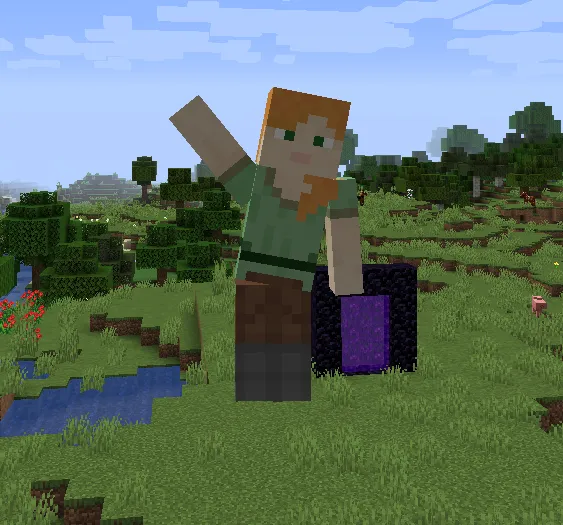
- Built-in emotes out of the box — You get default emotes like waving without needing extra setup, which is useful for testing instantly after installation. That matters because you can confirm everything works before you spend time curating custom packs. It also makes first-time use friendly for casual players.
- Custom emote support — You can create your own animations and use them in-game, which is the core reason most players install this mod long-term. This matters for communities that want shared style, events, or roleplay gestures beyond the defaults. It turns emotes from a novelty into a personalized system.
- Emote creation workflow with Blender and Blockbench tools — Official docs and tool links are provided, so creators are not guessing their way through a complex pipeline. That reduces friction for artists and content creators who want repeatable results. For teams, this makes it easier to standardize custom emote packs.
- Fast in-game emote wheel — Pressing
Bopens the emote selection wheel, giving you immediate access during gameplay. That matters because social actions need to be quick, not hidden in deep menus. The result is smoother communication during active play. - Simple custom emote folder management — Custom files can be dropped into
.minecraft/emotes, and the config screen can open the folder directly. This matters because the install path is easy to explain to new players and staff. It keeps setup practical for both individuals and server onboarding guides. - Server-side synchronization and cross-loader flexibility — Emotes can synchronize between players, and client/server mod loaders can differ in supported setups. That matters for mixed environments where players do not all run identical stacks. You can also still join vanilla servers, with the understanding that emote features are not active there unless you use compatible solutions like Online Emotes.
Screenshots
How to Install Emotecraft Mod (26.1)
- Choose your Minecraft version first (from 1.21.1 through 1.21.11 in the current release list), then download the matching Emotecraft file from an official source.
- Install one supported loader on your client: Fabric Loader, Minecraft Forge, NeoForge, or Quilt Loader.
- Place the mod JAR in your
modsfolder, then install the same mod on the server side if you want synchronized emotes in multiplayer. - If you run a plugin-based server, use the Bukkit/Paper build and place it as a plugin on Bukkit or Paper.
- Launch Minecraft, press
Bto open the emote wheel, and add custom files to.minecraft/emotes(or open that folder from the config screen).
Requirements & Compatibility
| Item | Details |
|---|---|
| Mod Name | Emotecraft Mod (26.1) |
| Author | KosmX |
| Category | Minecraft Mods |
| Supported Mod Loaders | Fabric, Forge, NeoForge, Quilt |
| Server Software Mentioned | Bukkit, Paper |
| Minecraft Versions Listed | 1.21.11, 1.21.10, 1.21.9, 1.21.8, 1.21.7, 1.21.5, 1.21.4, 1.21.1 |
| License | GPL-3.0-or-later |
| Published / Updated | 2021-02-08 / 2026-03-26 |
What's New
- Fixed an NBS player crash, which should improve stability in cases that previously failed.
- Updated NoteBlockLib to align with the current release branch.
- Updated PAL as part of dependency maintenance.
- Fixed configuration-related issues to make setup behavior more predictable.
Pros and Cons
Pros
- Built-in emotes are usable immediately after install.
- Custom emote support is the main strength for creators and communities.
- Official docs and tools are available for Blender/Blockbench workflows.
- Cross-environment flexibility appears strong across multiple loaders and server types.
- You can still connect to vanilla servers when needed.
Cons
- Most value comes from multiplayer or social play; solo players may use it less.
- Custom emote creation requires external tools and some learning time.
- Feature behavior depends on proper client/server setup for synchronized use.
- You must download from official sources only to avoid unsafe files.
Alternatives to Emotecraft Mod (26.1)
- Online Emotes — A complementary option mentioned for playing emotes on vanilla servers where full mod features are otherwise inactive.
- Emotecraft (Forge build) — Use this branch when your stack is specifically centered around Forge compatibility paths.
- Emotecraft Bukkit/Paper Plugin — A server-side plugin route for Bukkit/Paper environments that want emote support.
Download Emotecraft Mod (26.1)
| Minecraft Version | Fabric | NeoForge | Quilt |
|---|---|---|---|
| For Minecraft 1.21.11 | Download | Download | — |
| For Minecraft 1.21.10 | Download | Download | — |
| For Minecraft 1.21.9 | Download | Download | — |
| For Minecraft 1.21.8 | Download | Download | — |
| For Minecraft 1.21.7 | Download | Download | — |
| For Minecraft 1.21.5 | Download | Download | Download |
| For Minecraft 1.21.4 | Download | Download | Download |
| For Minecraft 1.21.1 | Download | Download | Download |
Always download mods from official sources to stay safe.
Frequently Asked Questions
Is Emotecraft worth installing for multiplayer servers?
Yes. It adds quick, visual player expression that can make social interaction clearer than chat-only reactions. For communities focused on roleplay, events, or friendly communication, that can noticeably improve moment-to-moment gameplay.
Can I use Emotecraft on vanilla servers?
Yes, but with limits. You can connect to vanilla servers while the mod is installed, but the mod's core emote functionality is not active there by default. The project also references Online Emotes for vanilla-server emote use.
Does Emotecraft support multiple mod loaders?
Yes. The listed support includes Fabric, Forge, NeoForge, and Quilt, and plugin support is available for Bukkit/Paper contexts. The provided notes also describe cross-modloader client/server scenarios in supported setups.
Where do I put custom emote files?
The folder is .minecraft/emotes. After placement, you can access emotes in-game from the wheel opened with B. The config screen can also open the emotes folder directly, which helps with quick file management.
What are the safest download sources for Emotecraft?
The safest sources are the official project pages. The provided list includes GitHub, Modrinth, CurseForge, CurseForge Forge build, Hangar (Paper), and the project Maven for developers. Avoiding unofficial mirrors is the recommended security practice.




![Not Enough Recipe Book [NERB] Mod (1.21.11) - thumbnail](http://mcinside.com/wp-content/uploads/2026/04/thumbnail-63-52x52.webp)


