
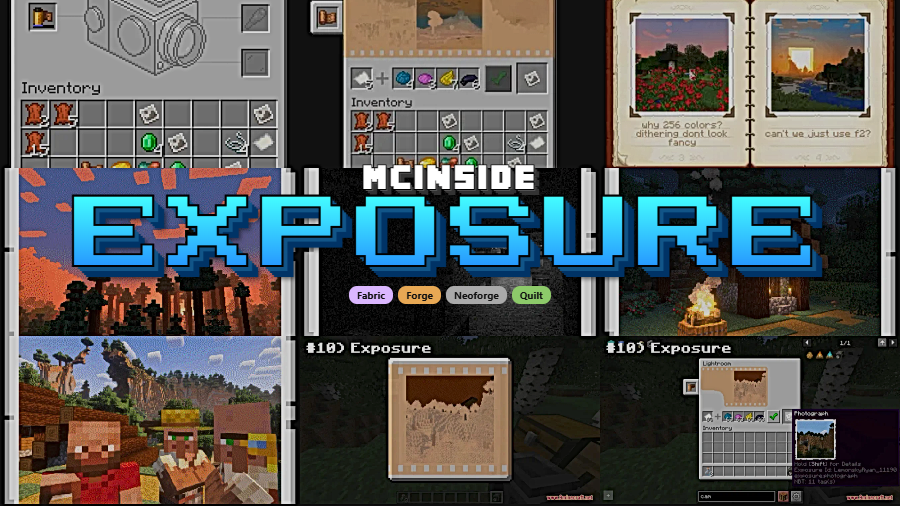
Exposure is a film photography mod that adds a fully functional camera system with realistic film development and printing mechanics to Minecraft, available for Fabric, Forge, NeoForge, and Quilt mod loaders.
Minecraft's default screenshot feature is functional but flat. There is no sense of craft, no process, and no way to display your captures as physical items in the world. Exposure changes that entirely by introducing an analog photography system that turns taking pictures into a genuine gameplay loop. With over 9.5 million downloads since its 2023 release, this mod by mortuusars has become the go-to choice for players who want more than a quick F2 screenshot. It treats photography as a skill — you load film, adjust settings, develop negatives, and print photographs you can hang on your walls or share with friends on multiplayer servers.
Key Features of Exposure Mod
- Fully Interactive Camera System — The camera works like a real handheld device: load a Film Roll, open the Viewfinder, compose your shot, and release the shutter. This hands-on approach makes every photograph feel intentional rather than just another screenshot saved to a folder. You are genuinely operating a tool within the game world.
- Adjustable Camera Settings — Press or hold Sneak while looking through the Viewfinder to access Focal Length, Shutter Speed, Flash mode, and Composition Guides. These controls let you frame shots with precision and adapt to different lighting conditions. Whether you are shooting a dark cave or a sunset over an ocean monument, you have the tools to get the exposure right.
- Camera Attachments and Modifications — Sneak-use the Camera to open the Attachments window where you can load film, equip a Flash using a Redstone Lamp, modify the Lens with a Spyglass, or add a color Filter using Glass Panes. This modular system ties photography directly into Minecraft's crafting ecosystem, giving each attachment a practical gameplay purpose.
- Black & White and Color Film — You can choose between simpler black and white film or more sophisticated color film that is harder to craft and process. Each film roll holds 16 frames, so you need to be selective about what you shoot. The limitation encourages thoughtful composition instead of spamming captures.
- Film Developing and Lightroom Printing — After shooting, developing your film is required before printing. The Lightroom block lets you preview negatives and select the best exposures before committing resources to a print. Black and white prints require Paper and Black Dye, making the entire workflow a satisfying crafting chain from capture to finished photograph.
- Chromatic Effects and Interplanar Projector — Beyond basic photography, Exposure includes chromatic visual effects and an Interplanar Projector that can display images in the game world. The projector opens up creative possibilities for galleries, museums, and multiplayer server decorations that go far beyond simple item frames.
- Companion Mods: Polaroid and Catalog — The ecosystem extends with optional add-ons like Exposure Polaroid for instant-print cameras and Exposure Catalog for organizing your photo collections. These companion mods build on the core system without bloating the base installation.
How to Install Exposure Mod
- Install your preferred mod loader: Fabric, NeoForge, Forge, or Quilt — Fabric and NeoForge support Minecraft 1.21.1, while all four loaders support 1.20.1.
- Download the correct Exposure file for your Minecraft version and mod loader from the official Modrinth page.
- Place the downloaded
.jarfile into your.minecraft/modsfolder. If the folder does not exist, launch Minecraft once with your mod loader to generate it. - Launch Minecraft using your mod loader profile. The mod should appear in the mod list on the main menu.
- Craft a Camera and Film Roll to begin — check the in-game recipe book or JEI/REI for crafting recipes.
Requirements & Compatibility
| Minecraft Version | Supported Loaders | Notes |
|---|---|---|
| 1.21.1 | Fabric, NeoForge | Latest supported version |
| 1.20.1 | Fabric, Forge, Quilt, NeoForge | Widest loader support |
Known incompatibilities: OptiFine is known to cause problems — use Sodium or Embeddium instead. Visual Overhaul crashes when opening camera controls. Exordium causes flickering when looking through the viewfinder. FastAnim on Fabric breaks player model animations while using the camera.
What's New
- Interplanar Projector images are now limited to a maximum resolution of 10000×10000 for stability and performance.
- On multiplayer servers, projecting images from URLs is now restricted to allowed domains by default to improve security.
- The URL domain allowlist is a client-side setting, so individual players can adjust it as needed.
- Added a config option to restrict file-based image projection to paths relative to the game directory on multiplayer servers.
Pros and Cons
Pros
- Complete photography workflow from film loading to printed photographs
- Supports all major mod loaders across multiple Minecraft versions
- Deeply integrated with vanilla crafting — attachments use existing Minecraft items
- Active development with regular updates and security improvements
- Expandable with companion mods like Polaroid and Catalog
- Open-source under MIT license
Cons
- Incompatible with OptiFine — players must switch to Sodium or Embeddium
- Known conflicts with several visual mods including Visual Overhaul and Exordium
- Color film crafting and processing can be resource-intensive for early-game players
- 16-frame film limit may feel restrictive for prolific photographers
Alternatives to Exposure Mod
- Camera Mod — A simpler camera mod focused on quick snapshots without the full film development workflow, suited for players who want convenience over immersion.
- Screenshot Viewer — Allows displaying screenshots and images in-game without a crafting process, ideal for server galleries and decoration.
- Invisible Item Frames — While not a camera mod, invisible item frames let you display maps and images cleanly on walls for a lightweight photo-display alternative.
Download Exposure Mod
| Minecraft Version | Fabric | Forge | NeoForge | Quilt |
|---|---|---|---|---|
| For Minecraft 1.21.1 | Download | — | Download | — |
| For Minecraft 1.20.1 | Download | Download | Download | Download |
Always download mods from official sources to stay safe.
Frequently Asked Questions
Does Exposure Mod work with OptiFine?
No — OptiFine is known to cause problems with Exposure. The mod author recommends using Sodium or Embeddium as a performance optimization replacement, both of which are compatible with Exposure and generally offer better mod compatibility overall.
Can I use Exposure Mod on multiplayer servers?
Yes — Exposure works on multiplayer servers and includes security features for safe image sharing. The latest update restricts URL-based image projection to allowed domains by default on multiplayer, and server-side file projection can be limited to the game directory for additional safety.
How many photos can I take on a single film roll?
16 frames per roll. Each film roll holds exactly 16 exposures, after which you need to load a new roll. This limitation is intentional and encourages players to compose shots carefully rather than capturing everything indiscriminately.
Is Exposure Mod available for Minecraft 1.21.1?
Yes — Exposure supports Minecraft 1.21.1 on both Fabric and NeoForge mod loaders. For Minecraft 1.20.1, all four major loaders are supported including Forge and Quilt. Check the download section for the correct file matching your version and loader.
What is the difference between black and white film and color film?
Black and white film is simpler to craft and develop, while color film produces full-color photographs but requires more complex materials and processing steps. Both types fit 16 frames per roll. New players should start with black and white film to learn the photography workflow before investing in color film production.




![[Let's Do] Meadow Mod (1.21.1) - thumbnail](http://mcinside.com/wp-content/uploads/2026/04/thumbnail-64-52x52.webp)


![Not Enough Recipe Book [NERB] Mod (1.21.11) - thumbnail](http://mcinside.com/wp-content/uploads/2026/04/thumbnail-63-52x52.webp)


