

Create: Extended Cogwheels Mod is a Create add-on mod that adds more cogwheel materials and recipe compatibility for Minecraft Forge, NeoForge, Fabric, and Quilt.
If you have ever opened a busy Create factory and struggled to tell one power line from another, this mod solves a real quality-of-life problem: more visual options for cogwheels and flywheels, plus recipe changes that help keep older worlds and mixed modpacks from breaking in awkward ways. It has also passed the 1 million download mark, which is a strong sign that a lot of Create players found the idea useful enough to keep installing it.
Key Features of Create: Extended Cogwheels Mod
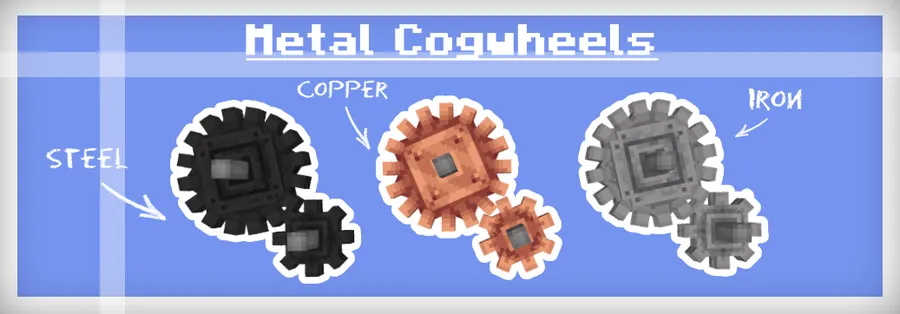
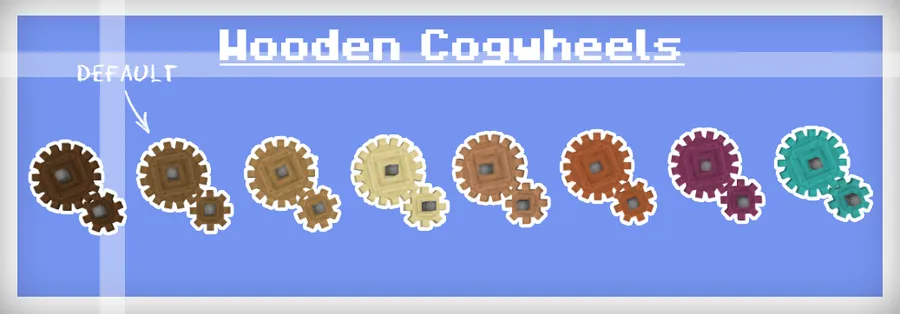
- More cogwheel materials for decoration and organization — The main benefit here is readability. When your Create machines spread across a base, different cogwheel types make it easier to sort builds by function and spot what belongs where. That matters just as much for aesthetics as it does for troubleshooting.
- No new steel ingot dependency — The mod specifically avoids forcing you to add another steel item just to use its content. That keeps it friendly to vanilla-leaning packs and reduces the chance that one extra dependency becomes a roadblock during world setup.
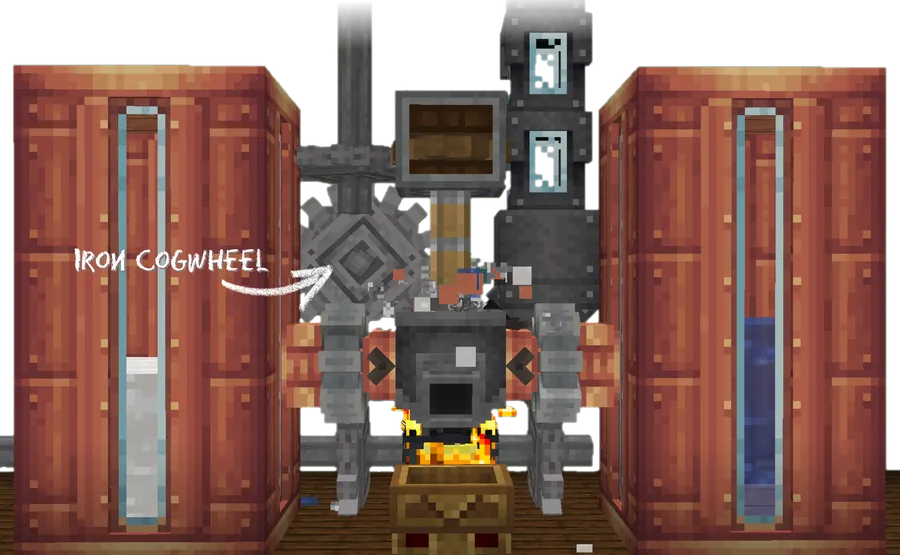
- Blasted iron cogwheels can become steel flywheels — This is the compatibility-minded part of the design. Instead of making existing worlds feel obsolete, the mod gives you a way to convert iron cogwheels into steel flywheels, which is a practical upgrade path when you start introducing steel into a pack.
- Native support for steel when your modpack already has it — If steel is already part of your pack, the mod does not get in the way. You can craft those cogwheel variants in the expected way with steel ingots, which helps the mod fit naturally into larger modded kitchens without forcing a special-case workflow.
- Regular cogwheels now use spruce planks — This recipe change is small but important because it gives the base cogwheel a clearer identity. It also helps separate the standard version from the extended variants, so your crafting progression feels more deliberate instead of cluttered.
- Recipes accept any cogwheel type — This is one of the best compatibility decisions in the mod. By allowing any cogwheel type in recipes that use cogwheels, it reduces the chance that another mod or an older world will trip over a single exact item match.
- Translation support across multiple languages — The mod includes localization work for Polish, German, Dutch, Korean, Simplified Chinese, Brazilian Portuguese, Mexican Spanish, and Traditional Chinese. That does not just help non-English players; it is also a good sign that the project has real community involvement and cares about accessibility.
Screenshots
How to Install Create: Extended Cogwheels Mod
- Make sure you have the correct loader installed for your setup, such as Fabric, Forge, NeoForge, or Quilt.
- Check that your Minecraft version matches one of the supported releases: 1.20.1, 1.19.2, or 1.18.2.
- Install Create and any other mod dependencies required by your modpack before adding this add-on.
- Download the file for the loader you are using, then place it into your Minecraft
modsfolder. - Launch the game, open a world, and verify that the new cogwheel options appear in Create crafting and building menus.
Requirements & Compatibility
| Item | Details |
|---|---|
| Mod Type | Create add-on focused on cogwheel materials, flywheels, and recipe compatibility |
| Supported Minecraft Versions | 1.20.1, 1.19.2, 1.18.2 |
| Supported Loaders | Forge, NeoForge, Fabric, Quilt |
| Required Loader | Fabric Mod Loader, Minecraft Forge, NeoForge, or Quilt Loader depending on your installation |
| Author | Rabbitminers |
| License | MIT |
| Published | 2022-12-20 |
| Last Updated | 2024-04-02 |
| Source Code | GitHub repository |
What's New
- Added support for Create 0.5.1f.
- Fixed inconsistent material consumption when applying textures.
- Fixed an edge case in material selection when using bamboo planks.
- Improved consistency around how cogwheel materials behave in updated Create setups.
Pros and Cons
Pros
- Good for players who want more visual control over Create builds.
- Built with compatibility in mind, especially for mixed modpacks and older worlds.
- Supports multiple major mod loaders and several Minecraft versions.
- Includes translations for multiple languages, which makes it easier to use in different regions.
Cons
- It is a focused add-on, so players looking for a bigger Create expansion may want more content.
- The regular cogwheel recipe change to spruce planks may not match every player's preferred crafting flow.
- Some localization entries may still need community help, according to the author's note.
Alternatives to Create: Extended Cogwheels Mod
- Dave's Building Extended — A good companion pick if you want more Create-friendly building variety to match the extra visual options this mod adds.
- Powderlogy & Illumination — A complementary choice for players who like adding more decorative detail and atmosphere around Create-focused builds.
- Extended Flywheels — A natural alternative if your goal is to expand the visual language of Create power systems even further.
Download Create: Extended Cogwheels Mod
| Minecraft Version | Fabric | Forge | NeoForge | Quilt |
|---|---|---|---|---|
| For Minecraft 1.20.1 | Download | Download | Download | Download |
| For Minecraft 1.19.2 | Download | Download | Download | Download |
| For Minecraft 1.18.2 | Download | Download | Download | Download |
Always download mods from official sources to stay safe.
Frequently Asked Questions
Is Create: Extended Cogwheels Mod a Create add-on?
Yes, it is a Create add-on built to expand cogwheel materials and improve recipe compatibility. Its purpose is to support Create builds rather than replace the base mod.
Which Minecraft versions does it support?
It supports 1.20.1, 1.19.2, and 1.18.2. Those are the versions listed in the provided mod data, so you should match your installation to one of them.
Does it work with Forge, Fabric, NeoForge, and Quilt?
Yes, it supports Forge, NeoForge, Fabric, and Quilt. That makes it easy to fit into a wide range of modpacks without being locked to a single loader family.
Does this mod add a new steel ingot?
No, it does not introduce another steel ingot. Instead, it is designed to stay compatible with packs that already have steel and to provide a conversion path from iron cogwheels to steel flywheels.
Will this mod break older worlds?
No, it is specifically written to be as compatible with existing worlds as possible. The recipe and conversion changes are meant to reduce friction when you load an older Create save or a mixed modpack.
Why were the cogwheel recipes changed?
They were changed to improve consistency and compatibility. Regular cogwheels now use spruce planks, and any cogwheel type can be accepted by recipes that depend on cogwheels, which helps avoid item-specific conflicts.
Is translation help still welcome?
Yes, translation help is welcome. The author explicitly notes that localization can still be improved, so community contributions are useful if you spot missing or slightly off names.


