

Fabric Seasons Mod is a Fabric mod that adds four seasons to Minecraft by changing biome colors, biome temperatures, weather behavior, and crop growth over time.
Vanilla Minecraft can feel visually frozen in time, especially once you have settled into a long-running world and every biome starts to look the same every day. Fabric Seasons fixes that problem by giving the world a visible and mechanical yearly cycle, and its 7,554,249 Modrinth downloads put it within sight of 8 million, which is strong evidence that players keep coming back to this style of seasonal immersion.
Key Features of Fabric Seasons Mod
- Four-season world cycle — The mod adds spring, summer, autumn, and winter, with each season lasting 28 in-game days by default. That gives your world a longer rhythm than simple day-night changes, so builds, farms, and exploration routes feel like they exist inside a living calendar instead of a static map.
- Server-side biome temperature changes — When installed on a server, biomes use different temperatures depending on the current season. This matters because weather starts to feel regional and timely, with effects such as snow and freezing in winter adding more atmosphere and a stronger sense that the world is reacting to time.
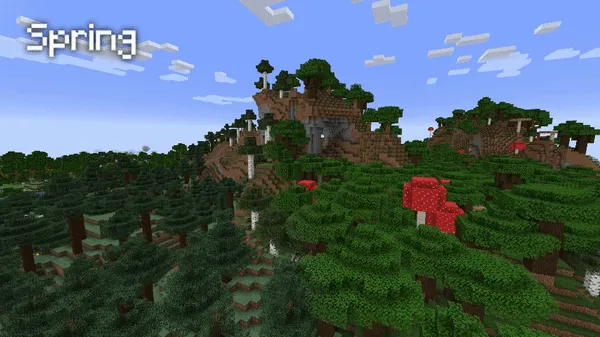
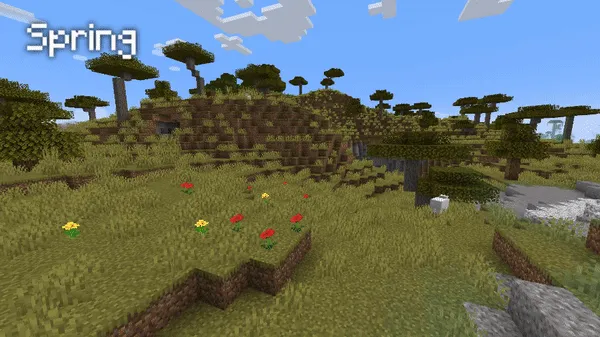
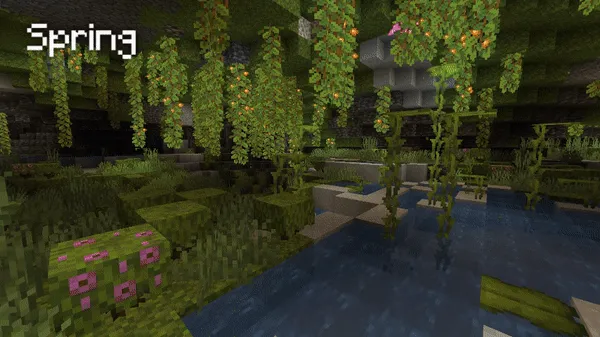
- Client-side seasonal colors — When installed on the client, biomes use different colormaps based on the season. Even though this side is visual only, it makes travel, building, and screenshots more satisfying because forests, fields, and plains no longer look identical year-round.
- Seasonal biome behavior — The seasonal rules are not applied in a flat way across every biome, which is one of the mod's best details. Cold biomes can get rain in summer, temperate biomes can get snow in winter, tropical biomes stay steadier, and hot biomes shift into a winter rainy season, so the map feels more varied and believable.
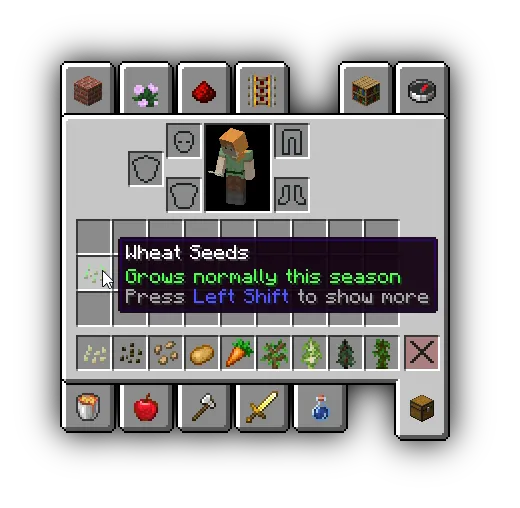
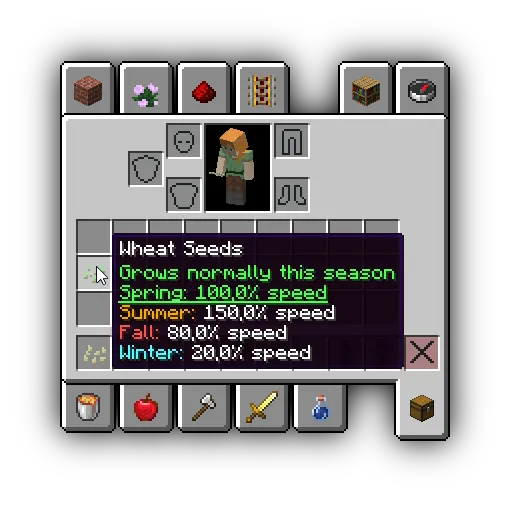
- Seasonal crop growth — Crops grow at different speeds depending on the active season, and each crop has a pre-configured seasonal profile. That gives farming a planning layer without turning it into a different game, because harvest timing starts to matter a little more from one part of the year to the next.
- Configurable pacing and datapack control — The default 28-day seasonal length is configurable, and crop behavior is driven by a datapack that users can edit. This is useful for players and server owners who want the idea of seasons but need to tune the pace to fit a specific survival world, modpack, or multiplayer schedule.
Screenshots
How to Install Fabric Seasons Mod
- Install the correct version of Fabric Mod Loader for your Minecraft setup before adding the mod itself.
- Download the Fabric Seasons file that matches your game version, such as Minecraft 1.21.1 or another listed release from the supported version range.
- Place the mod file into your Minecraft
modsfolder if you want the client-side visual changes, including seasonal biome colors. - Place the same mod on your server as well if you want biome temperature changes, seasonal weather behavior, and crop growth rules. The full experience is recommended when both client and server are using it.
- Launch the game and enter your world. Seasons are tied to world time, so the world will move through spring, summer, autumn, and winter as the days pass.
Requirements & Compatibility
| Item | Details |
|---|---|
| Mod Loader | Fabric |
| Required | Fabric Mod Loader |
| Minecraft Versions Listed | 1.21.1, 1.20.4, 1.20.2, 1.20.1, 1.20, 1.19.4, 1.19.3, 1.19.2, 1.19, 1.18.2, 1.18-rc4, 1.17.1, 1.17-rc1, 1.17-pre1, 1.17, 1.16.5 |
| Category | Minecraft Mods |
| Tags | adventure, utility |
| Author | D4rkness_King |
| License | MPL-2.0 |
| Published | 2021-05-09 |
| Last Updated | 2024-10-06 |
| Best Setup | Client for visual seasonal colormaps, server for biome temperature and crop logic, both for the full experience |
What's New
- The latest project update listed in the provided data is dated 2024-10-06.
- Minecraft 1.21.1 appears in the available download list, so this article's version target is directly supported in the provided data.
- The project's source code and commit-based changelog are maintained on GitHub, which is where ongoing changes are tracked.
- The mod remains available under the MPL-2.0 license.
- Modrinth records 7,554,249 downloads, showing continued long-term interest in the project.
Pros and Cons
Pros
- Adds visible and mechanical seasons without abandoning the vanilla feel.
- Changes biome temperatures and weather patterns on the server side.
- Improves atmosphere with seasonal biome colors on the client side.
- Includes seasonal crop growth for players who want a little more farming depth.
- Lets users adjust season pacing and crop behavior through configuration and datapacks.
Cons
- The full experience is best only when both client and server are running the mod.
- Client-only installation is visual and does not physically change the world.
- Seasonal crop speed changes may not suit every farm setup or survival pace.
- Some biome groups stay more stable than others, so the effect is not equally dramatic everywhere.
Alternatives to Fabric Seasons Mod
- Serene Seasons — A season-focused alternative if you want to compare another mod built around the changing time of year.
- Falling Leaves — A complementary visual mod that can make forests and outdoor areas feel more dynamic alongside seasonal color shifts.
- Farmer's Delight — A good companion choice if Fabric Seasons makes you want a deeper farming loop to go with seasonal crop timing.
Download Fabric Seasons Mod
| Minecraft Version | Fabric |
|---|---|
| For Minecraft 1.21.1 | Download |
| For Minecraft 1.20.4 | Download |
| For Minecraft 1.20.2 | Download |
| For Minecraft 1.20.1 | Download |
| For Minecraft 1.20 | Download |
| For Minecraft 1.19.4 | Download |
| For Minecraft 1.19.3 | Download |
| For Minecraft 1.19.2 | Download |
| For Minecraft 1.19 | Download |
| For Minecraft 1.18.2 | Download |
| For Minecraft 1.17.1 | Download |
| For Minecraft 1.17 | Download |
Always download mods from official sources to stay safe.
Frequently Asked Questions
Do I need to install Fabric Seasons Mod on both client and server?
No — you can install each component separately depending on what you want. The client side handles seasonal colormaps, while the server side handles biome temperatures, weather effects, and seasonal crops, so both together deliver the complete experience.
Does Fabric Seasons Mod change weather in Minecraft?
Yes — the server component changes biome temperatures by season, which enables weather changes such as snowing and block freezing in winter. That means weather starts to reflect the time of year instead of staying locked to the biome's default feel.
Does the client version only change visuals?
Yes — the client component is described as a visual change only. It updates biome colormaps for the current season, but it does not physically affect the world by itself.
Can I change how long each season lasts?
Yes — each season lasts 28 in-game days by default, and that length is configurable. That makes the mod easier to fit into slower survival worlds or faster multiplayer servers.
Do crops grow differently depending on the season?
Yes — crops have different growth speeds based on the current season. Those values are pre-configured per crop and are controlled through a datapack, which means users can change them if they want a different farming balance.
Which Minecraft versions are listed for Fabric Seasons Mod?
The provided data lists support from Minecraft 1.16.5 up to 1.21.1. It also includes several intermediate releases, plus 1.18-rc4, 1.17-rc1, and 1.17-pre1 in the version list.


![[Let's Do] Candlelight - Farm&Charm compat Mod (1.21.1) - thumbnail](http://mcinside.com/wp-content/uploads/2026/04/thumbnail-81-52x52.webp)


![[Let's Do] Meadow Mod (1.21.1) - thumbnail](http://mcinside.com/wp-content/uploads/2026/04/thumbnail-64-52x52.webp)
