
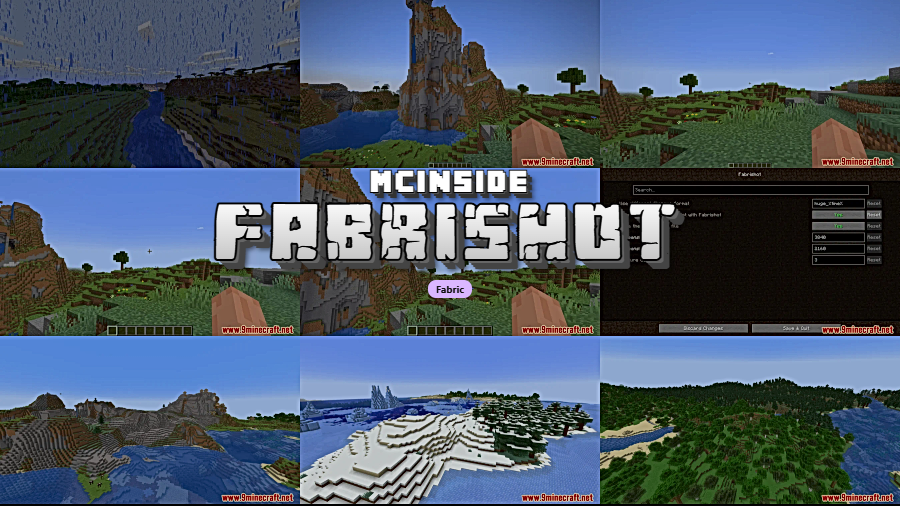
Fabrishot is a utility mod for Minecraft Fabric that lets you capture ultra-high-resolution screenshots far beyond the game's default limit. With a single key press, you can take screenshots at 4K resolution or higher, making it an essential tool for builders, content creators, and anyone who wants to showcase their Minecraft worlds in stunning detail.
Minecraft's built-in screenshot function captures images at your current window resolution — which for most players means a blurry, compressed image that looks terrible when zoomed in or shared on social media. This is a real problem for builders who spend hours on detailed creations, server owners promoting their worlds, and content creators who need clean visuals for thumbnails and portfolios. Fabrishot solves this by bypassing the default screenshot system entirely, rendering a full-resolution capture at 3840×2160 (4K) by default — with the option to go even higher. With over 14 million downloads on Modrinth, Fabrishot has become one of the most popular utility mods in the Fabric ecosystem, and for good reason: it does one thing and does it perfectly.
Key Features of Fabrishot
- Ultra-High-Resolution Screenshots — Fabrishot captures screenshots at 3840×2160 (4K) resolution by default, regardless of your actual game window size. This means even players on smaller monitors or lower-resolution displays can produce crisp, detailed images perfect for sharing, printing, or using as wallpapers.
- One-Key Capture with F9 — Instead of fumbling through menus or complex keybinds, simply press F9 to take a high-resolution screenshot instantly. This makes it easy to capture spontaneous moments during gameplay — a sunset over your base, a dramatic ravine, or a redstone build in action — without interrupting your flow.
- Customizable Resolution via Mod Menu — Using Mod Menu and Cloth Config, you can adjust the output resolution beyond the default 4K setting. Want an 8K screenshot for a massive panoramic print? Or a more modest 1440p to save disk space? Fabrishot gives you full control over the final image dimensions to match your exact needs.
- Lightweight and Focused Design — Fabrishot appears to be lightweight and does not add unnecessary features or bloat to your game. It focuses entirely on the screenshot function, which means it plays nicely alongside other mods in your load order without conflicts or performance concerns during normal gameplay.
- Broad Version Support — The mod supports Minecraft versions ranging from 1.16.3 all the way to the latest 1.21.11, covering years of Minecraft updates. Whether you're playing on a modern version or maintaining an older modpack, there's likely a compatible Fabrishot release available for your setup.
- Open-Source and MIT Licensed — Fabrishot is fully open-source under the MIT license with its source code available on GitHub. This means the community can inspect the code, contribute improvements, and trust that the mod contains no hidden surprises — an important consideration for server administrators and security-conscious players.
- Seamless Fabric Integration — Built specifically for the Fabric mod loader, Fabrishot follows Fabric's lightweight philosophy. It integrates cleanly with the Fabric ecosystem and works alongside popular Fabric mods like Sodium, Iris, and other rendering-related mods without requiring special patches or workarounds.
Screenshots
How to Install Fabrishot
- Download and install Fabric Mod Loader for your Minecraft version if you haven't already. Fabrishot requires Fabric to run.
- Download the Fabrishot .jar file for your specific Minecraft version from the download section below. Make sure the version matches your game.
- Place the downloaded .jar file into your
.minecraft/modsfolder. If the folder doesn't exist, launch Minecraft once with the Fabric profile to create it automatically. - Optionally install Mod Menu and Cloth Config to access Fabrishot's settings and customize the screenshot resolution from the in-game mod configuration screen.
- Launch Minecraft with your Fabric profile, load into a world, and press F9 to take your first high-resolution screenshot. The image will be saved in your standard
.minecraft/screenshotsfolder.
Requirements & Compatibility
| Requirement | Details |
|---|---|
| Mod Loader | Fabric |
| Latest Version | For Minecraft 1.21.11 |
| Supported Versions | 1.16.3 – 1.21.11 |
| Dependencies | Fabric Mod Loader (required); Mod Menu + Cloth Config (optional, for settings) |
| License | MIT |
| Author | ramidzkh |
What's New
- Updated to support Minecraft 1.21.11, the latest Fabric-compatible release
- Continued compatibility updates spanning from 1.21.4 through 1.21.11 throughout 2025
- Maintained backward compatibility with older Minecraft versions back to 1.16.3
- Ongoing stability improvements and maintenance since the original 2021 release
Pros and Cons
Pros
- Incredibly simple to use — just press F9
- Default 4K resolution with customizable output settings
- Supports a huge range of Minecraft versions (1.16.3 – 1.21.11)
- Over 14 million downloads — well-tested and community-trusted
- Open-source under MIT license
- Appears to be lightweight with minimal impact on normal gameplay
Cons
- Fabric-only — no Forge or NeoForge support available
- Requires Mod Menu and Cloth Config for configuration changes
- Very large screenshots take more disk space and may briefly pause the game during capture
- No built-in panoramic or 360-degree screenshot options
Alternatives to Fabrishot
- Screenshot Viewer — A utility mod that adds an in-game screenshot gallery, letting you browse and manage your captures without leaving Minecraft. Pairs well with Fabrishot for a complete screenshot workflow.
- Panoramica — If you need panoramic or 360-degree screenshots rather than flat high-resolution captures, Panoramica specializes in creating seamless panoramic images from within Minecraft.
- ReplayMod — A powerful recording and replay mod for Fabric that lets you capture entire gameplay sessions and export high-resolution screenshots from any angle after the fact, offering more flexibility than real-time screenshot tools.
Download Fabrishot
| Minecraft Version | Fabric |
|---|---|
| For Minecraft 1.21.11 | Download |
| For Minecraft 1.21.10 | Download |
| For Minecraft 1.21.9 | Download |
| For Minecraft 1.21.8 | Download |
| For Minecraft 1.21.7 | Download |
| For Minecraft 1.21.6 | Download |
| For Minecraft 1.21.5 | Download |
| For Minecraft 1.21.4 | Download |
| For Minecraft 1.21.3 | Download |
| For Minecraft 1.21.2 | Download |
| For Minecraft 1.21.1 | Download |
| For Minecraft 1.21 | Download |
Always download mods from official sources to stay safe.
Frequently Asked Questions
What key do I press to take a screenshot with Fabrishot?
F9 is the default key for taking a high-resolution screenshot with Fabrishot. This is separate from Minecraft's built-in F2 screenshot function, so you can use both — F2 for quick standard screenshots and F9 when you want the full high-resolution capture. The keybind can be changed in Minecraft's controls settings.
Can I change the screenshot resolution from the default 4K?
Yes — you can customize the resolution by installing Mod Menu and Cloth Config alongside Fabrishot. Once both are installed, open the Mods screen from the main menu, find Fabrishot in the list, and click the settings icon to adjust the output resolution to any value you prefer, whether higher or lower than the default 3840×2160.
Does Fabrishot work with Forge or NeoForge?
No — Fabrishot is built exclusively for the Fabric mod loader and does not support Forge or NeoForge. If you're using Forge, you would need to look for alternative screenshot mods designed for that loader. There is currently no official port planned for other mod loaders.
Will Fabrishot cause lag or affect my game performance?
Fabrishot appears to be lightweight and should not affect your FPS during normal gameplay. The mod only activates when you press F9, at which point there may be a brief pause while the high-resolution image is rendered and saved. The duration of this pause depends on your chosen resolution and hardware — higher resolutions on slower systems will take slightly longer.
Where are Fabrishot screenshots saved?
Screenshots are saved to the standard Minecraft screenshots folder located at .minecraft/screenshots, the same location as regular F2 screenshots. Fabrishot screenshots will have larger file sizes due to the higher resolution, so keep an eye on your disk space if you take many of them. The images are saved in PNG format for maximum quality.


![[Let's Do] Candlelight - Farm&Charm compat Mod (1.21.1) - thumbnail](http://mcinside.com/wp-content/uploads/2026/04/thumbnail-81-52x52.webp)


![[Let's Do] Meadow Mod (1.21.1) - thumbnail](http://mcinside.com/wp-content/uploads/2026/04/thumbnail-64-52x52.webp)


![Not Enough Recipe Book [NERB] Mod (1.21.11) - thumbnail](http://mcinside.com/wp-content/uploads/2026/04/thumbnail-63-52x52.webp)