
FallingTree is a utility mod that lets you chop down entire trees by breaking a single log block, available for Fabric, Forge, and NeoForge mod loaders across Minecraft versions 1.20.5 through 26.1.
Chopping trees in vanilla Minecraft is one of those tasks that players tolerate rather than enjoy. You punch or axe the bottom log, then pillar up to get the rest, leave floating treetops behind, or spend minutes cleaning up leaves. It is a repetitive chore that pulls you away from building, exploring, and actually having fun. FallingTree, developed by Rakambda, directly solves this problem by making tree harvesting fast, satisfying, and configurable. With over 8.5 million downloads on Modrinth alone, it has become one of the most popular utility mods in the Minecraft ecosystem — and for good reason. Whether you play on a private survival world or run a multiplayer server, this mod fits into nearly any setup without disrupting game balance.
Key Features of FallingTree Mod
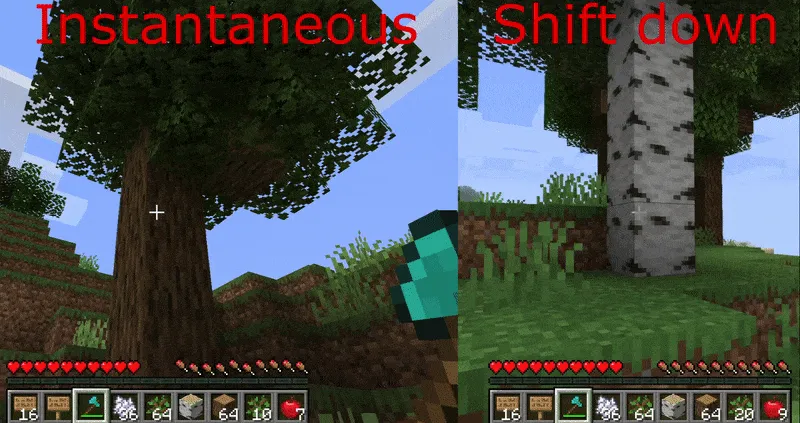
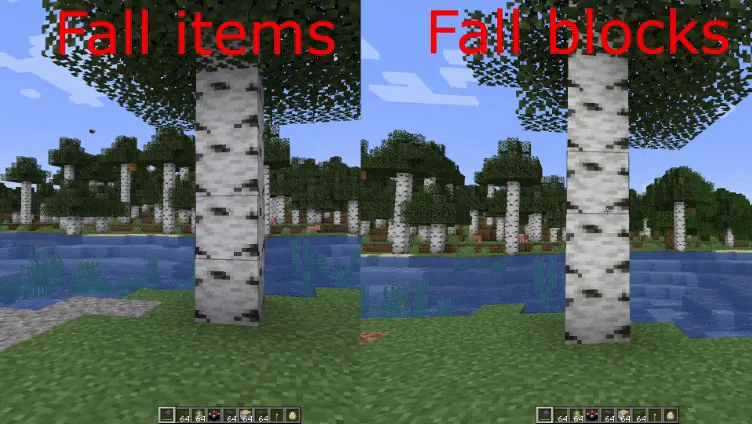
- Four Distinct Felling Modes — FallingTree does not force a single approach on you. Instantaneous mode drops the whole tree at once for maximum speed. Shift Down mode gradually lowers the trunk as you chop, which feels more immersive and less like cheating. Fall Items and Fall Blocks modes add a satisfying physics-like animation where the tree topples and scatters. You can pick whichever mode matches your playstyle and switch whenever you want.
- Fully Customizable Tree Detection — You can define exactly which blocks count as logs and which count as leaves in the configuration file. This means the mod works correctly with modded trees from other mods, not just vanilla oak and birch. If you run a heavily modded pack with exotic wood types, FallingTree can adapt to recognize them all.
- Flexible Tool Restrictions — By default, FallingTree activates when you use an axe, but you can expand that to include any tool or even bare hands. This is especially useful on servers where you want to control who can use the feature and under what conditions. Server admins can fine-tune the allowed tools to maintain the balance they want.
- Smart Durability Management — The mod can damage your axe proportionally to the number of blocks in the tree, so larger trees cost more durability. Even better, there is a safety option that stops your tool at 1 durability instead of breaking it entirely. You will never accidentally destroy a prized enchanted axe on a massive jungle tree again.
- Sneak Toggle — Hold sneak to temporarily disable FallingTree and chop logs one at a time, just like vanilla. This is perfect for situations where you only need a few logs or want to selectively harvest part of a tree. The toggle direction can also be reversed in the config so that sneaking activates the mod instead.
- Leaf Breaking Control — You can toggle whether leaves break automatically when the tree falls or remain in place to decay naturally. Automatic leaf breaking is convenient for fast wood farming, while leaving them intact keeps the environment looking more natural until they despawn on their own.
- Server-Side Only Support — On multiplayer servers, FallingTree can run entirely on the server without requiring clients to install anything. This dramatically simplifies deployment for server administrators. The only exception is if you use the speed-change feature or enchantment configurations, which need client-side installation.
Screenshots
How to Install FallingTree Mod
- Install your preferred mod loader. FallingTree supports Fabric, Minecraft Forge, and NeoForge. Download and run the installer for whichever loader matches your Minecraft version.
- If you are using Fabric, you must also install Fabric API, as FallingTree depends on it. Forge and NeoForge users do not need an additional API library, though Cloth Config API is optional for an in-game configuration GUI.
- Download the correct FallingTree file for your Minecraft version and mod loader from the official Modrinth page or CurseForge listing. Make sure the file version matches both your game version and your loader.
- Place the downloaded
.jarfile into your.minecraft/modsfolder. If the folder does not exist, launch the game once with your mod loader profile to generate it. - Launch Minecraft using your mod loader profile. FallingTree will work immediately with default settings. To customize modes, tool restrictions, or durability behavior, edit the config file found in
.minecraft/config/or use the Cloth Config GUI if installed.
Requirements & Compatibility
| Requirement | Details |
|---|---|
| Mod Loaders | Fabric, Forge, NeoForge |
| Minecraft Versions | 1.20.5 – 1.21.11, 26.1 (including snapshots) |
| Required Dependencies | Fabric API (Fabric only) |
| Optional Dependencies | Cloth Config API (for in-game config GUI on NeoForge/Forge/Fabric) |
| Server-Side Only | Yes, unless using speed or enchantment features |
| Known Incompatibilities | VeinMiner (use /veinminer groups remove Wood to resolve) |
| License | LGPL-3.0-only (open source) |
Important note for Minecraft 1.21+: Starting with version 1.21, FallingTree's enchantments must be added separately through a datapack. The datapack is available on the mod's official Modrinth page.
What's New
- Added Forge support for Minecraft 26.1, expanding loader coverage for the latest game version.
- Enabled Cloth Config integration for both Fabric and NeoForge, giving players an in-game GUI to adjust all settings without manually editing files.
- Continued multi-loader support across Fabric, Forge, and NeoForge for seamless compatibility.
- Various internal improvements and stability updates as part of the 26.1.0.3 release cycle.
Pros and Cons
Pros
- Four felling modes let you choose your preferred balance between convenience and immersion
- Works across Fabric, Forge, and NeoForge — no need to switch loaders
- Server-side only installation simplifies multiplayer deployment
- Highly configurable with tool restrictions, durability management, and custom tree definitions
- Open source under LGPL-3.0 with active development since 2021
- Over 8.5 million downloads proves community trust and reliability
Cons
- Enchantments require a separate datapack starting from Minecraft 1.21
- Known incompatibility with VeinMiner requires a manual command workaround
- Speed and enchantment features require client-side installation on servers
- No built-in replanting feature — you still need to replant saplings manually
Alternatives to FallingTree Mod
- TreeChop — Adds realistic chopping animations where trees fall based on where you cut them, offering a more physics-driven approach to tree felling compared to FallingTree's instant modes.
- Timber — A simpler tree-chopping mod that focuses on instant full-tree harvesting without the multiple mode options, ideal for players who want a lightweight no-configuration solution.
- VeinMiner — Extends batch-mining beyond trees to ores and other block clusters, useful if you want a single mod that speeds up harvesting for all block types, not just wood.
Download FallingTree Mod
| Minecraft Version | Fabric | Forge | NeoForge |
|---|---|---|---|
| For Minecraft 26.1 | Download | Download | Download |
| For Minecraft 1.21.11 | Download | Download | Download |
| For Minecraft 1.21.10 | Download | Download | Download |
| For Minecraft 1.21.9 | Download | Download | Download |
| For Minecraft 1.21.8 | Download | Download | Download |
| For Minecraft 1.21.7 | Download | Download | Download |
| For Minecraft 1.21.6 | Download | Download | Download |
| For Minecraft 1.21.5 | Download | Download | Download |
| For Minecraft 1.21.4 | Download | Download | Download |
| For Minecraft 1.21.3 | Download | Download | Download |
| For Minecraft 1.21.2 | Download | — | Download |
| For Minecraft 1.21.1 | Download | Download | Download |
Always download mods from official sources to stay safe.
Frequently Asked Questions
Is FallingTree Mod compatible with multiplayer servers?
Yes — FallingTree can run as a server-side only mod, meaning players do not need to install it on their client. The server handles all tree-felling logic automatically. The only exceptions are the speed adjustment feature and enchantment configurations, which require the mod on the client side as well.
Does FallingTree work with modded trees from other mods?
Yes, it does. You can customize which blocks are recognized as logs and leaves in the configuration file, so FallingTree can handle trees added by other mods like Biomes O' Plenty or Twilight Forest. You simply add the block IDs for the modded wood types to the config.
Will FallingTree break my tools faster than normal?
That depends on your configuration. By default, the mod can apply durability damage equal to the number of logs in the tree, which means large trees cost more durability. However, you can enable the safety feature that preserves your tool at 1 durability to prevent it from breaking, or disable tool damage entirely in the config file.
Can I use FallingTree alongside VeinMiner?
Yes, but you need to run one command first. There is a known conflict between the two mods when VeinMiner's Wood group overlaps with FallingTree's tree detection. Run /veinminer groups remove Wood to resolve the conflict, and both mods will work together without issues.
Do I need the enchantments datapack for Minecraft 1.21 and above?
Yes — starting with Minecraft 1.21, FallingTree's enchantments are no longer bundled with the mod itself. You need to download and install the separate enchantments datapack from the mod's official Modrinth page. Without it, the mod's core tree-felling features still work, but enchantment-based configurations will not be available.


![[Let's Do] Meadow Mod (1.21.1) - thumbnail](http://mcinside.com/wp-content/uploads/2026/04/thumbnail-64-52x52.webp)


![Not Enough Recipe Book [NERB] Mod (1.21.11) - thumbnail](http://mcinside.com/wp-content/uploads/2026/04/thumbnail-63-52x52.webp)
