Figura Mod is a client-side customization mod that lets you extensively change your player model and avatar for Minecraft Fabric, Forge, NeoForge, and Quilt. It focuses on visible avatar customization, custom scripting, and creator-friendly tools without requiring server-side mods.
If vanilla skins feel too limiting, Figura solves that problem by giving you a much deeper way to personalize your in-game identity and share that avatar with other players. That makes it useful for creators, roleplay-focused players, and anyone who wants their character to stand out, and its 1,157,962 Modrinth downloads suggest a large community has already found real value in it.
Key Features of Figura Mod
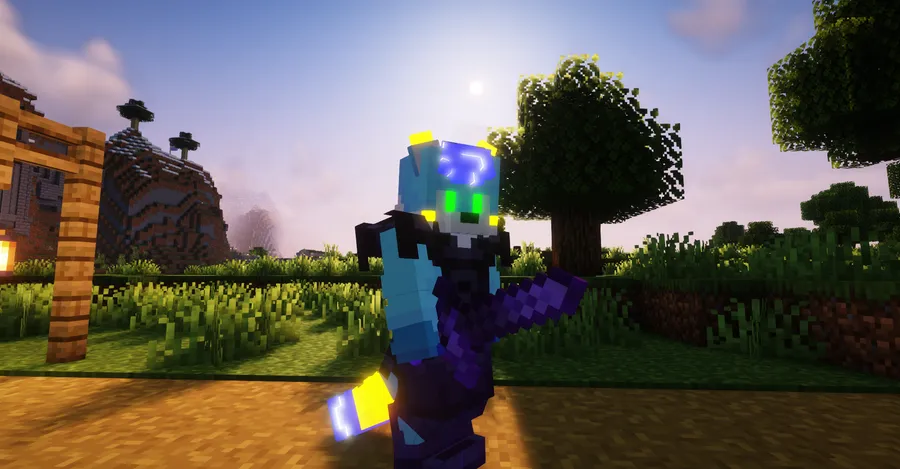
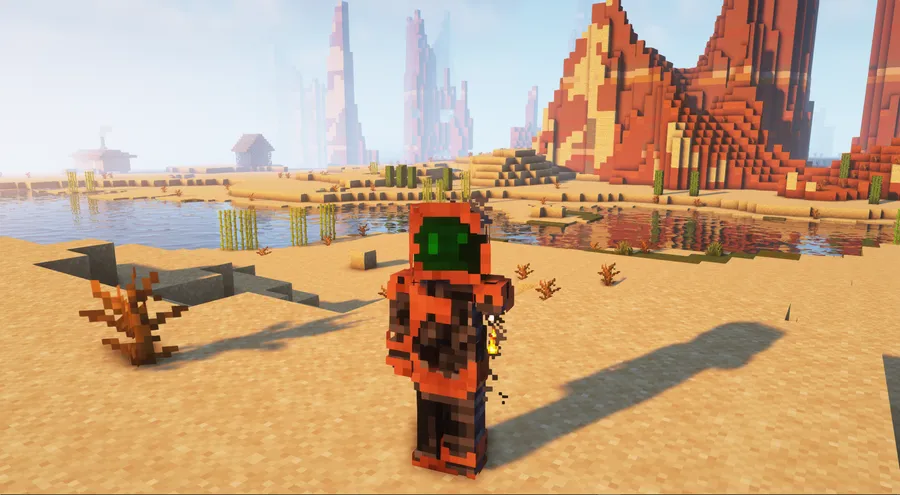
- Extensive player model customization — Figura is built around changing your player model far beyond a normal skin swap. That matters because it gives you more creative freedom when you want a character that feels unique, expressive, or tailored to a roleplay setup rather than just cosmetically different.
- Blockbench-based avatar creation — The mod appears designed to work closely with Blockbench, which is important because it gives creators a more structured way to build custom avatars and model parts. If you already like visual editing tools, this lowers the barrier to turning ideas into usable in-game models.
- Optional Lua scripting support — Figura includes an optional Lua API, and that changes the mod from a simple appearance tool into a more advanced creator platform. For players who want custom behavior, animations, or interactive avatar logic, scripting opens up much more than static cosmetics.
- Helpful learning resources for beginners — The project highlights a website-hosted wiki and a beginner-oriented video tutorial, which is a practical advantage for new users. Mods with deep customization can be overwhelming at first, so having learning material outside the game makes setup and experimentation much easier.
- Better workflow for VSCode users — Figura-related VSCode extensions are mentioned as a way to add autocomplete and other useful editor support. That matters because scripting is much easier when your editor helps you discover functions, reduce mistakes, and move faster while writing Lua.
- Blockbench extension support — A dedicated Blockbench extension for Figura is available, adding a special model format for the mod. For creators, this is important because it suggests a smoother pipeline between model creation and in-game use instead of forcing awkward manual conversion steps.
- Permission tools for unusual avatars — Figura also includes a permission system intended to help with cases such as invisible or very small avatars. That is useful in multiplayer situations because heavy customization can create visibility or readability issues, and permission controls help keep things manageable.
Screenshots
How to Install Figura Mod
- Choose the Minecraft version you want to play, such as 1.21.4, and make sure you download the matching Figura build for that version.
- Install a supported loader: Fabric Mod Loader, Minecraft Forge, NeoForge, or Quilt Loader.
- Download the correct Figura file for your Minecraft version and your selected loader.
- Place the mod file into your Minecraft
modsfolder, then launch the game with the same loader profile you installed. - Open Minecraft, load into a world or server, and configure your avatar, models, and optional Lua scripts after confirming the mod loads correctly.
Requirements & Compatibility
| Category | Details |
|---|---|
| Type | Client-side Minecraft mod |
| Supported Loaders | Fabric Mod Loader, Minecraft Forge, NeoForge, Quilt Loader |
| Main Minecraft Versions | 1.21.4, 1.21.3, 1.21.2, 1.21.1, 1.21, 1.20.6, 1.20.4, 1.20.3, 1.20.2, 1.20.1, 1.19.4, 1.19.3, 1.19.2, 1.18.2, 1.16.5 |
| Latest Listed Download Builds | 1.21.4 for NeoForge, Forge, and Fabric; 1.21.3 for NeoForge, Forge, and Fabric; 1.21.2 for Forge; 1.21.1 for NeoForge, Forge, and Fabric; 1.21 for NeoForge and Fabric; 1.20.6 for NeoForge, Forge, and Fabric; 1.20.4 for NeoForge, Forge, and Fabric; 1.20.3 for NeoForge |
| Author | skyrina |
| Category | Minecraft Mods |
| Tags | decoration, social, utility |
What's New
- Fixes frequent and random crashes related to skull rendering on Minecraft 1.21.4.
- Fixes a NeoForge launch crash affecting NeoForge 21.4.84-beta onward.
- Fixes the item render event not working correctly with the spyglass on 1.21.4.
- Fixes Minecraft Forge crashing while rendering an elytra.
Pros and Cons
Pros
- Offers much deeper avatar customization than standard skins.
- Supports Fabric, Forge, NeoForge, and Quilt.
- Includes optional Lua scripting for advanced creators.
- Works with Blockbench and related creator tools.
- Has strong social proof with more than 1 million downloads.
Cons
- The feature set may feel complex for first-time users.
- Advanced use depends on external tools such as Blockbench or VSCode extensions.
- Some download availability varies by Minecraft version and loader.
- Players who only want a simple cosmetic change may find it broader than necessary.
Alternatives to Figura Mod
- Figura Mod for Fabric — Best if you specifically want to use Figura through the Fabric ecosystem on supported Minecraft versions.
- Figura Mod for Forge — A practical choice if your existing mod setup already relies on Forge compatibility.
- Figura Mod for NeoForge — The NeoForge build makes the most sense for players using newer NeoForge-based mod packs.
Download Figura Mod
| Minecraft Version | Fabric | Forge | NeoForge | Quilt |
|---|---|---|---|---|
| For Minecraft 1.21.4 | Download | Download | Download | — |
| For Minecraft 1.21.3 | Download | Download | Download | — |
| For Minecraft 1.21.2 | — | Download | — | — |
| For Minecraft 1.21.1 | Download | Download | Download | — |
| For Minecraft 1.21 | Download | — | Download | — |
| For Minecraft 1.20.6 | Download | Download | Download | — |
| For Minecraft 1.20.4 | Download | Download | Download | — |
| For Minecraft 1.20.3 | — | — | Download | — |
| For Minecraft 1.20.2 | Download | Download | Download | — |
| For Minecraft 1.20.1 | Download | Download | — | Download |
| For Minecraft 1.19.4 | Download | Download | — | Download |
| For Minecraft 1.19.3 | Download | Download | — | Download |
Always download mods from official sources to stay safe.
Frequently Asked Questions
What does Figura Mod do in Minecraft?
Figura Mod lets you extensively customize your player model and avatar in Minecraft. It is aimed at players who want more visual identity, model control, and optional scripting than the default game normally provides.
Do I need a server mod to use Figura Mod?
No — the original description states that other players can see your avatar without requiring server mods. That makes Figura especially appealing for client-side customization where you want visible results without changing the server setup.
Does Figura Mod support Lua scripting?
Yes — Figura includes an optional Lua API. This is one of the mod's biggest strengths because it gives advanced users room to build more dynamic avatar behavior rather than stopping at simple model edits.
Which mod loaders work with Figura Mod?
Figura supports Fabric, Forge, NeoForge, and Quilt. You should still match the correct download to both your Minecraft version and your chosen loader before installing it.
Is Figura Mod beginner-friendly?
Yes — Figura appears approachable for beginners because the project points users toward a website-hosted wiki and a video tutorial. At the same time, its deeper tools mean there is still a learning curve if you want to move into scripting or more advanced avatar work.
What Minecraft versions are listed for Figura Mod?
The listed Minecraft versions are 1.21.4, 1.21.3, 1.21.2, 1.21.1, 1.21, 1.20.6, 1.20.4, 1.20.3, 1.20.2, 1.20.1, 1.19.4, 1.19.3, 1.19.2, 1.18.2, and 1.16.5. Download availability varies by loader, so checking the matching file is still important.