
FPS Reducer Mod is a client-side optimization mod that automatically reduces GPU and CPU usage by lowering frame rate when you are not actively using Minecraft, for Fabric, Forge, NeoForge, and Quilt. It restores normal frame rate as soon as you interact with the game again.
If your PC gets loud, warm, or power-hungry while Minecraft sits idle, this mod targets exactly that pain point. Instead of rendering full-speed frames when no one is touching the game, it drops FPS under idle or inactive-window conditions and can also lower sound volume while unfocused. That behavior is useful for automation sessions, background play, and long AFK windows where you still want the client open but do not need full rendering performance. With more than 5 million downloads on Modrinth (5,489,752), it has clear social proof among players who prioritize smoother multitasking and less wasted hardware effort.
Key Features of FPS Reducer Mod
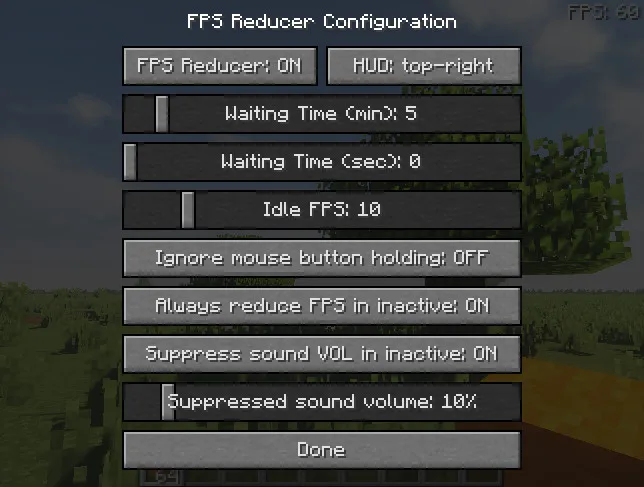
- Automatic FPS reduction during inactivity — This is the core feature: if there is no user operation for a specified period, FPS can be reduced automatically. By default, the mod drops frame rate to 10 FPS after 5 minutes of no input, which can help reduce background load during AFK tasks. The idle trigger is optional from v2.0, so you can tune behavior to your own play style.
- Automatic FPS reduction when the game window is inactive or minimized — When you alt-tab or minimize the client, rendering demand can still stay high in a normal setup. This mod cuts that waste by throttling FPS under inactive/minimized window conditions, which is especially useful while working in other apps. For players who run Minecraft in the background for farms or industry loops, this can make long sessions more practical.
- Sound suppression when inactive or minimized — Lowering FPS helps load, but sound can still be distracting when the game is unfocused. FPS Reducer also suppresses volume when the window is inactive or minimized, so your desktop stays quieter during multitasking. That simple behavior makes background sessions less intrusive without needing constant manual audio changes.
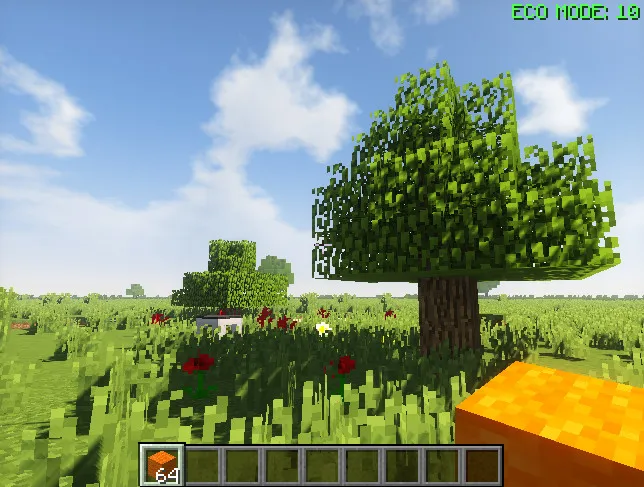
- On-screen current FPS indicator — The edge HUD readout shows your current FPS so you can confirm when throttling is active. This matters because it gives immediate visual feedback that your settings are actually working. You do not need to guess whether the client is in reduced mode.
- Client-thread CPU usage display (v1.14+) — The mod can also display CPU usage for the client thread, giving you another quick signal about runtime load. This is useful when testing idle settings, background behavior, or comparing before/after configuration. It keeps optimization decisions grounded in visible data instead of assumptions.
- Manual controls and quick configuration access — You can force FPS reduction manually with the
PAUSEkey (added in v1.16), which is handy when you know you are stepping away. By default, pressingENDopens the configuration GUI, so adjustments are fast without digging through menus. That combination makes the mod feel practical in day-to-day use, not just set-and-forget.
Screenshots
How to Install FPS Reducer Mod
- Choose your loader first: Fabric Mod Loader, Minecraft Forge, NeoForge, or Quilt Loader.
- Download the FPS Reducer file that matches both your Minecraft version and your loader.
- Place the mod file into your Minecraft
modsfolder for that game instance/profile. - Launch Minecraft with the same loader profile and verify the mod is listed on the client.
- Optionally open the config GUI with
ENDand tune idle timing, FPS limits, and related behavior to match your workflow.
Requirements & Compatibility
| Item | Details |
|---|---|
| Mod Type | Client-side optimization mod |
| Supported Loaders | Fabric, Forge, NeoForge, Quilt |
| Minecraft Versions | 26.1, 1.21.11 down to 1.14.4 (includes 1.21.x, 1.20.x, 1.19.x, 1.18.x, 1.17.1, 1.16.5, 1.15.2, 1.14.4) |
| Server Install Needed | No, server installation is not required |
| Author | bre2el |
| Category / Tag | Minecraft Mods / optimization |
| License | LicenseRef-All-Rights-Reserved |
What's New
- Updated release line to v2.16.
- Added initial release support for Minecraft 26.1 Forge.
- Added initial release support for Minecraft 26.1 Fabric.
- Fixed HUD not displaying when specific debug overlays (
F3-G/F3-B) are enabled (Issue #86).
Pros and Cons
Pros
- Targets idle and inactive-window waste directly with automatic FPS throttling.
- Supports all major modern loaders: Fabric, Forge, NeoForge, and Quilt.
- Useful monitoring tools via FPS edge display and client-thread CPU usage readout.
- Includes practical controls like manual throttle hotkey and quick config access.
- Client-side only, so adoption is straightforward for single-player and client setups.
Cons
- Focus is optimization behavior only; it does not add gameplay or visual content.
- Default idle behavior may need tuning depending on your AFK patterns.
- License is All Rights Reserved, which can matter for some redistribution preferences.
Alternatives to FPS Reducer Mod
- Dynamic FPS — Another background-focused option for reducing resource usage when Minecraft is unfocused.
- Sodium — A rendering optimization mod often used alongside performance-focused client setups.
- FerriteCore — A memory-oriented optimization mod that complements broader client performance tuning.
Download FPS Reducer Mod
| Minecraft Version | Fabric | Forge | NeoForge | Quilt |
|---|---|---|---|---|
| For Minecraft 26.1 | Download | Download | — | — |
| For Minecraft 1.21.11 | Download | Download | Download | Download |
| For Minecraft 1.21.10 | Download | Download | Download | Download |
| For Minecraft 1.21.9 | Download | Download | Download | Download |
| For Minecraft 1.21.8 | Download | Download | Download | Download |
| For Minecraft 1.21.7 | Download | Download | Download | Download |
| For Minecraft 1.21.6 | Download | Download | Download | Download |
| For Minecraft 1.21.5 | Download | Download | Download | Download |
| For Minecraft 1.21.4 | Download | Download | Download | Download |
| For Minecraft 1.21.3 | Download | Download | Download | Download |
| For Minecraft 1.21.2 | Download | — | Download | Download |
| For Minecraft 1.21.1 | Download | Download | Download | Download |
Always download mods from official sources to stay safe.
Frequently Asked Questions
Is FPS Reducer Mod required on the server?
No — this is a client-side mod, so you do not need to install it on the server. It is designed to manage your local client's rendering and resource behavior.
Does this mod reduce FPS when I alt-tab or minimize Minecraft?
Yes — it can reduce FPS when the game window is inactive or minimized. That is one of its core conditions for lowering unnecessary load while Minecraft runs in the background.
Can I trigger FPS reduction manually?
Yes — pressing the PAUSE key can reduce FPS manually. This feature was introduced in v1.16 and is useful when you know you are stepping away.
How do I open the mod configuration screen?
The default key is END — it opens the configuration GUI. From there, you can adjust behavior such as idle timing and throttling preferences.
What Minecraft versions and loaders are supported?
The mod supports multiple versions — from Minecraft 1.14.4 up through 1.21.11, plus 26.1 builds listed in the current data. Loader support includes Fabric, Forge, NeoForge, and Quilt, with specific download files varying by version.
Is FPS Reducer Mod allowed in modpacks?
Yes — the author states it is fine to use this mod in modpacks. You should still match each pack's Minecraft version and loader to the correct mod file.


