
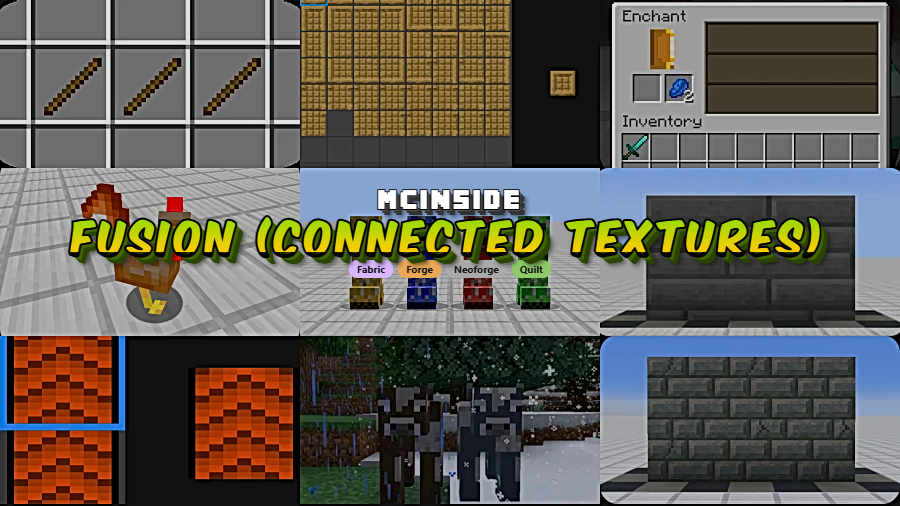
Fusion (Connected Textures) is a library and decoration mod that enables resource packs to use connected textures, custom entity models, and additional texture types in Minecraft, available for Fabric, Forge, NeoForge, and Quilt mod loaders.
Anyone who has placed glass blocks in Minecraft knows the frustration — ugly grid lines breaking up what should be a smooth, transparent surface. The same problem plagues bookshelves, bricks, and dozens of other blocks where visible seams between placed blocks ruin the aesthetic. For years, OptiFine was the only real answer, but it comes with compatibility headaches and performance trade-offs. Fusion, developed by SuperMartijn642, solves this problem as a lightweight, dedicated library that brings connected textures and advanced model features to any mod loader. With over 8.8 million downloads since its 2023 release, Fusion has quickly become one of the most trusted texture enhancement tools in the Minecraft modding community.
Key Features of Fusion (Connected Textures)
- Connected Textures Support — Fusion allows adjacent blocks of the same type to blend their textures seamlessly, removing the visible grid lines between them. This means glass panes, stone bricks, bookshelves, and similar blocks look like one continuous surface rather than a patchwork of repeated tiles. The visual difference is immediately noticeable, especially in large builds.
- Multi-Loader Compatibility — Unlike many texture mods that only work on one platform, Fusion supports Fabric, Forge, NeoForge, and Quilt simultaneously. This means you can switch mod loaders without losing your connected texture setup, and resource pack creators only need to build one pack that works everywhere.
- Extensive Resource Pack Ecosystem — Fusion ships with a growing library of official and third-party resource packs including Connected Glass, Connected Blocks, Block Transitions, Emissive Ores, 3D Items, and Stacking Items. Each pack targets a specific visual improvement, so you can pick and choose exactly which enhancements you want without bloating your game.
- Custom Entity Models — Beyond block textures, Fusion supports custom entity models through resource packs. This opens the door for resource pack creators to modify how mobs and entities appear in-game, adding another layer of visual customization that previously required separate mods.
- Soft Dependency Integration for Mod Developers — Mod developers can integrate Fusion as an optional dependency, meaning their mods gain connected texture support when Fusion is installed but still function normally without it. This approach keeps mod compatibility high while enabling visual upgrades for players who want them.
- Emissive Texture Support — Through packs like Fusion Emissive Ores and Glowing Emissive Ores, Fusion enables blocks to glow and emit light effects on their textures. Ore blocks deep underground become easier to spot and visually striking, adding both a practical and aesthetic benefit to mining.
- Lightweight Library Design — Fusion appears to be lightweight in its approach, functioning as a library that resource packs hook into rather than a heavy rendering overhaul. It focuses specifically on texture and model enhancements without trying to replace your entire rendering pipeline, which helps maintain compatibility with other mods.
How to Install Fusion (Connected Textures)
- Install your preferred mod loader. Fusion supports Fabric, Minecraft Forge, NeoForge, or Quilt. Download and run the installer for whichever loader you use.
- Download the Fusion .jar file matching your Minecraft version and mod loader from the official Modrinth page or the download section below.
- Place the downloaded .jar file into your
.minecraft/modsfolder. If the folder does not exist, launch Minecraft once with your mod loader profile to generate it. - Download one or more Fusion-compatible resource packs (such as Fusion Connected Glass or Fusion Connected Blocks) and place them in your
.minecraft/resourcepacksfolder. - Launch Minecraft, go to Options → Resource Packs, and activate the Fusion packs you downloaded. The connected textures will apply immediately.
Requirements & Compatibility
| Requirement | Details |
|---|---|
| Minecraft Versions | 1.16.5 – 1.21.11 |
| Mod Loaders | Fabric, Forge, NeoForge, Quilt |
| Author | SuperMartijn642 |
| Category | Library / Decoration |
| License | All Rights Reserved |
| Source Code | GitHub |
What's New
- v1.2.12c: Fixed a crash that occurred when CensoredASM was not installed.
- v1.2.12b: Resolved a crash caused by compatibility issues with CensoredASM.
- v1.2.12a: Fixed handling of legacy square aspect ratio full layout connecting textures, addressing visual glitches with older resource packs.
- v1.2.12: Corrected how connection key references work in connecting models, improving reliability of connected texture patterns.
- v1.2.11: Added a
show_breaking_overlayoption to block model modifiers and fixed crashes related to modded model bakeries.
Pros and Cons
Pros
- Works across all four major mod loaders — no need to switch mods when changing platforms
- Large ecosystem of official and community resource packs ready to use
- Lightweight library approach keeps it compatible with most other mods
- Active development with frequent updates for new Minecraft versions
- Does not require OptiFine, avoiding the compatibility issues OptiFine often introduces
Cons
- Requires separate resource pack downloads to actually see connected textures — the mod alone does nothing visible
- All Rights Reserved license limits how other developers can build upon it
- Fewer built-in texture options compared to OptiFine's long-established connected texture support
- Resource pack creators need to learn Fusion's specific format rather than using OptiFine's widely documented CTM format
Alternatives to Fusion (Connected Textures)
- Continuity — A Fabric-focused connected textures mod that supports OptiFine-format CTM resource packs, making it ideal if you already have OptiFine packs you want to reuse.
- OptiFine — The long-standing all-in-one optimization and visual enhancement mod that includes connected textures, but often conflicts with other Fabric and Forge mods.
- Indium — A rendering API addon for Sodium that enables Fabric Rendering API support, often needed alongside connected texture mods for compatibility with performance mods.
Download Fusion (Connected Textures)
| Minecraft Version | Fabric | Forge | NeoForge | Quilt |
|---|---|---|---|---|
| For Minecraft 1.21.11 | Download | Download | Download | Download |
| For Minecraft 1.21.10 | Download | Download | Download | Download |
| For Minecraft 1.21.9 | Download | Download | Download | Download |
| For Minecraft 1.21.8 | Download | Download | Download | Download |
| For Minecraft 1.21.7 | Download | Download | Download | Download |
| For Minecraft 1.21.6 | Download | Download | Download | Download |
| For Minecraft 1.21.5 | Download | Download | Download | Download |
| For Minecraft 1.21.4 | Download | Download | Download | Download |
| For Minecraft 1.21.3 | Download | Download | Download | Download |
| For Minecraft 1.21.2 | Download | Download | Download | Download |
| For Minecraft 1.21.1 | Download | Download | Download | Download |
| For Minecraft 1.21 | Download | Download | Download | Download |
Always download mods from official sources to stay safe.
Frequently Asked Questions
Does Fusion work with OptiFine?
No — Fusion and OptiFine are separate systems that handle connected textures differently. They use different resource pack formats, so packs made for OptiFine's CTM format will not work with Fusion, and vice versa. You should choose one or the other for your setup to avoid potential conflicts.
Do I need to download resource packs separately for Fusion to work?
Yes — Fusion by itself is a library that provides the framework for connected textures, but it does not change any visuals on its own. You need to download and activate compatible resource packs like Fusion Connected Glass or Fusion Connected Blocks to see the connected texture effects in-game.
Is Fusion compatible with Sodium and other performance mods?
Fusion appears to be compatible with most performance mods based on its library-focused design. Since it hooks into the resource pack system rather than overhauling rendering, it generally works alongside Sodium, Lithium, and similar optimization mods. Always test with your specific mod list to confirm.
Can I use Fusion on a multiplayer server?
Yes — Fusion is a client-side mod that handles texture rendering locally. The server does not need Fusion installed for players to use it. Each player simply installs Fusion and their preferred resource packs on their own client.
What Minecraft versions does Fusion support?
Fusion supports Minecraft 1.16.5 through 1.21.11, covering a wide range of both older and current versions. It is available for Fabric, Forge, NeoForge, and Quilt across this entire version range, so nearly any modern modded Minecraft setup can use it.


