

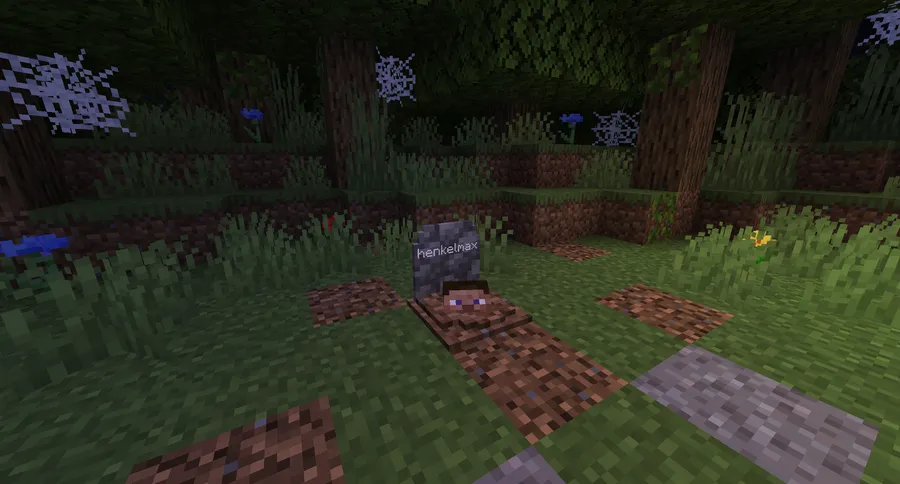
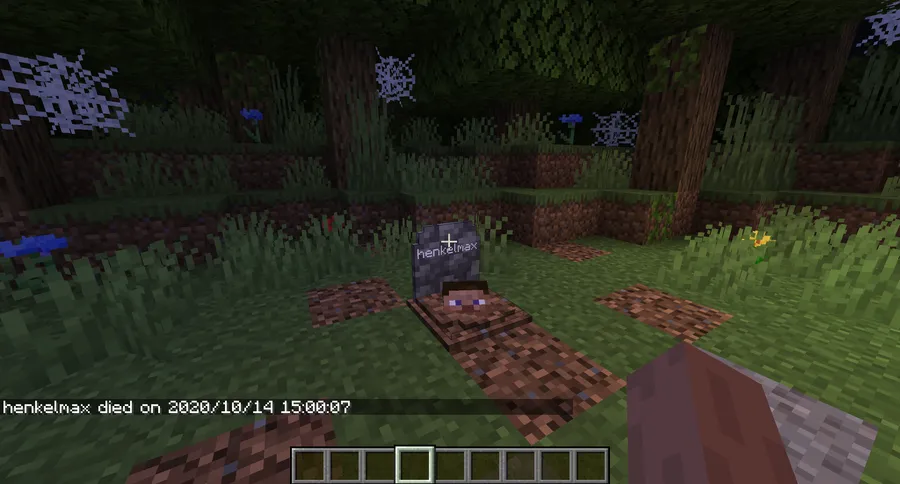
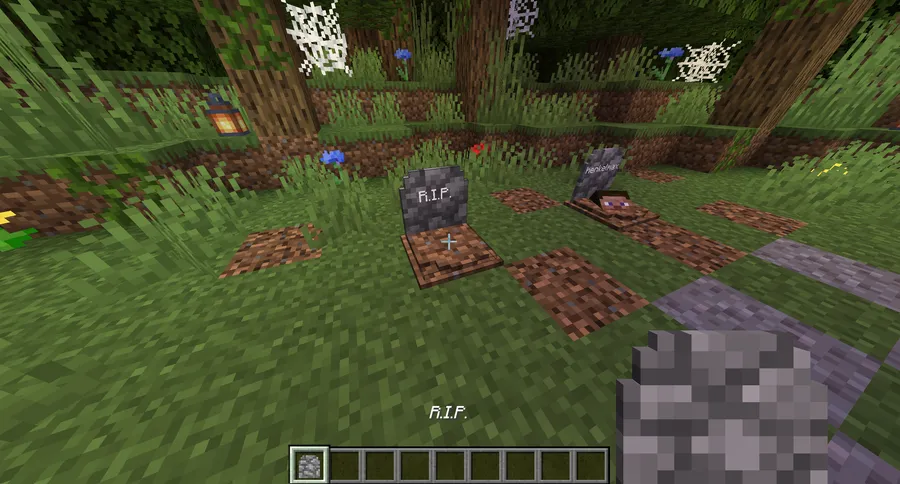
GraveStone Mod is a utility mod that places a gravestone containing all of your inventory items at the exact spot where you die, allowing you to retrieve your gear simply by breaking the grave, for Minecraft Forge and NeoForge.
Dying in Minecraft is frustrating enough on its own, but the real pain comes from scrambling back to your death location only to find your items have despawned or sunk into lava. GraveStone Mod by henkelmax solves this problem elegantly — every death spawns a gravestone that safely stores every single item you were carrying. With over 7.8 million downloads and active updates since 2022, this is one of the most trusted inventory-protection mods in the Minecraft community. Whether you play on a hardcore survival server or a casual world with friends, GraveStone Mod removes the sting of death without feeling like a cheat.
Key Features of GraveStone Mod
- Automatic Grave Placement on Death — Every time you die, a gravestone appears at your exact death location holding all of your items. This means you never have to worry about the five-minute despawn timer racing against you. Simply return to your grave and break it to get everything back.
- Smart Item Sorting Back to Original Slots — Starting from version 1.16.3, the mod restores items directly to the inventory slots they originally occupied. Instead of dumping a jumbled mess into your inventory, your armor goes back on your body, your hotbar items return to the correct slots, and your offhand item lands right where it was. This saves significant time reorganizing after death.
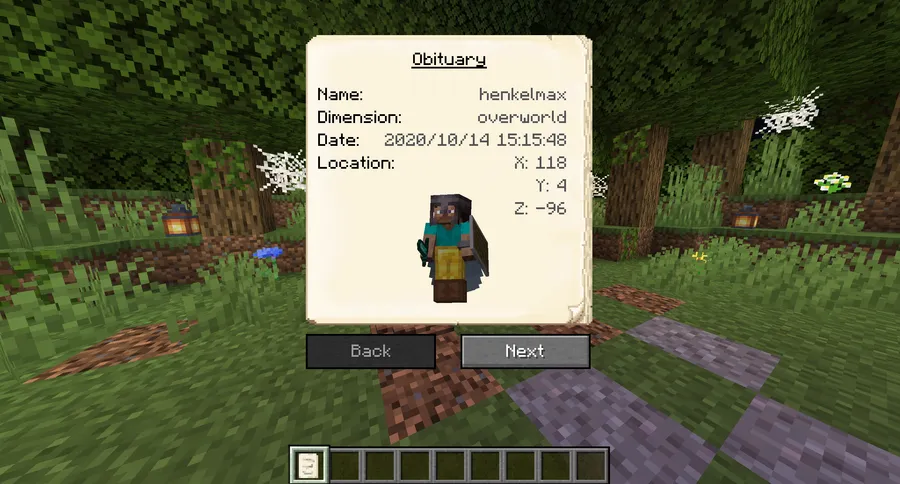
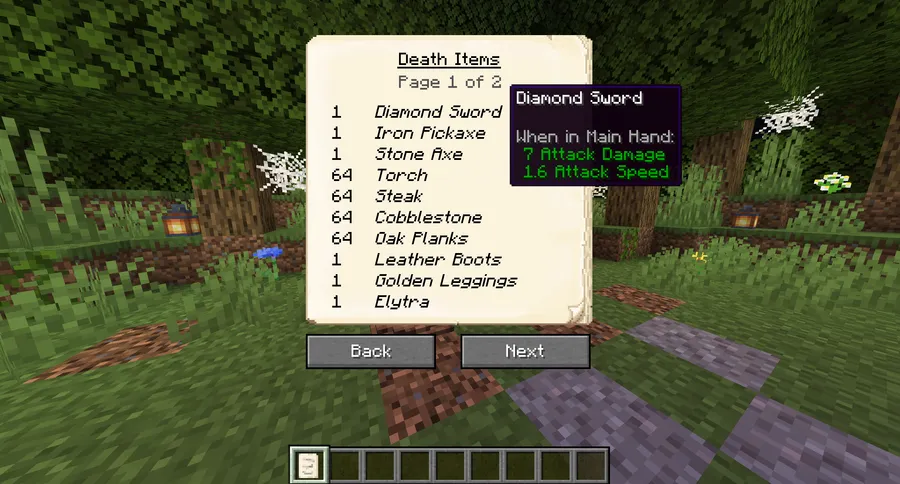
- Detailed Obituary System — Each death generates an obituary document that records your name, the dimension you died in, the exact coordinates, the date, a visual of your character with equipped gear, and a full item list. This is incredibly useful on multiplayer servers for tracking down lost graves or verifying what was in your inventory at the time of death.
- Sneak-to-Recover Option — Rather than breaking the gravestone, you can configure the mod so that simply sneaking on top of the grave returns your items. This is a small quality-of-life touch that makes item recovery faster and more intuitive, especially in tight spaces where breaking blocks could cause problems.
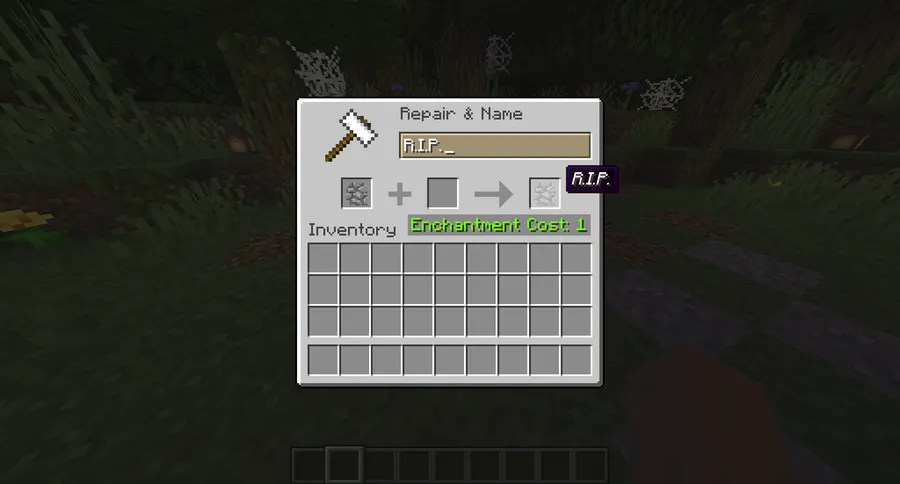
- Custom Grave Names via Anvil — You can craft gravestones and rename them in an anvil to display custom text. This opens up creative possibilities for memorial builds, roleplay servers, or simply marking important locations with personalized headstones.
- Ghost Spawning on Grave Break — An optional config setting spawns a ghost of the deceased player when someone breaks their grave. You can configure the ghost to either defend the player or attack them, adding an interesting risk-reward mechanic to item recovery that works especially well on PvP or adventure-style servers.
- Admin Recovery Command — If a grave is lost — say, it spawned inside an unloaded chunk or was destroyed by an explosion — server admins can use the
/restorecommand to recover a player's inventory from any recorded death. The command supports both replacing the current inventory and adding lost items on top of existing gear.
Screenshots
How to Install GraveStone Mod
- Download and install Minecraft Forge or NeoForge for your Minecraft version (1.19.1 through 1.21.11 are supported).
- Download the correct GraveStone Mod file matching your Minecraft version and mod loader from the download section below.
- Open your Minecraft installation folder, then navigate to the
modsfolder. If it does not exist, create it. - Place the downloaded
.jarfile into themodsfolder. - Launch Minecraft using the Forge or NeoForge profile. The mod will generate a config file on first run where you can customize all options.
Requirements & Compatibility
| Requirement | Details |
|---|---|
| Mod Loaders | Minecraft Forge, NeoForge |
| Minecraft Versions | 1.19.1 – 1.21.11, 26.1 |
| Multiplayer | Server-side required; works on dedicated servers and LAN |
| License | All Rights Reserved |
| Source Code | Available on GitHub |
What's New
- Updated to Minecraft 26.1 with full NeoForge support (March 2026)
- Continued compatibility maintained across the entire 1.21.x release cycle
- Mod remains actively maintained by henkelmax with regular version updates
Pros and Cons
Pros
- Items automatically sort back to their original inventory slots
- Extensive configuration options for server owners and players
- Obituary system provides detailed death records useful for multiplayer
- Admin recovery command prevents permanent item loss from edge cases
- Very broad version support from 1.19.1 through 1.21.11
- Over 7.8 million downloads — battle-tested and widely trusted
Cons
- No Fabric or Quilt support — Forge and NeoForge only
- All Rights Reserved license limits modification and redistribution
- Ghost spawning feature may be confusing if enabled without warning players
- Graves placed in unloaded chunks may be difficult to locate without admin help
Alternatives to GraveStone Mod
- Universal Graves — A server-side grave mod designed for Fabric and Quilt that offers similar death-recovery mechanics with a clean visual style and hologram-based grave markers.
- Corpse — Another Forge and NeoForge death-recovery mod by the same developer henkelmax, which spawns a player corpse instead of a gravestone and lets you loot items from the body directly.
- You're in Grave Danger — A lightweight Fabric alternative that places graves on death with configurable retrieval options and support for modded inventory containers.
Download GraveStone Mod
| Minecraft Version | NeoForge |
|---|---|
| For Minecraft 26.1 | Download |
| For Minecraft 1.21.11 | Download |
| For Minecraft 1.21.10 | Download |
| For Minecraft 1.21.9 | Download |
| For Minecraft 1.21.8 | Download |
| For Minecraft 1.21.7 | Download |
| For Minecraft 1.21.6 | Download |
| For Minecraft 1.21.5 | Download |
| For Minecraft 1.21.4 | Download |
| For Minecraft 1.21.3 | Download |
| For Minecraft 1.21.2 | Download |
| For Minecraft 1.21.1 | Download |
Always download mods from official sources to stay safe.
Frequently Asked Questions
Does GraveStone Mod work on multiplayer servers?
Yes — GraveStone Mod works on dedicated multiplayer servers and LAN worlds. The mod needs to be installed on the server side, and each player's grave is tied to their account, so only the owner can break it by default (configurable in the settings).
Will my items despawn if I take too long to reach my grave?
No, items stored inside a gravestone do not despawn. Unlike dropped items that vanish after five minutes, the gravestone holds your inventory indefinitely until you break it or an admin uses the restore command. Your gear is safe no matter how long it takes you to return.
Can I use GraveStone Mod with Fabric?
No — GraveStone Mod is only available for Minecraft Forge and NeoForge. If you play on Fabric, consider alternatives like Universal Graves or You're in Grave Danger which offer similar functionality for Fabric users.
What happens if I die inside a solid block like stone or lava?
The grave is placed at the next available empty space above your death location. If there is no free block directly above, the mod searches for the nearest valid position to ensure your grave is always accessible. Server admins can also use the /restore command as a backup if the grave ends up in an unreachable spot.
Can I customize the text and appearance of the gravestone?
Yes — you can craft gravestones and rename them in an anvil to display custom text on the headstone. Additionally, the config file lets you change the text color on graves, toggle skull rendering on or off, and control whether the obituary is generated on each death.


![[Let's Do] Candlelight - Farm&Charm compat Mod (1.21.1) - thumbnail](http://mcinside.com/wp-content/uploads/2026/04/thumbnail-81-52x52.webp)


![[Let's Do] Meadow Mod (1.21.1) - thumbnail](http://mcinside.com/wp-content/uploads/2026/04/thumbnail-64-52x52.webp)


![Not Enough Recipe Book [NERB] Mod (1.21.11) - thumbnail](http://mcinside.com/wp-content/uploads/2026/04/thumbnail-63-52x52.webp)