

Immersive Melodies is a music and instrument mod that lets you play custom melodies on seven craftable instruments in Minecraft, supporting Fabric, Forge, and NeoForge mod loaders across multiple game versions.
Vanilla Minecraft offers note blocks, but let's be honest — building a note block song is tedious, limited, and sounds robotic. Immersive Melodies completely reimagines music in the game by giving players actual instruments they can craft and play with real melodies. With over 5 million downloads on Modrinth, this mod by Luke100000 has become the go-to solution for players who want expressive, immersive music without the pain of redstone contraptions. Whether you're running a medieval roleplay server, hosting a talent show, or simply want Skeletons storming your base while playing Megalovania, this mod delivers in a way no other music mod quite matches.
Key Features of Immersive Melodies
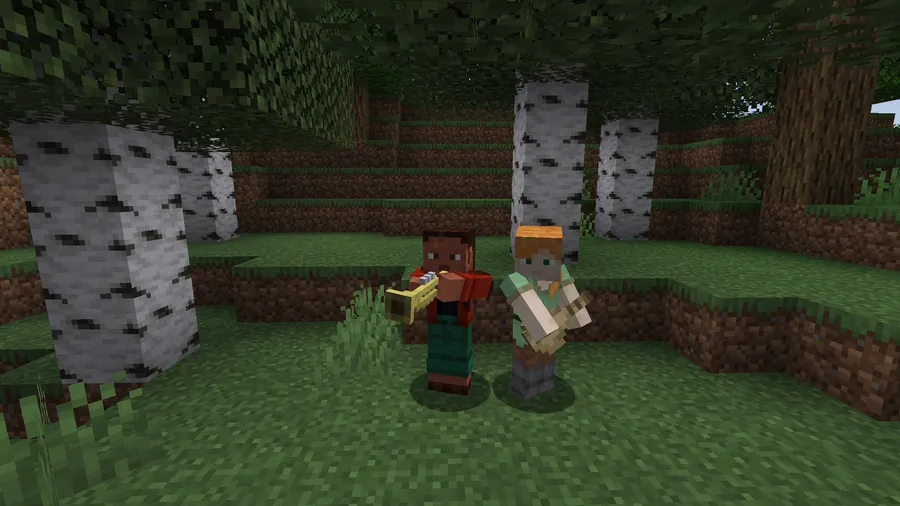
- 7 Craftable Instruments — The mod adds seven unique instruments to the game, each with its own distinct sound profile. This means you and your friends can form an actual band with different instrument parts, adding a layer of social gameplay that vanilla Minecraft completely lacks. All recipes unlock automatically in the vanilla recipe book after you collect a copper ingot.
- 25 Bundled Songs — Right out of the box, Immersive Melodies includes 25 pre-loaded melodies you can play immediately. This is ideal for players who just want to jump in and start performing without needing to source external files. The included library ranges from well-known tunes to original compositions, giving you plenty of variety from the start.
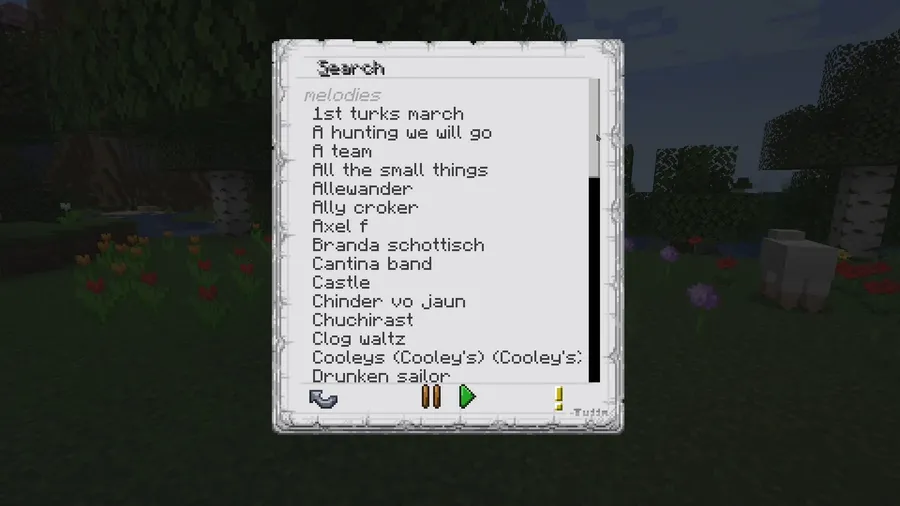
- Custom Melody Import via Drag and Drop — You can upload your own songs directly in-game using a simple drag-and-drop interface, or add them through datapacks. The mod supports both MIDI and ABC file formats, and there are millions of compatible files freely available across the internet. This essentially gives you an unlimited music library without leaving Minecraft.
- Full Multiplayer Support — Every feature works in multiplayer, meaning other players on your server can hear your performances in real time. This transforms music from a solo novelty into a genuine social experience — perfect for server events, weddings, tavern roleplay, or just annoying your friends with the same song on repeat.
- Keyboard and MIDI Device Support — Added in version 0.5.0, you can connect a real MIDI keyboard or use your computer keyboard to play instruments live. This turns Immersive Melodies from a jukebox into an actual performance tool, letting musically inclined players improvise and compose on the fly.
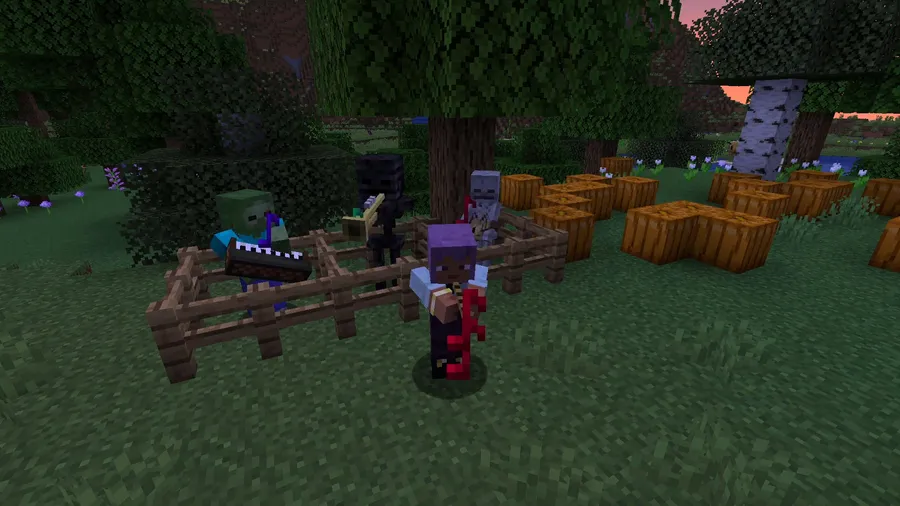
- Mob Interactions — Mobs can interact with instruments too — yes, birds actually dance when music plays nearby. This kind of ambient detail makes music feel like a living part of the world rather than just a player-only mechanic, and it creates genuinely entertaining moments during gameplay.
- Perceived Loudness Adjustment — The mod includes smart audio balancing that makes lower frequencies sound louder and higher frequencies quieter. This ensures instruments sound natural and balanced across their full range, which is a subtle but important quality-of-life feature that prevents melodies from sounding harsh or uneven.
Screenshots
How to Install Immersive Melodies
- Install the mod loader of your choice: Fabric, Forge, or NeoForge, depending on your Minecraft version and preference.
- Download the correct Immersive Melodies file for your Minecraft version and loader from the official Modrinth or CurseForge page.
- Place the downloaded
.jarfile into your.minecraft/modsfolder. If the folder does not exist, create it manually. - Launch Minecraft using the corresponding mod loader profile. The mod's instruments will appear in the recipe book once you pick up a copper ingot.
- To add custom songs, simply drag and drop MIDI or ABC files into the in-game melody interface, or package them as a datapack for server-wide distribution.
Requirements & Compatibility
| Requirement | Details |
|---|---|
| Minecraft Versions | 1.21.1, 1.20.1, 1.19.4, 1.19.2, 1.18.2 |
| Mod Loaders | Fabric, Forge, NeoForge |
| NeoForge Support | Available for Minecraft 1.21.1 |
| Fabric Support | Available for all supported versions |
| Forge Support | Available for 1.20.1, 1.19.4, 1.19.2, 1.18.2 |
| License | GPL-3.0-only (open source) |
| Author | Luke100000 |
What's New
- Version 0.6.2: Fixed recipes, advancements, and tags not loading correctly, along with a crash fix.
- Version 0.6.0: Resolved direct playback issues in multiplayer and introduced breaking API changes in preparation for 1.21, including a switch to Mojmap.
- Version 0.5.1: Melodies are now grouped by namespaces, and melody names can be translated via language keys.
- Version 0.5.0: Added keyboard and MIDI device support, perceived loudness adjustment for more balanced instrument sounds, and new bundled songs including Bad Apple.
Pros and Cons
Pros
- Huge variety with 7 instruments and 25 built-in songs
- Effortless custom song import via drag-and-drop with MIDI and ABC support
- Full multiplayer compatibility makes it ideal for servers
- Cross-loader support across Fabric, Forge, and NeoForge
- Open source with active development and frequent updates
- MIDI keyboard input allows live performance
Cons
- API changes in 0.6.0 may break compatibility with older addons
- No Bedrock Edition support — Java Edition only
- NeoForge support limited to 1.21.1 currently
- Requires external tools to create MIDI or ABC files if you want original compositions
Alternatives to Immersive Melodies
- Simple Voice Chat — If you want real-time voice communication on your server rather than instrument-based music, this mod adds proximity voice chat for a different kind of social immersion.
- Music Maker Mod — Another instrument-focused mod that takes a different approach to in-game music creation, offering its own set of playable instruments and composition tools.
- Ambient Sounds — While not an instrument mod, Ambient Sounds enhances the audio landscape of Minecraft with realistic environmental sounds, complementing Immersive Melodies nicely for a fully immersive audio experience.
Download Immersive Melodies
| Minecraft Version | Fabric | Forge | NeoForge |
|---|---|---|---|
| For Minecraft 1.21.1 | Download | — | Download |
| For Minecraft 1.20.1 | Download | Download | — |
| For Minecraft 1.19.4 | Download | Download | — |
| For Minecraft 1.19.2 | Download | Download | — |
| For Minecraft 1.18.2 | Download | Download | — |
Always download mods from official sources to stay safe.
Frequently Asked Questions
Does Immersive Melodies work in multiplayer?
Yes — Immersive Melodies fully supports multiplayer, and other players on the server can hear your instrument performances in real time. The mod synchronizes playback across clients, so everyone experiences the music together. You can even upload custom melodies that all server members can enjoy.
Can I use my own songs with Immersive Melodies?
Yes, you can import custom songs using MIDI or ABC file formats. Simply drag and drop the file into the in-game interface, or distribute songs server-wide through datapacks. There are millions of free MIDI and ABC files available online, so you will never run out of music to play.
Is Immersive Melodies compatible with Fabric and Forge?
Yes — the mod supports Fabric, Forge, and NeoForge. Fabric and Forge versions are available for Minecraft 1.18.2 through 1.20.1, while the 1.21.1 version supports Fabric and NeoForge. Make sure to download the correct file matching both your Minecraft version and mod loader.
How do I craft instruments in Immersive Melodies?
All instrument recipes unlock automatically in the vanilla recipe book after you collect a copper ingot. Once unlocked, you can view the crafting recipes directly in your crafting table interface without needing any external guides or wiki lookups.
Does Immersive Melodies affect game performance?
The mod appears to be lightweight based on its focus on audio playback rather than heavy rendering or world generation. It primarily handles melody data and instrument sound events, which are not resource-intensive operations. However, as with any mod, performance may vary depending on your system and the number of other mods installed.





![[Let's Do] Meadow Mod (1.21.1) - thumbnail](http://mcinside.com/wp-content/uploads/2026/04/thumbnail-64-52x52.webp)


![Not Enough Recipe Book [NERB] Mod (1.21.11) - thumbnail](http://mcinside.com/wp-content/uploads/2026/04/thumbnail-63-52x52.webp)


