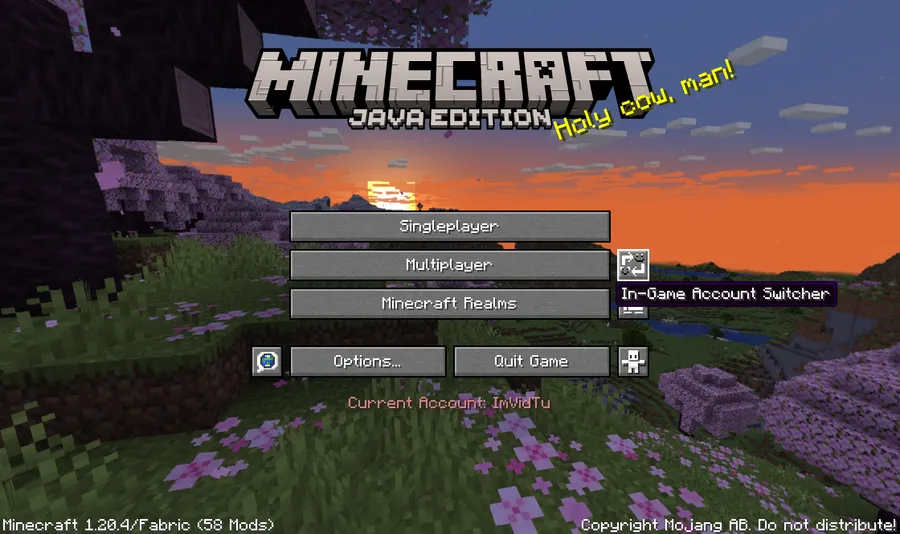
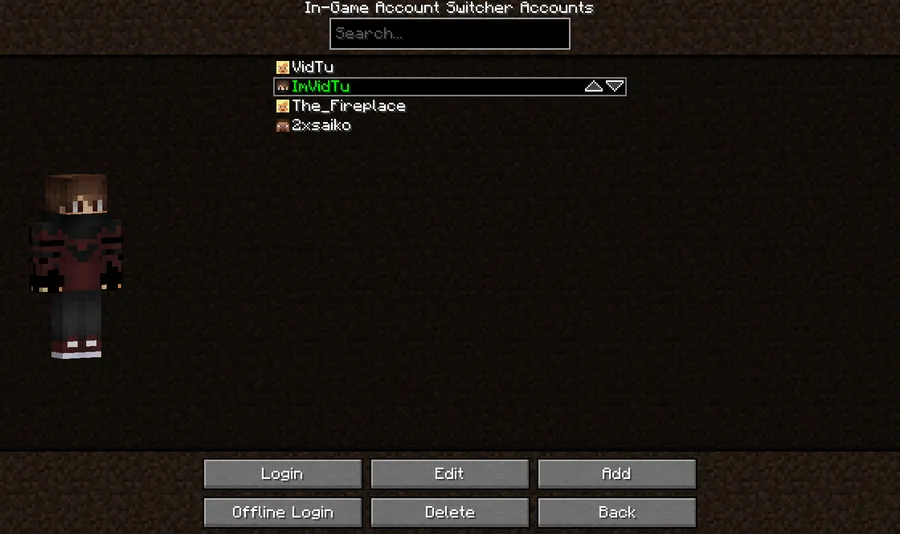
In-Game Account Switcher is a utility mod that lets you change the account you're logged into without restarting Minecraft, and it supports Fabric, Forge, NeoForge, and Quilt.
Restarting Minecraft every time you need a different account is a pain, especially if you keep an alt for servers, use a shared family machine, or need to move between profiles while testing. In-Game Account Switcher solves that problem directly, and its 3.27 million downloads suggest it has filled a real gap for a lot of players.
Key Features of In-Game Account Switcher
- Switch accounts without leaving the game — The main value here is simple: you stay in your current session instead of closing Minecraft, relaunching it, and signing back in from scratch. That saves time every time you need to swap profiles.
- No restart workflow — The mod is built around avoiding the usual logout-and-reboot cycle. For players who jump between servers, accounts, or testing profiles, that makes the process feel much smoother and less disruptive.
- Multi-loader support — It is available for Fabric, Forge, NeoForge, and Quilt, which makes it easier to keep the same account-switching workflow across different modded setups. That matters if you do not stay on one loader forever or if you move between modpacks.
- Wide Minecraft version coverage — The supported builds listed here span Minecraft 1.18.2 through 1.21.11, including 1.20.x and multiple 1.21.x releases. That gives the mod a long useful lifespan instead of pinning it to one short release window.
- Fabric and Quilt companion support — Fabric requires Fabric API, while Quilt uses QFAPI/QSL, and Mod Menu is optional on both. That is useful because you can plan the install cleanly instead of discovering dependency issues after the fact.
- Focused scope that appears lightweight — This is not a huge gameplay overhaul; it is a narrowly focused account-management tool. That kind of scope usually makes a mod easier to keep around because it solves one problem without changing how Minecraft plays.
- Helpful documentation and recovery guidance — The project points users to specific docs for terms, privacy, crypt details, stolen-account concerns, common errors, and secure log sharing. That support structure matters when a mod touches login behavior, because troubleshooting and account safety need clear guidance.
Screenshots
How to Install In-Game Account Switcher
- Choose the loader that matches your setup by visiting the loader page for Fabric, Forge, NeoForge, or Quilt.
- If you are on Fabric, install Fabric API first. If you are on Quilt, install QFAPI/QSL; Mod Menu is optional on both loaders.
- Download the version that matches your Minecraft release, such as 1.21.11, 1.21.7, or 1.20.6.
- Move the mod jar into your Minecraft
modsfolder. - Launch the game and use the in-game account switching flow to change accounts without restarting Minecraft.
Requirements & Compatibility
| Item | Details |
|---|---|
| Minecraft versions | 1.21.11, 1.21.10, 1.21.8, 1.21.7, 1.21.6, 1.21.5, 1.21.4, 1.21.3, 1.21.1, 1.20.6, 1.20.4, 1.20.2, 1.20.1, 1.19.4, 1.19.2, 1.18.2 |
| Supported loaders | Fabric, Forge, NeoForge, Quilt |
| Fabric requirement | Fabric API is required; Mod Menu is optional |
| Quilt requirement | QFAPI/QSL is required; Mod Menu is optional |
| Forge / NeoForge | No extra dependencies are listed in the provided data |
| License | LGPL-3.0-or-later |
| Source | GitHub repository |
What's New
- Added support for Minecraft 1.21.11.
- Added a Polish translation.
- Included internal code updates in the latest release.
- Published as a new alpha build with comparison links to the previous unstable and stable versions.
Pros and Cons
Pros
- Lets you switch logged-in accounts without restarting Minecraft.
- Supports Fabric, Forge, NeoForge, and Quilt.
- Covers a wide range of Minecraft versions from 1.18.2 to 1.21.11.
- Backed by clear docs for errors, privacy, crypt, and account-safety questions.
Cons
- Fabric users need Fabric API, and Quilt users need QFAPI/QSL.
- Old mod versions for Minecraft 1.8.9, 1.12.2, and similar releases are not supported.
- Users who rarely change accounts may not need the mod very often.
- Some support paths are documentation-driven, so you may need to read before troubleshooting.
Alternatives to In-Game Account Switcher
- Mod Menu is an optional companion on Fabric and Quilt, and it is useful if you want an easier way to manage installed mods alongside account-related tools.
- Fabric API is required on Fabric builds, so it is the first related mod to check if you are setting up the Fabric version of In-Game Account Switcher.
- QFAPI/QSL is required on Quilt, making it the key companion if you want this account-switching workflow on Quilt Loader.
Download In-Game Account Switcher
| Minecraft Version | Fabric | Forge | NeoForge | Quilt |
|---|---|---|---|---|
| For Minecraft 1.21.8 | Download | Download | Download | — |
| For Minecraft 1.21.7 | Download | Download | Download | Download |
| For Minecraft 1.21.6 | Download | Download | Download | Download |
| For Minecraft 1.21.5 | Download | Download | Download | Download |
| For Minecraft 1.21.4 | Download | Download | Download | Download |
| For Minecraft 1.21.3 | Download | Download | Download | Download |
| For Minecraft 1.21.1 | Download | Download | Download | Download |
| For Minecraft 1.20.6 | Download | Download | Download | Download |
| For Minecraft 1.20.4 | Download | Download | Download | Download |
| For Minecraft 1.20.2 | Download | Download | Download | Download |
| For Minecraft 1.20.1 | Download | Download | Download | Download |
| For Minecraft 1.19.4 | Download | Download | — | Download |
Always download mods from official sources to stay safe.
Frequently Asked Questions
Does In-Game Account Switcher let me change accounts without restarting?
Yes — that is the core purpose of the mod. It is designed so you can switch the logged-in account while Minecraft is already running, which is the whole reason most players install it.
Which mod loaders does it support?
It supports Fabric, Forge, NeoForge, and Quilt. The provided data also says Quilt should work, with Fabric API required on Fabric and QFAPI/QSL required on Quilt.
Which Minecraft versions are supported?
The supported downloads listed here cover Minecraft 1.21.11 down through 1.18.2. That includes 1.21.10, 1.21.8, 1.21.7, 1.21.6, 1.21.5, 1.21.4, 1.21.3, 1.21.1, 1.20.6, 1.20.4, 1.20.2, 1.20.1, 1.19.4, and 1.19.2.
Do I need Fabric API or QFAPI/QSL?
Yes — Fabric users need Fabric API, and Quilt users need QFAPI/QSL. Forge and NeoForge do not list extra dependencies in the supplied information.
Where can I download the mod?
You can download it from Modrinth, CurseForge, and GitHub. Unstable builds are also posted through GitHub Actions, but those require a GitHub account to access.
What should I do if I shared an account and think someone else is using it?
You should read the Stolen Accounts documentation first. The project specifically points users to that page for account-sharing and security concerns.
What if I get an SSLHandshakeException on an older version?
You need a newer Java 8 build. The mod author says the fix is to update Java, and notes that common vendors such as Eclipse Temurin can be used.