

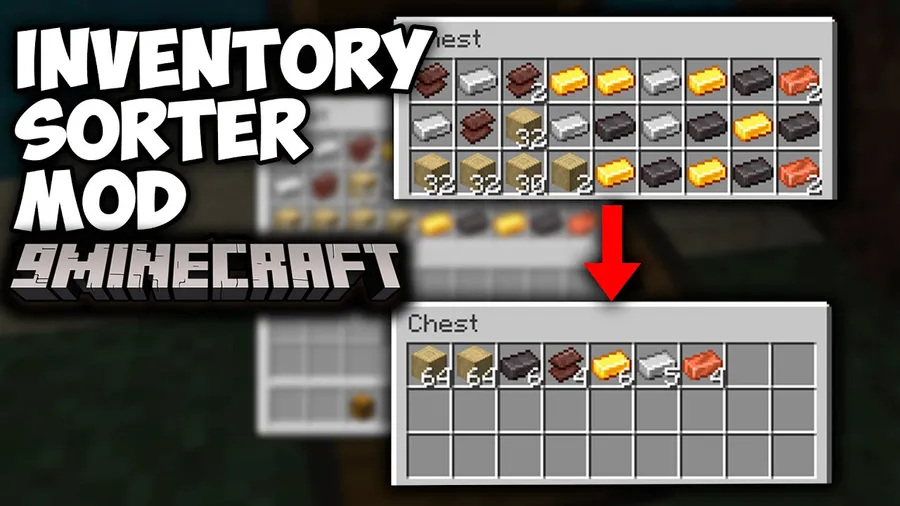
Keeping a tidy inventory in Minecraft shouldn't require tedious manual dragging — and that's exactly the problem Inventory Sorter Mod solves. With a single middle-click, your entire chest or inventory gets organized from highest to lowest item count, while the scroll wheel lets you move items one at a time between containers. Downloaded over 137,000 times on Modrinth and developed by cpw, this lightweight server-side mod has earned a loyal following among players who value speed and reliability in their inventory management.
Key Features
- One-click sorting: Middle-click inside any container to instantly sort items from highest to lowest count, grouped by item registry name so similar items always stay together.
- Scroll-wheel item transfer: Use the mouse wheel to move a single item at a time between your inventory and any open container — perfect for precise item management without dragging.
- Universal container support: Works with chests, player inventories, hoppers, and virtually all other containers. The mod respects slot restrictions like canExtract and isItemValid, so it won't break specialized inventories.
- Server-side processing: All sorting logic runs on the server rather than the client, making it both fast and reliable. This also means it must be installed on both client and server to function.
- Hotbar protection: An option to prevent the hotbar from being sorted is included and enabled by default, so your carefully arranged toolbar stays exactly how you left it.
Screenshots

How to Install
- Download and install Minecraft Forge or NeoForge for your Minecraft version.
- Download the Inventory Sorter Mod file matching your loader and game version.
- Place the downloaded
.jarfile into your.minecraft/modsfolder. - If playing on a server, install the same mod file on the server's
modsfolder as well. - Launch Minecraft with your Forge or NeoForge profile and open any container to start sorting.
Requirements
| Requirement | Details |
|---|---|
| Mod Loader | Minecraft Forge or NeoForge |
| Dependencies | None (standalone mod) |
| Minecraft Versions | 1.8.9, 1.12.2, 1.14.4, 1.15.2, 1.16.5, 1.18.1, 1.18.2, 1.19, 1.20.1, 1.21.11 |
Pros & Cons
Pros
- Extremely simple to use — middle-click and done
- Server-side sorting ensures speed and reliability across all players
- Scroll-wheel transfer adds precision without extra keybinds
- Wide version support spanning from 1.8.9 to 1.21.11
- Hotbar protection enabled by default prevents accidental toolbar rearrangement
Cons
- Must be installed on both client and server — not client-only
- No Fabric support — limited to Forge and NeoForge loaders
- May interact with too many container types, which could cause conflicts with heavily modded setups
Download
Always download mods from official sources to stay safe.
What's New
- Added an option to prevent the hotbar from being sorted, enabled by default for a better gameplay experience.
- Introduced a new option to abort sorting based on the first slot type in a container.
- Iron Furnace is now blacklisted by default, preventing unintended sorting in furnace-type containers.
- Players can now customize which containers are excluded from sorting through the blacklist system.
FAQ
Does Inventory Sorter work on multiplayer servers?
Yes, but it must be installed on both the client and the server. The mod processes all sorting server-side, so both ends need the mod present to function correctly.
Can I prevent my hotbar from being sorted?
Yes. The latest versions include a built-in option to protect your hotbar from sorting, and it is enabled by default. You don't need to change any settings unless you want your hotbar included.
Is Inventory Sorter available for Fabric?
No, Inventory Sorter currently supports only Minecraft Forge and NeoForge. Fabric players will need to look for alternative sorting mods compatible with the Fabric loader.


![[Let's Do] Meadow Mod (1.21.1) - thumbnail](http://mcinside.com/wp-content/uploads/2026/04/thumbnail-64-52x52.webp)


![Not Enough Recipe Book [NERB] Mod (1.21.11) - thumbnail](http://mcinside.com/wp-content/uploads/2026/04/thumbnail-63-52x52.webp)
