Item Borders Mod is a client-side utility mod that adds colored borders to inventory slots so important items stand out in Minecraft for Fabric, Forge, and NeoForge. It focuses on making item rarity and custom sorting easier to read at a glance without changing core gameplay.
Inventory clutter is a real problem once a survival world or modpack starts filling up with enchanted tools, rare drops, and gear that all sits in the same grid. Item Borders Mod solves that by adding visual borders around item slots, which makes valuable items easier to spot before you misclick, stash them, or overlook them entirely. With more than 6 million downloads on Modrinth, it also has the kind of adoption that suggests many players see the same issue and want a simple visual fix rather than a full inventory overhaul.
Key Features of Item Borders Mod
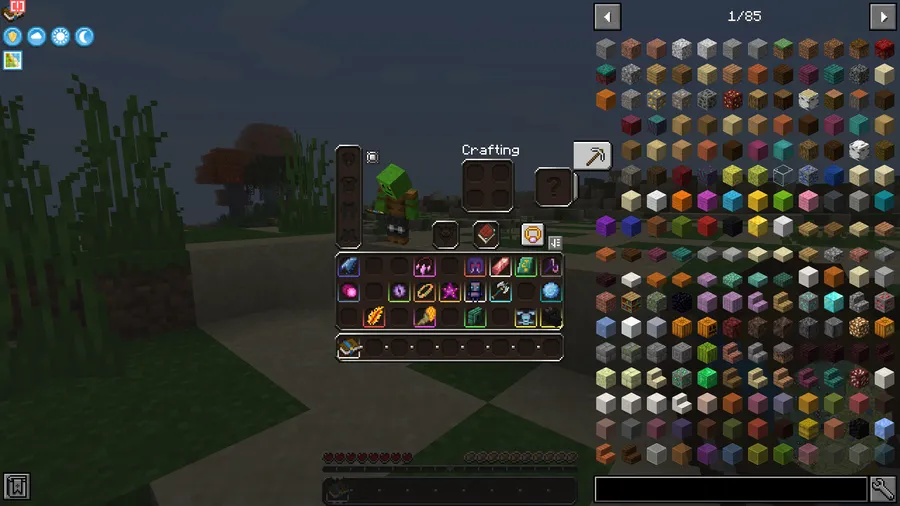
- Colored borders for item slots — The main feature is simple, but it matters because it turns the inventory into something you can scan instead of read item by item. When rare or important items are visually framed, it becomes easier to organize loot, compare gear, and avoid losing track of what matters most.
- Configurable handling for common items — By default, common items do not show borders, which keeps the interface from feeling too noisy. That matters because the mod highlights what is actually important first, while still giving you the option to enable borders for common items if you prefer a fully color-coded inventory.
- Optional hotbar border control — The mod can disable borders on the hotbar, which is a smart option if you want the main inventory to stay informative without adding extra visual clutter to your active item bar. That kind of control helps players tune the look to match how they actually use the HUD during building, combat, or exploration.
- Manual border colors for items and tags — You can assign custom colors with item paths or tags, including color names or hex values. This is useful because it gives you a predictable system for marking categories such as building blocks, tools, ores, or personal priority items instead of relying only on automatic rarity styling.
- Optional Loot Beams color synchronization — The mod includes an option to sync custom colors from Loot Beams as item borders. That matters for players who already use visual loot cues and want their inventory to match the same color language after an item is picked up.
- Modded item and rarity compatibility — The author notes that it should be fully compatible with modded items and even modded item rarities. For modpack players, that is the biggest reason to pay attention, because a border system only feels useful when it can continue working once vanilla items are no longer the whole experience.
- Fully client-side design — This is described as a fully client-side mod, so its role is presentation and readability rather than server-side mechanics. That makes it appealing if you want a better inventory view without changing the underlying item systems or depending on a server feature.
Screenshots
How to Install Item Borders Mod
- Choose the correct version of Item Borders Mod for your Minecraft version and mod loader. The listed releases support combinations of Fabric, Forge, and NeoForge, including Minecraft 1.21.4.
- Install your preferred loader first: Fabric, Forge, or NeoForge.
- Download the required dependency mods mentioned by the author. This mod requires Iceberg, Fabric 1.1.6+ also requires Forge Config API Port, and versions 1.2+ require Prism.
- Place the downloaded mod files and required dependencies into your Minecraft
modsfolder, then launch the game with the same loader profile you installed. - Open the game and adjust the client configuration if you want to show borders for common items, hide borders on the hotbar, or set manual colors for specific items and tags.
Requirements & Compatibility
| Item | Details |
|---|---|
| Category | Minecraft Mods |
| Author | Grend |
| Supported Loaders | Fabric, Forge, NeoForge |
| Requires | Fabric Mod Loader, Minecraft Forge, NeoForge, plus Iceberg; Fabric 1.1.6+ requires Forge Config API Port; versions 1.2+ require Prism |
| Minecraft Versions | 1.21.4, 1.21.3, 1.21.1, 1.21, 1.20.6, 1.20.5, 1.20.4, 1.20.2, 1.20.1, 1.20, 1.19.4, 1.19.3, 1.19.2, 1.19.1, 1.19, 1.18.2, 1.18.1, 1.16.5, 1.12.2 |
| Client or Server | Fully client-side |
| Compatibility Note | Should be fully compatible with modded items and modded item rarities |
| Modpack Use | Free to use in modpacks |
What's New
- Ported to Minecraft 1.21.4.
- The current listed release supports the latest Minecraft version shown in the data.
- Fabric, Forge, and NeoForge are all available for the 1.21.4 release.
- The project was last updated on 2025-02-07.
Pros and Cons
Pros
- Makes rare and important items easier to recognize at a glance.
- Includes flexible configuration for common items, hotbar borders, and manual color rules.
- Appears well-suited for modded play thanks to support for modded items and rarities.
- Works as a client-side visual tool rather than a gameplay rewrite.
- Can sync border colors with Loot Beams for a more consistent visual setup.
Cons
- Requires extra dependencies, including Iceberg and in some cases Forge Config API Port or Prism.
- Players who prefer a minimal HUD may need to tune the settings to avoid too much visual information.
- The provided feature set is focused on readability, so it does not add new inventory mechanics.
Alternatives to Item Borders Mod
- Iceberg — A required companion library for this mod, making it the first install to check if you want Item Borders working correctly.
- Forge Config API Port — A complementary dependency for Fabric 1.1.6+ releases, useful when you need the required config support for this setup.
- Prism — A complementary library required for versions 1.2+, so it belongs on the shortlist for anyone installing newer releases of Item Borders.
Download Item Borders Mod
| Minecraft Version | Fabric | Forge | NeoForge |
|---|---|---|---|
| For Minecraft 1.21.4 | Download | Download | Download |
| For Minecraft 1.21.3 | Download | Download | Download |
| For Minecraft 1.21.1 | Download | Download | Download |
| For Minecraft 1.21 | Download | Download | Download |
| For Minecraft 1.20.6 | Download | Download | — |
| For Minecraft 1.20.5 | Download | — | — |
| For Minecraft 1.20.4 | Download | Download | — |
| For Minecraft 1.20.2 | Download | Download | — |
| For Minecraft 1.20.1 | Download | Download | — |
| For Minecraft 1.20 | Download | Download | — |
| For Minecraft 1.19.4 | Download | Download | — |
| For Minecraft 1.19.3 | Download | Download | — |
Always download mods from official sources to stay safe.
Frequently Asked Questions
What does Item Borders Mod do?
It adds colored borders to inventory slots so items stand out more clearly. In practice, that means rare items, custom-tagged items, or manually defined categories can become easier to spot while sorting, looting, or managing gear.
Should I install Item Borders Mod?
Yes — if you want faster inventory readability, it is an easy mod to justify. The biggest benefit is visual clarity, especially when your inventory contains rare loot, enchanted gear, or many modded items that are otherwise easy to miss.
Is Item Borders Mod client-side?
Yes — the author describes it as fully client-side. That means it is focused on how items are displayed in your interface rather than changing server-side mechanics.
Does Item Borders Mod support Fabric, Forge, and NeoForge?
Yes — the listed releases include Fabric, Forge, and NeoForge support across multiple Minecraft versions. For Minecraft 1.21.4 specifically, all three loaders are available in the provided download data.
Can I customize which items get borders?
Yes — you can manually assign colors to items or tags using color names or hex codes. The configuration format shown by the author also allows you to disable automatic borders entirely if you want a fully manual setup.
Does Item Borders Mod work with modded items?
Yes — it should be fully compatible with modded items and even modded item rarities. That wording is important because it is presented as a compatibility expectation rather than a guaranteed claim for every possible mod combination.
Do I need extra dependencies for Item Borders Mod?
Yes — Iceberg is required. Fabric 1.1.6+ also requires Forge Config API Port, and versions 1.2+ require Prism, so your exact setup depends on the version and loader you choose.