

ItemSwapper is a Fabric mod that adds an inventory update concept for hotswapping items in Minecraft.
ItemSwapper solves a very specific problem: Minecraft inventory management is often slower than the action happening on screen. Instead of forcing you to pause and manually search for the right item, it gives you a context-aware swap interface that helps you change items faster, with less friction, and with enough customization to fit different playstyles. With more than 1.6 million downloads on Modrinth, it has clearly found an audience among players who want a smarter way to handle hot swapping.
Key Features of ItemSwapper Mod
- Switch between items from the inventory — This is the core improvement, and it makes the mod immediately useful in regular survival play. Instead of stopping to dig through slots, you can bring up a swap menu and move to the item you actually need.
- Show the inventory from an empty hand — This is handy when you are not already holding a mapped item and still want fast access. In practice, it reduces the "I need the right item first" problem that slows down building, crafting, and general cleanup.
- Switch between items from shulker boxes in the inventory — This feature is particularly strong for players who carry storage inside storage. It does require the mod or plugin on the server, but when it is available, it makes shulker-box workflows feel much more practical.
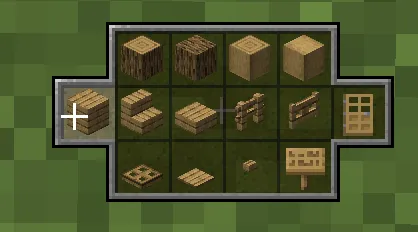
- Item wheel for block pallets — The wheel layout is a good fit for block variants and building sets. If you regularly cycle through similar blocks, the interface feels more natural than remembering exact slot locations.
- Item list for dynamic items like tools, food, potions, etc. — Some items are better represented as a list than a wheel, and this mod makes that distinction useful. It means the interface adapts to the category of item instead of treating every slot the same way.
- Fully customizable via resource packs — Customization matters here because the interface is meant to match your inventory habits, not fight them. Resource-pack support gives the mod a more polished feel and makes it easier to tune visually for different setups.
Screenshots
How to Install ItemSwapper Mod
- Install Fabric Mod Loader for the Minecraft version you want to play.
- Install Fabric API, since the mod lists it as a dependency.
- Download the matching ItemSwapper file for your version from the download table below.
- Place the mod file into your Minecraft
modsfolder and launch the game with the Fabric profile. - If you plan to use shulker box swapping on a server, make sure the server side is set up with the required Bukkit, Paper, or Spigot-compatible support before joining.
Requirements & Compatibility
| Requirement | Details |
|---|---|
| Mod type | Fabric |
| Dependency | Fabric API |
| Server support for shulker swapping | Bukkit, Paper, or Spigot support is required on the server for that specific feature. |
| Minecraft versions listed | 1.19.4, 1.20.1, 1.20.2, 1.20.4, 1.20.6, 1.21, 1.21.1, 1.21.3, 1.21.4, 1.21.5, 1.21.6, 1.21.7, 1.21.8, 1.21.9, 1.21.10, 1.21.11, 26.1, 26.1.1 |
| Development status | Still in development and may change over time. |
| Author | tr7zw |
| License | LGPL-3.0-only |
What's New
- Any 26.1 build is now marked as compatible, including 26.1.1.
- The key binding now shows properly in the Controls menu again.
- The ItemSwapper category title in Controls has been fixed.
- Internal libraries have been updated.
- Client-side and Java version flags were set for CurseForge.
Pros and Cons
Pros
- Fast, context-aware item swapping feels practical in real survival play.
- The empty-hand behavior makes the interface easier to reach when you need it most.
- Shulker box support is a strong quality-of-life upgrade when the server supports it.
- Resource-pack customization gives the mod a more personal, polished feel.
- The wheel and list layouts make the interface fit different item types better.
Cons
- The mod is still in development, so behavior may change over time.
- The shulker box feature depends on server-side support.
- It is limited to Fabric downloads in the data provided.
- Players who want a simple inventory helper may find the interface more involved than basic hotbar tools.
Alternatives to ItemSwapper Mod
- Inventory Profiles Next — A good choice if you want more control over inventory organization alongside faster day-to-day management.
- Mouse Wheelie — A natural companion if you like inventory actions driven by mouse movement and quick interaction patterns.
- Shulker Box Tooltip — Useful if your main focus is handling stored items and checking shulker contents more efficiently.
Download ItemSwapper Mod
| Minecraft Version | Fabric |
|---|---|
| For Minecraft 26.1.1 | Download |
| For Minecraft 26.1 | Download |
| For Minecraft 1.21.11 | Download |
| For Minecraft 1.21.10 | Download |
| For Minecraft 1.21.9 | Download |
| For Minecraft 1.21.8 | Download |
| For Minecraft 1.21.7 | Download |
| For Minecraft 1.21.6 | Download |
| For Minecraft 1.21.5 | Download |
| For Minecraft 1.21.4 | Download |
| For Minecraft 1.21.3 | Download |
| For Minecraft 1.21.1 | Download |
Always download mods from official sources to stay safe.
Frequently Asked Questions
Is ItemSwapper still being developed?
Yes, it is still in development. The author notes that it may change over time, so you should expect occasional updates and behavior adjustments as the mod evolves.
Do I need Fabric API to use ItemSwapper?
Yes, Fabric API is listed as a dependency. Install it alongside Fabric Mod Loader before adding the mod file to your mods folder.
Can I open the swap interface with an empty hand?
Yes, the mod supports showing the inventory from an empty hand. That makes it easier to reach the interface even when you are not already holding a mapped item.
Does shulker box swapping work by itself in multiplayer?
No, that feature requires the mod or plugin on the server. If the server does not provide the needed support, the shulker box workflow will not be available.
Can I customize the interface?
Yes, the mod is fully customizable through resource packs. That is useful if you want the interface to feel consistent with your texture pack or if you prefer a more readable layout.
What key opens ItemSwapper by default?
By default, the interface is triggered with R. You can also change keybinding behavior through the Controls menu if needed.
Does ItemSwapper work well with tools, food, and potions?
Yes, it includes an item list designed for dynamic items like tools, food, and potions. That is where the mod feels especially practical, because those items are often the ones you need to reach quickly.


![Medieval Buildings [End Edition] Mod](http://mcinside.com/wp-content/uploads/2026/04/thumbnail-591-52x52.webp)