
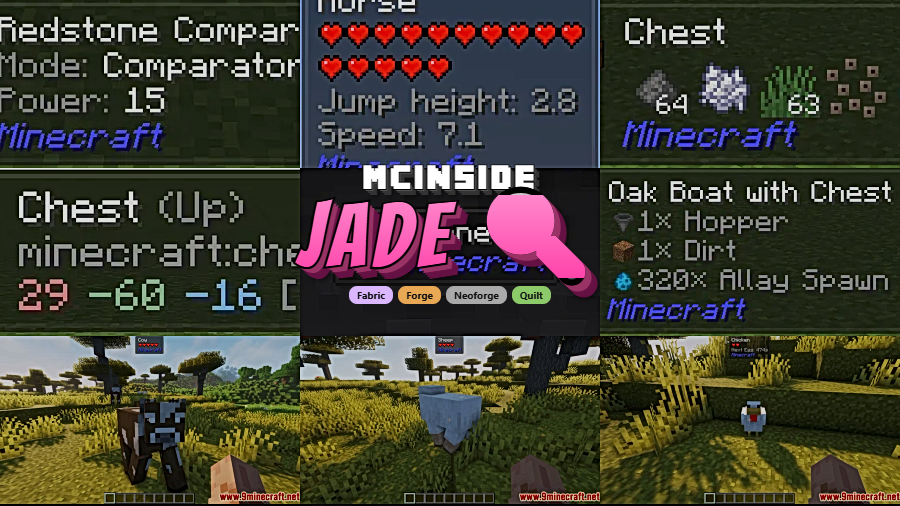
Jade is an information HUD mod that shows real-time details about any block, entity, or item you look at in Minecraft, available for Fabric, Forge, NeoForge, and Quilt mod loaders. Originally created as a modern fork of the classic Hwyla/Waila mods, Jade provides a clean, configurable tooltip overlay that identifies everything your crosshair lands on.
If you've ever stared at an unfamiliar block in a modpack and wondered what it was, what mod added it, or what it does, you already understand the problem Jade solves. In vanilla Minecraft, there is no built-in way to identify blocks or entities beyond the basic debug screen. When you add dozens of mods, each introducing new blocks and machines, navigating your world becomes genuinely confusing. Jade fixes this by displaying a compact tooltip whenever you look at something. With over 46 million downloads on Modrinth, it is one of the most widely used utility mods in the entire Minecraft modding ecosystem — and for good reason. Developed by Snownee, Jade has evolved from its Hwyla roots into a polished, actively maintained tool that works seamlessly across multiple mod loaders and Minecraft versions.
Key Features of Jade
- Block and Entity Identification Overlay — The core feature of Jade is its always-visible HUD tooltip that appears when your crosshair hovers over any block or entity. This means you never have to guess what something is, which is especially valuable in heavily modded worlds where hundreds of new blocks are in play. The overlay shows the block name, the mod it belongs to, and relevant metadata at a glance.
- Server-Side Data Sync — When installed on both client and server, Jade can display information that would otherwise be hidden, such as item storage contents, brewing stand fuel levels, and the number of bees inside a beehive. This deeper data layer turns Jade from a simple identifier into a genuine inspection tool that saves you from opening every container you walk past.
- Highly Configurable Display — Jade offers an in-game configuration screen accessible via Numpad 0 by default. You can toggle individual display modules on or off, adjust the overlay position, and fine-tune exactly what information appears. This level of control means you see only what matters to you, keeping your screen clean and uncluttered.
- Liquid and Fluid Display — With a single keypress (Numpad 2), you can toggle liquid identification on or off. This is particularly useful when working with tech mods that introduce custom fluids, letting you quickly identify water, lava, or any modded liquid without second-guessing.
- JEI Recipe Integration — Jade integrates with Just Enough Items (JEI) to let you look at any block and instantly pull up its crafting recipe (Numpad 3) or its uses (Numpad 4). This eliminates the need to open JEI separately and search manually, streamlining your crafting workflow significantly.
- Accessibility and Narration Support — Pressing Numpad 5 activates narration for the currently targeted block or entity. This accessibility feature makes Jade one of the few utility mods that actively supports players who rely on screen readers or audio cues, broadening the Minecraft experience for everyone.
- Extensive Addon Ecosystem — Through the companion Jade Addons mods (available for both NeoForge and Fabric), third-party mod developers can hook into Jade's API to provide custom tooltips for their own blocks and entities. This means the more mods you install, the more useful Jade becomes as an information hub.
How to Install Jade
- Install your preferred mod loader. Jade supports Fabric, Forge, NeoForge, or Quilt — pick the one that matches your modpack.
- Download the correct Jade file for your Minecraft version and mod loader from the download section below.
- Place the downloaded
.jarfile into your.minecraft/modsfolder. If the folder does not exist, launch Minecraft once with your mod loader to generate it. - Launch Minecraft and load into a world. You should see the Jade overlay appear when you look at any block. Press Numpad 0 to open the configuration screen and customize the display to your preferences.
- For full functionality (container previews, bee counts, brewing data), install Jade on your server as well. Simply place the same
.jarfile in the server'smodsfolder and restart.
Requirements & Compatibility
| Requirement | Details |
|---|---|
| Mod Loaders | Fabric, Forge, NeoForge, Quilt |
| Minecraft Versions | 1.20 – 1.21.11 (including snapshots up to 26.1) |
| Side | Client required; server optional but recommended for full features |
| License | CC BY-NC-SA 4.0 |
| Optional Integration | JEI (for recipe/uses lookup), Jade Addons (for extended mod support) |
What's New
- Fixed game rules not being registered correctly, resolving configuration issues on servers.
- Improved GUI item rendering and narration for a smoother overlay experience.
- Fixed fluid rendering issues that could cause visual glitches with modded liquids.
- Resolved player name lookup problems that affected multiplayer tooltip displays.
- The furnace display now hides the arrow icon when the inventory is empty, reducing visual clutter.
Pros and Cons
Pros
- Works across all major mod loaders — Fabric, Forge, NeoForge, and Quilt
- Extremely configurable with per-module toggle controls
- Server-side integration reveals hidden data like container contents
- Built-in JEI support for instant recipe lookups
- Actively maintained with frequent updates for new Minecraft versions
- Accessibility features including narration support
Cons
- Full functionality requires installation on both client and server
- Default keybinds use the numpad, which laptop users may need to remap
- Licensed under CC BY-NC-SA 4.0, which limits commercial use in modpacks
Alternatives to Jade
- WTHIT (What The Hell Is That) — Another Hwyla successor focused on a lightweight, minimalist approach to block identification with strong Fabric support.
- The One Probe — A similar information overlay mod that requires holding a probe item or wearing a helmet, adding a more balanced gameplay mechanic to block inspection.
- Megane — A WTHIT addon that extends tooltip support to popular tech mods, useful if you prefer the WTHIT ecosystem over Jade.
Download Jade
| Minecraft Version | Fabric | Forge | NeoForge | Quilt |
|---|---|---|---|---|
| For Minecraft 26.1 | Download | — | Download | Download |
| For Minecraft 1.21.11 | Download | — | Download | Download |
| For Minecraft 1.21.10 | Download | — | Download | Download |
| For Minecraft 1.21.9 | Download | — | Download | Download |
| For Minecraft 1.21.8 | Download | — | Download | Download |
| For Minecraft 1.21.7 | Download | — | Download | Download |
| For Minecraft 1.21.6 | Download | — | Download | Download |
| For Minecraft 1.21.5 | Download | — | Download | Download |
| For Minecraft 1.21.4 | Download | — | Download | Download |
| For Minecraft 1.21.3 | Download | — | Download | Download |
| For Minecraft 1.21.1 | Download | — | Download | Download |
| For Minecraft 1.20.1 | Download | Download | Download | Download |
Always download mods from official sources to stay safe.
Frequently Asked Questions
Is Jade client-side only?
Yes — Jade works as a client-only mod for basic block and entity identification. However, installing it on the server side unlocks additional features like viewing container contents, brewing stand fuel amounts, and bee counts inside beehives. For the best experience, install it on both client and server.
Does Jade work with Fabric?
Yes — Jade fully supports Fabric alongside NeoForge, Forge, and Quilt. Make sure to download the correct version that matches your mod loader and Minecraft version. Fabric users should also have the Fabric API installed as a prerequisite.
Is Jade the same as Waila or Hwyla?
Jade is a modern fork of Hwyla, which itself was a fork of the original Waila mod. Jade was built from the ground up for Minecraft 1.16 and later, featuring a redesigned API, more built-in addons, higher configurability, and better accessibility compared to its predecessors. If you previously used Waila or Hwyla, Jade is the recommended replacement.
Can I use Jade with JEI?
Yes — Jade has built-in JEI integration. When JEI is installed alongside Jade, you can press Numpad 3 while looking at any block to view its crafting recipe, or Numpad 4 to see its uses. This makes it easy to look up how to craft or utilize any block without opening the JEI interface manually.
Does Jade affect game performance?
Jade appears to be lightweight and is designed to have minimal impact on performance. The mod only processes tooltip data for the single block or entity your crosshair is targeting, rather than scanning your entire surroundings. With over 46 million downloads and widespread use in large modpacks, it has proven to be stable and efficient across a wide range of hardware setups.


![[Let's Do] Meadow Mod (1.21.1) - thumbnail](http://mcinside.com/wp-content/uploads/2026/04/thumbnail-64-52x52.webp)


![Not Enough Recipe Book [NERB] Mod (1.21.11) - thumbnail](http://mcinside.com/wp-content/uploads/2026/04/thumbnail-63-52x52.webp)


