

Just Zoom is a utility mod that lets you zoom in and out by pressing a hotkey and adjust the zoom level with your mouse wheel, available for Minecraft Fabric, Forge, and NeoForge. With over 5.6 million downloads since its 2023 release, it has become one of the most popular zoom solutions in the Minecraft modding community.
Vanilla Minecraft introduced the spyglass in 1.17, but it comes with frustrating limitations — black border overlay, a fixed zoom level, and the requirement to craft and hold the item. For builders checking distant details, PvP players scouting opponents, or explorers scanning the horizon, these restrictions get old fast. Just Zoom by Keksuccino strips away all of that friction. You press a key, you zoom, you scroll to adjust — no item needed, no overlay blocking your view. That straightforward approach has earned it over 5.6 million downloads across all mod loaders, making it a staple in lightweight modpacks and solo installs alike.
Key Features of Just Zoom
- Hotkey-Activated Zoom — Press Z or Y (depending on your keyboard layout) to instantly zoom in without needing any in-game item. This means you can zoom at any moment during gameplay — mid-combat, while building, or when exploring — without fumbling through your inventory for a spyglass.
- Mouse Wheel Zoom Adjustment — Scroll your mouse wheel while zoomed to dynamically increase or decrease the magnification level. This gives you granular control that the vanilla spyglass simply cannot match, letting you dial in exactly the zoom level you need in real time.
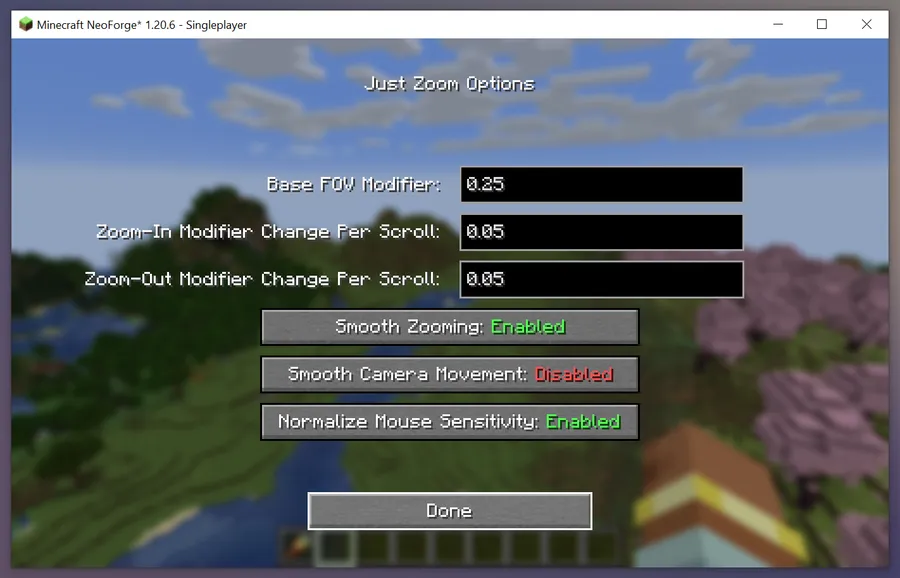
- Smooth Zoom Transitions — By default, zooming in and out uses a smooth animation similar to the spyglass effect, avoiding jarring camera snaps. If you prefer instant transitions, you can disable the smoothing in the mod's options for a snappier experience.
- Normalized Mouse Sensitivity — When you zoom in, Just Zoom automatically scales down your mouse sensitivity so your cursor does not fly across the screen. This is a critical quality-of-life feature for PvP players and anyone trying to inspect fine details at high magnification levels.
- Maximum Zoom Beyond Spyglass — Just Zoom can magnify far beyond what the vanilla spyglass offers, making it useful for scouting terrain, reading distant signs, or spotting mobs at extreme range. There is no arbitrary cap locking you out of higher zoom levels.
- No Overlay or Black Bars — Unlike the spyglass, Just Zoom provides a clean, unobstructed view when zoomed in. Your entire screen remains visible with no vignette or border effect, giving you full situational awareness even at high magnification.
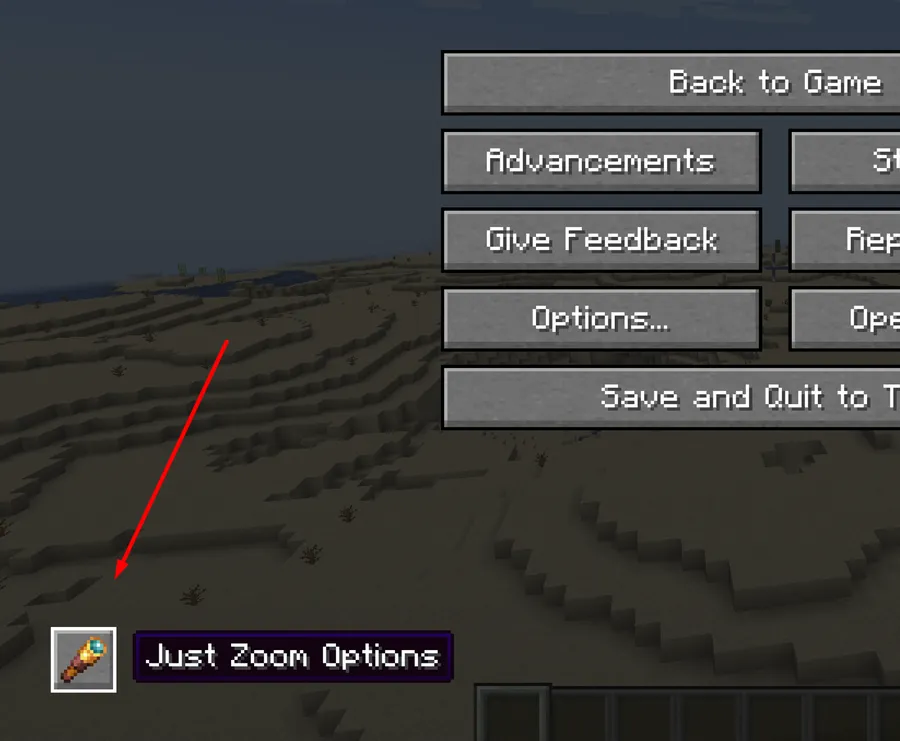
- In-Game Configuration Screen — Access the mod's settings directly from the pause screen by clicking the spyglass button in the bottom-left corner. You can customize zoom behavior, toggle smooth transitions, and rebind the hotkey through Minecraft's standard Controls menu without editing config files.
Screenshots
How to Install Just Zoom
- Install your preferred mod loader: Fabric, Minecraft Forge, or NeoForge. Make sure the loader version matches your Minecraft version.
- If using Fabric, also install Fabric API as it is required by most Fabric mods. Forge and NeoForge do not need an additional API.
- Download the correct Just Zoom file for your Minecraft version and mod loader from the download section below.
- Place the downloaded
.jarfile into your.minecraft/modsfolder. If the folder does not exist, create it manually. - Launch Minecraft with your mod loader profile. Once in-game, press Z (or Y) to test the zoom. To adjust settings, open the pause menu and click the spyglass icon in the bottom-left corner.
Requirements & Compatibility
| Requirement | Details |
|---|---|
| Mod Loaders | Fabric, Forge, NeoForge |
| Minecraft Versions | 1.21.11, 1.21.10, 1.21.8, 1.21.7, 1.21.6, 1.21.5, 1.21.4, 1.21.1, 1.21, 1.20.6, 1.20.4, 1.20.2, 1.20.1, 1.19.x, 1.18.x, 1.16.2–1.16.5 |
| Server Required | No — client-side only |
| Dependencies | Fabric API (Fabric only); none for Forge/NeoForge |
| Author | Keksuccino |
| License | DSMSLv2 |
What's New
- Added support for Minecraft 1.21.11 and 1.21.10 on both NeoForge and Fabric.
- Continued multi-loader support across Fabric, Forge, and NeoForge for recent 1.21.x releases.
- Ongoing bug fixes and stability improvements — issues can be reported on the official GitHub repository.
- The mod has been actively maintained since its initial release in June 2023, with the latest update in December 2025.
Pros and Cons
Pros
- Extremely simple to use — one hotkey, no crafting required
- Mouse wheel zoom adjustment offers far more control than the spyglass
- Clean view with no overlay or black bars blocking your screen
- Automatic mouse sensitivity normalization prevents erratic camera movement
- Works on all three major mod loaders: Fabric, Forge, and NeoForge
- Wide version support from 1.16.2 all the way to 1.21.11
- In-game configuration — no need to edit config files
Cons
- No cinematic mode or binocular-style overlay for players who want visual immersion
- Does not include a minimap or secondary scouting features — it is strictly a zoom tool
- Older Minecraft versions (1.16.x) only support Fabric and Forge, not NeoForge
Alternatives to Just Zoom
- Zoomify — A feature-rich zoom mod for Fabric and NeoForge with customizable zoom curves, scroll-based adjustment, and cinematic camera options for players who want more control over the zoom experience.
- Logical Zoom — A minimalist Fabric zoom mod inspired by OptiFine's zoom feature, ideal for players who want a lightweight solution without extra configuration options.
- WI Zoom — Another simple zoom mod that provides hotkey-based magnification with smooth transitions, serving as a straightforward alternative across multiple mod loaders.
Download Just Zoom
| Minecraft Version | Fabric | Forge | NeoForge |
|---|---|---|---|
| For Minecraft 1.21.11 | Download | — | Download |
| For Minecraft 1.21.10 | Download | — | Download |
| For Minecraft 1.21.8 | Download | Download | Download |
| For Minecraft 1.21.7 | Download | Download | Download |
| For Minecraft 1.21.6 | Download | Download | Download |
| For Minecraft 1.21.5 | Download | Download | Download |
| For Minecraft 1.21.4 | Download | Download | Download |
| For Minecraft 1.21.1 | Download | Download | Download |
| For Minecraft 1.21 | Download | Download | Download |
| For Minecraft 1.20.6 | Download | Download | Download |
| For Minecraft 1.20.4 | Download | Download | Download |
| For Minecraft 1.20.2 | — | Download | — |
Always download mods from official sources to stay safe.
Frequently Asked Questions
Is Just Zoom client-side only?
Yes — Just Zoom is a client-side mod and does not need to be installed on the server. You can use it on any multiplayer server without the server owner needing to add it, as it only modifies your local camera behavior.
Can I change the zoom hotkey from Z to another key?
Yes — you can rebind the zoom key through Minecraft's standard Controls settings menu. Navigate to Options → Controls → Key Binds and look for the Just Zoom entry to assign any key you prefer.
Does Just Zoom work with OptiFine?
No — OptiFine has its own built-in zoom feature that may conflict with Just Zoom. If you are using OptiFine for performance, consider switching to Sodium or Embeddium for optimization and using Just Zoom for a better zoom experience with scroll wheel control.
Does Just Zoom affect performance or FPS?
The mod appears to be lightweight and should not cause noticeable FPS drops. It only modifies the camera field of view when activated, so it does not add ongoing rendering overhead during normal gameplay.
Is Just Zoom compatible with Sodium and Iris Shaders?
Yes — Just Zoom is generally compatible with performance mods like Sodium and shader loaders like Iris Shaders. Since it only adjusts camera zoom rather than modifying rendering pipelines, it should work alongside most graphics-related mods without conflicts.


![Not Enough Recipe Book [NERB] Mod (1.21.11) - thumbnail](http://mcinside.com/wp-content/uploads/2026/04/thumbnail-63-52x52.webp)


