

Waiting five minutes for a 200-mod pack to reach the title screen gets old fast. Lightspeed Mod tackles that pain point directly by optimizing how Forge handles data during launch, cutting startup time by roughly 48%–71% according to developer ccr4ft3r. If you run heavy modpacks and dread every restart, this is the kind of silent background fix that makes a real difference.
Key Features
- Dramatically faster startup – Reduces launch time for large modpacks by approximately 48%–71%, turning multi-minute waits into something far more reasonable.
- Optimized loading & smart caching – Improves how Forge reads and processes data at launch, caching computed results so they don't need to be recalculated on subsequent startups.
- Reduced file system operations – Cuts unnecessary file reads that slow down the loading sequence, especially noticeable with hundreds of mods installed.
- Parallel task processing – Runs certain loading tasks simultaneously rather than one at a time, squeezing more efficiency out of modern hardware.
- Efficient data structures – Uses improved internal data handling to reduce processing overhead during the startup pipeline.
- High mod compatibility – Designed to work alongside most mods and large modpacks without conflicts.
- Client & server support – Functions on both sides, though the biggest improvement is on the client where startup times matter most.
- Launch time display – Shows the measured startup time on the title screen so you can compare before-and-after results yourself.
Screenshots




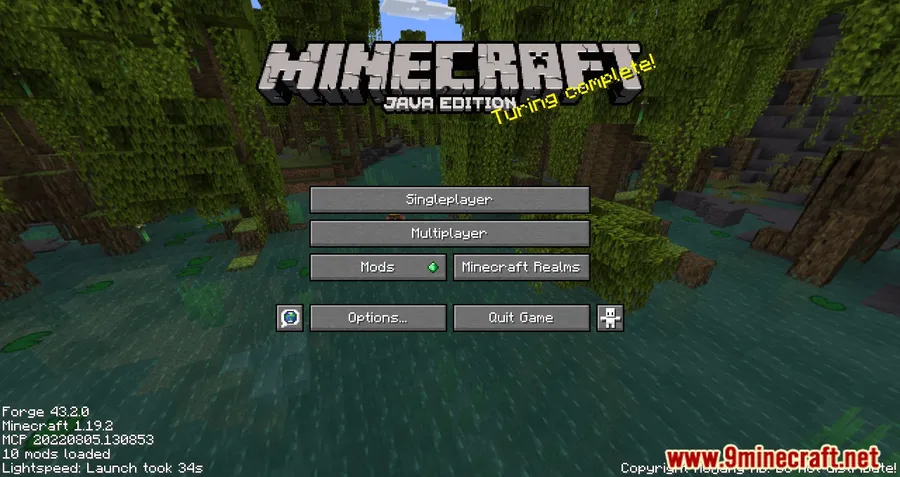
How to Install
- Download and install Minecraft Forge for your Minecraft version (1.19.2, 1.18.2, or 1.16.5).
- Download Lightspeed Mod from the link below, making sure the file version matches your Forge version.
- Place the downloaded
.jarfile into your.minecraft/modsfolder. - Launch Minecraft with the Forge profile — the mod works automatically with no configuration needed.
- Check the title screen for the startup time display to verify the mod is active.
Requirements
| Mod Loader | Dependencies | Minecraft Versions |
|---|---|---|
| Forge | Minecraft Forge | 1.19.2, 1.18.2, 1.16.5 |
Pros & Cons
Pros
- Significant startup time reduction (48%–71%) for heavy modpacks
- Works automatically — no configuration or settings to tweak
- Built-in launch time display lets you verify improvements instantly
- High compatibility with other mods and large modpacks
- Supports both client and server environments
Cons
- Forge-only — no Fabric or NeoForge support available
- Limited to older Minecraft versions (1.16.5–1.19.2); no support for 1.20+
- Improvement is focused on startup time, not in-game FPS or runtime performance
Download
Always download mods from official sources to stay safe.
FAQ
How much faster will my modpack load with Lightspeed Mod?
According to the developer, startup times can be reduced by approximately 48%–71%. The exact improvement depends on the size of your modpack and your system hardware, with larger modpacks generally seeing the biggest gains.
Does Lightspeed Mod work with Fabric or NeoForge?
No, Lightspeed Mod currently requires Minecraft Forge. There are no Fabric or NeoForge versions available at this time.
Do I need to change any settings after installing Lightspeed Mod?
No configuration is needed. The mod works automatically once placed in your mods folder. You can verify it's active by checking the startup time displayed on the Minecraft title screen.


![[Let's Do] Meadow Mod (1.21.1) - thumbnail](http://mcinside.com/wp-content/uploads/2026/04/thumbnail-64-52x52.webp)


![Not Enough Recipe Book [NERB] Mod (1.21.11) - thumbnail](http://mcinside.com/wp-content/uploads/2026/04/thumbnail-63-52x52.webp)


