
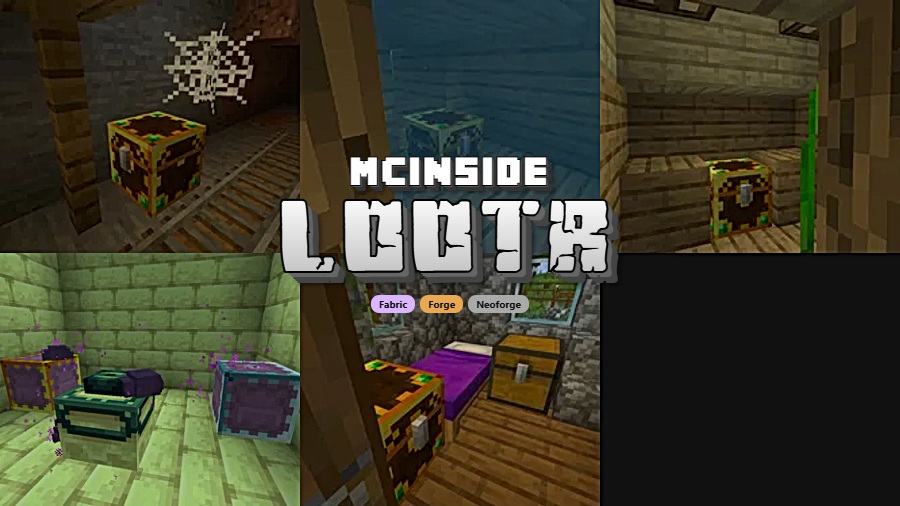
Lootr is a utility mod that creates instanced loot chests for each player on a Minecraft server, ensuring nobody misses out on loot from naturally generated structures. Available for Fabric, Forge, and NeoForge.
Anyone who has played Minecraft on a multiplayer server knows the frustration: you spend twenty minutes navigating a sprawling mineshaft, finally locate the chest room, and find nothing but someone else's leftover dirt and rotten flesh. Lootr solves this problem at its root by giving every player their own unique inventory inside each loot container. With over 15 million downloads across all platforms, it has become one of the most widely adopted quality-of-life mods in the Minecraft ecosystem — and for good reason. Server owners praise it for reducing chunk generation sprawl, while players appreciate that exploration always feels rewarding regardless of who arrived first.
Key Features of Lootr
- Per-Player Instanced Loot — Every container with a loot table generates a completely unique inventory for each player who opens it. This means two players can open the exact same chest in a desert temple and each receive different, freshly generated loot. No more racing your friends to structures or feeling cheated when someone beats you there.
- Visual Container Indicators — Lootr replaces the standard chest texture with a distinct gold appearance so you can immediately tell which containers are instanced. Once you have opened a chest, its color shifts from gold to blue, giving you a clear visual reminder of which loot you have already collected. This is especially helpful when revisiting large structures like strongholds or woodland mansions.
- Broad Container Support — The mod does not just work with regular chests. It supports trapped chests, barrels, shulker boxes, and minecart chests — essentially every vanilla container type that can hold a loot table. This comprehensive coverage means no loot source is left behind, regardless of what structure or dungeon you are exploring.
- Reduced World Size Growth — On multiplayer servers, players often generate enormous amounts of new terrain just to find untouched loot. Because Lootr makes existing structures rewardable for every player, there is far less incentive to push into unloaded chunks. Server operators have reported noticeably smaller world files and better overall performance as a result.
- Configurable Blacklists — Server admins can blacklist specific loot tables, entire mods, or even whole dimensions from Lootr's instancing system. This is particularly useful when running dungeon mods where you want certain containers to remain shared or competitive. The configuration is straightforward and gives operators granular control over the experience.
- Vanilla Loot Table Compatibility — Lootr does not modify how loot is generated — it only changes how containers deliver that loot. This means it works with any data pack, loot table mod, or custom loot configuration you already have in place. Your existing loot setup stays exactly the same; Lootr simply makes it fair for everyone.
- Multi-Loader Availability — Whether your server runs Fabric, Forge, or NeoForge, Lootr has you covered. The mod is actively maintained across all three loaders for recent Minecraft versions, so you are not locked into a single modding ecosystem.
Screenshots
How to Install Lootr
- Choose your mod loader. Lootr supports Fabric, Minecraft Forge, or NeoForge. Make sure you have one of these installed for your Minecraft version.
- Download the correct Lootr file for your Minecraft version and loader from the download section below. Double-check that the version numbers match exactly.
- Place the downloaded
.jarfile into your.minecraft/modsfolder. If you are installing on a server, place it in the server'smodsfolder as well. - Important: Lootr must be installed on both the client and the server. If you only install it on one side, the mod will not function correctly and you may encounter errors on connection.
- Launch Minecraft and join your server. Loot containers in newly discovered structures will automatically appear with Lootr's distinctive gold texture, confirming the mod is working.
Requirements & Compatibility
| Requirement | Details |
|---|---|
| Mod Loaders | Fabric, Forge, NeoForge |
| Minecraft Versions | 1.21.11, 1.21.10, 1.21.9, 1.21.8, 1.21.7, 1.21.6, 1.21.5, 1.21.4, 1.21.1, 1.21, 1.20.1, 1.20, 1.19.4, 1.19.3, 1.18.2, 1.16.5 |
| Installation Side | Required on both client and server |
| License | MIT (open source) |
| Author | noobanidus |
What's New
- Version bump and stable release for the latest supported Minecraft versions.
- Fixed an issue (#783) that was causing unexpected behavior with certain container types.
- The block convert blacklist now functions correctly, allowing admins to properly exclude specific blocks from Lootr's conversion system.
- Added Korean language translation support, expanding accessibility for Korean-speaking players.
- Various internal code improvements and branch merges for long-term stability.
Pros and Cons
Pros
- Completely eliminates loot stealing on multiplayer servers
- Reduces unnecessary chunk generation and world file bloat
- Works across Fabric, Forge, and NeoForge with wide version support
- Visual gold-to-blue indicator makes tracking opened chests effortless
- Fully compatible with custom loot tables and data packs
- Open source under MIT license with active development
Cons
- Must be installed on both client and server — no server-only option available
- Instanced inventories increase storage requirements on large servers with many players
- Does not work as a plugin — requires a modded server setup
- May conflict with certain dungeon mods unless blacklists are properly configured
Alternatives to Lootr
- LootBeams — Adds colorful beams of light above dropped items based on rarity, making valuable loot easier to spot on the ground after mob kills and chest looting.
- Easier Villager Trading — Streamlines the villager trade interface for a smoother multiplayer economy experience, complementing Lootr's fair-loot philosophy with fair trading.
- Dungeon Crawl — Generates massive underground dungeon structures filled with loot chests that pair perfectly with Lootr's instanced containers for group exploration.
Download Lootr
| Minecraft Version | Fabric | Forge | NeoForge |
|---|---|---|---|
| For Minecraft 1.21.11 | Download | — | Download |
| For Minecraft 1.21.10 | Download | — | Download |
| For Minecraft 1.21.9 | Download | — | Download |
| For Minecraft 1.21.8 | Download | — | Download |
| For Minecraft 1.21.6 | Download | — | Download |
| For Minecraft 1.21.5 | Download | — | Download |
| For Minecraft 1.21.4 | Download | — | Download |
| For Minecraft 1.21.1 | Download | — | Download |
| For Minecraft 1.21 | Download | — | Download |
| For Minecraft 1.20.1 | Download | Download | — |
| For Minecraft 1.20 | Download | Download | — |
| For Minecraft 1.19.4 | — | Download | — |
Always download mods from official sources to stay safe.
Frequently Asked Questions
Is Lootr required on both the client and the server?
Yes — Lootr must be installed on both the client and the server to function. There is currently no server-only or plugin version available. If only one side has the mod installed, players will experience connection issues or the instancing system will not activate.
Does Lootr work with modded loot tables and data packs?
Yes, it is fully compatible. Lootr does not alter how loot is generated — it only changes the container delivery system. Any custom data packs, loot table mods, or other loot modifications you use will continue to work exactly as expected. The instancing layer sits on top of the standard loot generation process.
Will Lootr affect server performance?
The mod appears to be lightweight and does not noticeably impact server TPS in typical use. However, because each player gets a unique inventory per container, servers with very large player counts will see increased data storage for those instanced inventories. For most servers, this trade-off is well worth the improvement in player experience.
Can I exclude certain chests or dimensions from Lootr?
Yes — Lootr provides a configurable blacklist system. You can exclude specific loot tables, all loot tables from a particular mod, or entire dimensions from the instancing system. This is especially useful for dungeon mods or adventure maps where you want certain containers to remain shared among all players.
How can I tell if a chest has already been opened with Lootr?
Lootr changes the visual appearance of instanced containers. Unopened loot chests display a distinctive gold texture that is different from regular vanilla chests. Once you open a container, its color shifts to blue, making it easy to identify at a glance which structures you have already looted during exploration.


![[Let's Do] Bakery (1.21.1, 1.20.1)](http://mcinside.com/wp-content/uploads/2026/04/thumbnail-92-300x169.webp)


![[Let's Do] Meadow Mod (1.21.1) - thumbnail](http://mcinside.com/wp-content/uploads/2026/04/thumbnail-64-52x52.webp)


![Not Enough Recipe Book [NERB] Mod (1.21.11) - thumbnail](http://mcinside.com/wp-content/uploads/2026/04/thumbnail-63-52x52.webp)
