
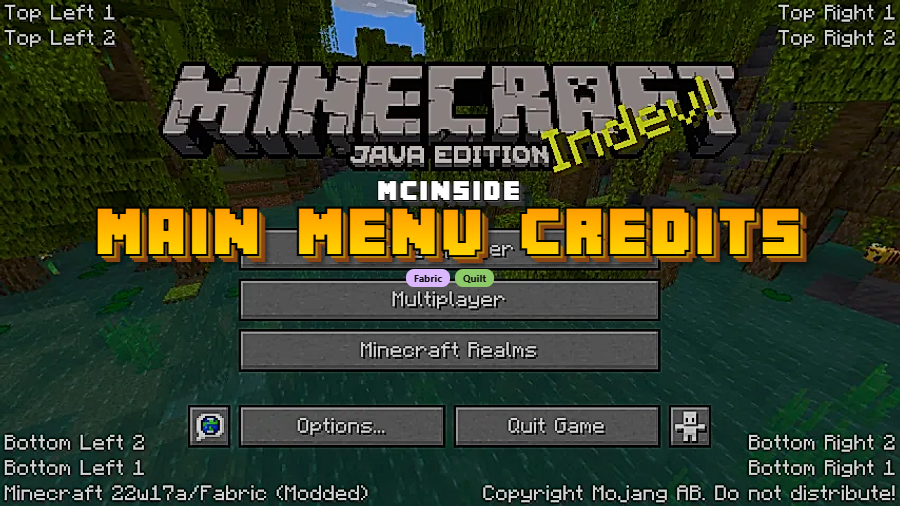
Main Menu Credits is a utility mod that adds customizable text and information directly to the Minecraft title screen, available for Fabric and Quilt mod loaders. Created by isXander, this lightweight client-side mod lets players and modpack creators display credits, server links, or any custom message right where players first land when they launch the game.
Every Minecraft player sees the same default title screen hundreds of times, and for modpack developers, that screen is wasted real estate. There is no built-in way to display your modpack name, link to your Discord server, or credit the creators who contributed to your project. Main Menu Credits solves this by giving you full control over the title screen text. With over 11 million downloads on Modrinth, it has become one of the most widely adopted utility mods in the Fabric ecosystem — a testament to how many modpack creators and players consider it essential for a polished Minecraft experience.
Key Features of Main Menu Credits
- Custom Title Screen Text — You can add any text to the Minecraft main menu, from modpack branding to personal credits. This is especially valuable for modpack creators who want their project to feel professional and complete the moment a player launches the game.
- Clickable Text with Chat-Style Events — The text you add supports click events, just like clickable links in Minecraft chat. This means you can link directly to a website, a Discord invite, or a donation page, turning the title screen into a functional information hub rather than a static splash.
- Hover Underline Feedback — When a click event is attached to text, hovering over it triggers an underline visual cue. Players immediately understand that the text is interactive, which prevents confusion and encourages engagement with the links you provide.
- JSON Configuration — All customization is handled through a simple JSON configuration file. You do not need to write any code or understand complex APIs — just edit the config, define your text entries, and reload. The wiki on GitHub documents every available option clearly.
- Lightweight Utility Design — Main Menu Credits appears to be lightweight and focused solely on title screen modification. It does not alter gameplay, chunk loading, or rendering pipelines, so it integrates cleanly into virtually any modpack without introducing conflicts or noticeable overhead.
- Wide Version Support — The mod covers a broad range of Minecraft versions from 1.18.2 all the way through the latest 26.1 snapshot. Whether you are maintaining a legacy modpack on 1.19.2 or building something cutting-edge on the newest release, this mod has you covered.
- Dual Loader Compatibility — Main Menu Credits supports both Fabric and Quilt loaders for the majority of its supported versions. This flexibility means you do not have to choose your mod loader based on whether this utility is available — it works on both.
Screenshots
How to Install Main Menu Credits
- Download and install Fabric Loader or Quilt Loader for your Minecraft version. Make sure the loader version matches your game version exactly.
- Download the Fabric API if you are using Fabric, as most Fabric mods require it as a dependency.
- Download the Main Menu Credits .jar file for your Minecraft version from the download section below.
- Move the downloaded .jar file into your
.minecraft/modsfolder. If the folder does not exist, launch Minecraft once with your mod loader profile to generate it automatically. - Launch Minecraft and check the title screen — the mod is now active. Edit the configuration file in
.minecraft/config/to customize what text appears on your main menu.
Requirements & Compatibility
| Requirement | Details |
|---|---|
| Mod Loader | Fabric or Quilt |
| Minecraft Versions | 1.18.2 – 26.1 |
| Side | Client-side |
| License | LGPL-3.0-only (open source) |
| Dependencies | Fabric API (for Fabric users) |
What's New
- Updated to support Minecraft 26.1, the latest available version.
- Version 1.3.0 ensures continued compatibility with the newest Minecraft snapshot releases.
- Ongoing maintenance from isXander keeps the mod current — last updated March 25, 2026.
Pros and Cons
Pros
- Extremely easy to configure with a simple JSON file
- Supports clickable links with hover feedback on the title screen
- Works on both Fabric and Quilt across 20+ Minecraft versions
- Over 11 million downloads — widely trusted and battle-tested
- Open source under LGPL-3.0 with active development
- Appears to be lightweight with no gameplay impact
Cons
- No Forge or NeoForge support — limited to Fabric and Quilt ecosystems
- Client-side only, so it cannot enforce server-wide branding
- Customization requires manual JSON editing rather than an in-game GUI
Alternatives to Main Menu Credits
- Custom Main Menu — A more comprehensive title screen overhaul mod that lets you redesign the entire main menu layout, buttons, and background, ideal if you need deeper customization beyond text overlays.
- FancyMenu — A popular menu customization mod with a visual editor that supports custom backgrounds, audio, animations, and text, offering a GUI-based approach for players who prefer not to edit config files manually.
- Custom Splash Screen — Focuses on customizing the Minecraft loading screen with custom colors, logos, and progress bars, complementing Main Menu Credits nicely for a fully branded modpack launch experience.
Download Main Menu Credits
| Minecraft Version | Fabric | Quilt |
|---|---|---|
| For Minecraft 26.1 | Download | — |
| For Minecraft 1.21.8 | Download | Download |
| For Minecraft 1.21.7 | Download | Download |
| For Minecraft 1.21.6 | Download | Download |
| For Minecraft 1.21.5 | Download | Download |
| For Minecraft 1.21.4 | Download | Download |
| For Minecraft 1.21.3 | Download | Download |
| For Minecraft 1.21.2 | Download | Download |
| For Minecraft 1.21.1 | Download | Download |
| For Minecraft 1.21 | Download | Download |
| For Minecraft 1.20.6 | Download | Download |
| For Minecraft 1.20.5 | Download | Download |
Always download mods from official sources to stay safe.
Frequently Asked Questions
Is Main Menu Credits client-side only?
Yes — Main Menu Credits is a client-side mod that only needs to be installed on the player's machine. It modifies the title screen display, which is entirely handled by the client. You do not need to install it on a server, and it will not cause issues when joining vanilla or modded servers.
Does Main Menu Credits work with Forge?
No — Main Menu Credits is only available for Fabric and Quilt mod loaders. There is no official Forge or NeoForge version. If you are running a Forge-based modpack, consider alternatives like FancyMenu or Custom Main Menu that offer Forge builds.
Can I add clickable links to the title screen with this mod?
Yes — you can add fully clickable text with URL actions, just like clickable messages in Minecraft chat. When a click event is attached, the text underlines on hover to signal interactivity. This is commonly used to link to modpack websites, Discord servers, or donation pages.
Does Main Menu Credits affect game performance?
No noticeable impact — the mod appears to be lightweight and only operates on the title screen. It does not modify rendering, world generation, or any gameplay systems, so it should not affect your frames per second or loading times during actual gameplay.
How do I customize what text appears on the main menu?
Edit the JSON configuration file located in your .minecraft/config/ folder after launching the game once with the mod installed. The configuration uses a straightforward JSON format where you define text entries, positions, and optional click events. Full documentation is available on the mod's official GitHub wiki maintained by isXander.



![[Let's Do] Candlelight - Farm&Charm compat Mod (1.21.1) - thumbnail](http://mcinside.com/wp-content/uploads/2026/04/thumbnail-81-52x52.webp)


![[Let's Do] Meadow Mod (1.21.1) - thumbnail](http://mcinside.com/wp-content/uploads/2026/04/thumbnail-64-52x52.webp)


![Not Enough Recipe Book [NERB] Mod (1.21.11) - thumbnail](http://mcinside.com/wp-content/uploads/2026/04/thumbnail-63-52x52.webp)