

Anyone running a heavily modded Minecraft setup knows the frustration: one mod blasts loud sound effects while another is barely audible, and the vanilla sound sliders offer no way to fix it. Mod Sound Volume Options Mod solves this by adding per-mod volume controls directly into the Music & Sound Options menu. Instead of muting an entire sound category just to tame one noisy mod, you can now fine-tune each mod's audio output independently — a small quality-of-life change that makes a big difference in modded play.
Key Features
- Per-Mod Volume Control — Adjust the sound effect volume for each installed mod individually, giving you full control over your audio mix without affecting vanilla sounds or other mods.
- Native Settings Integration — Adds a dedicated button inside the existing Music & Sound Options tab, so there's no need to learn a new menu or install extra UI mods.
Screenshots


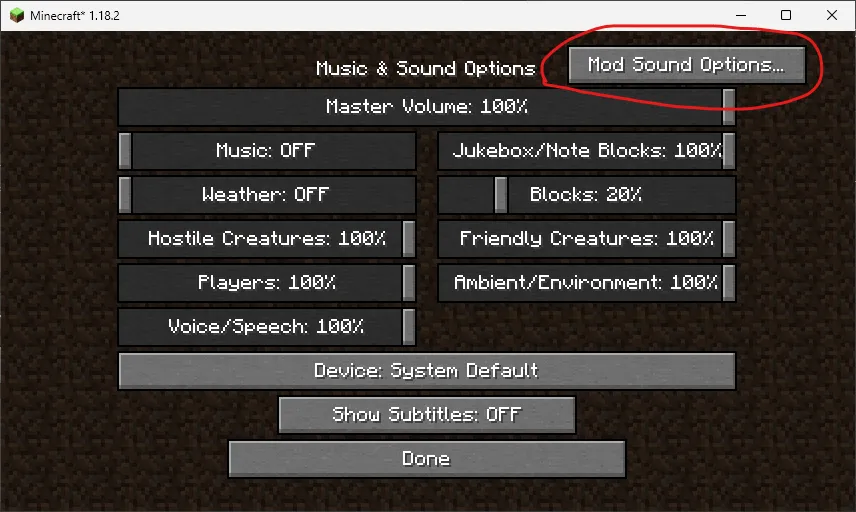
How to Install
- Download and install your preferred mod loader — Forge, NeoForge, or Fabric — for your Minecraft version.
- If using Fabric, make sure you also have Fabric API and MCPitanLibarch installed.
- Download the Mod Sound Volume Options file matching your Minecraft version and mod loader.
- Place the downloaded
.jarfile into your.minecraft/modsfolder. - Launch Minecraft, open Settings > Music & Sound Options, and look for the new volume control button.
Requirements
| Requirement | Details |
|---|---|
| Mod Loader | Forge, NeoForge, or Fabric |
| Dependencies | Fabric API and MCPitanLibarch (Fabric only); Forge/NeoForge require no extra dependencies |
| Minecraft Version | 1.16.5 – 1.21.11 |
Pros & Cons
Pros
- Gives granular audio control that vanilla Minecraft completely lacks
- Integrates cleanly into the existing settings menu — no extra keybinds or config files
- Supports all three major mod loaders (Forge, NeoForge, Fabric)
- Wide version support from 1.16.5 through 1.21.11
- Appears to be lightweight with minimal overhead
Cons
- Fabric users need two additional dependencies (Fabric API + MCPitanLibarch)
- Forge support stops at 1.20.4 — newer versions require NeoForge or Fabric
- Only controls mod-added sounds, not individual vanilla sound events
Download
Always download mods from official sources to stay safe.
FAQ
Can I mute a single mod's sounds without affecting other mods?
Yes — that is the core purpose of this mod. Open the Music & Sound Options menu, click the new button, and drag the slider for any specific mod all the way down to mute it while leaving every other mod's audio untouched.
Does Mod Sound Volume Options work on both Fabric and Forge?
It supports Forge (up to 1.20.4), NeoForge (1.20.6 and above), and Fabric across all listed versions. Just make sure you download the correct file for your mod loader.
Do I need any extra libraries to run this mod?
On Fabric you need Fabric API and MCPitanLibarch installed alongside it. On Forge or NeoForge, no additional dependencies are required.


![[ETF] Entity Texture Features Mod (1.21.11) – OptiFine Alternative](http://mcinside.com/wp-content/uploads/2026/03/thumbnail-2073-300x169.webp)


![[Let's Do] Candlelight - Farm&Charm compat Mod (1.21.1) - thumbnail](http://mcinside.com/wp-content/uploads/2026/04/thumbnail-81-52x52.webp)


![[Let's Do] Meadow Mod (1.21.1) - thumbnail](http://mcinside.com/wp-content/uploads/2026/04/thumbnail-64-52x52.webp)


![Not Enough Recipe Book [NERB] Mod (1.21.11) - thumbnail](http://mcinside.com/wp-content/uploads/2026/04/thumbnail-63-52x52.webp)