

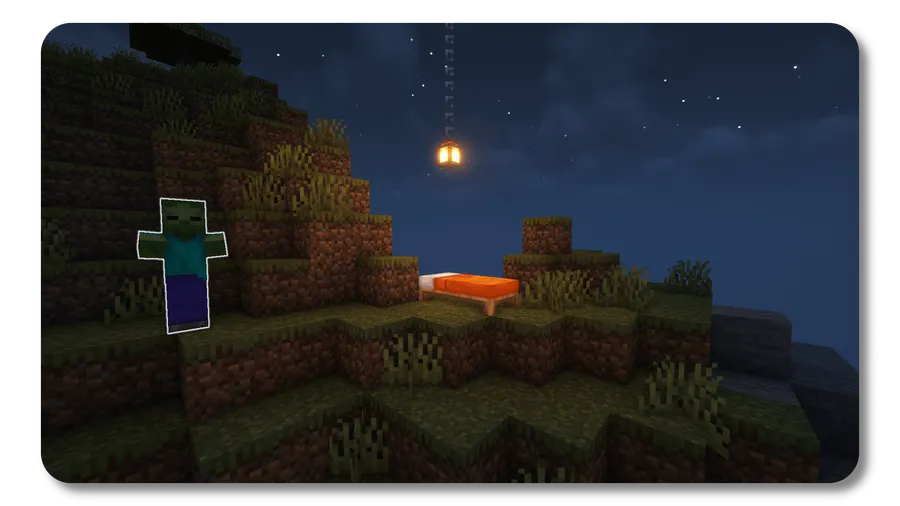
Monsters in the Closet Mod is a utility mod that highlights the exact mobs blocking your bed so you can sleep, for Minecraft Fabric and NeoForge. It focuses on the sleep-blocking moment only, instead of turning mob detection into a constant wallhack-style tool.
You know the situation: you click your bed, get denied, and then lose time circling your base trying to find one hidden hostile mob. This mod solves that exact frustration by showing you which nearby mobs are actually causing the sleep block, then getting out of the way. It is also proven popular in the community, with 5,560,616 Modrinth downloads, which puts it on the doorstep of the 6 million mark and signals strong player trust for a focused utility tool.
Key Features of Monsters in the Closet Mod
- Highlights only the mobs that block sleep — The core value is precision: it does not just show random nearby entities, it points to the ones that matter for the bed check. That means less guesswork and less wandering around your walls at night. In practical play, this saves time and keeps your survival loop moving.
- Activation is tied to the real sleep-denied condition — The highlight appears only when the game would show the "Can't sleep now; monsters nearby" message. This matters because the feature stays contextual instead of always-on. You get help exactly when the problem exists, not constant visual noise.
- Short 3-second highlight window — The effect intentionally lasts only three seconds, which appears to be a lightweight and fair design choice. You get enough time to spot the direction and target, but not enough to turn it into long-range tracking. For most players, that balance keeps the mod useful without making night danger trivial.
- Client-side install works in singleplayer and on servers — If you install it on your own client, it still functions in singleplayer and when you join servers. That is a big quality-of-life win because you can keep your own utility stack without waiting for server admins. It also makes testing and personal setup much easier.
- Optional server-side support for all players — When installed on the server, the highlights are visible to everyone, including players who do not have the mod client-side. This is especially useful for multiplayer communities that want consistent quality-of-life behavior. Admins can improve bed-time usability server-wide with one deployment choice.
- Dual loader support: Fabric and NeoForge — The project supports both major modding paths listed in the release data, so you can keep your preferred ecosystem. This matters if you switch packs, maintain multiple instances, or manage mixed environments. You do not need to pick this utility based on loader politics.
Screenshots
How to Install Monsters in the Closet Mod
- Choose your loader first: install Fabric Mod Loader or NeoForge for your Minecraft version.
- Download the Monsters in the Closet file that matches your exact Minecraft version (for example 1.21.10, 1.21.9, or 1.21.8) and your loader.
- Place the mod file into your game's
modsfolder, then launch Minecraft with the same loader profile you installed. - Join a world, try sleeping near hostile mobs, and confirm the brief highlight appears only when sleep is blocked by nearby monsters.
- For multiplayer admins, install it server-side if you want all players to see the highlights even without local client installation.
Requirements & Compatibility
| Item | Status | Details |
|---|---|---|
| Category | Minecraft Mods | Utility-focused gameplay helper |
| Required Loader | Required | Fabric Mod Loader or NeoForge |
| Mod Type | Supported | Fabric, NeoForge |
| Latest Listed Version | Available | Minecraft 1.21.10 |
| Other Listed Versions | Available | 1.21.9, 1.21.8, 1.21.7, 1.21.6, 1.21.5, 1.21.4, 1.21.3, 1.21.2, 1.21.1, 1.21, 1.20.6, 1.20.5, 1.20.4, 1.20.3, 1.20.2, 1.20.1, 1.20, 1.19.4, 1.19.3, 1.19.2, 1.19.1, 1.19, 1.18.2, 1.18.1, 1.18, 1.17.1, 1.17-pre1, 1.17, 1.16.5 |
| License | Open Source | MIT |
| Author | Maintained | Minenash |
What's New
- The latest changelog update targets Minecraft 1.21.9 and 1.21.10.
- Both Fabric and NeoForge release tracks are included in the listed current downloads.
- No additional gameplay mechanics are listed in the changelog beyond the version update.
Pros and Cons
Pros
- Solves a specific, common nighttime frustration with clear visual feedback.
- Short, conditional highlighting helps keep the feature practical instead of overpowered.
- Works with both Fabric and NeoForge, with broad version coverage.
- Client-only use is possible, and server-side install can extend benefits to everyone.
Cons
- Focused scope means it only helps with sleep-blocking monsters, not general mob tracking.
- The 3-second window may feel brief if you react slowly in hectic situations.
- You still need to match exact Minecraft version and loader when downloading.
- Players looking for larger AI or combat changes will need additional mods.
Alternatives to Monsters in the Closet Mod
- Jade — A complementary utility mod that adds quick in-world information overlays, useful when you want better situational awareness alongside sleep troubleshooting.
- Xaero's Minimap — A map-focused companion option for players who want stronger navigation and location context during survival nights.
- Light Overlay — A practical pairing for base safety planning, helping you reduce hostile spawn opportunities around your sleeping area.
Download Monsters in the Closet Mod
| Minecraft Version | Fabric | NeoForge |
|---|---|---|
| For Minecraft 1.21.10 | Download | Download |
| For Minecraft 1.21.9 | Download | Download |
| For Minecraft 1.21.8 | Download | Download |
| For Minecraft 1.21.7 | Download | Download |
| For Minecraft 1.21.6 | Download | Download |
| For Minecraft 1.21.5 | Download | Download |
| For Minecraft 1.21.4 | Download | Download |
| For Minecraft 1.21.3 | Download | Download |
| For Minecraft 1.21.2 | Download | Download |
| For Minecraft 1.21.1 | Download | Download |
| For Minecraft 1.21 | Download | Download |
| For Minecraft 1.20.6 | Download | — |
Always download mods from official sources to stay safe.
Frequently Asked Questions
What does Monsters in the Closet Mod actually do?
It highlights the mobs that are preventing sleep. In normal gameplay terms, when your bed is blocked by nearby monsters, the mod briefly marks the relevant hostile mobs so you can find and clear them faster.
Does this mod support both Fabric and NeoForge?
Yes, it supports both Fabric and NeoForge. The provided data lists both as required/supported mod types, and current downloads are shown for both loaders on recent versions.
Can I use it with only a client-side install?
Yes, client-side installation works. The author description states it works in singleplayer and on any server when installed on the client.
If a server installs it, do players need the mod too?
No, players do not need to install it individually in that case. With server-side installation, everyone can see the highlights, including users without the mod on their own client.
How long do the highlights stay visible?
The highlight duration is three seconds. That short duration appears intentionally designed to provide quick direction without turning the feature into constant tracking.
Is this mod trying to be a full combat or mob overhaul?
No, it is not a combat overhaul. It is a narrow utility mod centered on one pain point: identifying sleep-blocking mobs at the exact moment sleep is denied.





![CobbleDollars [Cobblemon Addon] Mod (1.21.1) - thumbnail](http://mcinside.com/wp-content/uploads/2026/04/thumbnail-108-52x52.webp)

![[Let's Do] Farm & Charm Mod (1.21.1) - thumbnail](http://mcinside.com/wp-content/uploads/2026/04/thumbnail-82-52x52.webp)


![[Let's Do] Candlelight - Farm&Charm compat Mod (1.21.1) - thumbnail](http://mcinside.com/wp-content/uploads/2026/04/thumbnail-81-52x52.webp)


