

Moving Elevators is a utility mod that adds real working elevators to Minecraft for Fabric, Forge, NeoForge, and Quilt.
If your base keeps growing upward, Moving Elevators solves the annoying part of getting around: repeated climbs, awkward redstone lifts, and travel systems that are more novelty than function. It gives you a practical elevator network with configurable floors, tunable cabin size and speed, and disguise options that help it blend into builds. With more than 1.6 million downloads on Modrinth, it has clear proof that players use it for both survival convenience and polished building projects.
Key Features of Moving Elevators Mod
- Real moving cabins — This mod does more than teleport you between points. The platform carries you and other entities standing on it, so it behaves like an actual elevator instead of a shortcut with a fancy skin. That matters when you want a transport system that feels physical and consistent inside a larger base.
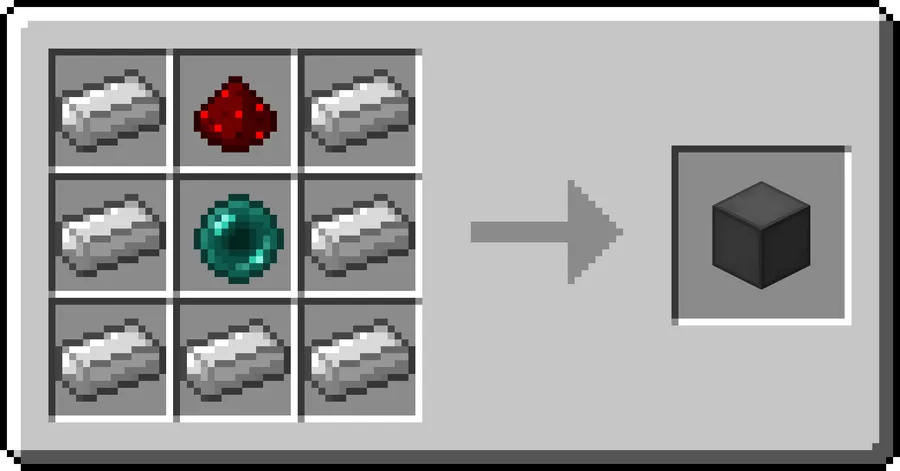
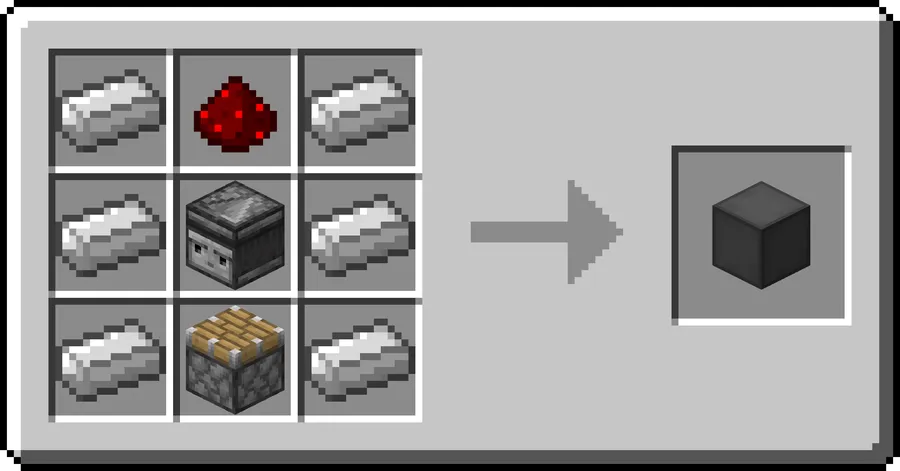
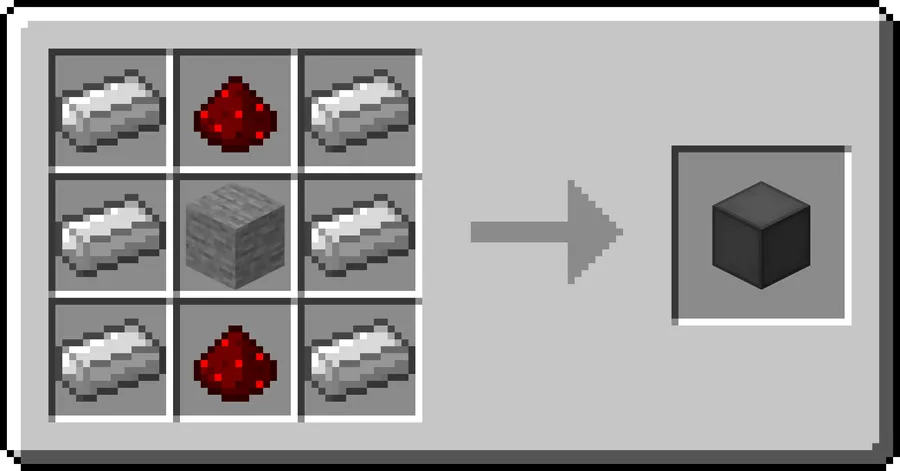
- Elevator Controller floor controls — The Controller acts as your floor-side panel and gives each level a clear way to interact with the lift. You can request the cabin, move it up or down, and adjust important settings from the block itself. In practice, that means every floor can function like a proper station instead of relying on a single master control.
- Configurable speed, size, and floor naming — Being able to change the platform size and movement speed makes the elevator fit the build instead of forcing the build to fit the elevator. Naming floors also makes larger bases easier to navigate, especially when you have several stops and need quick recognition. It is a small feature that pays off every time you use the system.
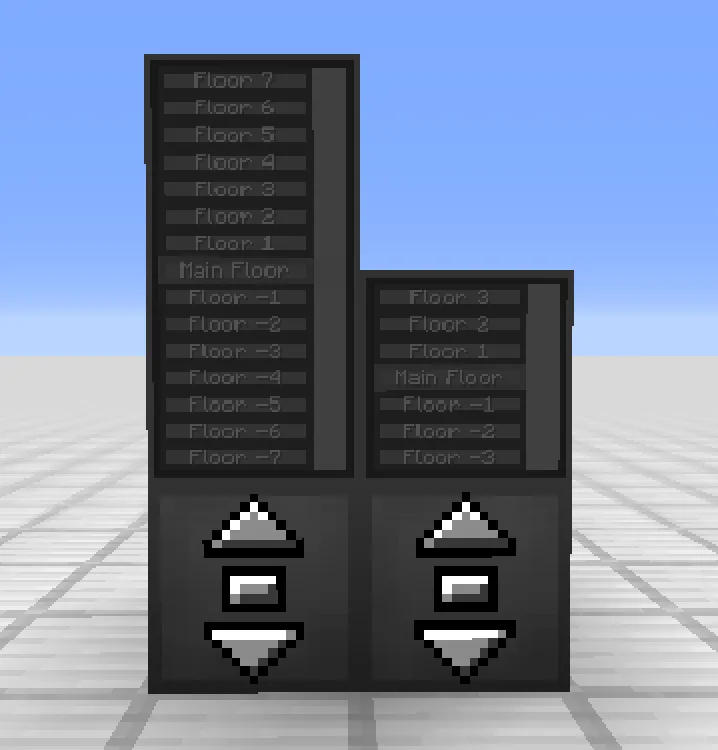
- Elevator Display for floor navigation — The Display shows the available floors and the current elevator position, which makes the whole setup much easier to read at a glance. You can request the cabin from the current floor or choose another destination directly from the panel. That turns the elevator into a usable navigation system rather than a decorative block with buttons.
- Remote Elevator Panel support — A Remote Elevator Panel can be bound to a Controller and placed somewhere else, which is ideal when you want access from a distant room or a more convenient entrance. This is especially useful in large bases where the main elevator is not always near the door you are using. It makes the whole network feel distributed instead of centralized.
- Disguise and color customization — Both the Controller and Display can be disguised as other blocks, and floor colors can be changed with dye on the Display. That matters if you care about architecture, because the elevator can disappear into the wall or match the tone of a room instead of standing out. The result is a cleaner build that still stays functional.
- Redstone and comparator interaction — The Controller can be triggered by redstone, and a comparator can check whether the platform is present. This gives technical builders more options for automation and status checking without adding extra guesswork. It is a smart fit for players who want the elevator to connect to a broader redstone system.
Screenshots
How to Install Moving Elevators Mod
- Choose the loader that matches your modpack or client setup: Fabric, Forge, NeoForge, or Quilt.
- Pick the Minecraft version you are playing, such as 1.21.11, 1.21.10, or another supported release from the download table below.
- Download the correct Moving Elevators file for your version and loader combination.
- Place the mod file into your `mods` folder and launch the game with the same loader selected.
- In-game, craft at least two Elevator Controllers, build the platform, and then add Displays or Remote Panels if you want a cleaner user experience.
Requirements & Compatibility
| Item | Details |
|---|---|
| Mod Author | SuperMartijn642 |
| Category | Minecraft Mods |
| Tags | Decoration, Technology |
| Supported Loaders | Fabric, Forge, NeoForge, Quilt |
| Supported Minecraft Versions | 1.21.11 down to 1.16.5, including 1.21.x, 1.20.x, 1.19.x, 1.18.x, 1.17.x, and 1.16.5 |
| License | LicenseRef-All-Rights-Reserved |
| Published | 2022-07-15 |
| Updated | 2026-02-09 |
| Downloads | 1,632,187 |
What's New
- Added clearer feedback when a cabin contains an invalid block or when something blocks the destination.
- Improved the ride by making the elevator slow down as it approaches the target floor.
- Adjusted the display layout and made cabin availability cache and show more efficiently on elevator displays.
- Added a config option for allowing moving unbreakable blocks, plus a higher default size limit of 11 blocks.
- Improved rendering for complex block models and fixed issues with overlapping cabin checks and camo data serialization.
Pros and Cons
Pros
- Turns vertical travel into a functional system instead of a workaround.
- Works across multiple major mod loaders.
- Offers useful customization for speed, size, names, and color.
- Includes redstone support for technical builds.
- Can be disguised to match your base design.
Cons
- Requires setup, so it is not an instant drop-in travel block.
- Works best when you build around the controller and display layout.
- The license is all-rights-reserved, which may matter for some users.
Alternatives to Moving Elevators Mod
- Create — A strong choice if you want a broader engineering and automation mod that can complement a transport-heavy base.
- Waystones — Useful when you want fast movement between locations instead of floor-to-floor travel inside one build.
- Elevator Mod — A direct alternative if your main goal is simple vertical mobility with a different implementation style.
Download Moving Elevators Mod
| Minecraft Version | Fabric | Forge | NeoForge | Quilt |
|---|---|---|---|---|
| For Minecraft 1.21.11 | Download | Download | Download | Download |
| For Minecraft 1.21.10 | Download | Download | Download | Download |
| For Minecraft 1.21.9 | Download | Download | Download | Download |
| For Minecraft 1.21.8 | Download | Download | Download | Download |
| For Minecraft 1.21.7 | Download | Download | Download | Download |
| For Minecraft 1.21.6 | Download | Download | Download | Download |
| For Minecraft 1.21.5 | Download | Download | Download | Download |
| For Minecraft 1.21.4 | Download | Download | Download | Download |
| For Minecraft 1.21.3 | Download | Download | Download | Download |
| For Minecraft 1.21.2 | Download | Download | Download | Download |
| For Minecraft 1.21.1 | Download | Download | Download | Download |
| For Minecraft 1.21 | Download | Download | Download | Download |
Always download mods from official sources to stay safe.
Frequently Asked Questions
Does Moving Elevators move players and mobs?
Yes — the platform moves you and other entities standing on it. That is the main reason it feels like a true elevator rather than a visual trick.
Can I disguise the Elevator Controller and Display?
Yes — both blocks can be disguised as other blocks by right-clicking them with the block you want to copy. This is the feature that makes the mod fit modern builds so well.
Does Moving Elevators support redstone?
Yes — the Controller can receive a redstone signal to request the platform, and a comparator can check whether the platform is present. That makes it useful for automated bases and status lights.
Can I use a Remote Elevator Panel anywhere?
Yes — a Remote Elevator Panel can be bound to a Controller and placed elsewhere. That is handy when you want elevator access from a different room, hallway, or entry point.
What Minecraft versions does Moving Elevators support?
It supports Minecraft 1.21.11 through 1.16.5. The download list includes many intermediate versions, including 1.21.x, 1.20.x, 1.19.x, 1.18.x, 1.17.x, and 1.16.5.
Which mod loaders work with Moving Elevators?
Fabric, Forge, NeoForge, and Quilt are all supported. You should download the file that matches the loader you are actually running.





![Legacy: [Let's Do] Brewery Mod (1.20.1) - thumbnail](http://mcinside.com/wp-content/uploads/2026/04/thumbnail-205-52x52.webp)


