

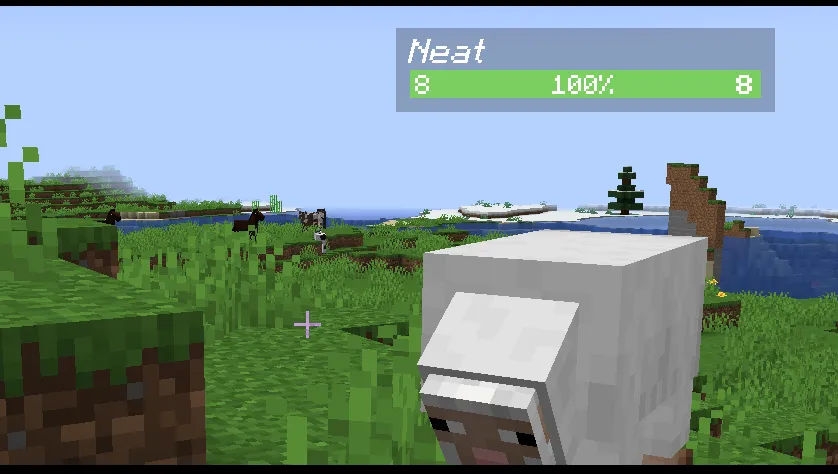
Neat is a client-side utility mod that adds minimalistic unit frames — floating health bars with name, HP, and armor info — above every entity in Minecraft, available for Fabric, Forge, NeoForge, and Quilt mod loaders.
Vanilla Minecraft gives you almost no information about the mobs you encounter. You swing your sword at a zombie and have no idea how much health it has left, whether it is wearing armor, or if your Smite enchantment even applies to it. This blind spot gets frustrating fast, especially when you are managing large fights or trying to prioritize targets. Neat solves this elegantly by placing a compact health bar above each visible entity — inspired by unit frame addons from MMOs. Created by Vazkii and maintained under the Violet Moon team, the mod has earned over 7.6 million downloads since its original release in 2022 on Modrinth, making it one of the most popular HUD utility mods in the Minecraft ecosystem.
Key Features of Neat
- Fully Client-Sided — Neat runs entirely on your client, which means you do not need the server owner to install anything. You can use it on multiplayer servers, realms, or singleplayer worlds without any extra setup. This makes it one of the easiest health bar mods to adopt.
- Line-of-Sight Health Bars — Health bars only appear when a mob is not obstructed by blocks or other obstacles. This keeps your screen clean in crowded areas like caves or mob farms, showing information only when you can actually see the entity. You never get a wall of overlapping bars obscuring your view.
- Dynamic Color-Coded Health — The health bar color shifts from green to yellow to red as a mob takes damage. This gives you an instant visual read on how close an enemy is to death, so you can decide whether to press the attack or back off — especially useful during boss fights or raids.
- Attribute and Armor Display — Each health bar shows the mob's undead or arthropod attribute along with its armor value. This tells you at a glance whether your Smite or Bane of Arthropods enchantment will be effective, helping you pick the right weapon for the job instead of guessing.
- Mob Stack Grouping — When mobs are stacked together — like spider jockeys or chicken jockeys — Neat groups their health bars intelligently instead of overlapping them. This prevents visual clutter and lets you track each entity in a stack individually.
- Scoreboard Team Integration — Neat reads Minecraft's built-in Scoreboard Teams system and colors player and mob names accordingly. On PvP servers or adventure maps that use teams, you can instantly identify allies and enemies by their name color on the health bar.
- Toggle Keybind and Deep Configuration — You can bind a key to toggle health bars on or off whenever you want, and the mod offers extensive configuration options to adjust bar size, display distance, and what information appears. This level of control means you can tailor Neat to fit any playstyle or modpack.
Screenshots
How to Install Neat
- Install your preferred mod loader: Fabric, NeoForge, Forge, or Quilt for your Minecraft version.
- Download the correct Neat file for your Minecraft version and loader from the download section below.
- Place the downloaded
.jarfile into your.minecraft/modsfolder. If the folder does not exist, launch the game once with your mod loader to generate it. - Launch Minecraft using the mod loader profile. Neat will activate automatically — health bars appear above mobs in-game.
- To customize the display, check the mod's configuration file in
.minecraft/config/or use a mod menu if available. You can also set a keybind under Controls to toggle health bars.
Requirements & Compatibility
| Detail | Info |
|---|---|
| Mod Loaders | Fabric, Forge, NeoForge, Quilt |
| Latest Version | Minecraft 1.21.8 |
| Supported Versions | 1.7.10 – 1.21.8 |
| Side | Client only |
| Author | Vazkii (Violet Moon) |
| License | CC-BY-NC-SA-3.0 |
| Last Updated | March 17, 2026 |
What's New
- Updated to support Minecraft 1.21.8, 1.21.7, and 1.21.6 across NeoForge, Fabric, and Quilt loaders.
- Continued maintenance under the Violet Moon team with regular releases tracking each Minecraft snapshot and release.
- Broad backward compatibility maintained — the mod still supports legacy versions as far back as 1.7.10.
- Latest release targets the 1.21.x branch with modern rendering and performance adjustments.
Pros and Cons
Pros
- Completely client-sided — works on any server without installation
- Supports all four major mod loaders and a huge range of Minecraft versions
- Clean, minimalistic design that does not clutter the screen
- Line-of-sight detection prevents information overload
- Highly configurable with a quick toggle keybind
- Actively maintained with over 7.6 million downloads
Cons
- Does not show numerical health values by default — primarily visual bars
- No boss-specific UI enhancements beyond the standard health bar
- May overlap with other HUD mods that add their own entity information
Alternatives to Neat
- Damage Indicators — Shows floating damage numbers and health bars when you hit mobs, providing more combat-focused feedback than Neat's passive unit frames.
- Jade — A popular tooltip mod that displays block and entity information when you look at them, offering broader data beyond just health bars.
- Mob Health Bar — Another health bar overlay mod with a different visual style, suited for players who prefer a less minimalistic look.
Download Neat
| Minecraft Version | Fabric | Forge | NeoForge | Quilt |
|---|---|---|---|---|
| For Minecraft 1.21.8 | Download | — | Download | Download |
| For Minecraft 1.21.7 | Download | — | Download | Download |
| For Minecraft 1.21.6 | Download | — | Download | Download |
| For Minecraft 1.21.5 | Download | — | Download | Download |
| For Minecraft 1.21.4 | Download | — | Download | Download |
| For Minecraft 1.21.1 | Download | — | Download | Download |
| For Minecraft 1.21 | Download | — | Download | Download |
| For Minecraft 1.20.1 | Download | Download | — | Download |
| For Minecraft 1.20 | Download | Download | — | Download |
| For Minecraft 1.19.4 | Download | Download | — | — |
| For Minecraft 1.19.3 | Download | Download | — | Download |
| For Minecraft 1.19 | Download | Download | — | Download |
Always download mods from official sources to stay safe.
Frequently Asked Questions
Is Neat client-side only?
Yes — Neat is fully client-sided and does not need to be installed on the server. You can add it to your own mods folder and join any multiplayer server or realm without the server operator needing to do anything. This is one of its biggest advantages for multiplayer players.
Does Neat work with Fabric and NeoForge?
Yes — Neat supports Fabric, NeoForge, Forge, and Quilt mod loaders. For Minecraft 1.21 and later versions, the mod is available for NeoForge, Fabric, and Quilt. Older versions like 1.20.1 and below also include Forge support.
Can I hide the health bars when I don't need them?
Yes — Neat includes a configurable keybind that lets you toggle health bars on or off at any time. You can set this keybind in the Controls menu under Minecraft settings. This is useful when you want a clean view for building or taking screenshots.
Does Neat affect game performance?
Neat appears to be lightweight since it is a client-side rendering overlay that only draws health bars for visible, unobstructed entities. The line-of-sight check means bars are not rendered for mobs behind walls, which helps keep the performance cost low even in areas with many entities.
Is Neat compatible with other HUD mods like Jade?
Generally, yes — Neat can run alongside other HUD and tooltip mods without crashes. However, some visual overlap may occur if another mod also adds entity health information. In that case, you can disable one or configure Neat's display settings to reduce redundancy.


