

Particle Core is a particle optimization mod that reduces unnecessary particle rendering, offers particle-type-specific spawn control, and can disable potion particles for Minecraft Fabric, Forge, NeoForge, and Quilt setups. It is designed to make particle-heavy gameplay feel cleaner and more manageable without changing the core game loop.
Particle spam is one of those Minecraft issues that becomes obvious once you start fighting mobs, using potions, exploring modded environments, or stacking visual effects. particle core mod targets that exact problem by culling particles you cannot see, optimizing the ones that remain, and letting you reduce or disable specific particle types. With more than 8 million downloads on Modrinth, it has already earned a strong reputation among players who care about performance, cleaner visuals, and finer control over how busy the screen feels.
Key Features of Particle Core
- Particle culling — This is the headline feature because it avoids rendering particles that are outside your visible view. In real play, that matters because many particle effects happen around the player at once, and drawing effects you cannot even see is wasted work. It appears to be one of the most practical ways to reduce visual overhead without simply turning everything off.
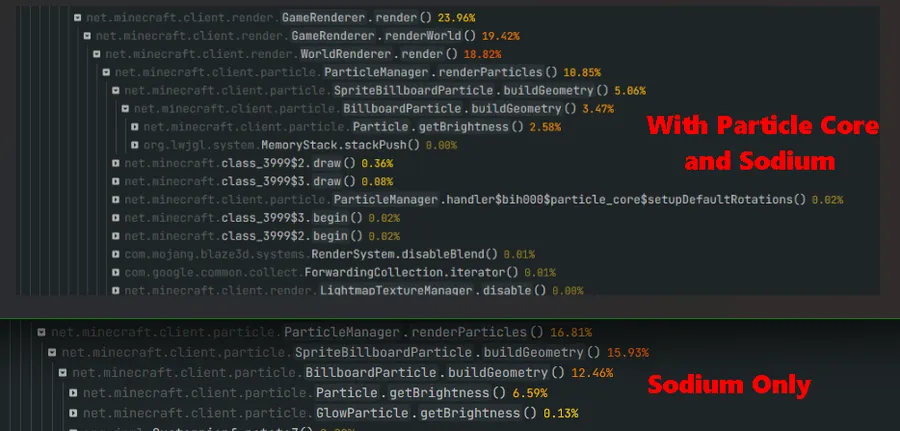
- Rendering optimizations — Particle Core also improves how visible particles are processed, including vertex transformations and lightmap polling. For the player, that means the mod is not only about hiding effects but also about handling active particles more efficiently. If you already use Sodium, this mod is positioned as an extra layer of particle-focused optimization rather than a replacement.
- By-type particle reduction — The config lets you map a particle identifier, such as
minecraft:smoke, to a value between0.0and1.0. That matters because you can target the exact particles that annoy you most instead of lowering every effect globally. It is a much more flexible approach for players who want a balanced screen rather than a completely stripped-down look. - Full particle-type disabling — The mod supports excluding specific particle types entirely through tags or config-based controls. That is useful when one visual effect is especially distracting, repetitive, or unnecessary for your play style. Unlike a visual-only workaround, this approach is meant to stop those particles from spawning in the first place.
- Potion particle toggle — Potion particles can quickly clutter the screen, especially for players who spend a lot of time buffed or fighting status-heavy mobs. Particle Core includes an option to turn those particles off entirely. For everyday gameplay, this can make the game feel clearer and less visually noisy during combat or exploration.
- Fine-tuning for vanilla particle settings — Vanilla gives you broad presets like
ALL,DECREASED, andMINIMAL, but those settings can feel too coarse. Particle Core adds two dials that let you tune behavior between those presets. That is valuable if you want something more precise than vanilla offers without fully committing to the most aggressive reduction level.
Screenshots
How to Install Particle Core
- Choose the correct version of Particle Core for your Minecraft build, such as one of the listed 1.21.11 through 1.21.4 releases.
- Install the loader your setup uses: Fabric Mod Loader, Minecraft Forge, NeoForge, or Quilt Loader.
- Place the downloaded Particle Core file into your Minecraft
modsfolder. - Launch the game once so the mod can generate its config file in the standard
configfolder. - Open
particle_core_config_v[x].jsonif you want to reduce specific particle types, disable potion particles, or adjust the vanilla-style particle tuning options.
Requirements & Compatibility
| Item | Details |
|---|---|
| Category | Minecraft Mods |
| Supported loaders | Fabric, Forge, NeoForge, Quilt |
| Required loaders | Fabric Mod Loader, Minecraft Forge, NeoForge, Quilt Loader |
| Minecraft versions | 1.21.11, 1.21.10, 1.21.9, 1.21.8, 1.21.7, 1.21.6, 1.21.5, 1.21.4, 1.21.3, 1.21.2, 1.21.1, 1.21, 1.20.6, 1.20.5, 1.20.4, 1.20.3, 1.20.2, 1.20.1, 1.20 |
| Author | fzzyhmstrs |
| License | MIT |
| Known compatibility note | Compatible with Sodium and described as improving performance over Sodium alone. |
What's New
- Version 0.3.3 is the current referenced release in the provided changelog.
- No new additions were listed for this update.
- No general behavior changes were listed for this update.
- A crash was fixed for particles that use a custom
VertexConsumerthat is not aBufferBuilder.
Pros and Cons
Pros
- Focused specifically on particle optimization rather than broad performance claims.
- Lets you reduce or disable specific particle types instead of relying only on global presets.
- Includes potion particle disabling for a cleaner view.
- Offers more granular control than vanilla particle settings.
- Works with Fabric, Forge, NeoForge, and Quilt, with stated Sodium compatibility.
Cons
- Best results depend on manual configuration if you want per-particle tuning.
- Disabling particle types too aggressively may remove visual feedback some players like.
- Server-side exclusion tags should be used carefully because they affect joining clients.
Alternatives to Particle Core
- Sodium — A well-known optimization mod and the most obvious companion here, since Particle Core is explicitly described as compatible with it and able to improve performance beyond Sodium alone.
- Fabric Mod Loader — Not a direct alternative in function, but a practical route if you want to run Particle Core or other lightweight utility and optimization mods on a Fabric setup.
- Quilt Loader — Another supported loader option if you want to build a modded setup around Particle Core and similar utility-focused tools.
Download Particle Core
| Minecraft Version | Fabric | NeoForge | Quilt |
|---|---|---|---|
| For Minecraft 1.21.11 | Download | Download | Download |
| For Minecraft 1.21.10 | Download | Download | Download |
| For Minecraft 1.21.9 | Download | Download | Download |
| For Minecraft 1.21.8 | Download | Download | Download |
| For Minecraft 1.21.7 | Download | Download | Download |
| For Minecraft 1.21.6 | Download | Download | Download |
| For Minecraft 1.21.5 | Download | Download | Download |
| For Minecraft 1.21.4 | Download | Download | Download |
| For Minecraft 1.21.3 | Download | Download | Download |
| For Minecraft 1.21.2 | Download | Download | Download |
| For Minecraft 1.21.1 | Download | Download | Download |
| For Minecraft 1.21 | Download | Download | Download |
Always download mods from official sources to stay safe.
Frequently Asked Questions
What does Particle Core actually do?
Particle Core reduces unnecessary particle rendering, optimizes visible particles, and gives you controls to lower or disable specific particle effects. In practice, it is built for players who want less screen clutter and more control over how particles behave.
Should I install Particle Core if I already use Sodium?
Yes — the provided data says Particle Core is compatible with Sodium and can improve performance over Sodium alone. That makes it a sensible add-on if particle-heavy scenes are still one of the areas you want to tune further.
Can I disable only one annoying particle type instead of all particles?
Yes — the mod includes by-type reduction and disabling options. You can assign a particle identifier to a value from 0.0 to 1.0, which means you can completely remove a particle or just reduce how often it appears.
Does Particle Core support Forge, NeoForge, Fabric, and Quilt?
Yes — those loaders are all listed in the provided compatibility data. That broad loader support makes the mod easier to fit into different modded Minecraft setups.
Can I turn off potion particles with this mod?
Yes — potion particles can be disabled in the config. That is especially useful if constant status-effect visuals make combat or exploration harder to read.
Where is the configuration file located?
The config is stored in the standard Minecraft config folder. The filename is listed as particle_core_config_v[x].json, with [x] representing the current config version.


![[Let's Do] Meadow Mod (1.21.1) - thumbnail](http://mcinside.com/wp-content/uploads/2026/04/thumbnail-64-52x52.webp)


![Not Enough Recipe Book [NERB] Mod (1.21.11) - thumbnail](http://mcinside.com/wp-content/uploads/2026/04/thumbnail-63-52x52.webp)
