

Physics Mod is a visual overhaul mod that adds realistic physics simulation — including ragdoll effects, block destruction, and item gravity — to Minecraft, available for Fabric, Forge, NeoForge, and Quilt mod loaders.
Vanilla Minecraft has always had a certain charm, but its physics engine is essentially non-existent. Blocks float in mid-air after you mine beneath them, mobs vanish in a puff of particles when defeated, and dropped items hover awkwardly above the ground. Physics Mod tackles all of these immersion-breaking issues head-on, transforming the game into a far more dynamic and visually satisfying experience. With over 13 million downloads on Modrinth alone, it has become one of the most popular visual enhancement mods in the entire Minecraft ecosystem — and for good reason. Created by developer haubna and actively maintained since late 2022, the mod continues to receive updates for the latest Minecraft versions including the recent 1.21.x releases.
Key Features of Physics Mod
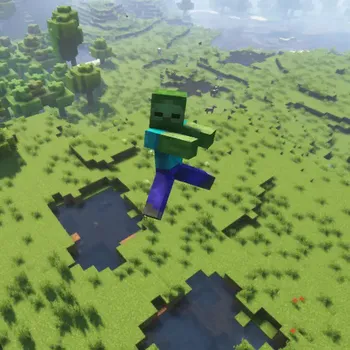
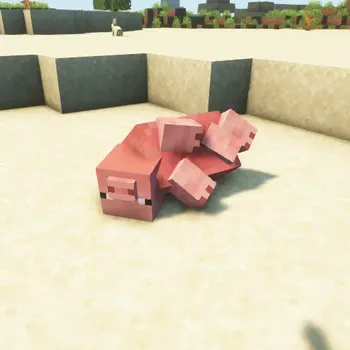
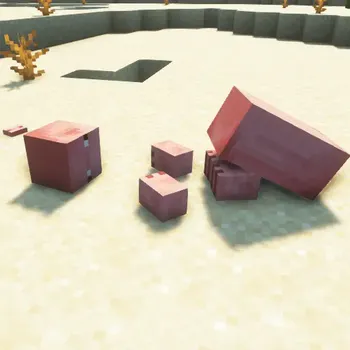
- Mob Ragdoll Physics — When mobs are defeated, they no longer just disappear. Instead, their bodies react to the killing blow with realistic ragdoll effects, tumbling and collapsing based on the direction and force of impact. Every vanilla Minecraft mob is supported, and each one can fracture into a blocky version for an extra layer of visual destruction.
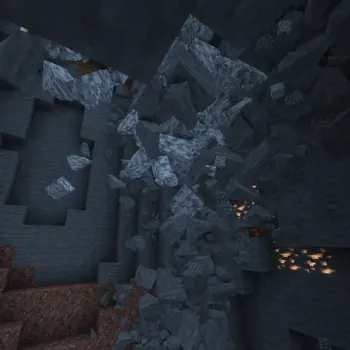
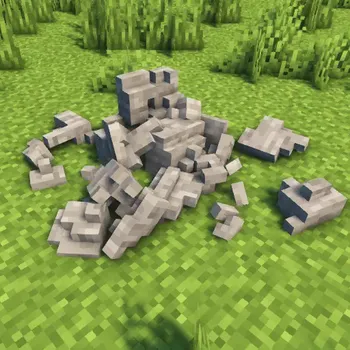
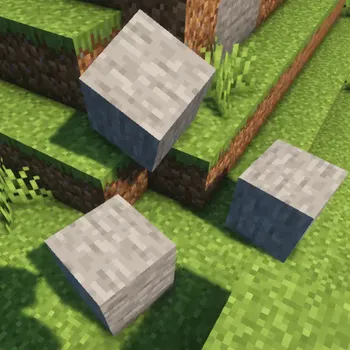
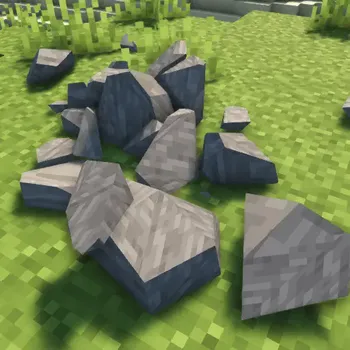
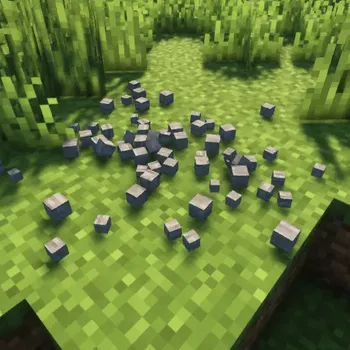
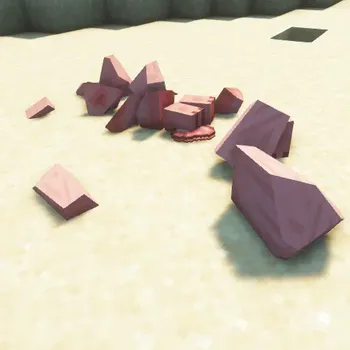
- Block Destruction & Crumbling — Mined or destroyed blocks now shatter into smaller fragments that scatter across the ground realistically. This transforms mundane activities like mining into visually spectacular events, and makes explosions from TNT or creepers feel genuinely devastating rather than simply removing blocks from the world.
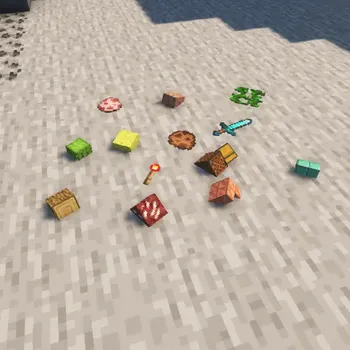
- Realistic Item Physics — Tired of dropped items floating and spinning above the ground? Physics Mod replaces that dated behavior with proper item gravity. Dropped items now fall naturally and settle on surfaces, making the world feel significantly more grounded and believable.
- Collapsing Structures — When you remove supporting blocks from a structure, the unsupported portions can crumble and collapse. This adds a strategic element to building and demolition, and creates jaw-dropping moments when entire caves or buildings come crashing down in a chain reaction of physics-driven destruction.
- Adjustable Gravity Settings — Physics Mod lets you customize gravity to simulate different planetary environments. You can set gravity to match the Moon, Mars, Pluto, or Earth — or dial in a completely custom value. This opens up creative possibilities for adventure maps, minigames, and general experimentation.
- Cross-Platform Support — The mod runs on Windows, Linux, and macOS. Apple Silicon (M1/M2) users can run the mod on Minecraft 1.20 and above natively, with a compatibility mode available for older versions. This broad platform coverage means almost any player can enjoy the enhanced physics.
- Multi-Loader Compatibility — Whether you use Fabric, Forge, NeoForge, or Quilt, Physics Mod has you covered. Each major Minecraft version typically receives builds for all four loaders, so you do not need to switch your modding setup to use it.
Screenshots
How to Install Physics Mod
- Install a compatible mod loader on your system. You can use Fabric, Forge, NeoForge, or Quilt — Physics Mod supports all four.
- Download the correct Physics Mod file for your Minecraft version and chosen loader from the official Modrinth page or from the download table below.
- Navigate to your Minecraft installation folder. On Windows, press Win + R, type
%appdata%\.minecraft, and press Enter. - Place the downloaded
.jarfile into themodsfolder. If the folder does not exist, create it manually. - Launch Minecraft using your mod loader profile. Physics Mod should appear in the mod list, and you can configure its settings from the in-game options menu.
Requirements & Compatibility
| Requirement | Details |
|---|---|
| Mod Loaders | Fabric, Forge, NeoForge, Quilt |
| Minecraft Versions | 1.20 – 1.21.11 (including snapshots up to 26.1) |
| Operating Systems | Windows, Linux, macOS (M1/M2 native from 1.20+) |
| License | All Rights Reserved |
| Last Updated | March 25, 2026 |
Pros and Cons
Pros
- Dramatically improves visual immersion with ragdolls, crumbling blocks, and item gravity
- Supports all four major mod loaders — no need to change your setup
- Cross-platform compatibility including native Apple Silicon support
- Highly customizable gravity and physics settings
- Actively maintained with regular updates for new Minecraft versions
- Massive community (13 million+ downloads) ensures long-term support
Cons
- Physics simulations can be demanding on lower-end hardware, especially with collapsing structures
- All Rights Reserved license means the source code is not publicly available for modification
- Older macOS versions on Apple Silicon require a compatibility mode workaround
- May conflict with other mods that alter block breaking or mob death behavior
Alternatives to Physics Mod
- Enchancement — A visual polish mod that enhances vanilla animations, entity rendering, and particle effects for a more refined Minecraft aesthetic without full physics simulation.
- Not Enough Animations — Focuses specifically on adding missing third-person animations for eating, drinking, map reading, and other player actions, complementing Physics Mod well if paired together.
- Falling Leaves — A lightweight mod that adds leaf particles beneath tree canopies for ambient immersion, a good pick if you want subtle visual improvements without the heavier physics calculations.
Download Physics Mod
| Minecraft Version | Fabric | Forge | NeoForge | Quilt |
|---|---|---|---|---|
| For Minecraft 26.1 | Download | Download | Download | Download |
| For Minecraft 1.21.11 | Download | Download | Download | Download |
| For Minecraft 1.21.10 | Download | Download | Download | Download |
| For Minecraft 1.21.9 | Download | Download | Download | Download |
| For Minecraft 1.21.8 | Download | Download | Download | Download |
| For Minecraft 1.21.7 | Download | Download | Download | Download |
| For Minecraft 1.21.6 | Download | Download | Download | Download |
| For Minecraft 1.21.1 | Download | Download | Download | Download |
| For Minecraft 1.21 | Download | Download | Download | Download |
| For Minecraft 1.20.1 | Download | Download | Download | Download |
| For Minecraft 1.20 | Download | Download | Download | Download |
Always download mods from official sources to stay safe.
Frequently Asked Questions
Is Physics Mod compatible with Sodium or OptiFine?
Physics Mod is generally compatible with performance optimization mods like Sodium. However, because it adds real-time physics calculations, you should expect some additional GPU and CPU load on top of whatever performance mod you are running. Test with your specific mod list to confirm stability.
Does Physics Mod work on multiplayer servers?
Yes — Physics Mod is a client-side mod, so it works on multiplayer servers without requiring the server to install anything. Other players without the mod will not see the physics effects, but your own experience will be fully enhanced.
Can I disable specific physics features I don't like?
Yes — Physics Mod includes an in-game configuration menu where you can toggle individual features on or off. You can disable ragdolls, block crumbling, or item physics independently, letting you customize exactly which effects appear in your game.
Does Physics Mod support Minecraft 1.20 on Apple Silicon Macs?
Yes — native Apple Silicon (M1/M2) support is available for Minecraft 1.20 and above. For older Minecraft versions on these processors, the developer provides a compatibility mode with setup instructions on the mod's GitHub page.
Will Physics Mod cause performance issues on my computer?
It depends on your hardware and settings. The mod adds real-time physics calculations that can be demanding, particularly during large explosions or collapsing structures. Mid-range to high-end systems typically handle it without issues, while lower-end machines may need to reduce physics quality settings or disable features like structure collapse to maintain smooth framerates.


![[Let's Do] Candlelight - Farm&Charm compat Mod (1.21.1) - thumbnail](http://mcinside.com/wp-content/uploads/2026/04/thumbnail-81-52x52.webp)


![[Let's Do] Meadow Mod (1.21.1) - thumbnail](http://mcinside.com/wp-content/uploads/2026/04/thumbnail-64-52x52.webp)


![Not Enough Recipe Book [NERB] Mod (1.21.11) - thumbnail](http://mcinside.com/wp-content/uploads/2026/04/thumbnail-63-52x52.webp)